> ## Documentation Index
> Fetch the complete documentation index at: https://docs.flowx.ai/llms.txt
> Use this file to discover all available pages before exploring further.
# Memory capabilities
> Persist conversation context across messages with automatic session memory retrieval.
## Overview
Session memory lets AI nodes in chat-driven workflows access previous messages from the current
conversation. When enabled, FlowX automatically retrieves recent conversation history and injects it
into the LLM's context — giving the AI agent awareness of what was discussed earlier in the session.
Memory is **per-session** (identified by Chat Session ID) and managed entirely by FlowX. You don't
need to build any memory retrieval logic — just toggle it on per node.
The recent conversation history is retrieved and attached on each message
The last 30 turns are sent to the model in full, oldest to newest — no lossy summarization
Turn memory on per AI (Custom Agent) or Intent Classification node with the **Use conversation memory** toggle
Inspect the conversation context that was sent to the model in the workflow console log
***
## How memory works
The Chat component sends the message + `chatSessionId` to the chat-driven workflow.
FlowX retrieves the recent conversation history for the session — the last 30 turns (each a user
message and the agent's response).
For each node with **Use conversation memory** enabled, the retrieved turns are added to the LLM
prompt in full (oldest to newest), giving the AI agent context from earlier in the session.
After the AI generates a response, FlowX stores both the user message and the agent response,
so they're available as memory on the next message.
***
## What gets sent to the model
When memory is enabled, the recent turns are wrapped in a `` block and added to the prompt,
introduced as "Prior conversation between the user and the assistant (oldest to newest)":
```
How do I verify my account?
Navigate to Settings and select Verification.
What documents do I need?
You need a valid ID and proof of address.
```
* The last **30 turns** are included **in full** — there is no summarization or truncation of older
turns within that window.
* A turn the user cancelled mid-response is marked as cancelled rather than dropped.
Only user messages and agent responses are included in memory. Internal workflow data, routing
decisions, and intermediate node outputs are not part of the memory.
***
## Enabling memory
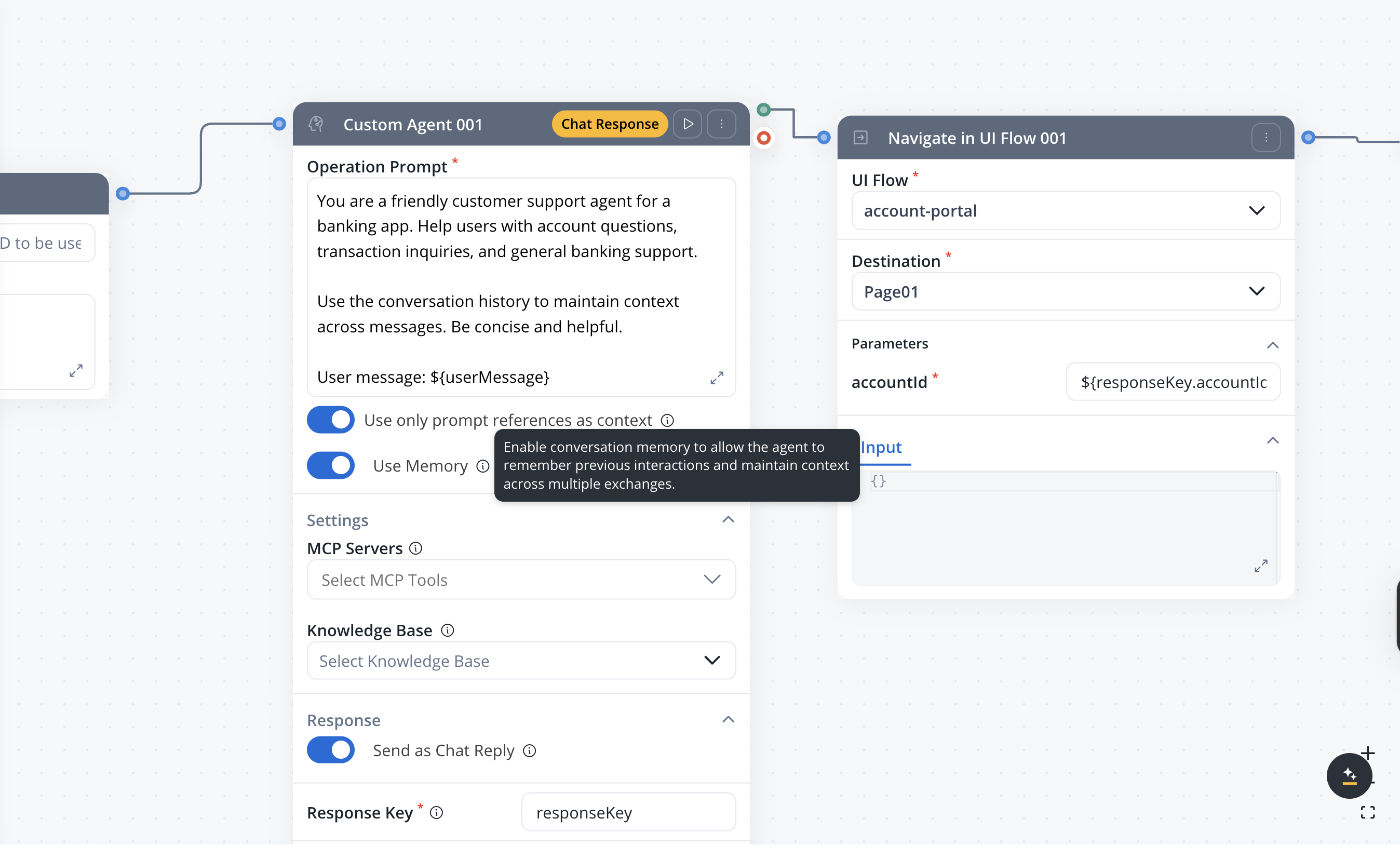
Memory is controlled per node with the **Use conversation memory** toggle, in the node's **Background**
section. It's available on:
* **AI (Custom Agent)** nodes — for context-aware AI responses
* **Intent Classification** nodes — for more accurate classification using conversation history
**Default:** OFF
When enabled, the node sends the `chatSessionId` with its request; FlowX retrieves the recent turns
and attaches them to the LLM call.
Memory is only available in **conversational** workflows. The toggle does not appear on nodes in
output-focused workflows.
***
## Inspecting memory in the console
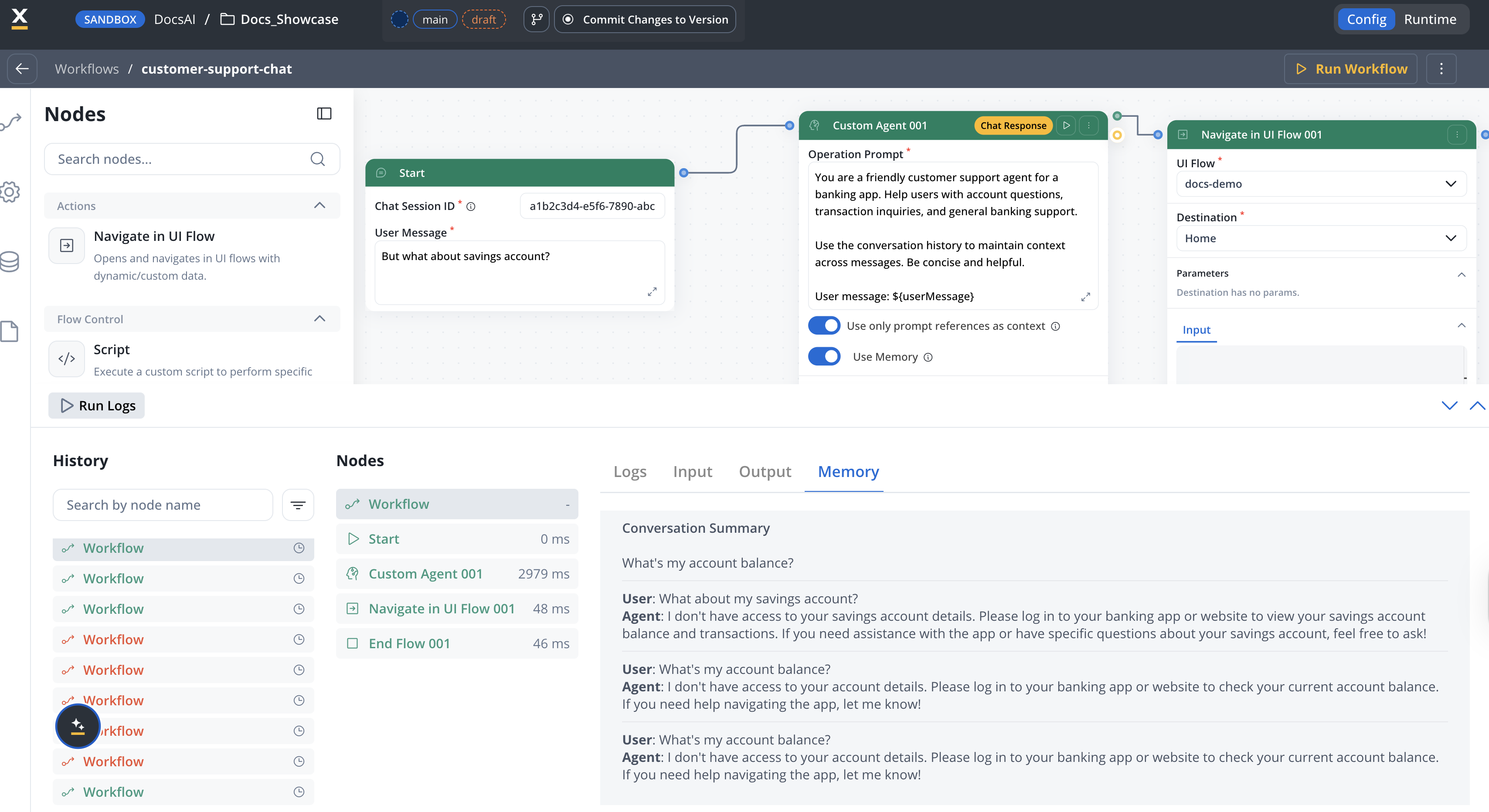
When an AI node with **Use conversation memory** enabled completes, the workflow console log includes
a **Memory** tab showing the conversation context that was available to the model for that run:
* A **Conversation Summary** heading followed by the conversation's title.
* The most recent user/agent turns from the session.
The node returns this as a `memoryUseSummary` object:
```json theme={"dark"}
{
"summary": "Account setup",
"chatMessages": [
{
"messageId": "msg-003",
"userMessage": "What documents do I need?",
"agentResponse": "You need a valid ID and proof of address."
},
{
"messageId": "msg-002",
"userMessage": "How do I verify my account?",
"agentResponse": "Navigate to Settings and select Verification."
}
]
}
```
The **Memory** tab is a preview of recent turns for debugging; the `summary` field carries the
conversation's title, and `chatMessages` lists the most recent turns. The full set of turns sent to
the model (up to 30) is what the AI node actually receives — see [What gets sent to the
model](#what-gets-sent-to-the-model).
The Memory tab only appears when `memoryUseSummary` data exists for the workflow instance. If you
don't see it, verify that **Use conversation memory** is enabled on at least one node.
***
## Storage
| Data | Storage | Details |
| ---------------- | -------------------------------- | ------------------------------------------------------ |
| Session ID | Browser storage + FlowX Database | Links the client chat instance to the server session |
| Message history | FlowX Database | Complete record of user and agent messages per session |
| Session metadata | FlowX Database | Timestamps, workflow reference, user info |
Session memory is tied to the `chatSessionId` — the same session ID retrieves the same memory across
workflow runs. The Chat component manages session IDs automatically.
***
## Limitations
* Memory is **session-scoped** — there is no cross-session or cross-user memory.
* The last **30 turns** are sent to the model; turns older than that window are not included.
* Memory cannot be manually edited or cleared from the Designer UI.
* Only **user messages** and **agent responses** are stored — internal workflow data is excluded.
***
## Related resources
Full guide to building chat-driven workflows with memory and intent routing
Runtime behavior, session management, and display modes
Route conversations based on detected user intent with optional memory
Configure AI nodes with memory, chat reply, and response settings
## Related topics
- [FlowX.AI 5.6.0 Release Notes](/release-notes/v5.x/v5.6.0-march-2026/v5.6.0-march-2026.md)
- [FlowX.AI 5.9.0 Release Notes](/release-notes/v5.x/v5.9.0-june-2026/v5.9.0-june-2026.md)
- [Chat-driven workflows](/5.9/ai-platform/chat-driven-workflows.md)
- [UI Flows](/5.9/docs/building-blocks/ui-flows.md)
- [ModPod setup](/5.9/setup-guides/modpod-setup.md)