> ## Documentation Index
> Fetch the complete documentation index at: https://docs.flowx.ai/llms.txt
> Use this file to discover all available pages before exploring further.
# Call activity node
> The Call Activity node is a custom node type in the main process that provides advanced options for starting subprocesses.
There are cases when extra configuration is needed on certain nodes to enhance process management and execution.

For when to use a Call Activity vs. starting a subprocess from a User Task action, mobile back-navigation behavior, and async mode constraints, see [Process design principles](../../process/design-principles).
**Swimlane constraint**: a subprocess whose UI renders inside the parent process (through a **Parent Process** navigation area) must have **exactly one swimlane**. With multiple swimlanes, the runtime can't render the subprocess in the parent and reports `Could not render subprocess due to multiple swimlanes or missing Parent Process Area` - see the [error glossary](../../../resources/error-glossary#could-not-render-subprocess-due-to-multiple-swimlanes-or-missing-parent-process-area).
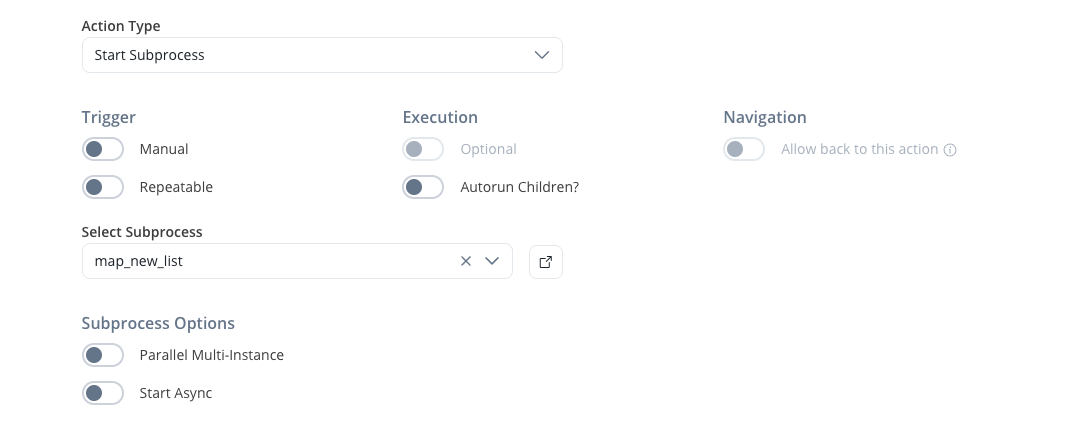
The Call Activity node contains a default action for starting a subprocess, which can be started in two modes:
* **Async mode**: The parent **process** will continue without waiting for the subprocess to finish.
Select if this task should be invoked asynchronously. Make tasks asynchronous if they cannot be executed instantaneously, for example, a task performed by an outside service.
* **Sync mode**: The parent process must wait for the subprocess to finish before advancing.
The start mode can be chosen when configuring the call activity.
If the parent process needs to wait for the subprocess to finish and retrieve results, the parent process key that will hold the results must be defined using the *output key* node configuration value.
## Retrying the parent token
Retrying the parent process token while it sits on a Call Activity node re-executes the node's start subprocess action, starting a **new subprocess instance**. The original subprocess instance isn't resumed or terminated: it remains in its current state alongside the new one. With [parallel multi-instance](#parallel-multi-instance) enabled, retrying the parent token starts a new full set of subprocess instances.
Account for the extra instance when retrying: any work or data in the original subprocess instance is not carried over to the new one.
## Starting multiple subprocesses
### Parallel multi-instance
The Call Activity node can also be used for starting a set of subprocesses that will be started and run at the same time.
This is useful when there is an array of values in the parent process parameters, and a subprocess needs to be started for each element in that array.
#### Configuration options
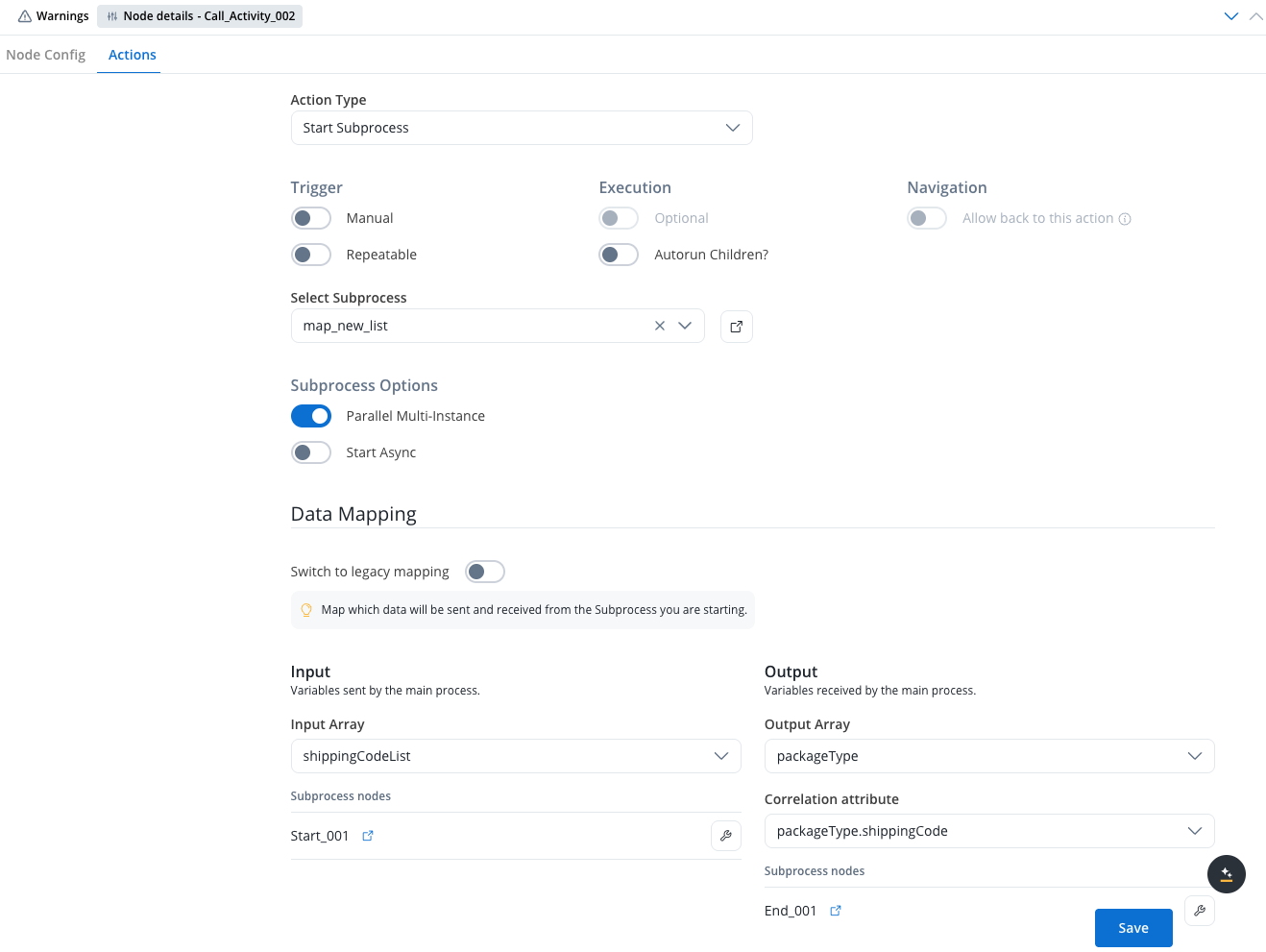
When configuring parallel multi-instance on a Call Activity node, you have access to the following configuration options:
* **Input Array**: Declare the array used for subprocess input. Map the array of objects or the keys inside the array of objects to the destination object or its keys from the subprocess.
* **Output Array**: Declare the array used for subprocess output. Map from the subprocess object back to an array of objects in the parent process.
* **Correlation attribute**: The attribute that will be used to correlate subprocess results with parent process data.
#### Data mapping
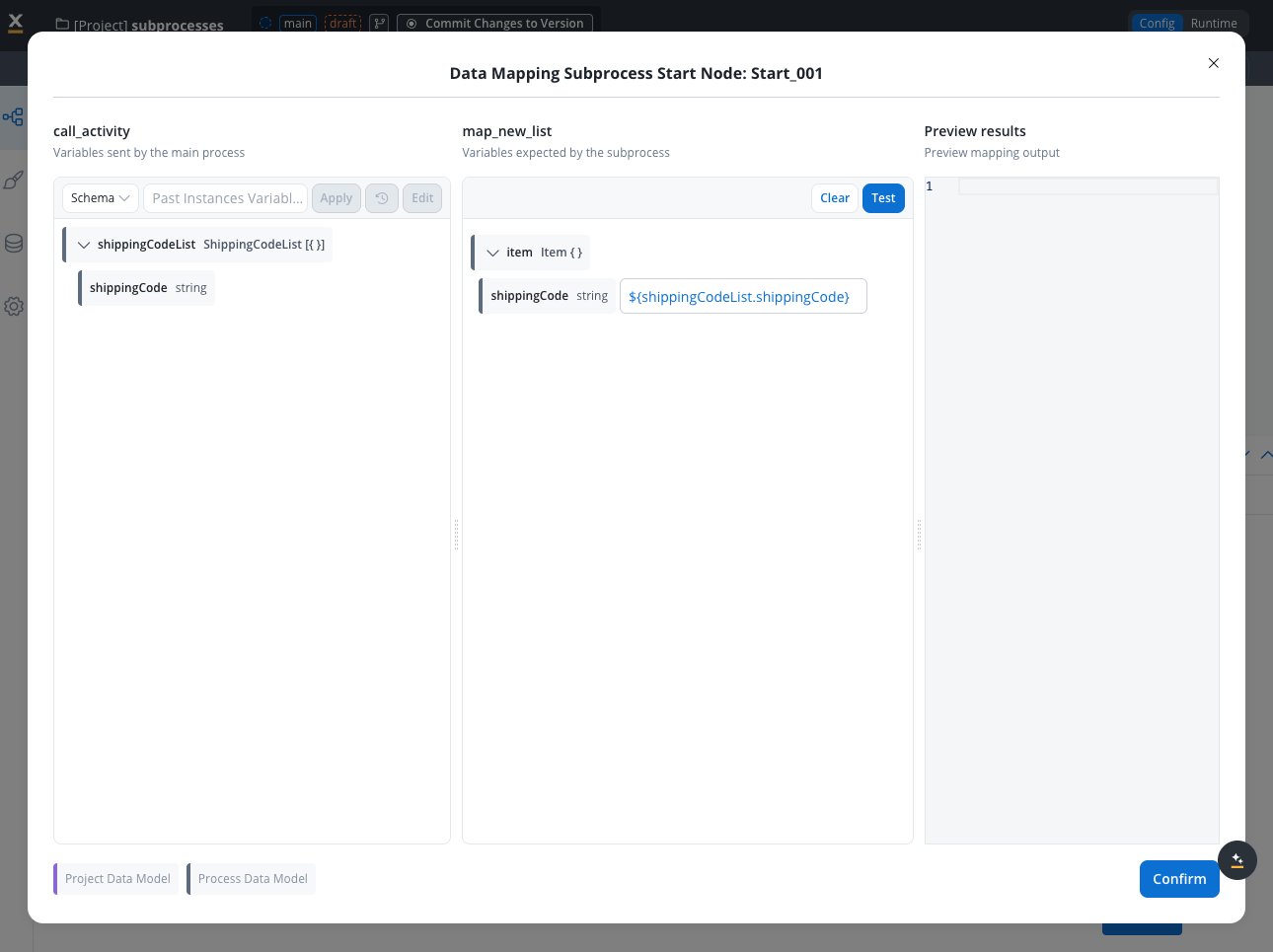
In the **Data Mapping** section, when **Parallel Multi-instance** is enabled, you can configure:
##### New data mapping
1. **Declare arrays**: Define the arrays used for subprocess input and subprocess output
2. **Input mapping**: In the mapping modal, map the array of objects or the keys inside the array of objects to the destination object or its keys from the subprocess
3. **Output mapping**: Map from the subprocess object back to an array of objects in the parent process
##### Legacy mapping
Legacy mapping works using current mechanics in both configuration and runtime, with no changes to existing features.
When you change the arrays in the node configuration and save, any existing mappings for input and output will be automatically deleted.
To filter, reshape, or compute over an array inside a mapping (instead of passing it through wholesale), switch the parameter to **function mode** with the **f(x)** icon and use JavaScript on the resolved value. See [Transforming arrays](../../process/data-mappers#transforming-arrays) on the Data mappers page for patterns and the `|| []` fallback.
#### Correlation attribute behavior
When results from parallel subprocesses are returned, the **correlation attribute** determines how the subprocess payload is handled:
* **Update existing element**: When the correlation attribute value from the subprocess payload matches one or more elements in the parent process array, those elements are updated with the subprocess payload
* **Insert new element**: When the correlation attribute value from the subprocess payload doesn't match any records in the parent process array, the payload is inserted as a new element in the array
This allows for flexible data handling where subprocesses can either update existing records or add new ones based on the correlation logic.
#### Output population and incomplete instances
The output array in the parent process populates **incrementally**: each subprocess reports back as it completes, and the parent appends its result right away - results don't wait for the rest of the set. Results arrive in **completion order**, not input-array order; when a **correlation attribute** is configured, each result updates the element matching its correlation key instead of appending.
Until the parent token advances, the accumulated values live in the parent's process data but aren't visible to subsequent nodes or the UI - you can confirm they arrived by inspecting the instance's process data in monitoring.
In **Sync mode**, the parent token advances only when **every** instance in the set completes. A subprocess counts as completed when it **reaches an end node** or is **dismissed**. An instance that ends any other way (ABORTED, TERMINATED, EXPIRED, FAILED) never reports back to the parent, so the parent token keeps waiting - **there is no timeout on the wait** - even though the results of the completed instances are already present in the parent's process data. A partial run isn't recoverable: to get results for all items, run the operation again.
Two configurations end the wait automatically:
* **Expiry time on the parent process definition**: the parent (and, by default, its active subprocesses) moves to EXPIRED at the scheduled moment. The run isn't recovered, but it stops hanging. See [What happens when a process expires](../../process/process-definition#what-happens-when-a-process-expires).
* **An interrupting boundary event (timer, message, or error) on the Call Activity node**: the parent advances on the boundary branch, and the still-active subprocess instances are aborted. Already-finished instances keep their FINISHED status.
An instance reaches **ABORTED** in exactly two cases: an interrupting boundary event on the parent's Call Activity node (as above), or a token reset in the parent from a manual action with back-navigation, which aborts the subprocesses started by the actions being re-executed.
For parallel multi-instance sets whose subprocesses depend on external systems (Kafka replies, integrations), configure an **interrupting boundary timer** on the Call Activity node so a single failed instance can't hold the parent indefinitely.
The Retry action isn't available on an aborted subprocess instance, because Retry applies only to ACTIVE tokens. Retrying the parent token starts a new full set of subprocess instances — see [Retrying the parent token](#retrying-the-parent-token).
#### Dismissing unfinished subprocesses
When subprocesses are started in **Sync mode**:
* If the token is advanced due to another action being performed in the process
* Then the subprocesses that haven't finished are automatically dismissed
This ensures that the parent process can continue without waiting indefinitely for subprocesses that may not complete.
### Business rule example
Below is an example of an MVEL business rule used to generate a list of shipping codes:
```java theme={"dark"}
import java.util.*;
def mapValues(shippingCode) {
return {
"shippingCode": shippingCode
}
}
shippingCodeList = [];
shippingCodeList.add(mapValues("12456"));
shippingCodeList.add(mapValues("146e3"));
shippingCodeList.add(mapValues("24356"));
shippingCodeList.add(mapValues("54356"));
output.put("shippingCodeList", shippingCodeList);
```
In this example, the shippingCodeList array contains multiple shipping code maps. Each of these maps could represent parameters for individual subprocesses. The ability to generate and handle such arrays allows the system to dynamically start and manage multiple subprocesses based on the elements in the array, enabling parallel processing of tasks or operations.
To achieve this, select the *parallel multi-instance* option. The *input array* name from the parent process also needs to be specified.
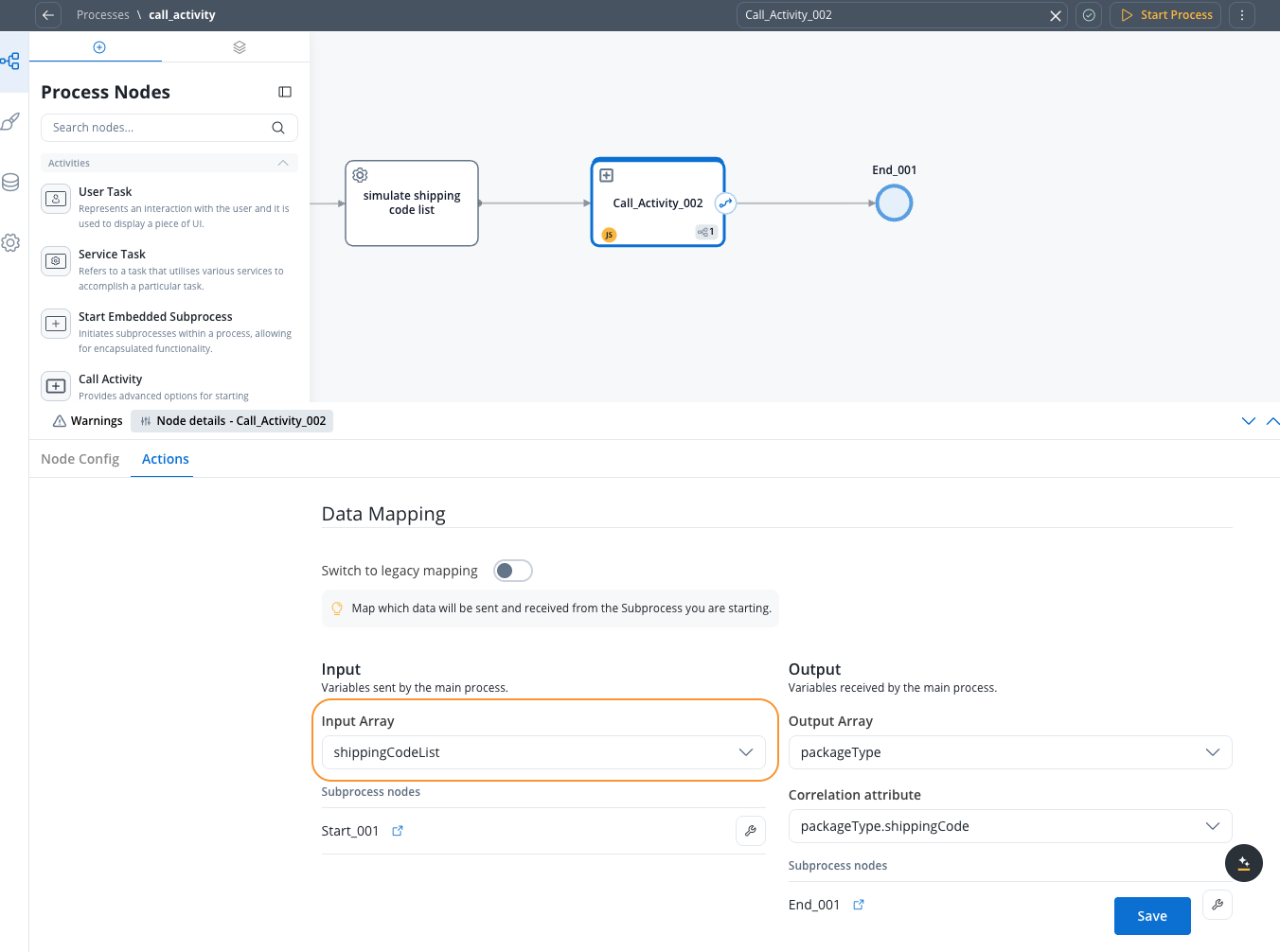
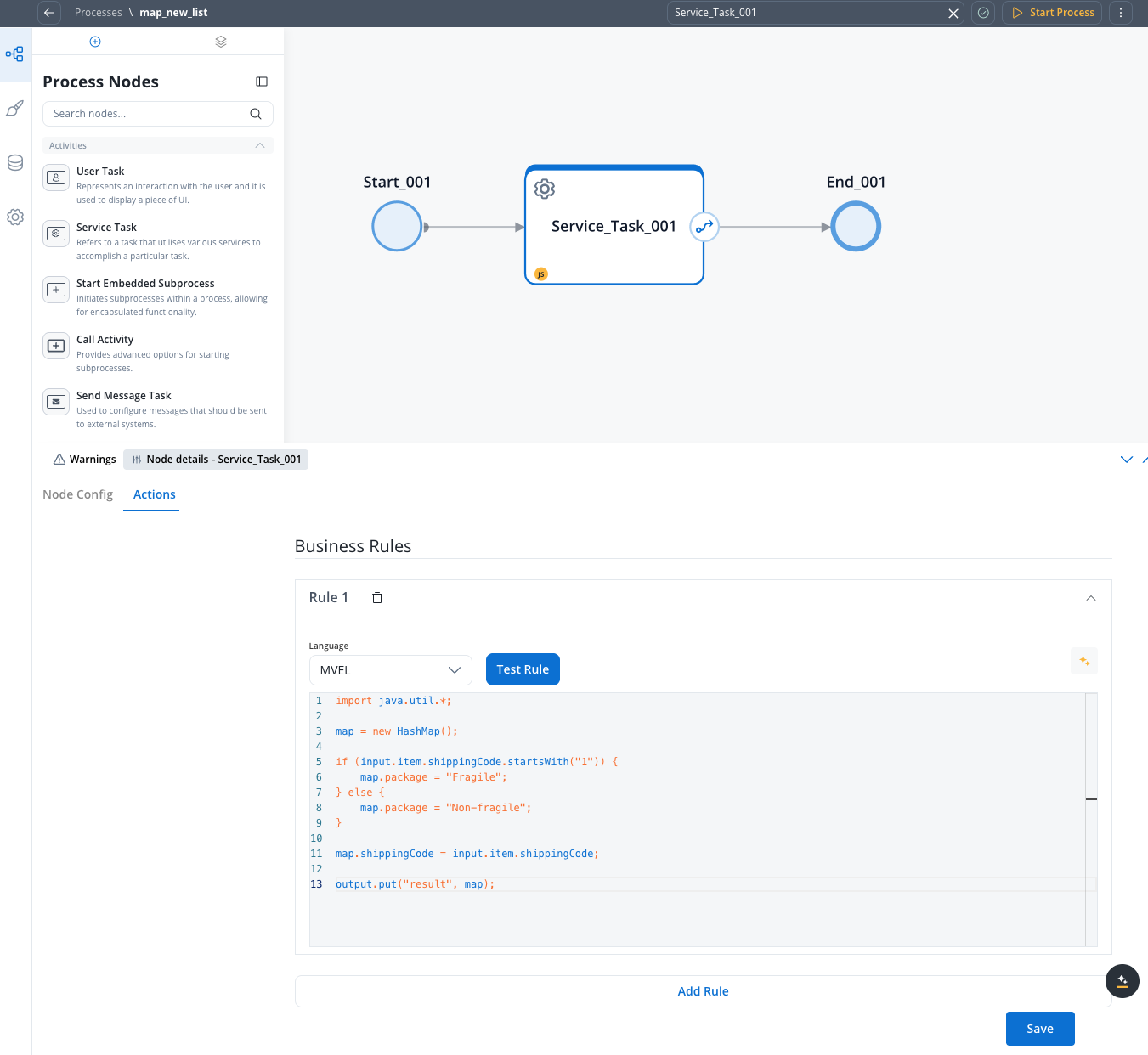
When designing such a subprocess that will be started in a loop, remember that the input value for the subprocess (one of the values from the array in the parent process) will be stored in the subprocess parameter values under the key named *item*. This key should be used inside the subprocess. If this subprocess produces any results, they should be stored under a key named *result* to be sent back to the parent process.
#### Subprocess business rule example
Here's an MVEL business rule for a subprocess that processes shipping codes:
```java theme={"dark"}
import java.util.*;
map = new HashMap();
if (input.item.shippingCode.startsWith("1")) {
map.package = "Fragile";
} else {
map.package = "Non-fragile";
}
map.shippingCode = input.item.shippingCode;
output.put("result", map);
```
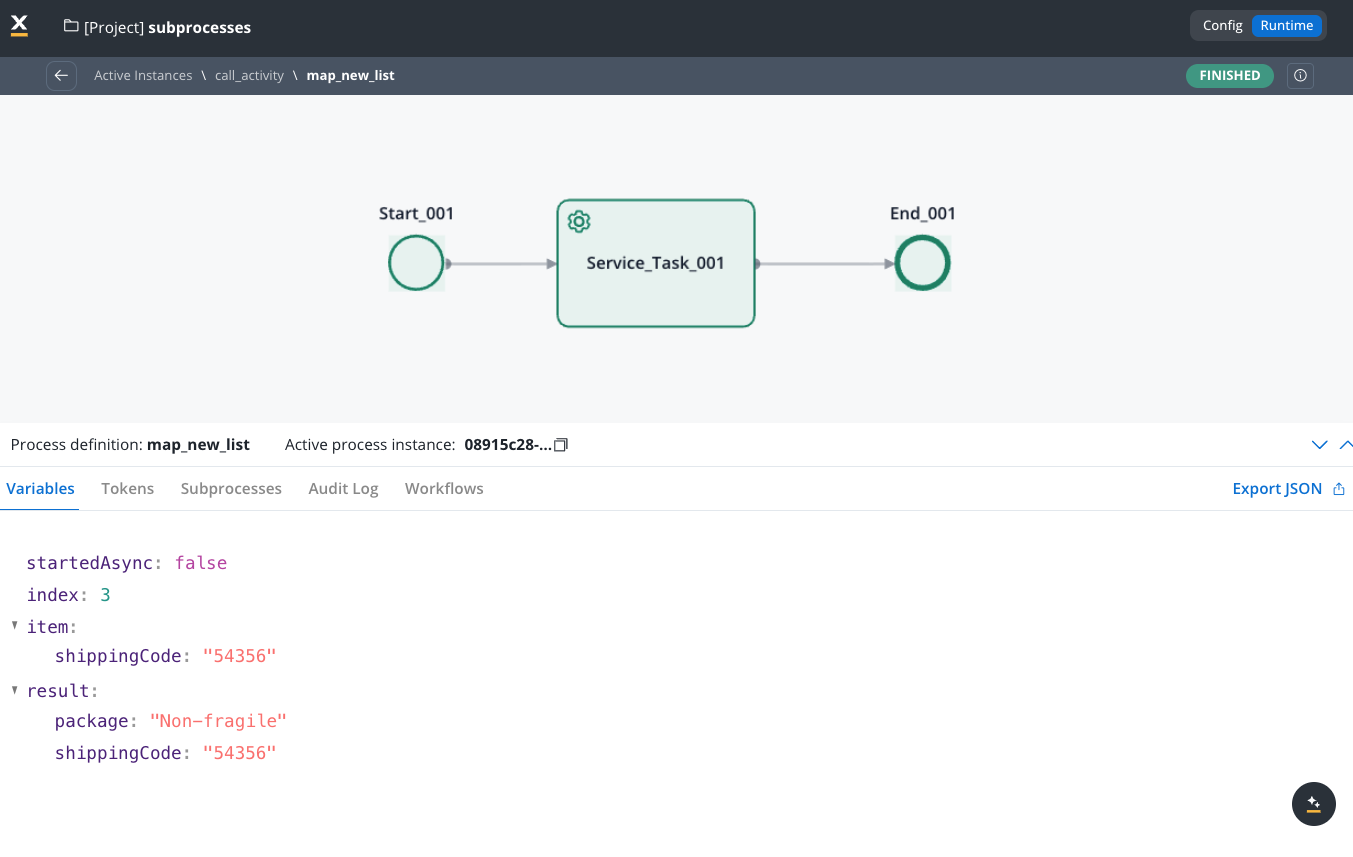
## Result (one of the subprocess instances)
The result shows the output of a process that has handled multiple shipping codes. The structure is:
```json theme={"dark"}
{
"package": "Non-fragile",
"shippingCode": "54356"
}
```
This contains the result of processing the specific shipping code, indicating additional attributes related to the shipping code (for example, package type) determined during the subprocess execution.
## Related topics
- [Data mappers](/5.9/docs/building-blocks/process/data-mappers.md)
- [Subprocess management](/5.9/docs/building-blocks/process/subprocess.md)
- [Reference types in resources usage](/5.9/docs/projects/reference-types.md)
- [Start subprocess action](/5.9/docs/building-blocks/actions/start-subprocess-action.md)
- [Process definition](/5.9/docs/building-blocks/process/process-definition.md)