> ## Documentation Index
> Fetch the complete documentation index at: https://docs.flowx.ai/llms.txt
> Use this file to discover all available pages before exploring further.
# Migrate process instances
> Move running process instances from one build to another to apply a corrected process definition without restarting them, individually or in bulk.
export const release_3 = "5.12"
export const release_2 = "5.12"
export const release_1 = "5.13"
export const release_0 = "5.11"
SaaS · {release_0}
**Available on SaaS with FlowX.AI {release_0}.** This feature is live on managed (SaaS) deployments now. Self-hosted deployments will receive it with the next LTS release family.
## Overview
Process instance migration moves running instances from the build they started on to a
different build of the same process, so a fix or change made in a newer build applies to
instances that are already in flight. It is an operational corrective action, alongside
[updating process variables](./update-process-variables) - you use it to fix forward
without asking end users to restart.
You can migrate:
* **A single instance** - from its contextual menu on the Process instances page.
* **Instances in bulk** - a chosen set of instances on a source build, from the Corrective Actions page.
## Eligibility
Only instances that are still running can be migrated:
| Condition | Rule |
| - | - |
| **Instance status** | Only instances in **STARTED** or **ON HOLD** status are eligible. Finished, terminated, expired, and failed instances are not migrated. |
| **Build selection** | The **active** build cannot be the **source**, since its instances are the ones the active policy is serving. It can be the **target**. The only build excluded from the target list is the one already picked as the source. |
\| **UI Flow sessions** | UI Flow sessions are **not** migrated (see Limitations). |
## Prerequisites
Migrating process instances is a workspace-level **Operations** action. The acting user needs
the **Operations** permission in the workspace. The built-in `operations_editor`
(`workspace_operations_editor`) role grants it, and `workspace_admin` includes it by default.
For the full permission breakdown, see the
[Roles and permissions matrix](/5.9/setup-guides/access-management/roles-permissions-matrix) and
[Workspaces access rights](/5.9/setup-guides/access-management/workspaces-access-rights).
### Corrective actions role
SaaS · {release_1}
**Available on SaaS with FlowX.AI {release_1}.** This feature is live on managed (SaaS) deployments now. Self-hosted deployments will receive it with the next LTS release family.
Migration is governed by the **Process instance corrective actions** permission, granted by the
**Workspace corrective actions editor** role. This role replaces the Workspace operations editor
role, and users and groups that had the old role are moved to the new one automatically.
`workspace_admin` includes the permission, and organization admins have it through their workspace
admin access. See the
[Workspace corrective actions editor permission matrix](/5.9/setup-guides/access-management/roles-permissions-matrix#workspace-corrective-actions-editor-permission-matrix).
## Migrate a single instance
Go to **Runtime → Active Process → Process instances**, then open the contextual menu
(three dots) on the instance you want to migrate and select **Migrate**.
Select the **target build** to migrate the instance to. Builds are listed newest first
(descending by build creation date).
On the Migration page, review how the instance's active node maps into the target build.
If the active node does not exist in the target build, the token is repositioned per the
[node mapping rules](#node-mapping-when-a-node-is-missing).
Confirm to run the migration. When it completes, the instance runs on the target build and
its previously active tokens are marked **Migrated** (see [After migration](#after-migration)).
## Migrate instances in bulk
Bulk migration moves every eligible instance on a source build to a target build in one action.
Go to **Runtime → Runtime Control → Corrective Actions**, open the menu (three dots, top
right) and select **Bulk Migration**.
In the **Migrate Instances** modal, choose the **Source Build** and the **Target Build**.
Both lists are ordered newest first (descending by build creation date). Then, under
**Which instances do you want to move?**, pick a selection mode and fill in its fields; see
[Choosing which instances to move](#choosing-which-instances-to-move). Click **Continue**.
The Migration page shows the number of **running instances** eligible for migration
(instances in STARTED or ON HOLD status), the source and target builds (read-only), and the
node mapping section.
Resolve any active nodes that do not exist in the target build, per the
[node mapping rules](#node-mapping-when-a-node-is-missing).
Click **Start** to run the bulk migration.
Keep a single bulk run at or below roughly **10,000 instances**. Runs of that size perform
acceptably. Substantially larger runs degrade and are not recommended.
### Choosing which instances to move
SaaS · {release_2}
**Available on SaaS with FlowX.AI {release_2}.** This feature is live on managed (SaaS) deployments now. Self-hosted deployments will receive it with the next LTS release family.
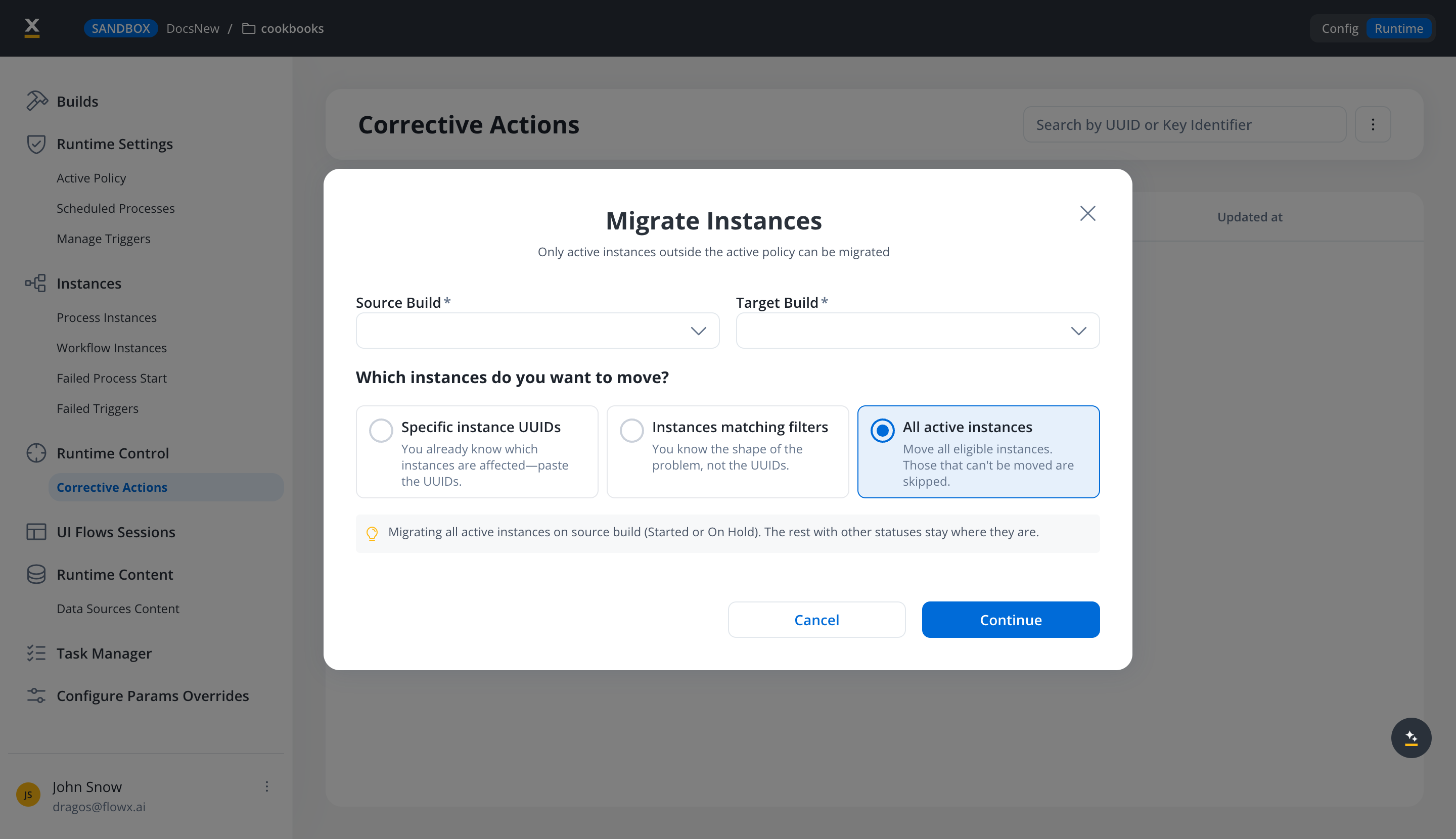
Bulk migration no longer means "everything on the build". The modal offers three selection modes, and you pick one:
| Mode | Use it when |
| - | - |
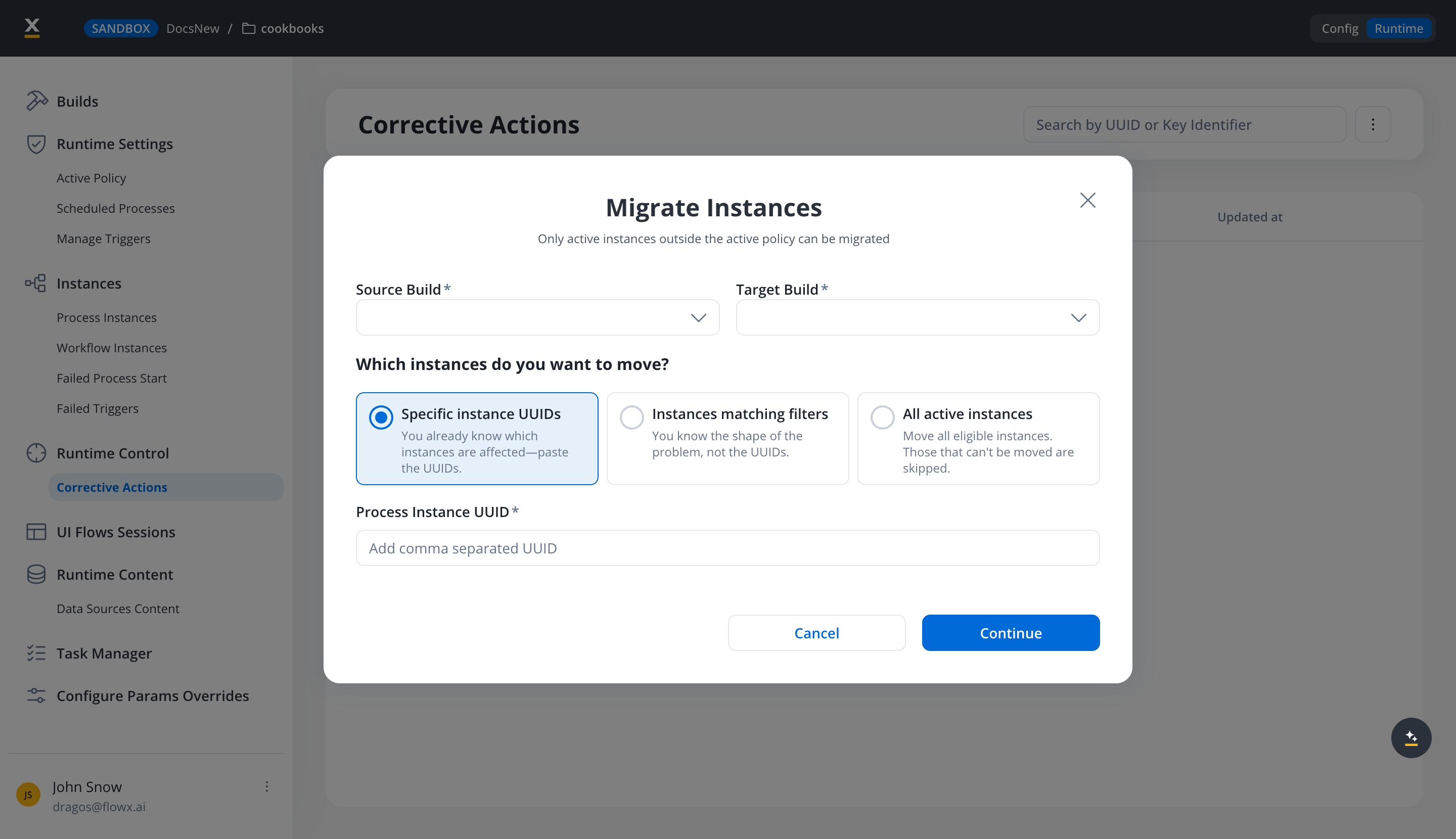
| **Specific instance UUIDs** | You already know which instances are affected, so you paste their UUIDs. |
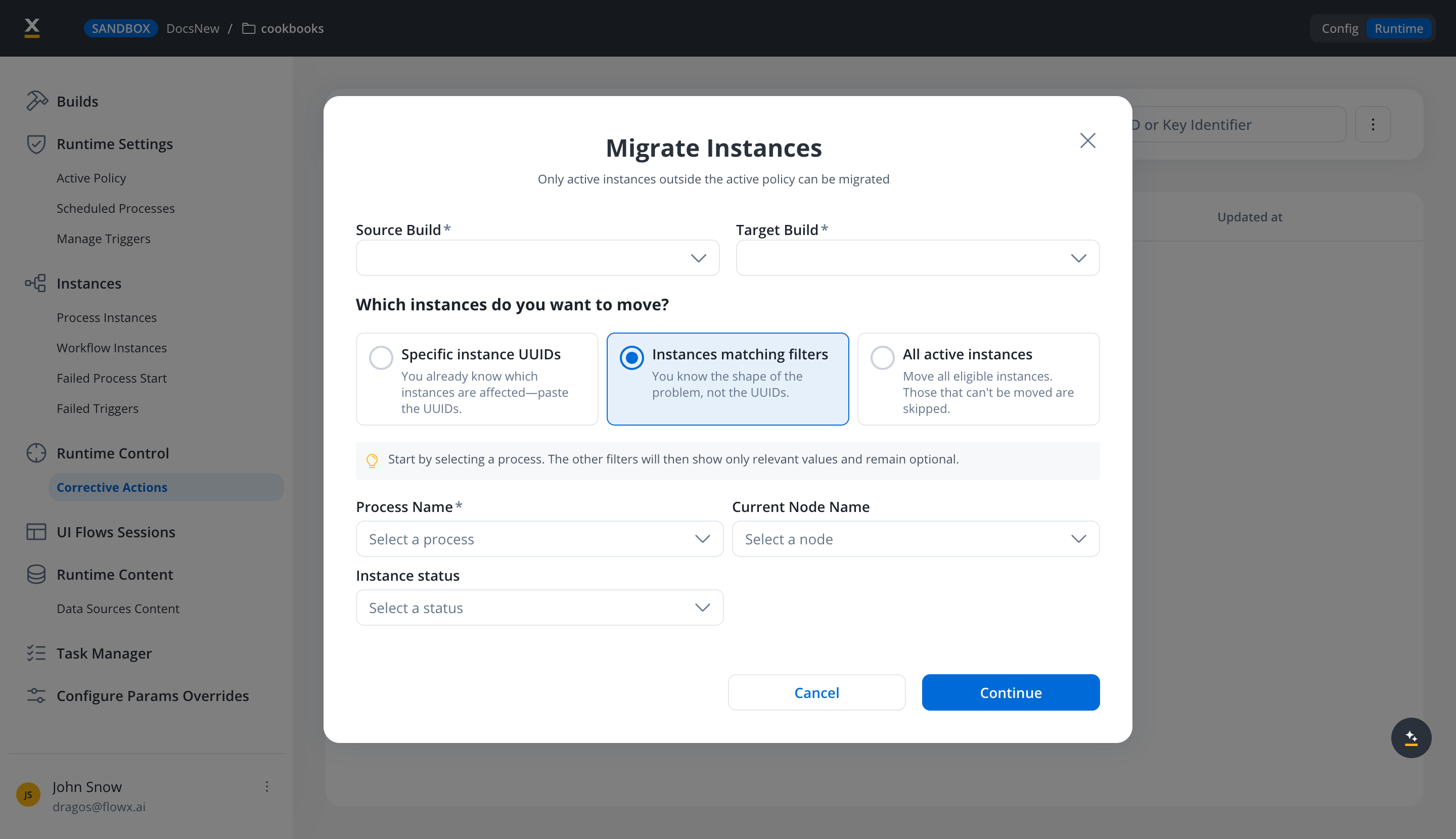
| **Instances matching filters** | You know the shape of the problem but not the UUIDs. |
| **All active instances** | You want every eligible instance moved. Instances that cannot be moved are skipped rather than failing the run. |
**Specific instance UUIDs** shows a **Process Instance UUID** field taking comma-separated UUIDs, up to **100** in one run. More than that is rejected rather than truncated.
**Instances matching filters** selects by where an instance currently sits, not by its overall state. The three fields cascade: pick a process first, and each later field offers only values relevant to the earlier ones.
| Filter | Required | What it matches |
| - | - | - |
| **Process Name** | Yes | Instances of that process definition. |
| **Current Node Name** | No | Instances whose active token sits on that node. |
| **Instance status** | No | The token's status on that node. Pick a node first, since a status on its own has nothing to apply to. |
Before you start the run, the modal reports how many instances the selection matches, and calls out any UUIDs you pasted that can never match so you can correct them rather than wonder why the count is short.
Reach for **Instances matching filters** when a fix targets a known failure point, such as every instance stuck on one Service Task. It is the difference between moving the instances that need the fix and moving the whole build.
## Node mapping (when a node is missing)
When an active token sits on a node that does not exist in the target build, the token is
repositioned to the previously visited node. Specific node types have additional effects:
| Active node not in target build | Result |
| - | - |
| **General rule** | The active migrated token remains on the previously visited node. |
| **Start Parallel Gateway** | Not supported. The parallel gateway must still exist in the target build, so this is not a case you should migrate into. See [Limitations](#limitations). |
| **Embedded subprocess** | Token moves to the previously visited node. All previously visited nodes in the embedded context are removed from token history. |
| **Call Activity** | Token moves to the previously visited node. All started subprocess instances from that node are cancelled. |
| **Node with a boundary event** | Token moves to the previously visited node. |
## After migration
On the Process instance page of a migrated instance:
* Tokens that were active on the source build are shown with the **Migrated** status.
* Tokens created after migration are shown with their current status.
* Nodes on the canvas are color-coded based on the newly created and active tokens.
## Audit trail
SaaS · {release_3}
**Available on SaaS with FlowX.AI {release_3}.** This feature is live on managed (SaaS) deployments now. Self-hosted deployments will receive it with the next LTS release family.
Every bulk migration is recorded in the [audit log](../../../platform-deep-dive/core-extensions/audit), attributed to the user who started it:
* One entry for the run itself, with the **Bulk Migrate Process Instances** subject and the **Migrate** event. The entry records success, or an error with the number of instances that failed to migrate.
* One **Migrate** entry per migrated instance, with the **Process Instance** subject and the instance identifier. A root instance and its subprocesses are audited individually, all with the same outcome: the tree migrates, and rolls back on failure, as a single unit.
To view these entries filtered to corrective actions, go to **Runtime → Runtime Control → Corrective Actions**, open the menu (three dots, top right) and select **Audit Logs**.
## Limitations
* **UI Flow sessions are not migrated.** Any UI Flow session tied to the instance does not carry
over to the target build.
* **No undo of a successful migration.** Rollback is automatic only if a migration **fails**;
there is no snapshot restore for a migration that succeeded. To correct a bad migration, fix
the target build and migrate the instance again (fix-forward).
* **The parallel gateway itself must still exist in the target build.** You can change nodes
*inside* the parallel branches and migrate normally. You cannot migrate onto a build where the
parallel gateway nodes themselves (the split and the join) no longer exist.
## Related resources
Monitor instance status, tokens, and canvas color coding.
The other in-flight corrective action for running instances.
The Operations permission that governs migration.
## Related topics
- [FlowX.AI 5.12.0 Release Notes](/release-notes/v5.x/v5.12.0-september-2026/v5.12.0-september-2026.md)
- [Move tokens](/5.9/docs/projects/runtime/active-process/move-token.md)
- [FlowX.AI Audit](/5.9/docs/platform-deep-dive/core-extensions/audit.md)
- [Notification center](/5.9/docs/flowx-designer/notification-center.md)
- [Process definition](/5.9/docs/building-blocks/process/process-definition.md)
This documentation is built and hosted on [Mintlify](https://mintlify.com), a developer documentation platform.