

Overview
Partitioning and archiving are data management strategies used to handle large volumes of data efficiently. They improve database performance, manageability, and storage optimization. By dividing data into partitions and archiving older or less frequently accessed data, organizations can ensure better data management, quicker query responses, and optimized storage use.Partitioning
Partitioning is the process of dividing a large database table into smaller, more manageable pieces, called partitions. Each partition can be managed and queried independently. The primary goal is to improve performance, enhance manageability, and simplify maintenance tasks such as backups and archiving. Partitions can be created per day, week or month. This means that a partition ID is computed at insert time for each row of process_instance and related tables. Afterwards, a retention period can be setup (eg: 3 partitions). A flowx engine-driven cron job (with configurable start interval) will check if there is any partition which needs to be archived and will perform the necessary actions.Benefits of partitioning
- Improved Query Performance: By scanning only relevant partitions instead of the entire table.
- Simplified Maintenance: Easier to perform maintenance tasks like backups and index maintenance.
- Data Management: Better data organization and management by dividing data based on specific criteria such as date, range, or list.
Database Compatibility: Oracle Database and PostgreSQL.
Archiving
Archiving involves moving old data from the primary tables to separate archive tables. This helps in reducing the load on the primary tables, thus improving performance and manageability.Benefits of archiving
- Storage Optimization: Archived data can be compressed, saving storage space.
- Performance Improvement: Reduces the volume of data in primary tables, leading to faster query responses.
- Historical Data Management: Maintains historical data in a separate, manageable form.
Partitioning and archiving in Oracle Database
Oracle Database partitioning
1
Concept
Oracle Database partitioned tables are utilized, allowing for efficient data management and query performance.
2
Implementation
Each partition can be managed and queried independently.Example: The
process_instance table can be partitioned by day, week, or month.3
Benefits
Improved query performance by scanning only relevant partitions.Simplified maintenance tasks like backups and archiving.
Oracle Database archiving
1
Process
Detaching the partition from the main table.Converting the detached partition into a new table named
archived_${table_name}_${interval_name}_${reference} for example: archived_process_instance_monthly_2024_03 .The DATE is in the format
yyyy-MM-dd if the interval is DAY, or in the format yyyy-MM if the interval is MONTH, or in the format yyyy-weekOfYear if the interval is WEEK.2
Steps
Identify partitions eligible for archiving based on retention settings.Detach the partition from the main table.Create a new table with the data from the detached partition.Optionally compress the new table to save space.
3
Benefits
Manages historical data by moving it to separate tables, reducing the load on the main table.Compression options (OFF, BASIC, ADVANCED) further optimize storage.
Oracle offers several compression options—OFF, BASIC, and ADVANCED—that optimize storage. Each option provides varying levels of data compression, impacting storage savings and performance differently.
- OFF: No compression is applied.
- BASIC: Suitable for read-only or read-mostly environments, it compresses data without requiring additional licenses.
- ADVANCED: Offers the highest level of compression, supporting a wide range of data types and operations. It requires an Advanced Compression license and provides significant storage savings and performance improvements by keeping data compressed in memory.
PostgreSQL archiving
1
Process
Creating a new table for the partition being archived.Moving data from the main table to the new archive table (in batches).
Since here the DB has more work to do than just changing some labels (actual data insert and delete vs relabel a partition into a table, for Oracle Database) the data move is batched and the batch size is configurable.
2
Steps
Identify partitions eligible for archiving based on retention settings.Create a new table following this naming convention:
archived__${table_name}__${interval_name}_${reference}, example: archived__process_instance__weekly_2024_09 .Configure the batch size for data movement to control the load on the database.3
Benefits
Efficiently manages historical data.Batch processing allows for better control over the archiving process and system performance.
Differences from Oracle DBs:Archiving involves actual data movement (insert and delete operations), unlike Oracle Databases where it is mainly a relabeling of partitions.The batch size for data movement is configurable, allowing fine-tuning of the archiving process.
Native PostgreSQL partitioning
Available starting with FlowX.AI 5.9.5Also part of FlowX.AI 5.12. Unlike most 5.12 features, this one reaches self-hosted 5.9.x deployments in a patch rather than waiting for the next LTS.
RANGE(partition_id) partitioned tables with a composite primary key of (id, partition_id):
process_instance · token_instance · incident · embedded_subprocess_instance · process_instance_debug · process_instance_initiator · process_instance_snapshot · process_inst_swimlane_owner · process_instance_param_values_backup
The conversion is a database migration that runs automatically the first time the engine starts on the new version. Oracle deployments are unaffected.
Who this affects
Only deployments that already had partitioning enabled. The migration checks whether this deployment has ever partitioned data, and skips the conversion entirely if it has not. If you never enabled
FLOWX_DATA_PARTITIONING_ENABLED, there is no conversion, no lock and no extra disk use.What the conversion costs
The conversion rewrites each table in full, which is why it is skipped where it would bring no benefit. While it runs, expect:
Two things limit the impact. Each table is committed on its own, so its lock is released as soon as that table is done rather than being held across all nine. And the migration is resumable: if startup is interrupted, the next run skips the tables that already converted and continues from where it stopped.
This is separate from steady-state storage, which does not grow. Once converted, the engine writes straight into a partitioned table instead of writing to one large table and copying rows into archive tables, so the ongoing footprint is no larger than before.
How archiving changes
Once tables are natively partitioned, archiving detaches a partition rather than copying rows out of it, usingDETACH CONCURRENTLY. That makes PostgreSQL archiving behave much like Oracle’s, where archiving is mainly a relabelling rather than a data move, so the batched insert-and-delete described under PostgreSQL archiving no longer applies.
This is controlled by flowx.data.partitioning.archiving.postgres-native, which defaults to true. Setting it to false returns archiving to the previous batched behaviour, but it does not undo the conversion: the tables remain natively partitioned.
Daily operations
Once set up, the partitioning and archiving process involves the following operations:1
Partition ID Calculation
The
partition_id is automatically calculated based on the configured interval (DAY, WEEK, MONTH).
Example for daily partitioning: 2024-03-01 13:00:00 results in partition_id = 124061. See the Partition ID calculation section.2
Retention Management
Data older than the configured retention interval becomes eligible for archiving and compressing.
3
Archiving process
A cron job checks for eligible partitions.Eligible partitions are archived and optionally compressed.The process includes deactivating foreign keys, creating new archive tables, moving data references, reactivating foreign keys, and dropping the original partition.
4
Space management
Archived tables remain in the database but occupy less space if compression is enabled.Recommendation: to free up space, consider moving archived tables to a different database or tablespace. Additionally, you have the option to move only process instances or copy definitions depending on your needs.
Future schema updates or migrations will not affect archived tables. They retain the schema from the moment of archiving.
Configuring partitioning and archiving
The Partitioning and Archiving feature is optional and can be configured as needed.
flowx.data.partitioning block on the process-engine. Archiving settings — including the scheduler that detaches and archives old partitions — live in the nested archiving block:
Set
FLOWX_DATA_PARTITIONING_INTERVAL to the same value on the process-engine and Integration Designer. A mismatch desynchronizes archive alignment between the two services. See Integration Designer setup, Workflow partitioning for the Integration Designer settings.Compression for archived (detached) partitions is available only for Oracle DBs.
The batch size setting for archiving data is available only for PostgreSQL DBs.
Logging information
Partitioning and archiving actions are logged in two tables:DATA_PARTITIONING_LOG: For tracking archived partitions.
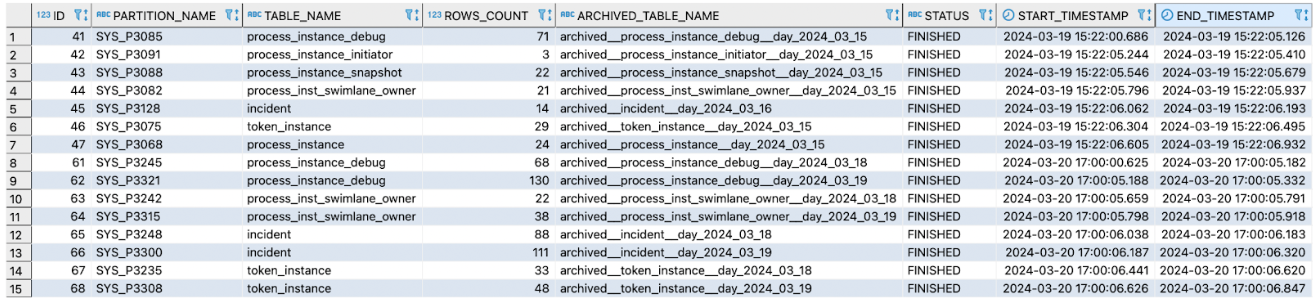
DATA_PARTITIONING_LOG_ENTRY: For logging SQL commands executed for archiving.

Enabling partitioning and Elasticsearch indexing strategy
When partitioning is enabled, the Elasticsearch indexing strategy must also be enabled and configured on FlowX Engine setup.Why?
- When archiving process instances, data from Elasticsearch must be deleted, not just the cache but also indexed keys (e.g., those indexed for data search on process instances).
Elasticsearch indexing configuration
Check the Elasticsearch indexing setup here:Elasticsearch indexing setup
Index partitioning
-
transforms.routeTS.topic.format: "process_instance-${timestamp}": This value must start with the index name defined in the process-engine config: flowx.indexing.processInstance.index-name. In this example, the index name is prefixed with “process_instance-” and appended with a timestamp for dynamic index creation. For backward compatibility, the prefix must be “process_instance-”. However, backward compatibility is not strictly required here. yaml -
transforms.routeTS.timestamp.format: "yyyyMMdd": This format ensures that timestamps are consistently represented and easily parsed when creating or searching for indices based on the process instance start date. You can adjust this value as needed (e.g., for monthly indexes, use “yyyyMM”). However, note that changing this format will cause existing indexed objects to remain unchanged, and update messages will be treated as new objects, indexed again in new indices. It is crucial to determine your index size and maintain consistency.
Kafka Elasticsearch Connector
Technical details
Partition ID calculation
- The
partition_idformat follows this structure:<LEVEL || YEAR || BIN_ID_OF_YEAR>. This ID is calculated based on the start date of theprocess_instance, the partition interval, and the partition level.LEVEL: This represents the “Partitioning level,” which increments with each change in the partitioning interval (for example, if it changes fromDAYtoMONTHor vice versa).YEAR: The year extracted from theprocess_instancedate.BIN_ID_OF_YEAR: This is the ID of a bucket associated with theYEAR. It is created for all instances within the selected partitioning interval. The maximum number of buckets is determined by the partitioning frequency:- Daily: Up to 366 buckets per year
- Weekly: Up to 53 buckets per year
- Monthly: Up to 12 buckets per year
Calculation example
For a timestamp of2024-03-01 13:00:00 with a daily partitioning interval, the partition_idwould be 124061:
1: Partitioning Level (LEVEL)24: Year - 2024 (YEAR)061: Bucket per configuration (61st day of the year)
Archived tables
- Naming format:
archived__${table_name}__${interval_name}_${reference}. Examples:- archived__process_instance__monthly_2024_03
- archived__process_instance__weekly_2024_09
- archived__process_instance__daily_2024_03_06