Easily track and manage your project’s evolution with comprehensive versioning features.
Versioning enables you to manage changes, track progress, and collaborate effectively by capturing snapshots of your project’s state at any point in time. The versioning system ensures that resources are grouped and tracked as part of the project, providing a comprehensive and structured approach to development.
Project version
A Project Version is an editable snapshot of your project at a specific moment. It contains all resources (e.g., processes, integrations, templates) and configurations grouped under the project.
Project: The main project entity that contains all your resources (processes, integrations, templates, etc.)
Project Branch: Branches within a project (similar to Git branches) that allow parallel development
Project Version: Individual versions within branches that track the state of your project
Each version can have one of the following statuses:
WIP (Work In Progress): Draft versions that are actively being edited
COMMITTED: Finalized versions that have been submitted with a commit message
MERGE_IN_PROGRESS: Versions currently being merged between branches
The tab above provides a summary of all accessible project versions and branches available in the current environment.
Resources within a project (e.g., processes, integrations, templates) are versioned as part of the project, not individually.
Certain resources are considered global and are not included in project-specific versioning. These resources are shared across projects and environments to maintain consistency and simplify their management. Examples of such global resources include:
Themes: Predefined design themes used across multiple projects.
Fonts: A library of fonts accessible globally.
Global Media Files: Shared media assets.
Out of Office Settings: Configurations for user availability and auto-responses that are managed at the platform level.
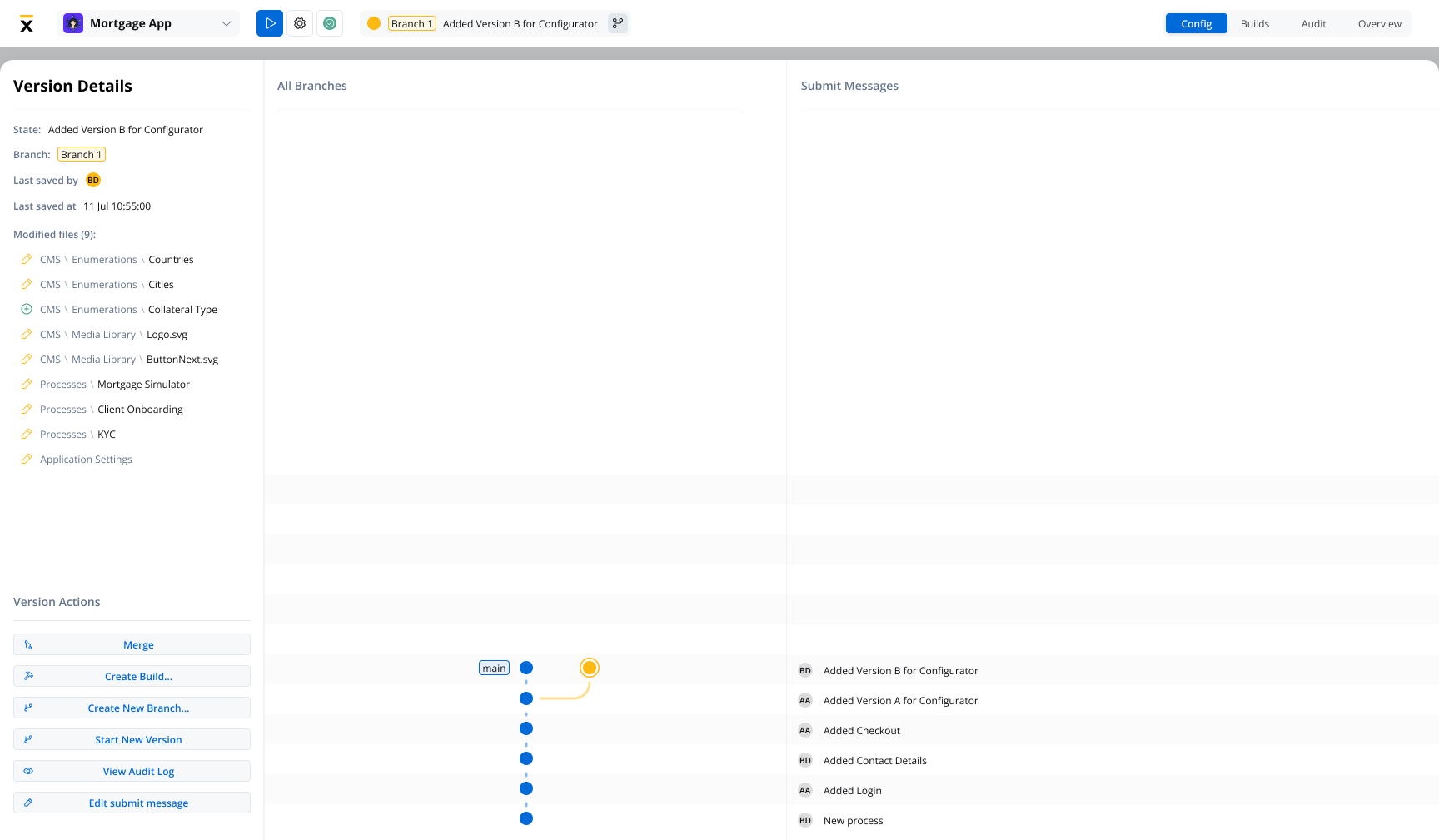
Version details
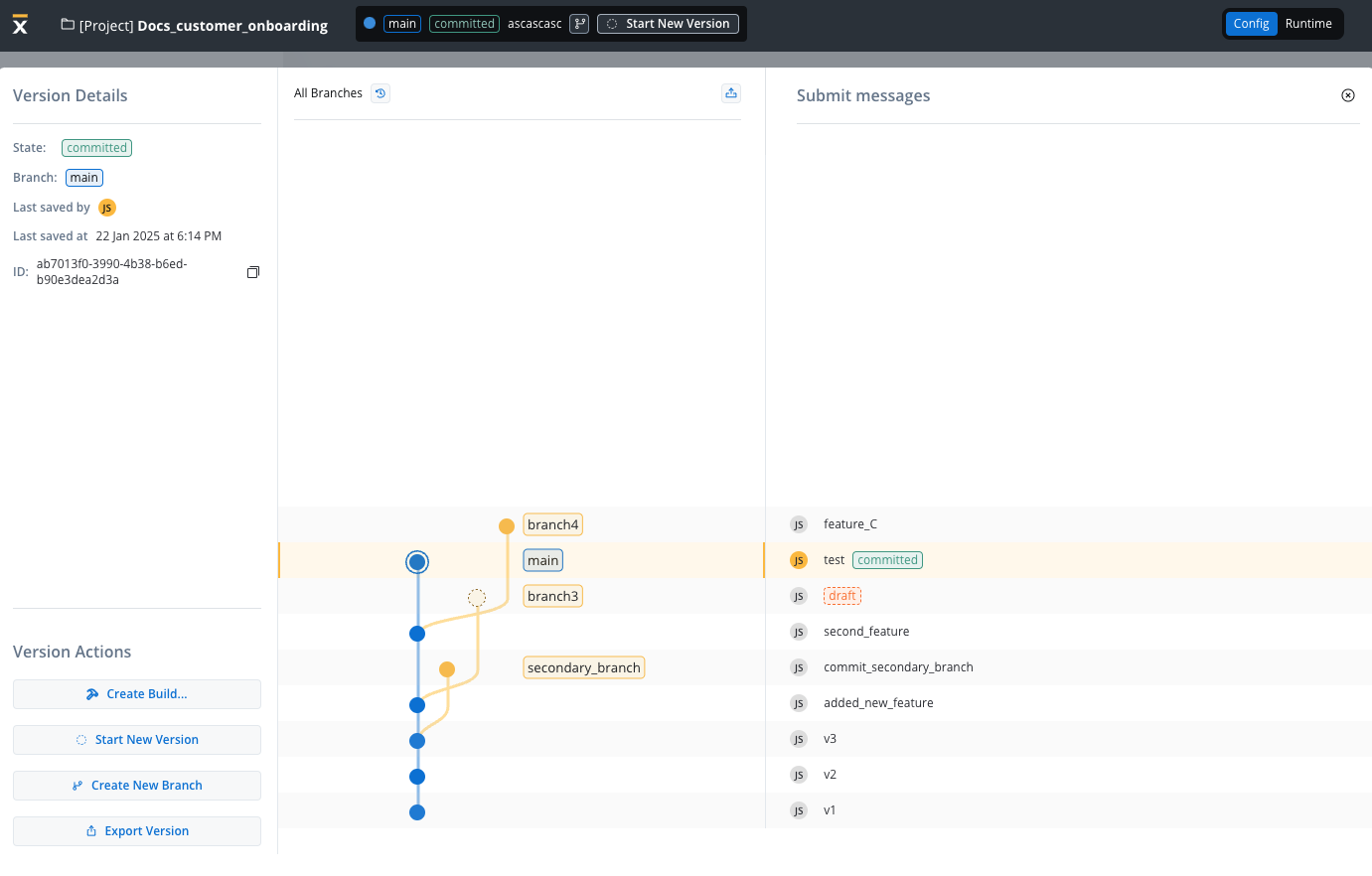
State: Displays the current state of the version (e.g., draft, committed).
Branch: Indicates the currently selected branch (e.g., main).
Last Saved By: Shows the username of the person who last saved changes (e.g., “JS”).
Last Saved At: Displays the timestamp of the most recent save (e.g., “23 Jan 2025 at 10:11 AM”).
ID: A unique identifier for the version, with a copy button for convenience.
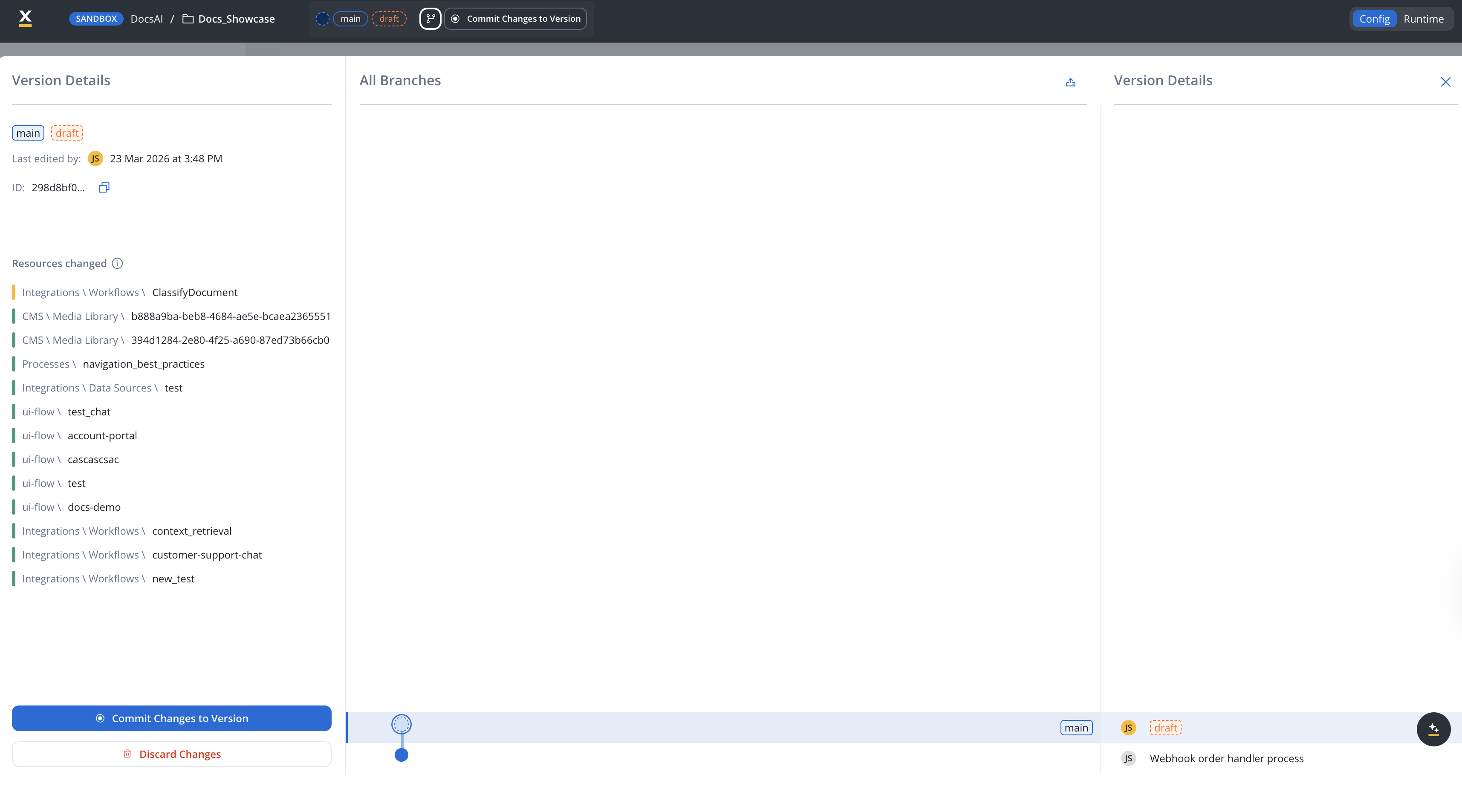
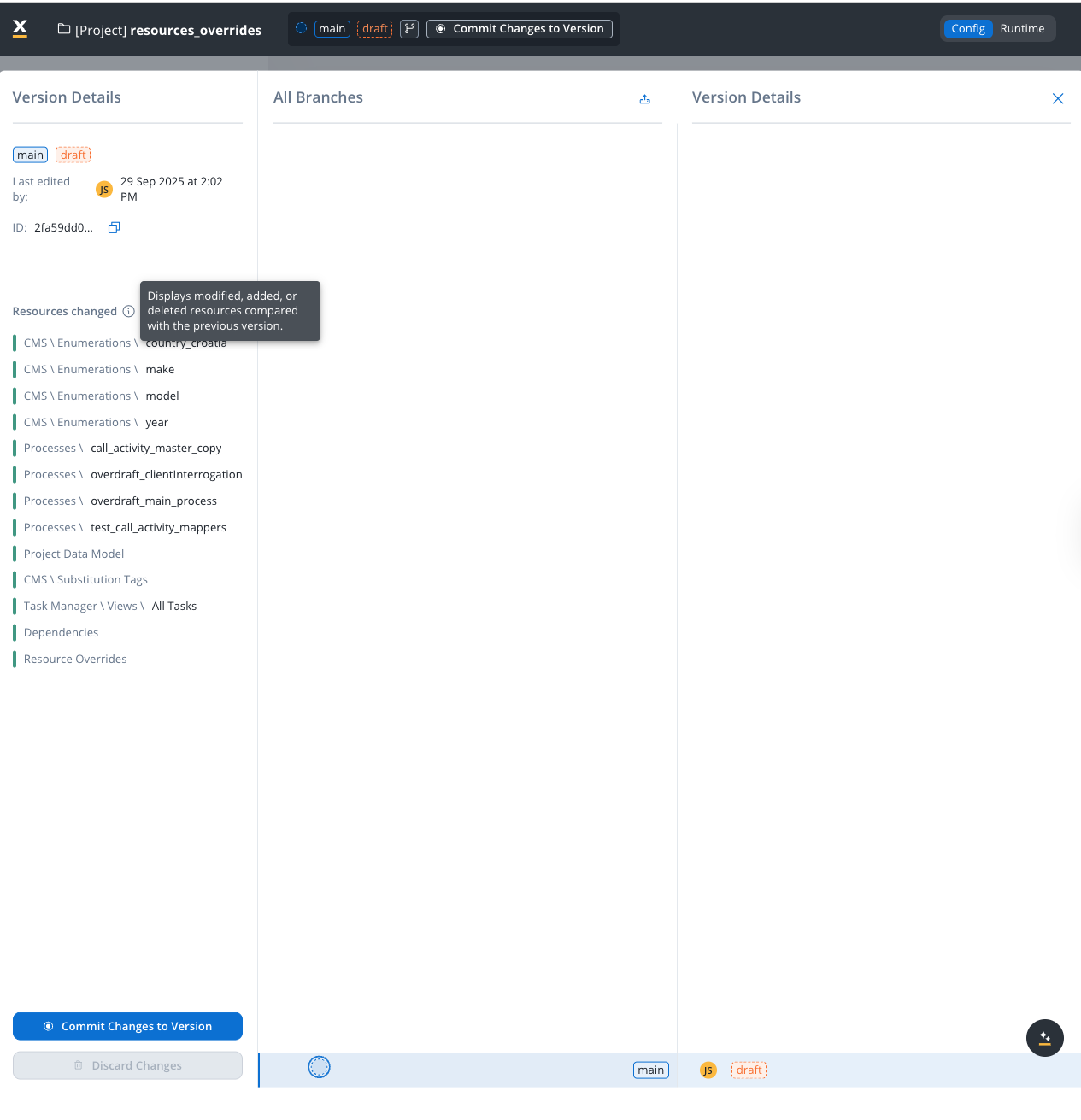
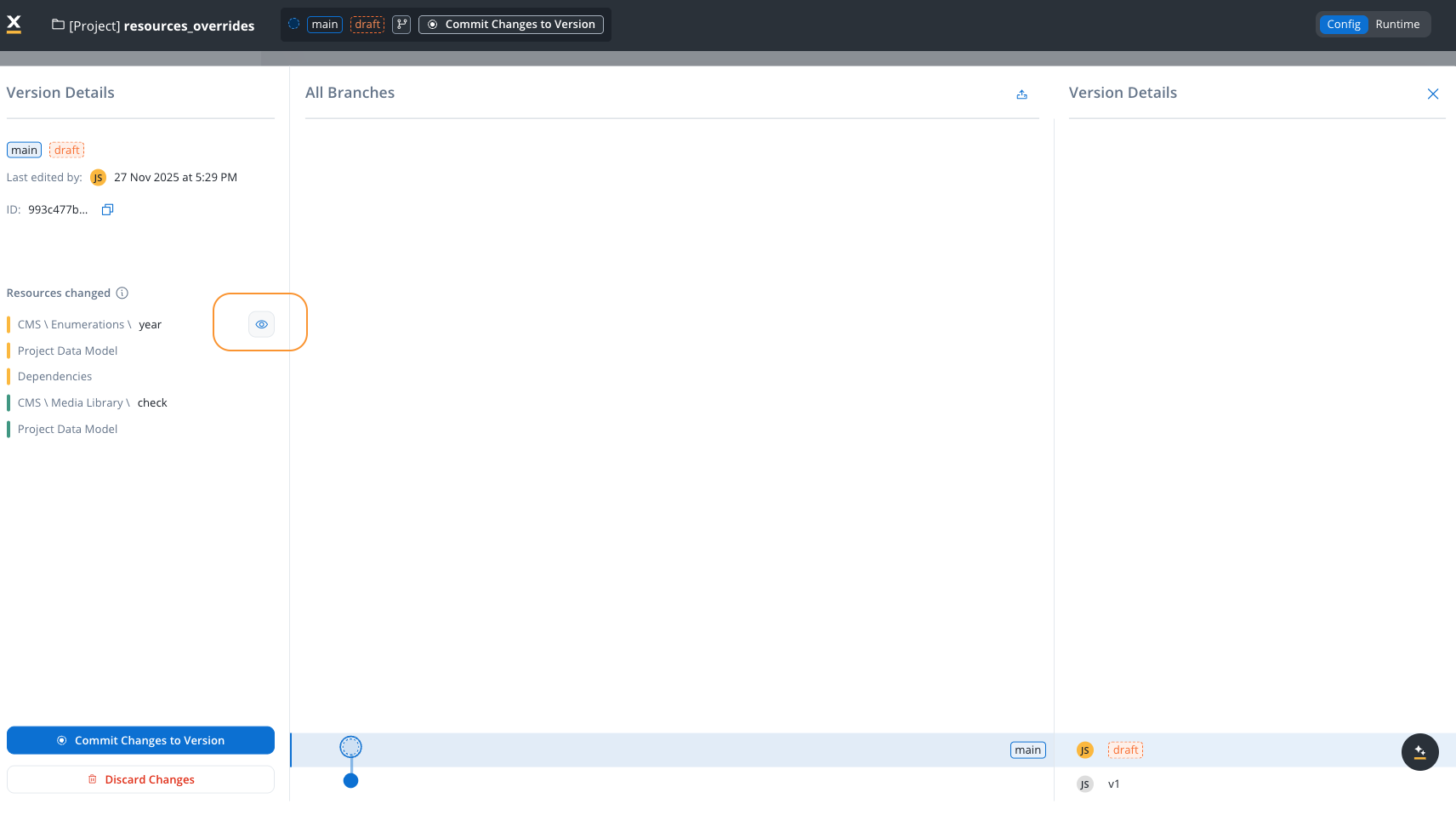
Resources Changed: Displays a summary of modified, added, or deleted resources compared with the previous version (visible only for draft versions with changes).
Resources changed
The Resources Changed section provides a clear overview of all modifications made in the current draft version compared to the last committed version. This helps you track exactly what has been modified before committing your changes.
The list groups changes by resource type, including:
CMS \ Enumerations: Modified enumeration values (for example, country lists, dropdown options)
Processes: Changed process definitions
Project Data Model: Updates to the data model structure
Each resource is color-coded to indicate the type of change:
Color
Meaning
Yellow
Modified resource
Green
Added resource
Red
Deleted resource
Use the Resources Changed list to review all pending modifications before committing. This ensures you have a complete understanding of what will be included in the commit.
Compare versions
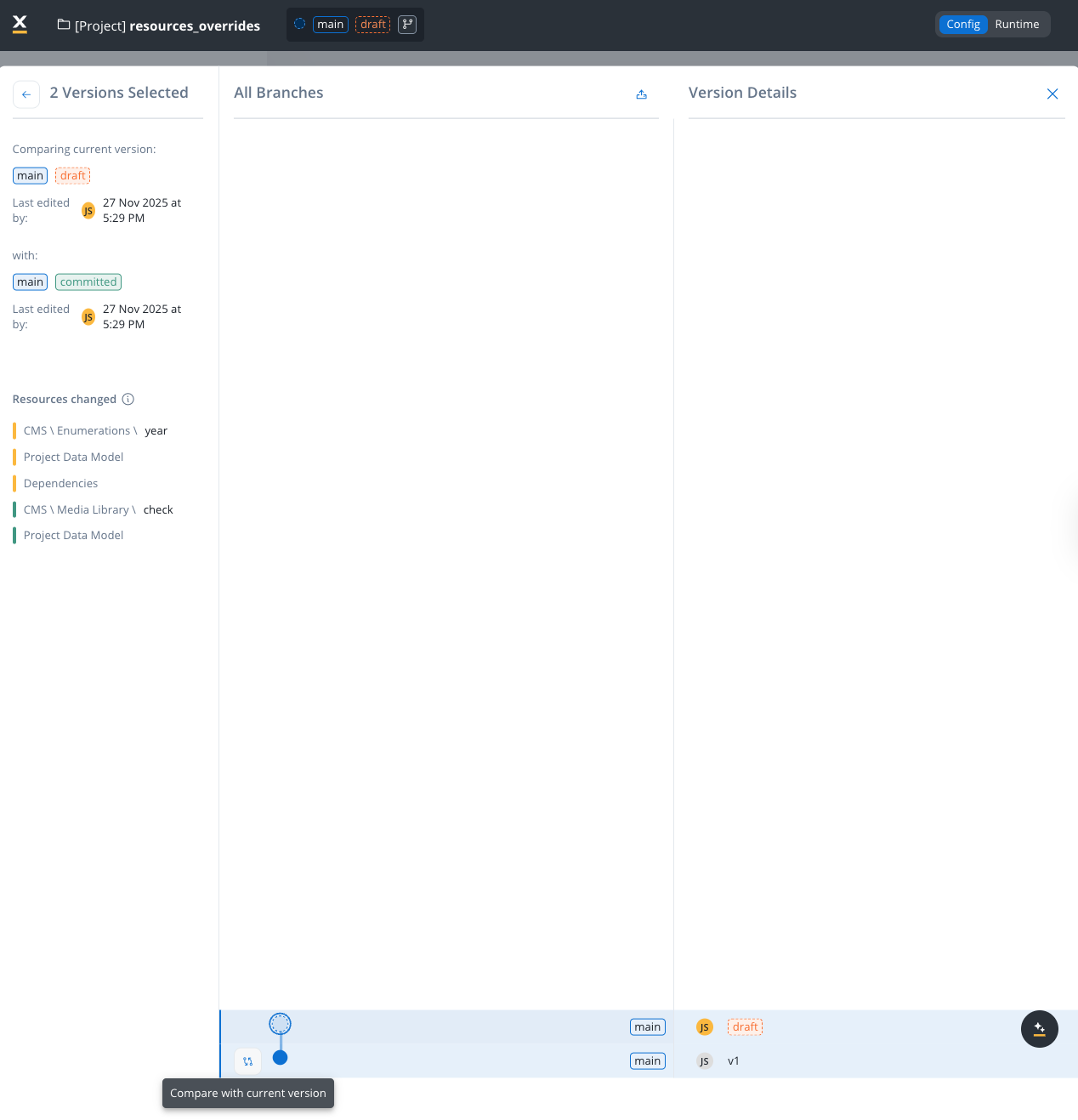
The Compare Versions feature allows you to select two versions and view the differences between them. This is useful for understanding what changes were made between any two points in your project’s history.To compare versions:
Select a version in the branch graph
Click on the Compare with current version button at the bottom of the graph to quickly compare any committed version with the current draft version.
The comparison view displays:
Comparing current version: Shows the first selected version with its branch, state, and last edited timestamp
with: Shows the second selected version being compared against
Resources changed: Lists all resources that differ between the two versions
Viewing detailed resource changes
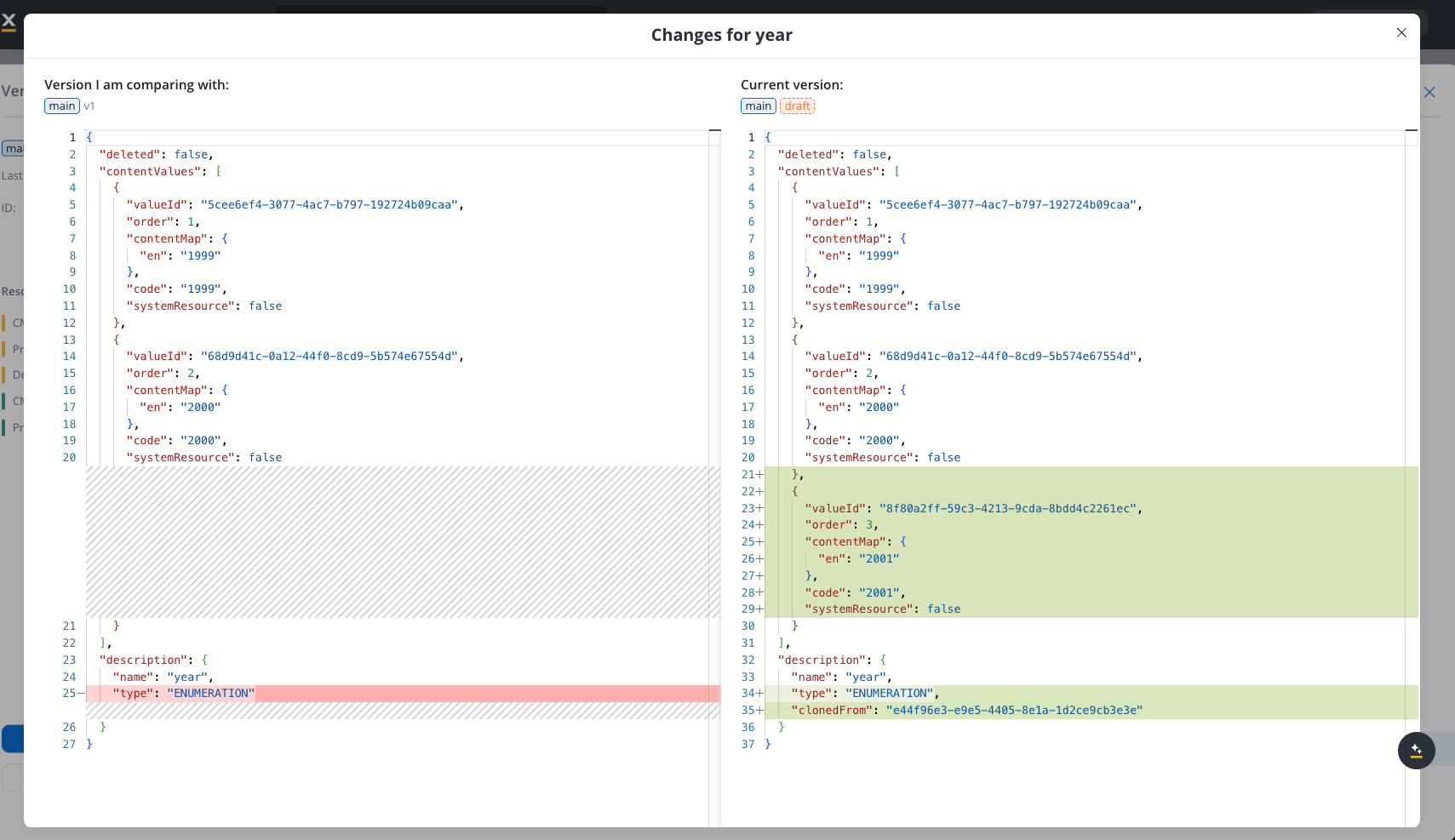
To inspect the specific changes made to a resource, hover over any item in the Resources changed list and click the eye icon that appears. This opens a detailed comparison modal.
The Changes modal provides a side-by-side JSON comparison:
Left panel: Shows the version you are comparing with (the previous/committed version)
Right panel: Shows the current draft version
Highlighted lines: Added or modified content is highlighted in green, making it easy to identify what changed
This feature helps you track changes across multiple commits, review what was modified before a specific release, or understand the evolution of your project over time.
Resource history
The Resource History feature lets you view the version history for a specific resource, showing which project versions included changes to that resource.To access it, right-click any resource (process, enumeration, substitution tag, media asset, integration, etc.) and select View History. This opens the Resource History modal.The modal displays a table with the following columns:
Column
Description
Version
The project version that included a change to this resource
Last edited by
The user who last modified the resource in that version
Last edited at
The timestamp of the last modification
For each version in the list, you can:
See changes — Opens a comparison view showing what changed in this resource between the selected version and the previous one
Open version in new tab — Navigates to the full project version in a new browser tab
Resource history tracks changes at the project version level. Individual resources do not have their own independent version history — they are always versioned as part of the project.
Branch and commit graph
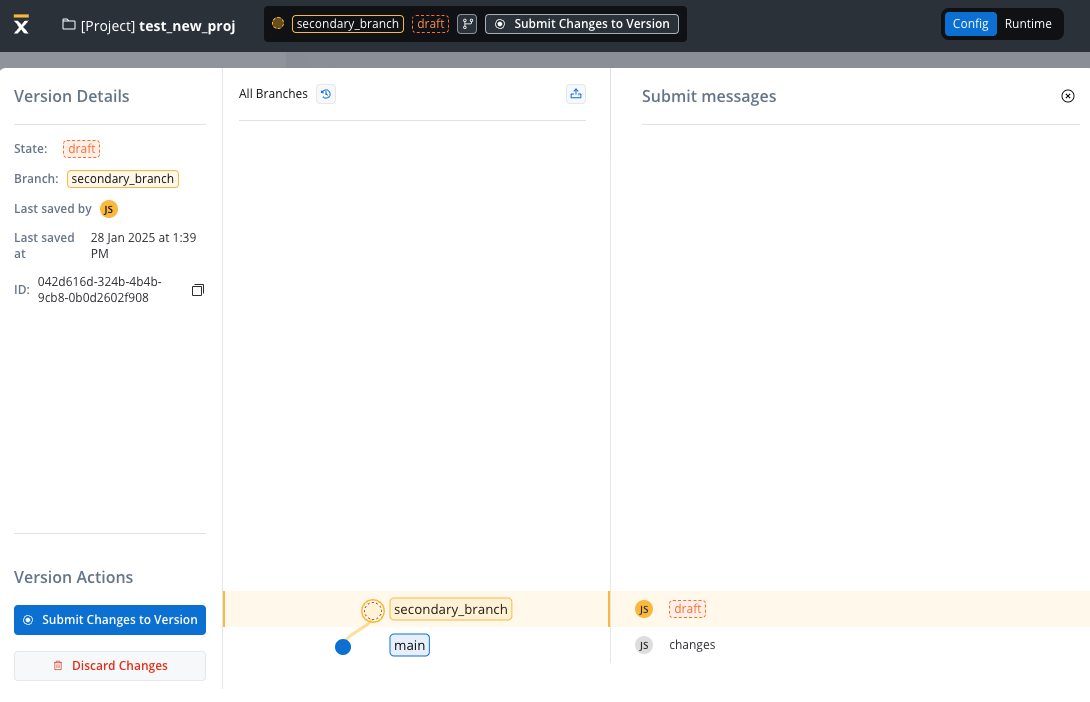
The graph visually organizes the project’s versioning structure, showing relationships between branches and commits.
Graph View:
Provides a visual representation of branches and commits.
Main Branch (blue): The main development branch.
Secondary Branches (yellow): Feature or development branches such as branch3, branch4, and secondary_branch.
Markers:
Dotted Circles: Represent draft versions.
Solid Circles: Represent committed versions.
Commit history
Displays a chronological list of commit messages for the selected branch.
Details:
Commit messages (e.g., v1, commit_secondary_branch) are aligned with their respective branches.
Each commit shows:
The user responsible (e.g., “JS”).
The state of the commit (e.g., draft, commited).
Top bar: global controls
Project Name: Displays the current project name (Docs_customer_onboarding).
Branch Selector: Dropdown to navigate between branches.
State Indicator: Highlights the state of the current branch (e.g., draft for main).
Commit Changes to Version: Button for committing draft changes globally.
Config/Runtime Tabs:
Config: For managing version configuration.
Runtime: For runtime options or monitoring.
Core versioning operations
The table below summarizes key versioning operations and their functions:
Operation
Description
Create Project
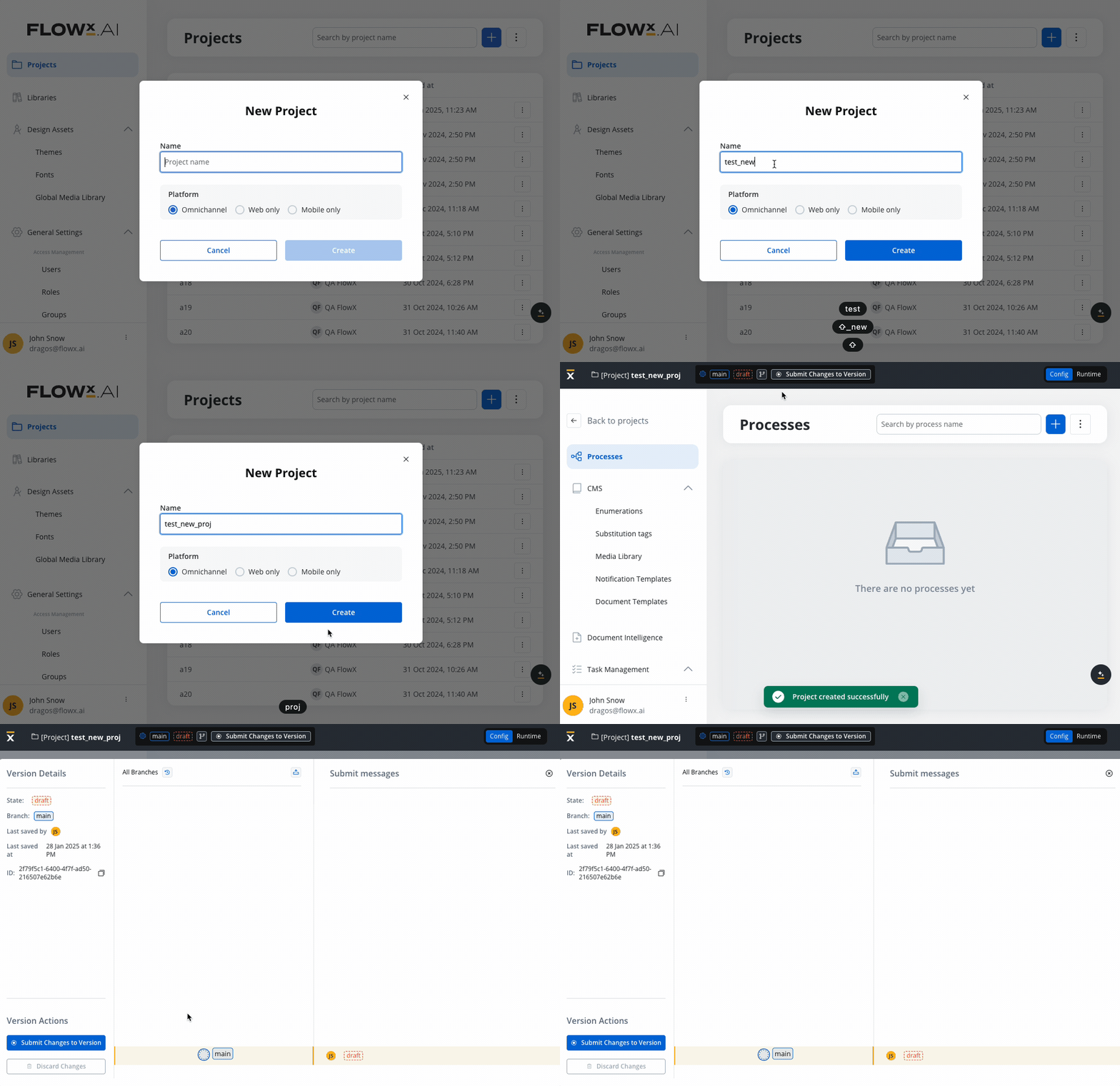
Creates a project and its initial draft version.
Create Resource
Adds a new resource in draft status to the current project version.
Edit Resource
Creates a deep copy of a resource for editing if the original is COMMITTED.
Commit Project
Updates the statuses of the project, its manifest, and resources to COMMITTED.
Discard draft
Deletes draft resources and the draft project version.
Start New draft
Creates a new draft version by copying the last COMMITTED project version.
Create Branch
Creates a new branch and a corresponding draft project version from the selected commit.
Detailed steps for operations
1
Create Project
A new project is created in draft (WIP) state.
An initial draft project version is automatically generated.
2
Create Resource
Adds a resource in draft status to the current project version.
Updates the project manifest to include:
UUID of the new resource.
last_change_time: Set to the current timestamp.
last_committed_time: Null (since the resource is WIP).
3
Edit Resource
Scenario A: Editing a draft Resource
No new resource version is created.
Updates the project manifest:
last_change_time: Current timestamp.
Scenario B: Editing a COMMITTED Resource
A deep copy of the COMMITTED resource is created as draft.
Updates the project manifest:
Links to the new draft resource.
last_change_time: Current timestamp.
4
Commit Project
Commits the current draft project version:
draft Resources:
Status: Updated to COMMITTED.
last_change_time and last_committed_time: Set to the current timestamp.
Project Version:
Status: Updated to COMMITTED.
5
Discard Draft
Deletes draft resources and the draft project version.
Available only when there are changes after the last commit.
6
Start New Draft
Creates a new draft project version by copying:
The last COMMITTED project version.
Its manifest, linking to COMMITTED resources.
7
Create Branch
Creates a new branch and draft project version:
Copies the selected COMMITTED project version.
Updates the manifest to reference existing COMMITTED resources.
Lifecycle of a project version
Create Project: Automatically starts with a draft (work-in-progress) project version.
Modify Resources: Draft (WIP) resources can be edited directly, while COMMITTED resources are cloned into draft (WIP) before editing.
Commit Changes: Promotes the project version and its resources to COMMITTED status.
Start New WIP: Allows iterative development by creating a new draft version.
Create Branch: Enables parallel development with isolated draft versions.
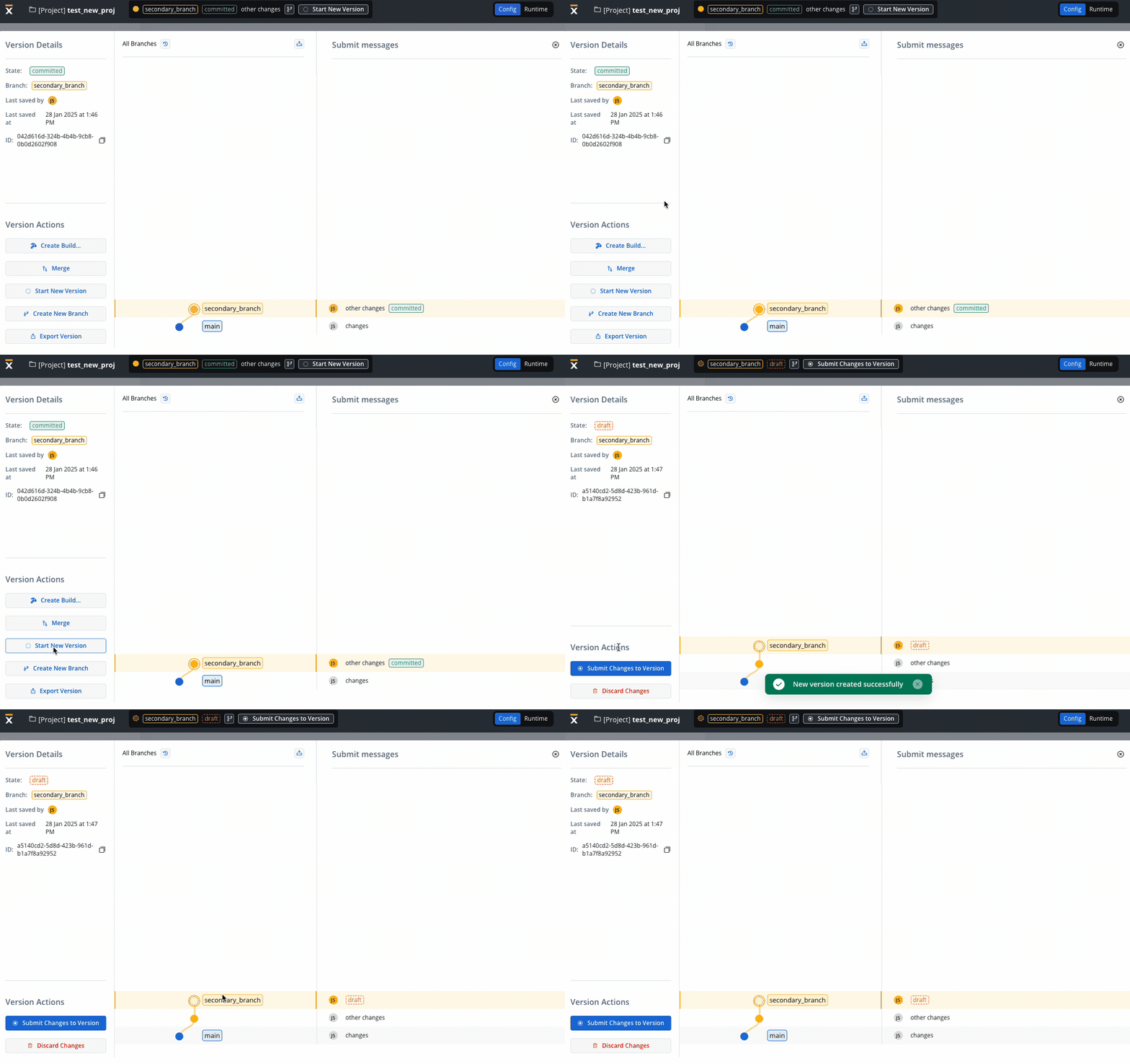
Starting a new draft version
You can initiate a new draft (work-in-progress) version while keeping the committed version intact. A draft version is automatically created under the following circumstances:
New Project: When you create a new project, a corresponding draft version is initiated. This ensures that ongoing changes are tracked separately from the committed version.
New Branch Creation: The creation of a new branch in the system also triggers the creation of a draft version (from a committed version only). This simplifies the process of branching and development, allowing for parallel progress without impacting the main committed version.
Manual Draft Version Creation: You have the flexibility to initiate a new draft version manually. This is particularly useful when building upon the latest version available on a branch.
Advanced features
Committing changes
You can commit changes exclusively on work-in-progress (WIP) versions. Changes can be committed using the designated action within the version menu. Upon triggering the commit action, a modal window appears, prompting you to provide a commit message.
A string of maximum 50 characters, mandatory for commit. Only letters, numbers, and characters [] () . _ - / are allowed.
The placeholder indicating work-in-progress is replaced with a “committed” state within the graph view.
Updating commit messages
You have the flexibility to modify commit messages after changes are committed. This can be accomplished using the action available in the version menu.
Creating a new branch
Using versioning you can work on a stable copy of the project, isolated from ongoing updates by other users. You can create a new branch starting from a specific commit point.
The initiation of new branches is achieved using the dedicated action located in the left menu of the chosen commit point (used as the starting point for the branch).
A string of maximum 16 characters, mandatory for branch creation.
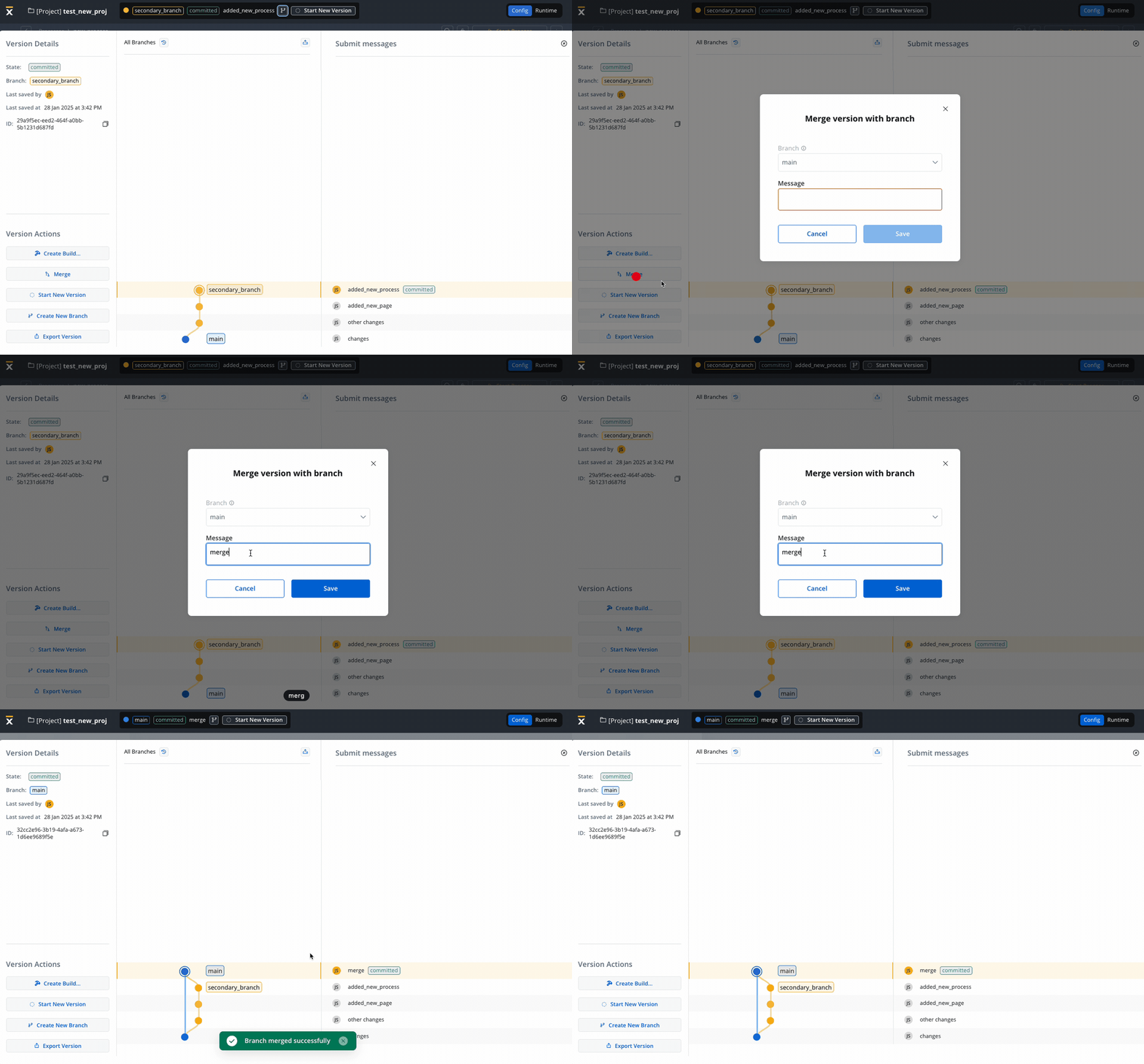
Merging changes
You can incorporate updates made on a secondary branch into the main branch or another secondary branch. To ensure successful merging of changes, adhere to the following criteria:
You can merge the latest version from a secondary branch into either its direct or indirect parent branch.
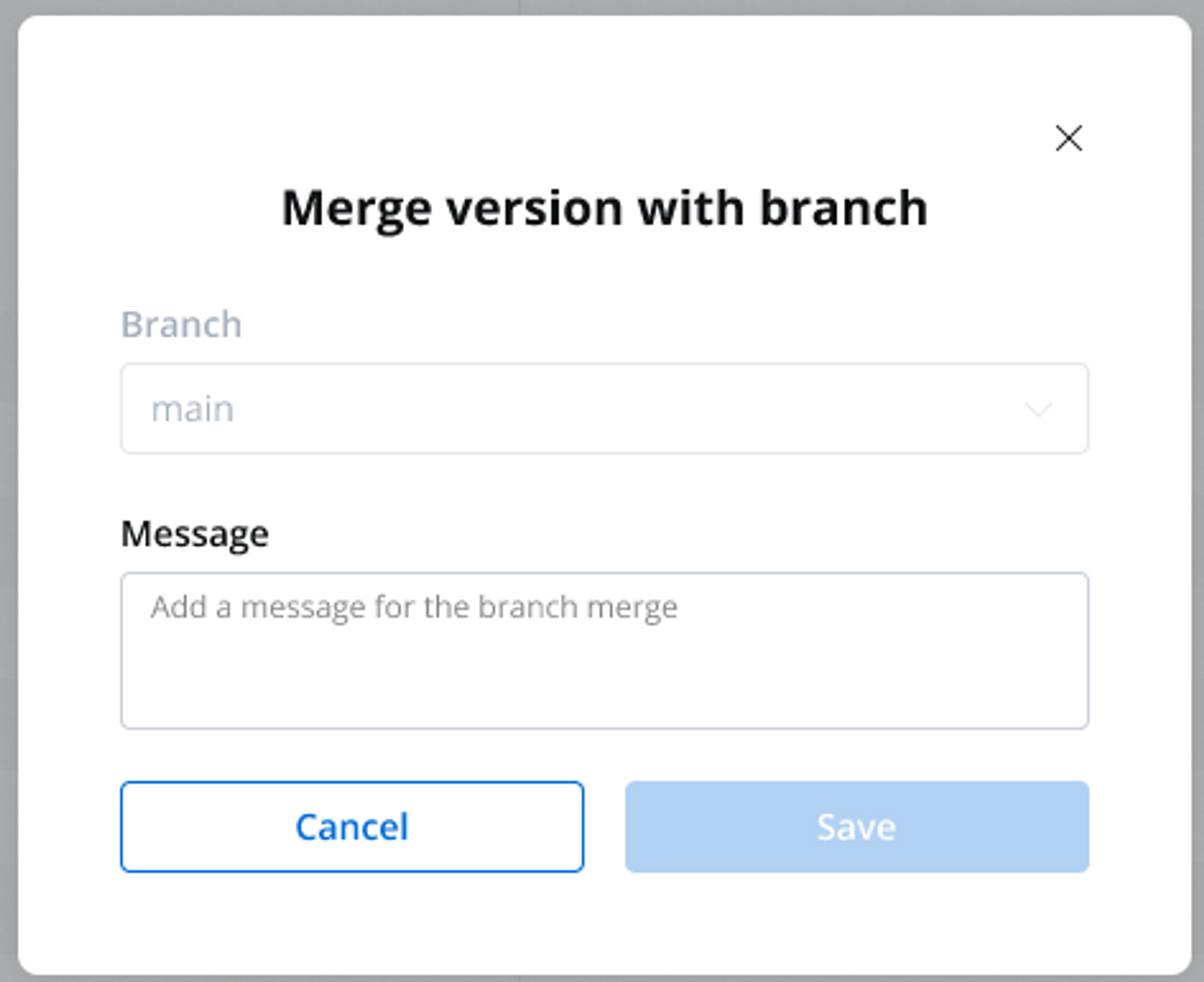
Upon triggering the merge action, a modal window appears, giving the possibility to make the following selection:
Branch: Displays the branches to which the current branch is a child (direct or indirect).
Message: A string of maximum 50 characters (limited to letters), numbers and the following characters: [] () . _ - /.
The graph representation is updated to display the new version on the selected parent branch and the merged version is automatically selected, facilitating further development and tracking.
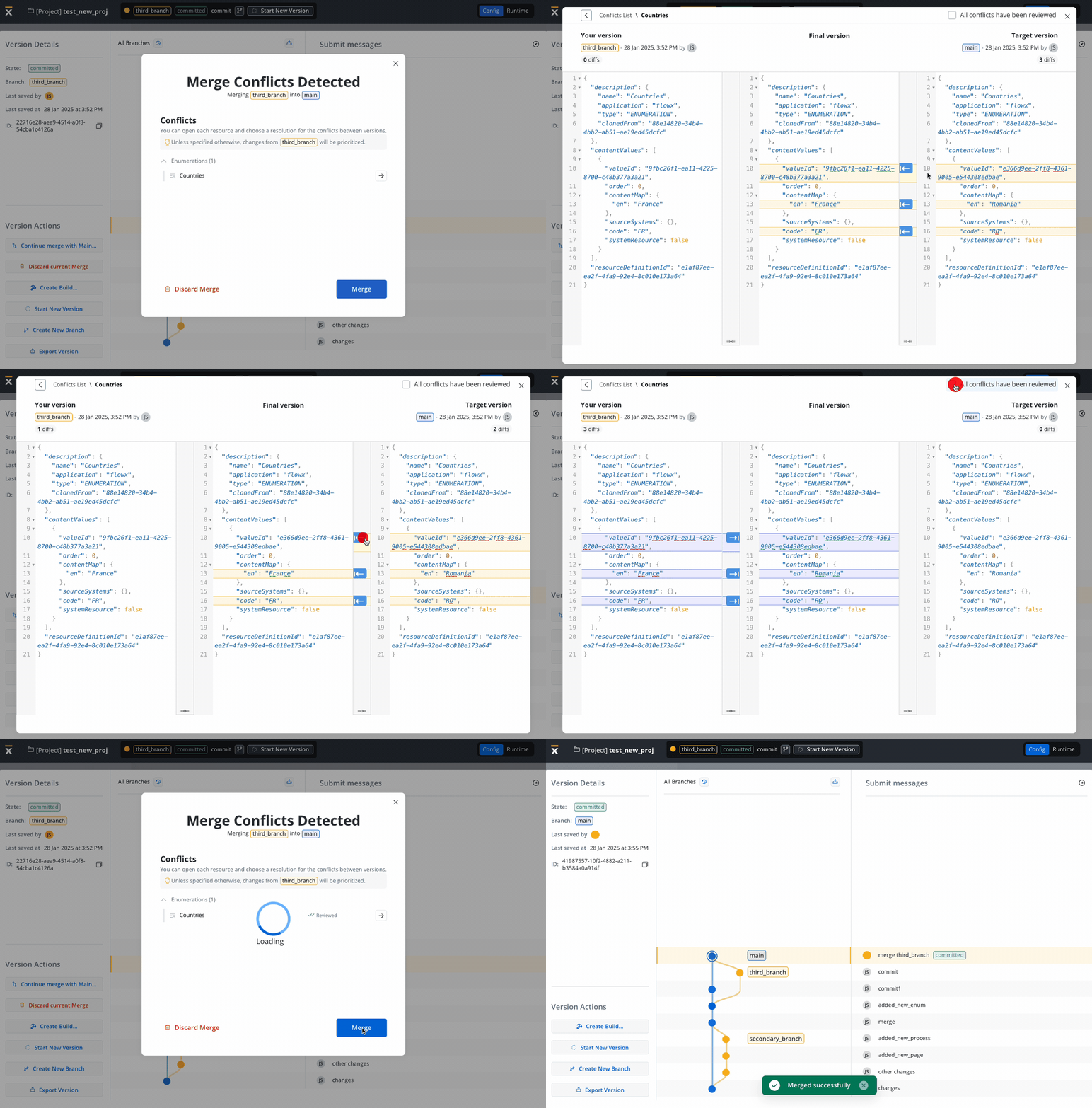
Managing conflicts
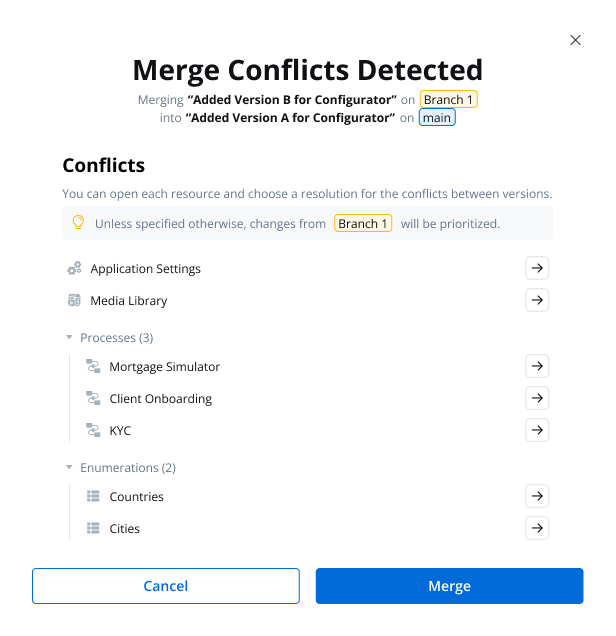
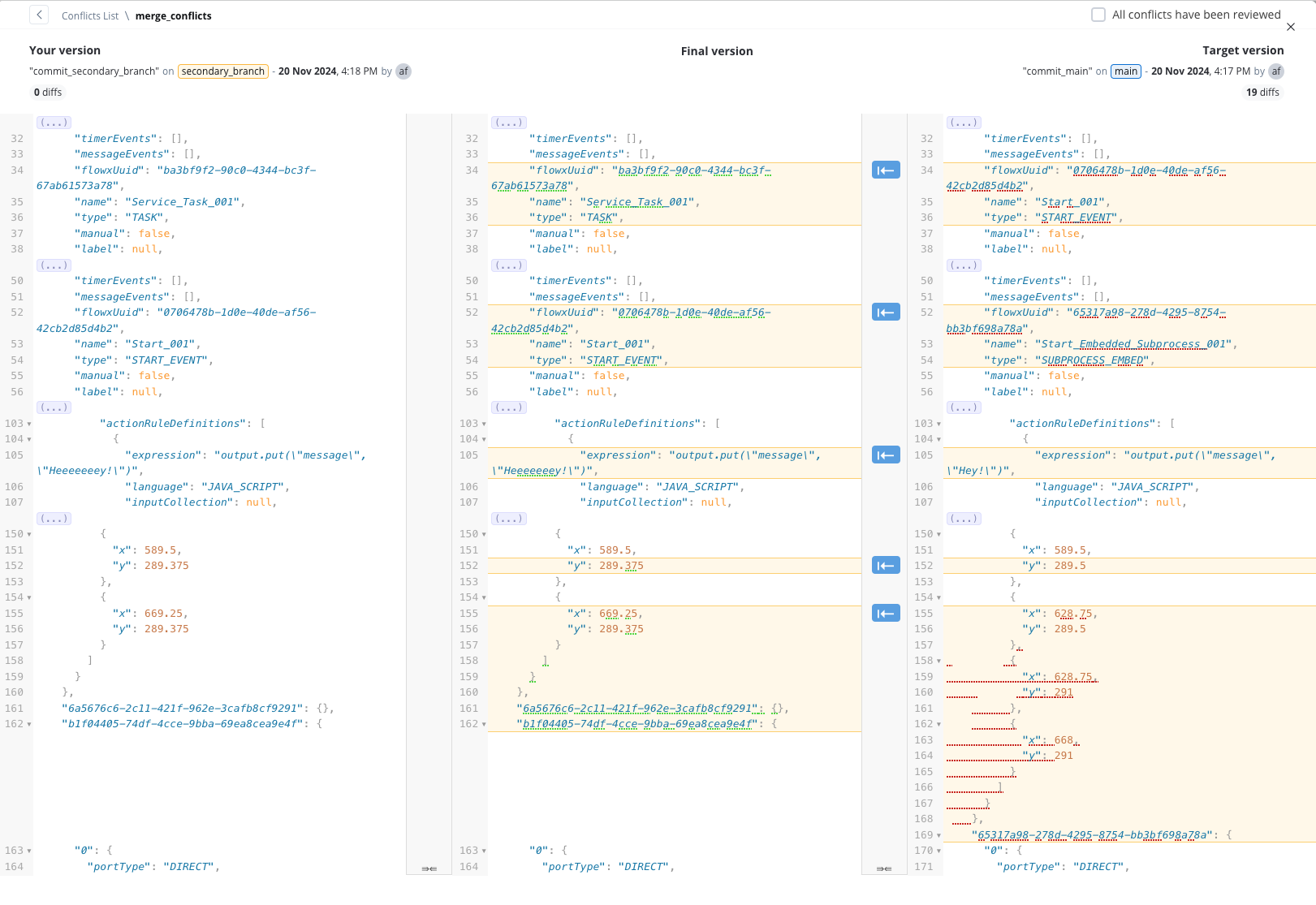
The Conflict Resolution and Version Comparison feature provides a mechanism to identify and address conflicts between two process versions that, if merged, could potentially disrupt the integrity of a project.The system displays both the version to be merged and the current version on a single screen, providing a clear visual representation of the differences. Conflicts and variations between the two versions are highlighted, enabling users to readily identify areas requiring attention.
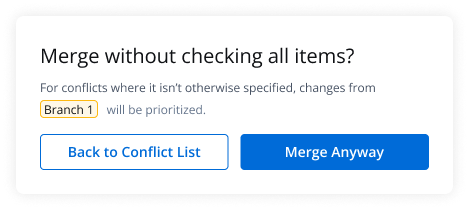
Unless specified otherwise, changes from the source branch will be prioritized.
Not all changes are considered conflicts, changes in node positions are not treated as conflicts. Primary causes lie in identifying differences within business rules, expressions, and other scripts.
Merging without conflicts
Easily merge secondary branches into the main branch or other branches when no conflicts are detected. The updated merge modal includes:
A clean interface for branch selection.
A mandatory, validated commit message field (max 50 characters).
Real-time feedback for successful merges and updates to the branching graph.
Advanced conflict detection
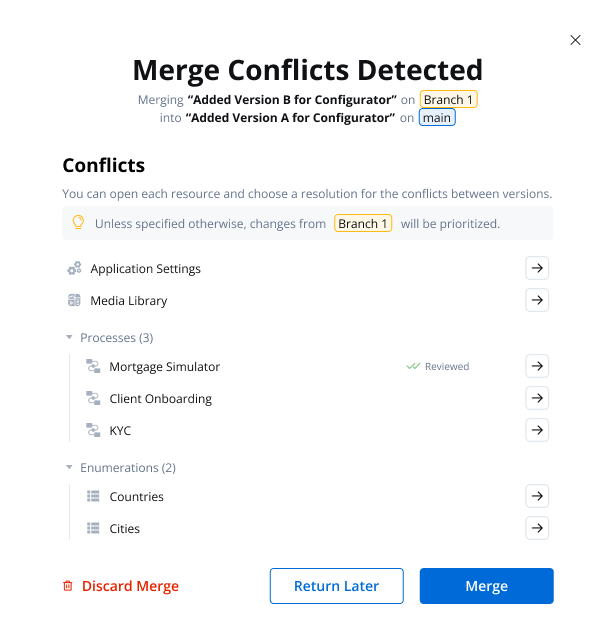
The new Conflicts Detected Modal provides a detailed overview of conflicting changes, with features such as:
Clear grouping by resource type (e.g., Processes, Enumerations, Media Library).
Scrollable lists and clickable entries to resolve conflicts efficiently.
A comprehensive comparison of source and target branch differences for context.
Resource-level conflict resolution
Resolve conflicts directly at the resource level with an intuitive interface:
Navigation Support: Quickly jump between differences for efficient resolution.
Progress Tracking: Mark resources as “Reviewed” or “Seen” to monitor resolution progress.
Flexible merge overrides
Handle unresolved conflicts with the Merge Anyway option, which provides flexibility while maintaining control over outcomes:
A confirmation modal explains how unresolved conflicts will be handled (e.g., prioritizing source branch changes).
Allows merging to continue even when some conflicts remain unresolved.
Merging empty User Task nodes
Adding components to the same User Task node on two parallel branches, when that node was empty at the point the branches diverged, is a special case the merge can’t resolve as a conflict. Each branch creates its own root container with a distinct ID, so there is no shared resource to compare and the system doesn’t flag a conflict.
Avoid this pattern: add at least one component to a User Task node before branching, so both branches modify the same container instead of creating separate root containers. In the 5.1 line, merging two branches that each added a root container to the same empty User Task node can leave the merged screen unable to render, and starting the process returns an error.
Read-only state
The Read-Only State feature allows you to access and view committed versions of your projects while safeguarding the configuration from unintended modifications. By recognizing the visual indicators of the read-only state, you can confidently work within a controlled environment, ensuring the integrity of project’s process definitions.
Builds
A build is a deployable snapshot of a committed project version, packaged and prepared for deployment to a runtime environment. Builds enable you to create immutable, versioned packages that can be deployed consistently across different environments.
You can create multiple versions of a project before creating a build. You can create a build for any committed project version. Once created, a build cannot be edited—you’ll need to create a new project version and generate a new build to incorporate changes.
Creating a build
To create a build from a committed project version:
1
Navigate to Version Details
Access the version details panel for the committed version you want to build. You can only create builds from committed versions, not from draft (WIP) versions.
2
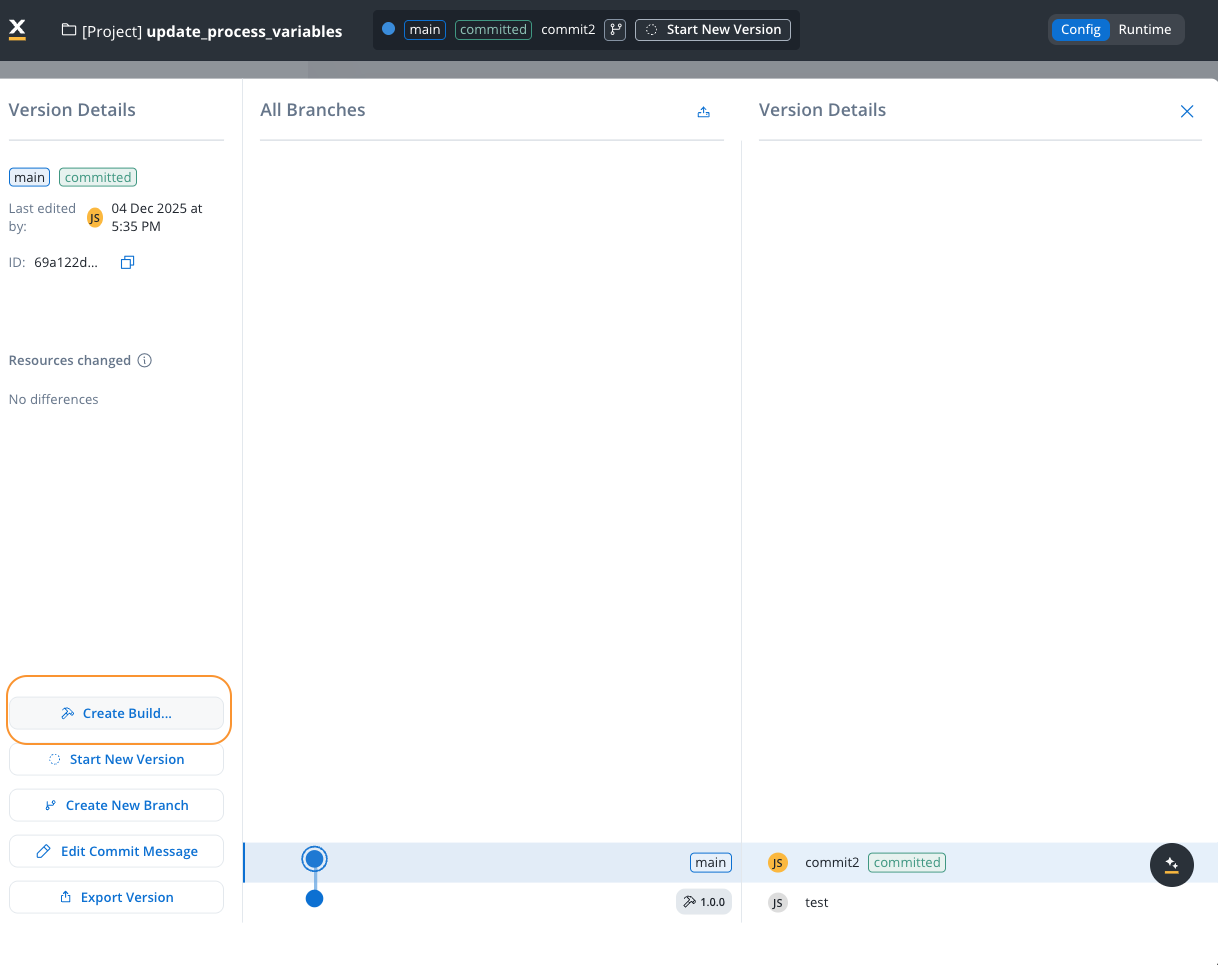
Open Create Build Dialog
Click the Create Build… button in the version details panel. This opens the build creation modal.
Create Build
3
Configure Build Settings
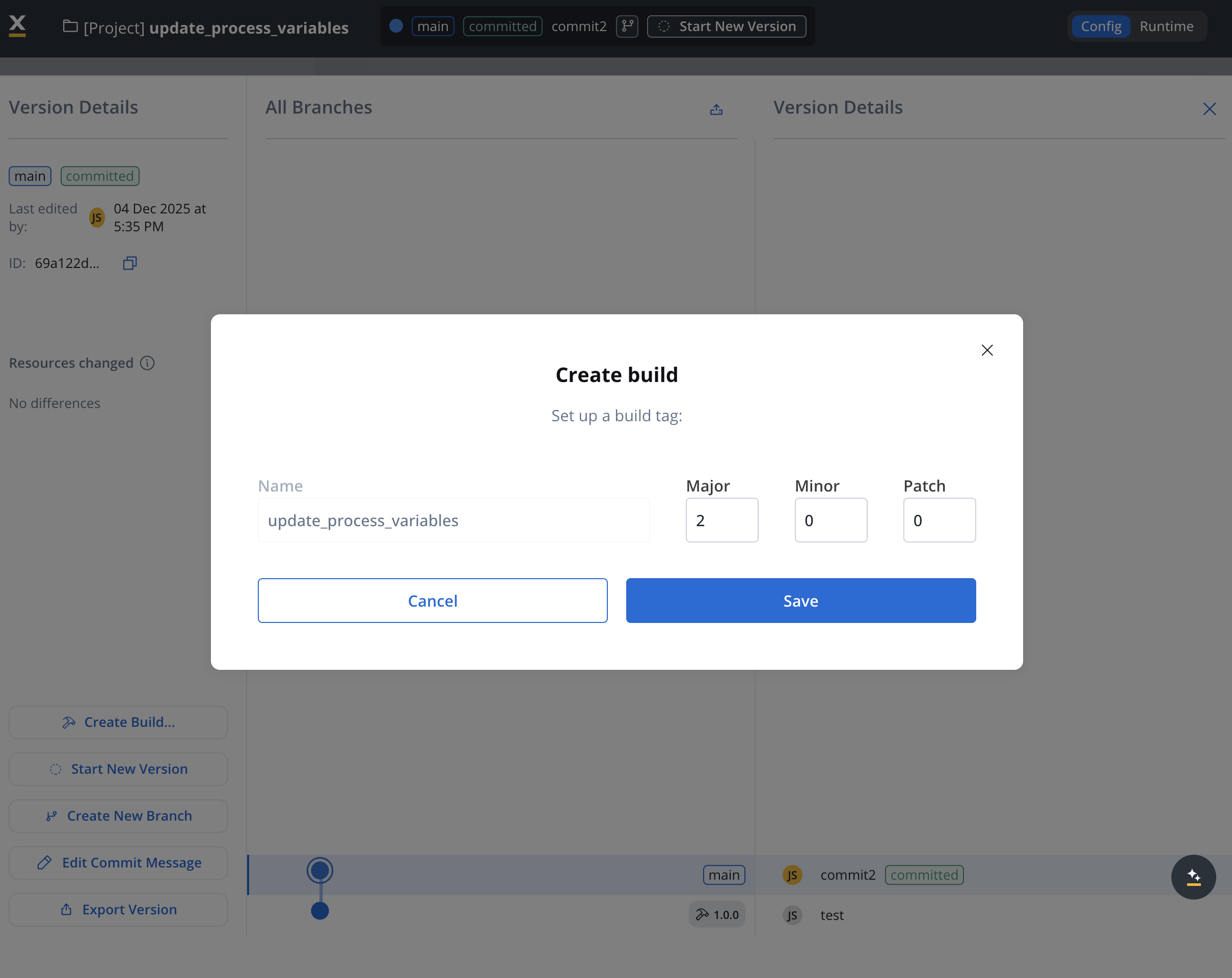
In the Create build modal, configure the following settings:
Name: The build name (defaults to the project name). This helps identify the build in the builds list.
Build Tag Version: Set the semantic version for this build:
Major: Major version number (e.g., 1)
Minor: Minor version number (e.g., 0)
Patch: Patch version number (e.g., 0)
The build tag follows semantic versioning format (e.g., 1.0.0) and helps track different builds of the same project version.
4
Save the Build
Click Save to create the build. The build is now available in the Builds section and can be deployed to runtime environments.
Managing builds
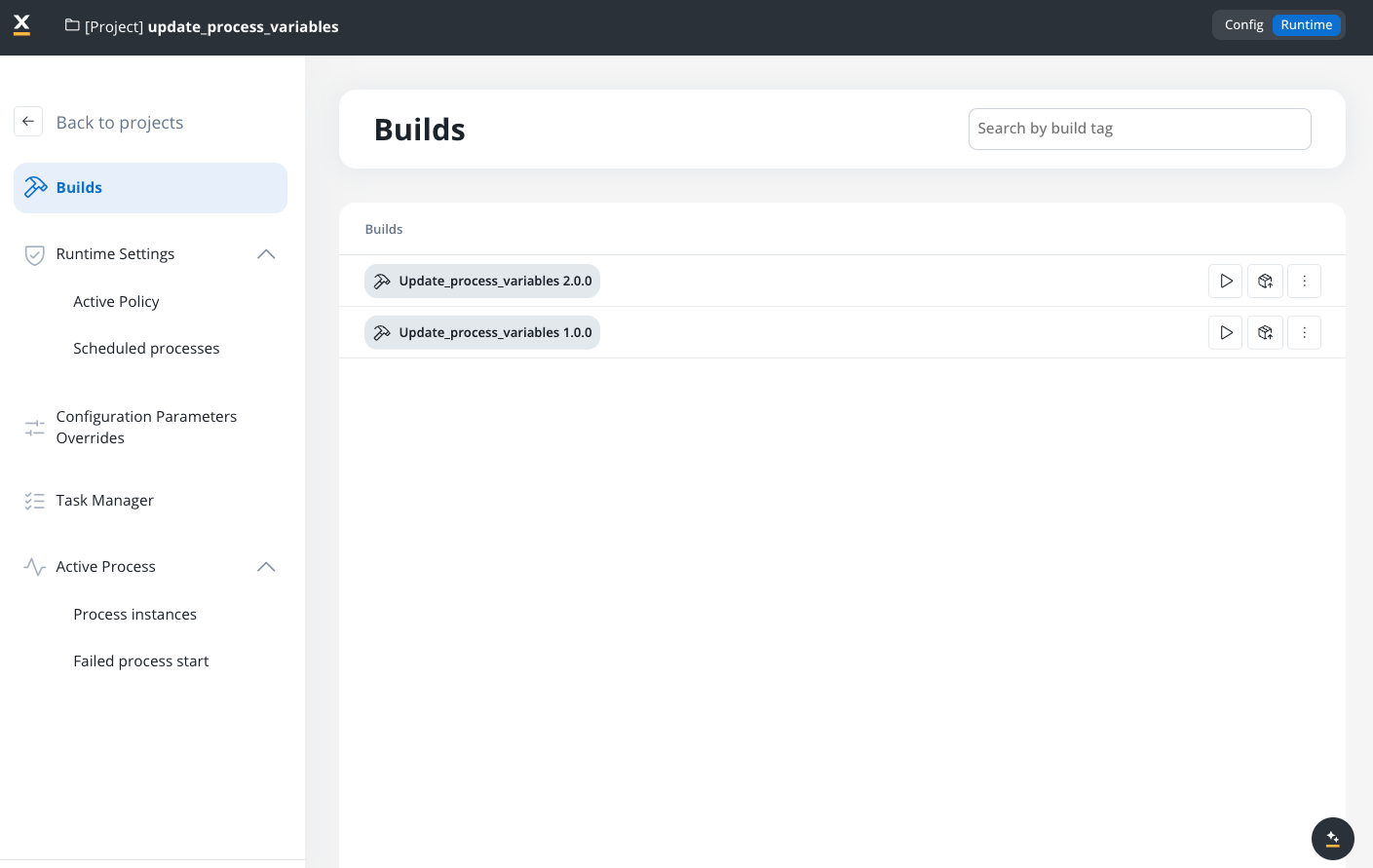
The Builds section provides a centralized interface for viewing and managing all builds for your project.
Builds list
The builds list displays all builds created for the project, showing:
Build name and version: Displays the build name and tag version (e.g., Update_process_variables 1.0.0)
Build actions: Each build entry provides quick access to:
Play/Run:
Test build
Test endpoint
Test workflow
Test operation
Export:
Export the build
More options: Additional actions via the context menu
View contents
Workflow test instances
Audit log
Apply indexes
Searching builds
Use the Search by build tag field to quickly find specific builds by their version tag or name.
Exporting versions
You can export project versions for backup, migration, or sharing across environments. The export process includes an option to include binary files.
1
Select Version to Export
Navigate to the version details panel and select the version you want to export.
2
Initiate Export
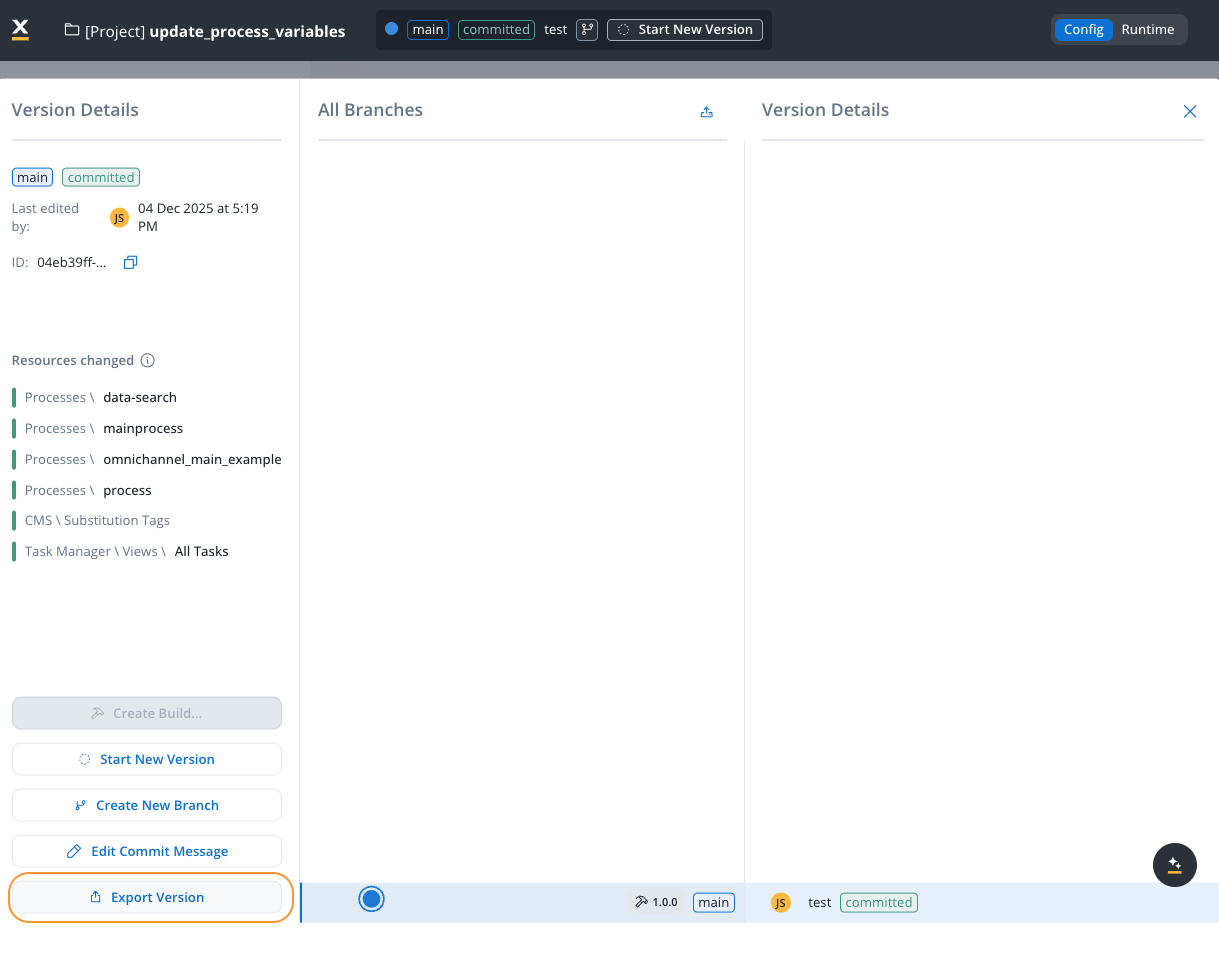
Click the Export Version button in the version details panel.
3
Choose Binary Files Option
When exporting, a modal appears asking whether to include binary files:
Include: Includes binary files (e.g., images, documents) in the export. This may increase the export size and import time.
Don’t include: Exports only the project structure and configurations without binary files.
Including binary files may significantly increase the export file size and the time required to import the version in another environment.
4
Complete Export
Click Continue to proceed with the export. The exported file can be imported into other environments or workspaces.
Once a build is created, it becomes immutable—you cannot modify its contents. This ensures:
Consistency: The same build behaves identically across all environments
Traceability: You can always identify exactly which project version is running
Stability: Prevents accidental changes that could affect production systems
To incorporate changes into a build:
Make your changes in the project (creating a new draft version)
Commit the changes to create a new project version
Create a new build from the updated committed version
Audit view
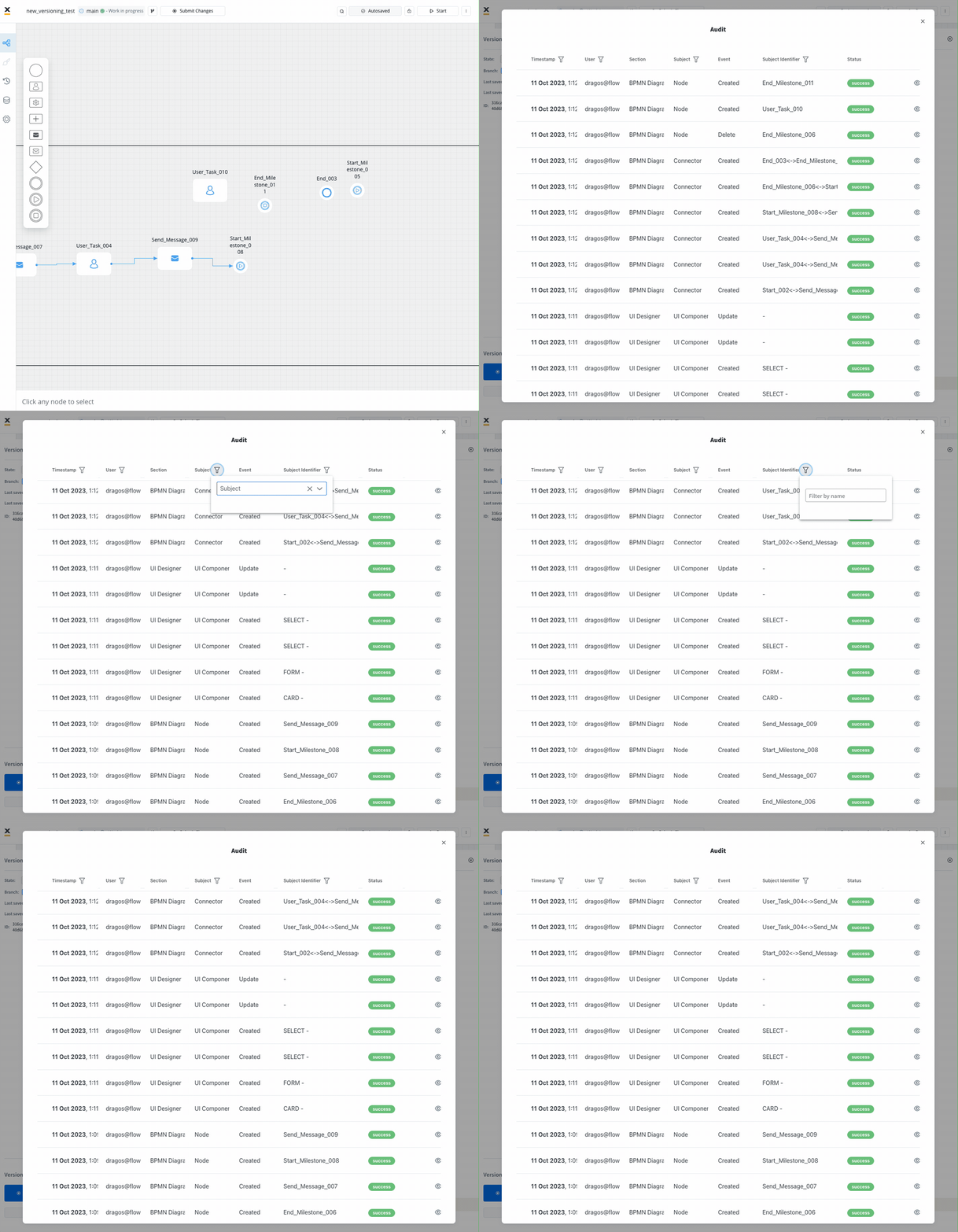
The “Open Audit View” provides you with a detailed audit log of actions related to work-in-progress (WIP) versions of a process. The primary goal is to ensure transparency and accountability for actions taken before the commit or save process.You can quickly access and review the history of WIP versions, facilitating efficient decision-making and collaboration.
Last modified on October 14, 2026
{"docsConfig":{"theme":"mint","$schema":"https://mintlify.com/docs.json","name":"FlowX.AI","description":"Comprehensive documentation for FlowX.AI, the AI-driven process automation platform.","colors":{"primary":"#fcb813","light":"#fcb813","dark":"#fcb813"},"logo":{"light":"https://mintcdn.com/flowxai/38fXEM0a7v86Lg2m/logo/light.png?fit=max\u0026auto=format\u0026n=38fXEM0a7v86Lg2m\u0026q=85\u0026s=d767c06cef433b0a02f40a1f4f785eab","dark":"https://mintcdn.com/flowxai/38fXEM0a7v86Lg2m/logo/dark.png?fit=max\u0026auto=format\u0026n=38fXEM0a7v86Lg2m\u0026q=85\u0026s=6b8b8c3e7abd17acf6be8bffce4e599d"},"favicon":"https://mintcdn.com/flowxai/VVxnbzjz7JuL1Ngt/favicon2.svg?fit=max\u0026auto=format\u0026n=VVxnbzjz7JuL1Ngt\u0026q=85\u0026s=ef6a780a1ed3894c7b276bcc7b3c6c69","appearance":{"default":"dark","strict":false},"background":{"decoration":"grid","color":{"light":"#f4f4f5","dark":"#0a0b0d"}},"navbar":{"links":[],"primary":{"type":"button","label":"Academy","href":"https://academy.flowx.ai/"}},"footer":{"socials":{"linkedin":"https://www.linkedin.com/company/flowxai","x":"https://x.com/FlowX_ai","youtube":"https://www.youtube.com/@FlowX_AI"},"links":[{"header":"Documentation","items":[{"label":"Introduction","href":"https://docs.flowx.ai/5.9/docs/introduction"},{"label":"Platform overview","href":"https://docs.flowx.ai/5.9/docs/platform-overview/flowx-architecture"},{"label":"Designer","href":"https://docs.flowx.ai/5.9/docs/flowx-designer/overview"},{"label":"AI Platform","href":"https://docs.flowx.ai/5.9/ai-platform/ai-in-flowx"},{"label":"Use the docs with AI","href":"https://docs.flowx.ai/5.9/docs/getting-started/using-flowx-docs-with-ai"},{"label":"Release notes","href":"https://docs.flowx.ai/release-notes/overview"}]},{"header":"Resources","items":[{"label":"FlowX.AI Academy","href":"https://academy.flowx.ai"},{"label":"Support","href":"https://flowxai.zendesk.com/"}]},{"header":"Company","items":[{"label":"About FlowX.AI","href":"https://www.flowx.ai/about"},{"label":"Contact us","href":"mailto:hello@flowx.ai"},{"label":"Careers","href":"https://apply.workable.com/flowxai"}]},{"header":"Legal","items":[{"label":"Privacy Policy","href":"https://www.flowx.ai/privacy-policy"},{"label":"Cookie Policy","href":"https://www.flowx.ai/cookie-policy"},{"label":"Cookie settings","href":"https://docs.flowx.ai/?cookie-settings"},{"label":"Terms and Conditions","href":"https://www.flowx.ai/terms-and-conditions"}]}]},"search":{"prompt":"Search the docs"},"seo":{"metatags":{"zd-site-verification":"94tteg5ir5of8gkb4twzh"}},"fonts":{"heading":{"family":"Sora"},"body":{"family":"Geist"}},"styling":{"eyebrows":"breadcrumbs","codeblocks":"dark","latex":true},"integrations":{"ga4":{"measurementId":"G-CGW0FVK9YM"},"cookies":{"key":"flowx-docs-analytics-consent","value":"granted"}},"banner":{"content":"🚀 [See the latest FlowX.AI releases →](/release-notes/overview)","dismissible":true},"contextual":{"options":["copy","view","chatgpt","claude","perplexity","mcp","cursor","vscode"],"display":"header"},"metadata":{"timestamp":true},"navigation":{"pages":[]}},"deployment":{"deploymentMetadataValue":{"subdomain":"flowxai","hasAudioNarration":false,"actualSubdomain":"flowxai","customDomains":["docs.flowx.ai"],"gitSource":{"type":"github","owner":"flowx-ai","repo":"flowx-docs","deployBranch":"main","contentDirectory":"","isPrivate":true,"mountPath":"","label":""},"feedback":{"thumbs":true,"contextualFeedback":{"allowEmail":true},"agentFeedback":true},"entitlements":{"AI_CHAT":{"status":"ENABLED"},"CONTEXTUAL_FEEDBACK":{"status":"ENABLED"},"CODE_SNIPPET_FEEDBACK":{"status":"ENABLED"},"WEB_MCP":{"status":"ENABLED"},"NARRATION":{"status":"ENABLED"}},"buildId":"6b058b43b460ddeb8b55d59b","clientVersion":"0.0.4286","searchFilterCounts":[{"language":"default","tag":"Documentation","count":800},{"language":"default","tag":"Building blocks","count":331},{"language":"default","tag":"Platform deep dive","count":267},{"language":"default","tag":"Setup guides","count":194},{"language":"default","tag":"UI Designer","count":140},{"language":"default","tag":"Release notes","count":139},{"language":"default","tag":"Release Notes","count":139},{"language":"default","tag":"Microservices","count":112},{"language":"default","tag":"Core extensions","count":107},{"language":"default","tag":"v5.x","count":89}],"searchSettings":{"isFiltersEnabled":true}},"assistantConfig":{"enableAskAiButton":false,"enableStarterQuestions":false,"enableContextualStarterQuestions":true,"enableAskAiSearchBar":true,"deflection":{"enabled":true,"type":"email","email":"learning.team@flowx.ai","showHelpButton":true}},"basePath":"","hasChatPermissions":true,"hasWebMcpPermissions":true,"toggles":[{"name":"kill-isr","enabled":true,"variant":{"name":"disabled","enabled":false,"feature_enabled":true},"impressionData":false},{"name":"custom-rbac-roles","enabled":true,"variant":{"name":"disabled","enabled":false,"feature_enabled":true},"impressionData":false},{"name":"agent-mintlify-slack","enabled":true,"variant":{"name":"disabled","enabled":false,"feature_enabled":true},"impressionData":false},{"name":"agent-integrations-settings","enabled":true,"variant":{"name":"disabled","enabled":false,"feature_enabled":true},"impressionData":false},{"name":"rbac-expansion","enabled":true,"variant":{"name":"disabled","enabled":false,"feature_enabled":true},"impressionData":false},{"name":"automations-pr-grouping","enabled":true,"variant":{"name":"disabled","enabled":false,"feature_enabled":true},"impressionData":false},{"name":"custom-prefix","enabled":true,"variant":{"name":"disabled","enabled":false,"feature_enabled":true},"impressionData":false},{"name":"analytics-v7","enabled":true,"variant":{"name":"disabled","enabled":false,"feature_enabled":true},"impressionData":false},{"name":"user-flows-analytics","enabled":true,"variant":{"name":"disabled","enabled":false,"feature_enabled":true},"impressionData":false},{"name":"no-publish-flow","enabled":true,"variant":{"name":"disabled","enabled":false,"feature_enabled":true},"impressionData":false},{"name":"workos-onboarding","enabled":true,"variant":{"name":"disabled","enabled":false,"feature_enabled":true},"impressionData":false},{"name":"snapshot-serving-live","enabled":true,"variant":{"name":"disabled","enabled":false,"feature_enabled":true},"impressionData":false},{"name":"stripTemperatureMiddleware","enabled":true,"variant":{"name":"disabled","enabled":false,"feature_enabled":true},"impressionData":false},{"name":"support-platform-pylon-zendesk","enabled":true,"variant":{"name":"disabled","enabled":false,"feature_enabled":true},"impressionData":false},{"name":"snapshot-serving","enabled":true,"variant":{"name":"disabled","enabled":false,"feature_enabled":true},"impressionData":false},{"name":"instant-rollback","enabled":true,"variant":{"name":"disabled","enabled":false,"feature_enabled":true},"impressionData":false},{"name":"granular-notifications-server","enabled":true,"variant":{"name":"disabled","enabled":false,"feature_enabled":true},"impressionData":false},{"name":"granular-notifications","enabled":true,"variant":{"name":"disabled","enabled":false,"feature_enabled":true},"impressionData":false},{"name":"automations-fable","enabled":true,"variant":{"name":"disabled","enabled":false,"feature_enabled":true},"impressionData":false},{"name":"fixed-ai-action-pricing","enabled":true,"variant":{"name":"disabled","enabled":false,"feature_enabled":true},"impressionData":false},{"name":"site-roles","enabled":true,"variant":{"name":"disabled","enabled":false,"feature_enabled":true},"impressionData":false},{"name":"automation-resolve-merge-conflict","enabled":true,"variant":{"name":"disabled","enabled":false,"feature_enabled":true},"impressionData":false},{"name":"scoped-publishing","enabled":true,"variant":{"name":"disabled","enabled":false,"feature_enabled":true},"impressionData":false},{"name":"mintql","enabled":true,"variant":{"name":"disabled","enabled":false,"feature_enabled":true},"impressionData":false},{"name":"page-level-analytics","enabled":true,"variant":{"name":"disabled","enabled":false,"feature_enabled":true},"impressionData":false},{"name":"editor-version-history-v2","enabled":true,"variant":{"name":"disabled","enabled":false,"feature_enabled":true},"impressionData":false},{"name":"billing-page-v2","enabled":true,"variant":{"name":"disabled","enabled":false,"feature_enabled":true},"impressionData":false},{"name":"full-page-search","enabled":true,"variant":{"name":"disabled","enabled":false,"feature_enabled":true},"impressionData":false},{"name":"workspace-projects","enabled":true,"variant":{"name":"disabled","enabled":false,"feature_enabled":true},"impressionData":false},{"name":"assistant-v5","enabled":true,"variant":{"name":"disabled","enabled":false,"feature_enabled":true},"impressionData":false},{"name":"fork-pr-previews","enabled":true,"variant":{"name":"disabled","enabled":false,"feature_enabled":true},"impressionData":false},{"name":"revalidation-jwt","enabled":true,"variant":{"name":"disabled","enabled":false,"feature_enabled":true},"impressionData":false},{"name":"workos-sso-scim","enabled":true,"variant":{"name":"disabled","enabled":false,"feature_enabled":true},"impressionData":false},{"name":"hobby-abuse-scan","enabled":true,"variant":{"name":"disabled","enabled":false,"feature_enabled":true},"impressionData":false},{"name":"dashboard-inbox","enabled":true,"variant":{"name":"disabled","enabled":false,"feature_enabled":true},"impressionData":false},{"name":"workos-signup","enabled":true,"variant":{"name":"disabled","enabled":false,"feature_enabled":true},"impressionData":false},{"name":"turbopuffer-dual-write","enabled":true,"variant":{"name":"disabled","enabled":false,"feature_enabled":true},"impressionData":false},{"name":"workos-enabled","enabled":true,"variant":{"name":"disabled","enabled":false,"feature_enabled":true},"impressionData":false},{"name":"approve-review-flow","enabled":true,"variant":{"name":"disabled","enabled":false,"feature_enabled":true},"impressionData":false},{"name":"editor-metadata","enabled":true,"variant":{"name":"disabled","enabled":false,"feature_enabled":true},"impressionData":false},{"name":"sso-setup-deadline-banner","enabled":true,"variant":{"name":"disabled","enabled":false,"feature_enabled":true},"impressionData":false},{"name":"turbopuffer-serve","enabled":true,"variant":{"name":"disabled","enabled":false,"feature_enabled":true},"impressionData":false},{"name":"live-agents","enabled":true,"variant":{"name":"disabled","enabled":false,"feature_enabled":true},"impressionData":false},{"name":"starter-pricing","enabled":true,"variant":{"name":"control","enabled":true,"payload":{"type":"string","value":"control"},"feature_enabled":true},"impressionData":false},{"name":"llms-txt-v2","enabled":true,"variant":{"name":"disabled","enabled":false,"feature_enabled":true},"impressionData":false},{"name":"wildcard-email-auth","enabled":true,"variant":{"name":"disabled","enabled":false,"feature_enabled":true},"impressionData":false}],"privacy":{"consentBanner":{"enabled":false}},"googleFontsInlined":true},"customCss":[{"filePath":"custom.css","content":"/* cyrillic-ext */\n@font-face {\n font-family: 'Geist Mono';\n font-style: normal;\n font-weight: 400;\n font-display: swap;\n src: url(/_mintlify/assets/fonts/google/s/geistmono/v6/or3nQ6H-1_WfwkMZI_qYFrodmgPn.woff2) format('woff2');\n unicode-range: U+0460-052F, U+1C80-1C8A, U+20B4, U+2DE0-2DFF, U+A640-A69F, U+FE2E-FE2F;\n}\n/* cyrillic */\n@font-face {\n font-family: 'Geist Mono';\n font-style: normal;\n font-weight: 400;\n font-display: swap;\n src: url(/_mintlify/assets/fonts/google/s/geistmono/v6/or3nQ6H-1_WfwkMZI_qYFrMdmgPn.woff2) format('woff2');\n unicode-range: U+0301, U+0400-045F, U+0490-0491, U+04B0-04B1, U+2116;\n}\n/* symbols2 */\n@font-face {\n font-family: 'Geist Mono';\n font-style: normal;\n font-weight: 400;\n font-display: swap;\n src: url(/_mintlify/assets/fonts/google/s/geistmono/v6/or3nQ6H-1_WfwkMZI_qYFg08vz7ehw.woff2) format('woff2');\n unicode-range: U+2000-2001, U+2004-2008, U+200A, U+23B8-23BD, U+2500-259F;\n}\n/* vietnamese */\n@font-face {\n font-family: 'Geist Mono';\n font-style: normal;\n font-weight: 400;\n font-display: swap;\n src: url(/_mintlify/assets/fonts/google/s/geistmono/v6/or3nQ6H-1_WfwkMZI_qYFrgdmgPn.woff2) format('woff2');\n unicode-range: U+0102-0103, U+0110-0111, U+0128-0129, U+0168-0169, U+01A0-01A1, U+01AF-01B0, U+0300-0301, U+0303-0304, U+0308-0309, U+0323, U+0329, U+1EA0-1EF9, U+20AB;\n}\n/* latin-ext */\n@font-face {\n font-family: 'Geist Mono';\n font-style: normal;\n font-weight: 400;\n font-display: swap;\n src: url(/_mintlify/assets/fonts/google/s/geistmono/v6/or3nQ6H-1_WfwkMZI_qYFrkdmgPn.woff2) format('woff2');\n unicode-range: U+0100-02BA, U+02BD-02C5, U+02C7-02CC, U+02CE-02D7, U+02DD-02FF, U+0304, U+0308, U+0329, U+1D00-1DBF, U+1E00-1E9F, U+1EF2-1EFF, U+2020, U+20A0-20AB, U+20AD-20C4, U+2113, U+2C60-2C7F, U+A720-A7FF;\n}\n/* latin */\n@font-face {\n font-family: 'Geist Mono';\n font-style: normal;\n font-weight: 400;\n font-display: swap;\n src: url(/_mintlify/assets/fonts/google/s/geistmono/v6/or3nQ6H-1_WfwkMZI_qYFrcdmg.woff2) format('woff2');\n unicode-range: U+0000-00FF, U+0131, U+0152-0153, U+02BB-02BC, U+02C6, U+02DA, U+02DC, U+0304, U+0308, U+0329, U+2000-206F, U+20AC, U+2122, U+2191, U+2193, U+2212, U+2215, U+FEFF, U+FFFD;\n}\n/* cyrillic-ext */\n@font-face {\n font-family: 'Geist Mono';\n font-style: normal;\n font-weight: 500;\n font-display: swap;\n src: url(/_mintlify/assets/fonts/google/s/geistmono/v6/or3nQ6H-1_WfwkMZI_qYFrodmgPn.woff2) format('woff2');\n unicode-range: U+0460-052F, U+1C80-1C8A, U+20B4, U+2DE0-2DFF, U+A640-A69F, U+FE2E-FE2F;\n}\n/* cyrillic */\n@font-face {\n font-family: 'Geist Mono';\n font-style: normal;\n font-weight: 500;\n font-display: swap;\n src: url(/_mintlify/assets/fonts/google/s/geistmono/v6/or3nQ6H-1_WfwkMZI_qYFrMdmgPn.woff2) format('woff2');\n unicode-range: U+0301, U+0400-045F, U+0490-0491, U+04B0-04B1, U+2116;\n}\n/* symbols2 */\n@font-face {\n font-family: 'Geist Mono';\n font-style: normal;\n font-weight: 500;\n font-display: swap;\n src: url(/_mintlify/assets/fonts/google/s/geistmono/v6/or3nQ6H-1_WfwkMZI_qYFg08vz7ehw.woff2) format('woff2');\n unicode-range: U+2000-2001, U+2004-2008, U+200A, U+23B8-23BD, U+2500-259F;\n}\n/* vietnamese */\n@font-face {\n font-family: 'Geist Mono';\n font-style: normal;\n font-weight: 500;\n font-display: swap;\n src: url(/_mintlify/assets/fonts/google/s/geistmono/v6/or3nQ6H-1_WfwkMZI_qYFrgdmgPn.woff2) format('woff2');\n unicode-range: U+0102-0103, U+0110-0111, U+0128-0129, U+0168-0169, U+01A0-01A1, U+01AF-01B0, U+0300-0301, U+0303-0304, U+0308-0309, U+0323, U+0329, U+1EA0-1EF9, U+20AB;\n}\n/* latin-ext */\n@font-face {\n font-family: 'Geist Mono';\n font-style: normal;\n font-weight: 500;\n font-display: swap;\n src: url(/_mintlify/assets/fonts/google/s/geistmono/v6/or3nQ6H-1_WfwkMZI_qYFrkdmgPn.woff2) format('woff2');\n unicode-range: U+0100-02BA, U+02BD-02C5, U+02C7-02CC, U+02CE-02D7, U+02DD-02FF, U+0304, U+0308, U+0329, U+1D00-1DBF, U+1E00-1E9F, U+1EF2-1EFF, U+2020, U+20A0-20AB, U+20AD-20C4, U+2113, U+2C60-2C7F, U+A720-A7FF;\n}\n/* latin */\n@font-face {\n font-family: 'Geist Mono';\n font-style: normal;\n font-weight: 500;\n font-display: swap;\n src: url(/_mintlify/assets/fonts/google/s/geistmono/v6/or3nQ6H-1_WfwkMZI_qYFrcdmg.woff2) format('woff2');\n unicode-range: U+0000-00FF, U+0131, U+0152-0153, U+02BB-02BC, U+02C6, U+02DA, U+02DC, U+0304, U+0308, U+0329, U+2000-206F, U+20AC, U+2122, U+2191, U+2193, U+2212, U+2215, U+FEFF, U+FFFD;\n}\n/* cyrillic-ext */\n@font-face {\n font-family: 'Geist Mono';\n font-style: normal;\n font-weight: 600;\n font-display: swap;\n src: url(/_mintlify/assets/fonts/google/s/geistmono/v6/or3nQ6H-1_WfwkMZI_qYFrodmgPn.woff2) format('woff2');\n unicode-range: U+0460-052F, U+1C80-1C8A, U+20B4, U+2DE0-2DFF, U+A640-A69F, U+FE2E-FE2F;\n}\n/* cyrillic */\n@font-face {\n font-family: 'Geist Mono';\n font-style: normal;\n font-weight: 600;\n font-display: swap;\n src: url(/_mintlify/assets/fonts/google/s/geistmono/v6/or3nQ6H-1_WfwkMZI_qYFrMdmgPn.woff2) format('woff2');\n unicode-range: U+0301, U+0400-045F, U+0490-0491, U+04B0-04B1, U+2116;\n}\n/* symbols2 */\n@font-face {\n font-family: 'Geist Mono';\n font-style: normal;\n font-weight: 600;\n font-display: swap;\n src: url(/_mintlify/assets/fonts/google/s/geistmono/v6/or3nQ6H-1_WfwkMZI_qYFg08vz7ehw.woff2) format('woff2');\n unicode-range: U+2000-2001, U+2004-2008, U+200A, U+23B8-23BD, U+2500-259F;\n}\n/* vietnamese */\n@font-face {\n font-family: 'Geist Mono';\n font-style: normal;\n font-weight: 600;\n font-display: swap;\n src: url(/_mintlify/assets/fonts/google/s/geistmono/v6/or3nQ6H-1_WfwkMZI_qYFrgdmgPn.woff2) format('woff2');\n unicode-range: U+0102-0103, U+0110-0111, U+0128-0129, U+0168-0169, U+01A0-01A1, U+01AF-01B0, U+0300-0301, U+0303-0304, U+0308-0309, U+0323, U+0329, U+1EA0-1EF9, U+20AB;\n}\n/* latin-ext */\n@font-face {\n font-family: 'Geist Mono';\n font-style: normal;\n font-weight: 600;\n font-display: swap;\n src: url(/_mintlify/assets/fonts/google/s/geistmono/v6/or3nQ6H-1_WfwkMZI_qYFrkdmgPn.woff2) format('woff2');\n unicode-range: U+0100-02BA, U+02BD-02C5, U+02C7-02CC, U+02CE-02D7, U+02DD-02FF, U+0304, U+0308, U+0329, U+1D00-1DBF, U+1E00-1E9F, U+1EF2-1EFF, U+2020, U+20A0-20AB, U+20AD-20C4, U+2113, U+2C60-2C7F, U+A720-A7FF;\n}\n/* latin */\n@font-face {\n font-family: 'Geist Mono';\n font-style: normal;\n font-weight: 600;\n font-display: swap;\n src: url(/_mintlify/assets/fonts/google/s/geistmono/v6/or3nQ6H-1_WfwkMZI_qYFrcdmg.woff2) format('woff2');\n unicode-range: U+0000-00FF, U+0131, U+0152-0153, U+02BB-02BC, U+02C6, U+02DA, U+02DC, U+0304, U+0308, U+0329, U+2000-206F, U+20AC, U+2122, U+2191, U+2193, U+2212, U+2215, U+FEFF, U+FFFD;\n}\ncode,pre,kbd,samp{font-family:\"Geist Mono\", ui-monospace, SFMono-Regular, Menlo, monospace}#topbar-cta-button{color:#131007!important}.label-version{display:inline-block;font-weight:bold;color:#ffffff;background-color:#007bff;padding:0.5px 15px;border-radius:12px;box-shadow:0 2px 4px rgba(0, 0, 0, 0.1);font-size:0.9em;text-transform:uppercase;letter-spacing:0.5px;margin-right:5px;transition:background-color 0.3s ease;text-decoration:none}.label-version:hover{background-color:#0056b3}#banner{background:linear-gradient(90deg, #0a0b0d 0%, #0e1013 55%, #2a2310 100%)!important;border-bottom:1px solid rgba(252, 184, 19, 0.30);backdrop-filter:saturate(120%)}#banner a{color:#fcb813!important;text-decoration-color:rgba(252, 184, 19, 0.55)!important;transition:opacity 0.2s ease}#banner a:hover{opacity:0.85}:root{--flowx-yellow-50: #fff8e7;--flowx-yellow-200: #ffdf92;--flowx-yellow-400: #ffc739;--flowx-yellow-500: #fcb813;--flowx-yellow-800: #8a5e00;--flowx-yellow-900: #6b4e08;--flowx-neutrals-50: #f7f8f9;--flowx-neutrals-100: #e3e8ed;--flowx-neutrals-200: #cbd1db;--flowx-neutrals-300: #a6b0be;--flowx-neutrals-400: #8390a2;--flowx-neutrals-500: #64748b;--flowx-neutrals-700: #475263;--flowx-neutrals-800: #2a313a;--flowx-neutrals-900: #1d232c;--flowx-blue-50: #e6f0fb;--flowx-blue-200: #8abbed;--flowx-blue-700: #004c99;--flowx-blue-900: #002d5b;--flowx-elevation-m: 0 8px 16px #1634621a}.cb-wrap{margin-top:32px}.cb-filters{display:flex;flex-wrap:wrap;gap:8px;margin-bottom:24px}.cb-filters input{position:absolute;width:1px;height:1px;overflow:hidden;clip:rect(0 0 0 0);white-space:nowrap}.cb-filters label{cursor:pointer;user-select:none;font-size:12px;line-height:16px;font-weight:600;padding:8px 16px;border-radius:120px;border:1px solid var(--flowx-neutrals-200);color:var(--flowx-neutrals-500);background:transparent;transition:border-color 0.15s ease, background 0.15s ease, color 0.15s ease}.cb-filters label span{margin-left:6px;opacity:0.55;font-variant-numeric:tabular-nums}.cb-filters label:hover{border-color:var(--flowx-yellow-500);color:var(--flowx-neutrals-900)}.cb-filters input:checked+label{background:var(--flowx-yellow-500);border-color:var(--flowx-yellow-500);color:var(--flowx-neutrals-900)}.cb-filters input:focus-visible+label{outline:2px solid var(--flowx-yellow-500);outline-offset:2px}.dark .cb-filters label{border-color:var(--flowx-neutrals-700);color:var(--flowx-neutrals-400)}.dark .cb-filters label:hover{border-color:var(--flowx-yellow-400);color:var(--flowx-neutrals-50)}.dark .cb-filters input:checked+label{background:var(--flowx-yellow-500);border-color:var(--flowx-yellow-500);color:var(--flowx-neutrals-900)}.cb-grid{display:grid;grid-template-columns:repeat(3, minmax(0, 1fr));gap:16px}@media (max-width: 1024px){.cb-grid{grid-template-columns:repeat(2, minmax(0, 1fr))}}@media (max-width: 640px){.cb-grid{grid-template-columns:1fr}}.cb-wrap:has(#cb-cookbook:checked) .cb-card:not([data-f~=\"cookbook\"]),.cb-wrap:has(#cb-tutorial:checked) .cb-card:not([data-f~=\"tutorial\"]),.cb-wrap:has(#cb-guide:checked) .cb-card:not([data-f~=\"guide\"]),.cb-wrap:has(#cb-pattern:checked) .cb-card:not([data-f~=\"pattern\"]),.cb-wrap:has(#cb-docs:checked) .cb-card:not([data-f~=\"docs\"]),.cb-wrap:has(#cb-conv:checked) .cb-card:not([data-f~=\"conversational\"]),.cb-wrap:has(#cb-integr:checked) .cb-card:not([data-f~=\"integrations\"]),.cb-wrap:has(#cb-ui:checked) .cb-card:not([data-f~=\"ui\"]){display:none}.cb-card{position:relative;display:flex;flex-direction:column;gap:12px;padding:24px;border:1px solid var(--flowx-neutrals-100);border-radius:16px;background:transparent;text-decoration:none!important;transition:border-color 0.2s ease, transform 0.2s ease, box-shadow 0.2s ease}.cb-card::after{content:\"\\2192\";position:absolute;top:20px;right:24px;font-size:14px;line-height:22px;color:var(--flowx-neutrals-300);transition:color 0.2s ease, transform 0.2s ease}.cb-card:hover{transform:translateY(-2px);border-color:var(--flowx-yellow-500);box-shadow:var(--flowx-elevation-m)}.cb-card:hover::after{color:var(--flowx-neutrals-900);transform:translateX(4px)}.dark .cb-card{border-color:var(--flowx-neutrals-800)}.dark .cb-card:hover{border-color:var(--flowx-yellow-400);box-shadow:0 8px 16px rgba(0, 0, 0, 0.4)}.dark .cb-card:hover::after{color:var(--flowx-yellow-400)}@media (prefers-reduced-motion: reduce){.cb-card,.cb-card::after{transition:none}.cb-card:hover{transform:none}.cb-card:hover::after{transform:none}}.cb-tags{display:flex;flex-wrap:wrap;gap:6px;padding-right:24px}.cb-tag{font-size:10px;line-height:12px;font-weight:600;letter-spacing:0.05em;text-transform:uppercase;padding:4px 8px;border-radius:4px;background:var(--flowx-neutrals-50);color:var(--flowx-neutrals-500)}.cb-tag-tut{background:var(--flowx-yellow-50);color:var(--flowx-yellow-800)}.cb-tag-pat{background:var(--flowx-neutrals-900);color:#ffffff}.cb-tag-cook{background:var(--flowx-yellow-500);color:var(--flowx-neutrals-900)}.cb-tag-gui{background:var(--flowx-blue-50);color:var(--flowx-blue-700)}.dark .cb-tag{background:var(--flowx-neutrals-800);color:var(--flowx-neutrals-400)}.dark .cb-tag-tut{background:var(--flowx-yellow-900);color:var(--flowx-yellow-200)}.dark .cb-tag-pat{background:var(--flowx-neutrals-50);color:var(--flowx-neutrals-900)}.dark .cb-tag-cook{background:var(--flowx-yellow-500);color:var(--flowx-neutrals-900)}.dark .cb-tag-gui{background:var(--flowx-blue-900);color:var(--flowx-blue-200)}.cb-title{display:block;font-size:14px;line-height:22px;font-weight:600;letter-spacing:-0.01em;color:var(--flowx-neutrals-900)}.dark .cb-title{color:var(--flowx-neutrals-50)}.cb-desc{display:block;font-size:12px;line-height:18px;font-weight:400;color:var(--flowx-neutrals-500)}.dark .cb-desc{color:var(--flowx-neutrals-400)}.cb-foot{display:flex;flex-wrap:wrap;align-items:baseline;gap:16px;margin-top:40px;padding-top:24px;border-top:1px solid var(--flowx-neutrals-100);font-size:12px;line-height:16px}.dark .cb-foot{border-top-color:var(--flowx-neutrals-800)}.cb-foot span{color:var(--flowx-neutrals-400)}.dark .cb-foot span{color:var(--flowx-neutrals-500)}.cb-foot a{font-weight:600;text-decoration:none;color:var(--flowx-neutrals-900);border-bottom:1px solid var(--flowx-yellow-500);padding-bottom:1px}.dark .cb-foot a{color:var(--flowx-neutrals-50)}.cb-foot a:hover{color:var(--flowx-yellow-800)}.dark .cb-foot a:hover{color:var(--flowx-yellow-400)}#content-area:has(.fxh-hero) #header{display:none}main#content-container:has(.fxh-hero){max-width:none}#content-area:has(.fxh-hero){width:100%!important}#content-area:has(.fxh-hero) #content{max-width:none;margin-top:0}#content-area:has(.fxh-hero) #content div[class*=\"--page-padding\"]{--page-padding: 0px}#content-area:has(.fxh-hero) #content>:not(.fxh-hero){max-width:1360px;margin-left:auto;margin-right:auto}.fxh-hero{position:relative;text-align:center}@media (min-width: 1024px){.fxh-hero{margin-top:-2.5rem}}.fxh-hero__bg{position:sticky;top:0;z-index:0;height:100dvh;overflow:clip;border-radius:18px;background:#0a0b0d;border:1px solid rgba(255, 255, 255, 0.08)}.fxh-hero__bg::before{content:\"\";position:absolute;inset:0;background-image:linear-gradient(rgba(255, 255, 255, 0.045) 1px, transparent 1px),\n linear-gradient(90deg, rgba(255, 255, 255, 0.045) 1px, transparent 1px);background-size:56px 56px;-webkit-mask-image:radial-gradient(ellipse at 50% 0%, #000 25%, transparent 75%);mask-image:radial-gradient(ellipse at 50% 0%, #000 25%, transparent 75%);pointer-events:none}.fxh-hero__bg::after{content:\"\";position:absolute;top:-45%;left:25%;width:50%;height:90%;background:radial-gradient(closest-side, rgba(252, 184, 19, 0.10), transparent 70%);pointer-events:none}.fxh-hero__steps{position:relative;z-index:1;margin-top:-100dvh}.fxh-hero__step{position:relative;min-height:calc(100dvh - 9.5rem);display:grid;grid-template-columns:minmax(0, 1fr);align-content:center;padding:48px clamp(24px, 5vw, 56px) 96px}.fxh-hero__step:not(:first-child){min-height:72dvh;padding-top:48px;padding-bottom:48px}.fxh-hero--single .fxh-hero__bg{position:absolute;inset:0;height:auto;z-index:0}.fxh-hero--single .fxh-hero__steps{margin-top:0}.fxh-hero--single .fxh-hero__step{min-height:calc(100dvh - 9.5rem)}.fxh-hero--slim .fxh-hero__step{min-height:min(46dvh, 480px);padding-top:clamp(40px, 6vh, 64px);padding-bottom:clamp(40px, 6vh, 64px)}.fxh-step-title{display:block;font-family:\"Sora\", sans-serif;font-size:clamp(1.7rem, 3.4vw, 2.6rem);font-weight:700;letter-spacing:-0.02em;line-height:1.1;color:#f5f5f0;max-width:20ch;margin:0 auto clamp(18px, 3vh, 28px)}.fxh-vs{display:flex;flex-wrap:wrap;justify-content:center;gap:clamp(9px, 1.1vw, 14px);max-width:min(780px, 100%);margin:clamp(14px, 3vh, 30px) auto 0;padding:0;list-style:none}.fxh-vs li{display:flex;align-items:center;gap:12px;padding:11px clamp(18px, 1.6vw, 24px);border:1px solid rgba(255, 255, 255, 0.14);background:rgba(255, 255, 255, 0.035);-webkit-backdrop-filter:blur(12px);backdrop-filter:blur(12px);border-radius:999px}.fxh-vs__no{font-family:\"Geist Mono\", ui-monospace, SFMono-Regular, Menlo, monospace;font-size:11px;color:rgba(255, 255, 255, 0.42)}.fxh-vs__name{font-family:\"Sora\", sans-serif;font-size:clamp(12.5px, 1.1vw, 15px);font-weight:600;letter-spacing:0.01em;color:rgba(255, 255, 255, 0.9)}.fxh-scroll{position:absolute;bottom:clamp(20px, 4vh, 40px);left:50%;transform:translateX(-50%);display:flex;flex-direction:column;align-items:center;gap:8px;font-family:\"Geist Mono\", ui-monospace, SFMono-Regular, Menlo, monospace;font-size:10px;letter-spacing:0.3em;text-transform:uppercase;color:rgba(255, 255, 255, 0.42)}.fxh-scroll-line{width:1px;height:46px;background:linear-gradient(rgba(255, 255, 255, 0.45), transparent)}.fxh-eyebrow{font-family:\"Geist Mono\", ui-monospace, SFMono-Regular, Menlo, monospace;display:inline-flex;align-items:center;gap:12px;font-size:13px;font-weight:400;letter-spacing:0.22em;text-transform:uppercase;color:#a3a39a;margin-bottom:28px}.fxh-tick{display:inline-block;width:8px;height:8px;flex-shrink:0;background:#fcb813;animation:fxh-tick-pulse 2.6s ease-in-out infinite}@keyframes fxh-tick-pulse{0%,100%{opacity:1}50%{opacity:0.35}}.fxh-title{display:block;font-family:\"Sora\", sans-serif;font-weight:700;letter-spacing:-0.02em;line-height:1.08;max-width:920px;margin:0 auto clamp(20px, 3vh, 28px);text-wrap:balance}.fxh-line{display:block;font-size:clamp(1.7rem, 3.4vw, 2.7rem);color:#f5f5f0}.fxh-line--dim{color:rgba(244, 245, 243, 0.58);margin-top:0.06em}.fxh-amber{color:#fcb813}.fxh-sub{display:block;max-width:62ch;margin:0 auto clamp(20px, 3vh, 28px);font-size:15px;line-height:1.55;color:#b9b9b1}.fxh-ctas{display:flex;flex-wrap:wrap;justify-content:center;gap:12px;position:relative}.fxh-cta{display:inline-flex;align-items:center;justify-content:center;gap:8px;white-space:nowrap;padding:12px 22px;border-radius:10px;font-size:15px;font-weight:550;text-decoration:none!important;transition:background 0.2s ease, border-color 0.2s ease, color 0.2s ease}.fxh-cta--primary{background:#fcb813;color:#131007!important;font-weight:640}.fxh-cta--primary:hover{background:#ffc739}.fxh-cta--ghost{border:1px solid rgba(255, 255, 255, 0.16);color:#f4f5f3!important}.fxh-cta--ghost:hover{border-color:rgba(255, 255, 255, 0.42);background:rgba(255, 255, 255, 0.04)}.fxh-term{position:relative;width:min(680px, 100%);margin:clamp(24px, 4vh, 36px) auto clamp(22px, 3.5vh, 32px);text-align:left;border:1px solid rgba(255, 255, 255, 0.12);border-radius:18px;overflow:hidden;background:linear-gradient(180deg, rgba(255, 255, 255, 0.10) 0, rgba(255, 255, 255, 0.03) 20%, rgba(255, 255, 255, 0.01) 60%, rgba(255, 255, 255, 0.045) 100%),\n rgba(10, 11, 13, 0.91);box-shadow:0 24px 60px rgba(0, 0, 0, 0.5)}.fxh-term__bar{display:flex;align-items:center;gap:16px;padding:14px 22px;font-family:\"Geist Mono\", ui-monospace, SFMono-Regular, Menlo, monospace;font-size:13px;letter-spacing:0.06em;color:rgba(255, 255, 255, 0.62);border-bottom:1px solid rgba(255, 255, 255, 0.12)}.fxh-term__dots{display:inline-flex;gap:7px}.fxh-term__dots i{width:11px;height:11px;border-radius:50%;border:1px solid rgba(255, 255, 255, 0.12)}.fxh-term__body{display:flex;flex-direction:column;gap:14px;padding:24px 26px 26px;font-family:\"Geist Mono\", ui-monospace, SFMono-Regular, Menlo, monospace;font-size:14px}.fxh-term__body p{margin:0;color:rgba(255, 255, 255, 0.72)}.fxh-term__prompt{color:#fcb813;margin-right:8px}.fxh-caret{display:inline-block;width:9px;height:1.05em;margin-left:6px;vertical-align:text-bottom;background:rgba(252, 184, 19, 0.85);animation:fxh-caret-blink 1.1s steps(1) infinite}@keyframes fxh-caret-blink{50%{opacity:0}}.fxh-term__log{display:grid;gap:5px;align-content:start}.fxh-term__log:empty{display:none}.fxh-term__log .ln{display:flex;justify-content:space-between;gap:16px;font-size:12.5px;color:rgba(255, 255, 255, 0.58);opacity:0;transform:translateY(6px);animation:fxh-ln-in 0.45s cubic-bezier(0.16, 1, 0.3, 1) forwards}.fxh-term__log .ok{color:#fcb813;margin-right:8px}.fxh-term__log .t{color:rgba(255, 255, 255, 0.34)}@keyframes fxh-ln-in{to{opacity:1;transform:none}}.fxh-term__ver{margin-left:auto;color:rgba(255, 255, 255, 0.34)}.fxh-field{position:absolute;inset:0;width:100%;height:100%;pointer-events:none;opacity:0.55}.fxh-hero--live .fxh-hero__bg::before{display:none}.fxh-hero--live .fxh-hero__step:first-child .fxh-eyebrow,.fxh-hero--live .fxh-hero__step:first-child .fxh-title,.fxh-hero--live .fxh-hero__step:first-child .fxh-sub,.fxh-hero--live .fxh-hero__step:first-child .fxh-ctas,.fxh-hero--live .fxh-hero__step:first-child .fxh-scroll{opacity:0;transform:translateY(26px);animation:fxh-rv-in 0.9s cubic-bezier(0.16, 1, 0.3, 1) forwards}.fxh-hero--live .fxh-hero__step:first-child .fxh-eyebrow{animation-delay:0.15s}.fxh-hero--live .fxh-hero__step:first-child .fxh-title{animation-delay:0.26s}.fxh-hero--live .fxh-hero__step:first-child .fxh-sub{animation-delay:0.48s}.fxh-hero--live .fxh-hero__step:first-child .fxh-ctas{animation-delay:0.59s}.fxh-hero--live .fxh-hero__step:first-child .fxh-scroll{animation-delay:0.92s}@keyframes fxh-rv-in{to{opacity:1;transform:none}}@media (max-width: 640px){.fxh-hero__step{padding:72px 20px}}@media (prefers-reduced-motion: reduce){.fxh-tick,.fxh-caret{animation:none}.fxh-hero--live .fxh-hero__step:first-child .fxh-eyebrow,.fxh-hero--live .fxh-hero__step:first-child .fxh-title,.fxh-hero--live .fxh-hero__step:first-child .fxh-sub,.fxh-hero--live .fxh-hero__step:first-child .fxh-ctas,.fxh-hero--live .fxh-hero__step:first-child .fxh-scroll{animation:none;opacity:1;transform:none}}.cb-grid--2{grid-template-columns:repeat(2, minmax(0, 1fr))}@media (max-width: 640px){.cb-grid--2{grid-template-columns:1fr}}:root{--fxl-mono: \"Geist Mono\", ui-monospace, SFMono-Regular, Menlo, monospace;--fxl-display: \"Sora\", sans-serif;--fxl-ease: cubic-bezier(0.16, 1, 0.3, 1);--fxl-text: #17181b;--fxl-dim: rgba(23, 24, 27, 0.64);--fxl-faint: rgba(23, 24, 27, 0.44);--fxl-line: rgba(24, 24, 27, 0.12);--fxl-line-soft: rgba(24, 24, 27, 0.07);--fxl-amber-text: #8a5e00;--fxl-bg: #f4f4f5;--fxl-panel: #fcfcfd;--fxl-amber-soft: rgba(252, 184, 19, 0.12)}.dark{--fxl-text: #f4f5f3;--fxl-dim: rgba(244, 245, 243, 0.58);--fxl-faint: rgba(244, 245, 243, 0.34);--fxl-line: rgba(255, 255, 255, 0.08);--fxl-line-soft: rgba(255, 255, 255, 0.05);--fxl-amber-text: #fcb813;--fxl-bg: #0a0b0d;--fxl-panel: #0c0e11;--fxl-amber-soft: rgba(252, 184, 19, 0.08)}.fxl-no{display:flex;align-items:center;gap:12px;font-family:var(--fxl-mono);font-size:12px;letter-spacing:0.18em;text-transform:uppercase;color:var(--fxl-faint);margin-top:8px}.fxl-no::after{content:\"\";flex:1;height:1px;background:var(--fxl-line-soft)}.fxl-no+h2{margin-top:10px}.fxl-grid{display:grid;grid-template-columns:repeat(2, 1fr);gap:1px;background:var(--fxl-line);border:1px solid var(--fxl-line);border-radius:16px;overflow:hidden}.fxl-cell{position:relative;display:block;background:var(--fxl-panel);padding:clamp(24px, 2.6vw, 34px);text-decoration:none!important;transition:background 0.2s ease}.fxl-cell:hover{background:var(--fxl-amber-soft)}.fxl-cell::after{content:\"\\2192\";position:absolute;top:24px;right:26px;font-family:var(--fxl-mono);font-size:14px;color:var(--fxl-faint);transition:color 0.2s ease, transform 0.2s ease}.fxl-cell:hover::after{color:var(--fxl-amber-text);transform:translateX(4px)}.fxl-cell__no{display:block;font-family:var(--fxl-mono);font-size:11px;letter-spacing:0.2em;color:var(--fxl-amber-text);margin-bottom:14px}.fxl-cell__title{display:block;font-family:var(--fxl-display);font-size:18px;font-weight:600;letter-spacing:-0.01em;color:var(--fxl-text);margin-bottom:6px}.fxl-cell__desc{display:block;font-size:13.5px;line-height:1.5;color:var(--fxl-dim);max-width:46ch}.fxl-grid--1{grid-template-columns:1fr}.fxl-grid--3{grid-template-columns:repeat(3, 1fr)}@media (max-width: 1024px){.fxl-grid--3{grid-template-columns:repeat(2, 1fr)}}@media (max-width: 640px){.fxl-grid,.fxl-grid--3{grid-template-columns:1fr}}.fxl-cell--eval{grid-column:1 / -1;display:grid;grid-template-columns:minmax(0, 1fr) minmax(0, 1.05fr);gap:32px;align-items:center}.fxl-cell--eval::after{content:none}.fxl-cell--eval:hover{background:var(--fxl-panel)}.fxl-eval__links{display:flex;flex-wrap:wrap;gap:8px 18px;margin-top:18px}.fxl-eval__links a{font-family:var(--fxl-mono);font-size:12px;color:var(--fxl-amber-text);text-decoration:none!important;border-bottom:1px solid rgba(252, 184, 19, 0.45);padding-bottom:1px}.fxl-eval__links a:hover{border-bottom-color:var(--fxl-amber-text)}.fxl-stack{font-family:var(--fxl-mono);font-size:12px;color:var(--fxl-faint)}.fxl-stack__row{position:relative;display:flex;align-items:center;justify-content:space-between;gap:12px;padding:7px 12px 7px 30px;border-bottom:1px solid var(--fxl-line-soft)}.fxl-stack__row:last-child{border-bottom:none}.fxl-stack__row span:last-child{font-size:10.5px;letter-spacing:0.08em;opacity:0.8}.fxl-stack__tick{position:absolute;left:10px;top:50%;width:7px;height:7px;margin-top:-3.5px;border-radius:2px;background:var(--fxl-line)}.fxl-stack__client{border:1px solid var(--fxl-line);border-radius:10px;color:var(--fxl-dim)}.fxl-stack__client .fxl-stack__tick{background:#fcb813}.fxl-stack__gw{display:flex;align-items:center;gap:10px;padding:10px 0 10px 30px;font-size:10.5px;letter-spacing:0.16em;text-transform:uppercase}.fxl-stack__gw::after{content:\"\";flex:1;height:1px;background:repeating-linear-gradient(90deg, var(--fxl-line) 0 4px, transparent 4px 8px)}.fxl-stack__svc{position:relative;border:1px solid var(--fxl-line);border-radius:10px;overflow:hidden}.fxl-stack__spine{position:absolute;left:13px;top:0;bottom:0;width:1px;background:var(--fxl-line)}.fxl-stack__pulse{position:absolute;left:10px;top:0;width:7px;height:7px;border-radius:50%;background:#fcb813;box-shadow:0 0 0 4px rgba(252, 184, 19, 0.18);opacity:0;animation:fxl-stack-ride 6.6s linear infinite}.fxl-stack__svc .fxl-stack__row,.fxl-stack__svc .fxl-stack__tick{animation:6.6s linear infinite}.fxl-stack__svc .fxl-stack__row{animation-name:fxl-stack-lit}.fxl-stack__svc .fxl-stack__tick{animation-name:fxl-stack-tick}.fxl-stack__svc .fxl-stack__row:nth-child(4),.fxl-stack__svc .fxl-stack__row:nth-child(4) .fxl-stack__tick{animation-delay:0.55s}.fxl-stack__svc .fxl-stack__row:nth-child(5),.fxl-stack__svc .fxl-stack__row:nth-child(5) .fxl-stack__tick{animation-delay:1.1s}.fxl-stack__svc .fxl-stack__row:nth-child(6),.fxl-stack__svc .fxl-stack__row:nth-child(6) .fxl-stack__tick{animation-delay:1.65s}.fxl-stack__svc .fxl-stack__row:nth-child(7),.fxl-stack__svc .fxl-stack__row:nth-child(7) .fxl-stack__tick{animation-delay:2.2s}.fxl-stack__svc .fxl-stack__row:nth-child(8),.fxl-stack__svc .fxl-stack__row:nth-child(8) .fxl-stack__tick{animation-delay:2.75s}.fxl-stack__foot{display:flex;justify-content:space-between;margin-top:8px;font-size:10.5px;letter-spacing:0.14em;text-transform:uppercase}.fxl-stack__bus{color:var(--fxl-amber-text)}@keyframes fxl-stack-ride{0%{top:0;opacity:0}4%{opacity:1}52%{top:calc(100% - 7px);opacity:1}58%,100%{top:calc(100% - 7px);opacity:0}}@keyframes fxl-stack-lit{0%,2%{color:var(--fxl-faint)}6%,18%{color:var(--fxl-text)}30%,100%{color:var(--fxl-faint)}}@keyframes fxl-stack-tick{0%,2%{background:var(--fxl-line)}6%,18%{background:#fcb813}30%,100%{background:var(--fxl-line)}}@media (prefers-reduced-motion: reduce){.fxl-stack__pulse,.fxl-stack__svc .fxl-stack__row,.fxl-stack__svc .fxl-stack__tick{animation:none}.fxl-stack__svc .fxl-stack__row{color:var(--fxl-dim)}}@media (max-width: 768px){.fxl-cell--eval{grid-template-columns:1fr;gap:24px}}.fxl-flow{display:flex;align-items:stretch;gap:14px}.fxl-flow__stage{flex:1;border:1px solid var(--fxl-line);background:var(--fxl-panel);border-radius:14px;padding:20px 22px}.fxl-flow__no{display:block;font-family:var(--fxl-mono);font-size:11px;letter-spacing:0.18em;text-transform:uppercase;color:var(--fxl-amber-text);margin-bottom:10px}.fxl-flow__title{display:block;font-family:var(--fxl-display);font-size:15px;font-weight:600;letter-spacing:-0.01em;color:var(--fxl-text)}.fxl-flow__desc{display:block;margin-top:6px;font-size:12.5px;line-height:1.5;color:var(--fxl-dim)}.fxl-flow__arrow{align-self:center;flex-shrink:0;font-family:var(--fxl-mono);font-size:16px;color:var(--fxl-amber-text)}@media (max-width: 768px){.fxl-flow{flex-direction:column}.fxl-flow__arrow{transform:rotate(90deg)}}.fxl-rails{list-style:none;padding:0;margin:0;font-family:var(--fxl-mono);font-size:13px;color:var(--fxl-dim)}.fxl-rails li{display:flex;align-items:baseline;gap:12px;padding:12px 0;border-bottom:1px solid var(--fxl-line-soft)}.fxl-rails li:last-child{border-bottom:none}.fxl-rails__state{align-self:center;flex-shrink:0;width:7px;height:7px;border-radius:2px;background:#fcb813}.fxl-rails a{color:var(--fxl-text);text-decoration:none;border-bottom:1px solid rgba(252, 184, 19, 0.45);padding-bottom:1px;transition:color 0.15s ease}.fxl-rails a:hover{color:var(--fxl-amber-text)}.fxl-rails em{margin-left:auto;padding-left:16px;flex-shrink:0;font-style:normal;font-size:11px;letter-spacing:0.1em;color:var(--fxl-faint)}.fxl-proc{display:grid;grid-template-columns:repeat(4, 1fr);gap:1px;list-style:none;padding:0;margin:0;background:var(--fxl-line);border:1px solid var(--fxl-line);border-radius:16px;overflow:hidden}.fxl-proc li{background:var(--fxl-bg);padding:clamp(22px, 2.4vw, 32px);margin:0}.fxl-proc__no{display:block;font-family:var(--fxl-mono);font-size:11px;letter-spacing:0.2em;color:var(--fxl-amber-text);margin-bottom:16px}.fxl-proc__title{display:block;font-family:var(--fxl-display);font-size:17px;font-weight:600;letter-spacing:-0.01em;color:var(--fxl-text);margin-bottom:8px}.fxl-proc__desc{display:block;font-size:13.5px;line-height:1.55;color:var(--fxl-dim)}.fxl-proc a{display:inline-block;margin-top:12px;font-family:var(--fxl-mono);font-size:12px;color:var(--fxl-amber-text);text-decoration:none;border-bottom:1px solid rgba(252, 184, 19, 0.45);padding-bottom:1px}.fxl-proc a:hover{border-bottom-color:var(--fxl-amber-text)}@media (max-width: 1024px){.fxl-proc{grid-template-columns:repeat(2, 1fr)}}@media (max-width: 640px){.fxl-proc{grid-template-columns:1fr}}.fxl-reg{border:1px solid var(--fxl-line);background:var(--fxl-panel);border-radius:16px;padding:clamp(16px, 2.5vw, 28px)}.fxl-reg__hd,.fxl-reg__row{display:grid;grid-template-columns:minmax(180px, 1.2fr) 2fr 150px 24px;gap:16px;align-items:baseline;font-family:var(--fxl-mono)}.fxl-reg__hd{font-size:11px;letter-spacing:0.08em;color:var(--fxl-faint);padding-bottom:10px;border-bottom:1px solid var(--fxl-line-soft)}.fxl-reg__item{border-bottom:1px solid var(--fxl-line-soft)}.fxl-reg__item:last-child{border-bottom:none}.fxl-reg__toggle{position:absolute;width:1px;height:1px;overflow:hidden;clip:rect(0 0 0 0);white-space:nowrap}.fxl-reg__row{padding:14px 0;cursor:pointer;font-size:12.5px;user-select:none}.fxl-reg__toggle:focus-visible+.fxl-reg__row{outline:2px solid #fcb813;outline-offset:2px}.fxl-reg__type{font-size:10px;letter-spacing:0.12em;color:var(--fxl-faint);margin-left:6px}.fxl-reg__type--lts{color:var(--fxl-amber-text)}a.fxl-reg__row{text-decoration:none!important;transition:background 0.15s ease}a.fxl-reg__row:hover{background:var(--fxl-amber-soft)}a.fxl-reg__row:hover .fxl-reg__name{color:var(--fxl-amber-text)}.fxl-reg__name{color:var(--fxl-text);font-weight:500}.fxl-reg__caps{color:var(--fxl-dim)}.fxl-reg__status{color:var(--fxl-amber-text);white-space:nowrap}.fxl-reg__mark{color:var(--fxl-amber-text);font-size:14px;text-align:right;transition:transform 0.3s var(--fxl-ease)}.fxl-reg__item:has(.fxl-reg__toggle:checked) .fxl-reg__mark{transform:rotate(45deg)}.fxl-reg__body{display:none;padding:2px 0 18px;font-size:13.5px;line-height:1.6;color:var(--fxl-dim);max-width:72ch}.fxl-reg__item:has(.fxl-reg__toggle:checked) .fxl-reg__body{display:block}.fxl-reg__body p{margin:0 0 8px}.fxl-reg__body strong{color:var(--fxl-text);font-weight:600}@media (max-width: 768px){.fxl-reg__hd,.fxl-reg__row{grid-template-columns:1fr 132px 20px;gap:10px}.fxl-reg__caps,.fxl-reg__hd span:nth-child(2){display:none}}.fxl-dgv{display:grid;gap:10px}.fxl-dgv__row{display:grid;grid-template-columns:150px 1fr;gap:18px;align-items:baseline;border:1px solid var(--fxl-line);border-radius:12px;padding:14px 20px}.fxl-dgv__key{font-family:var(--fxl-mono);font-size:12.5px;color:var(--fxl-amber-text)}.fxl-dgv__val{font-size:13.5px;line-height:1.55;color:var(--fxl-dim)}@media (max-width: 640px){.fxl-dgv__row{grid-template-columns:1fr;gap:6px}}.fxl-cta{position:relative;overflow:hidden;border-radius:18px;padding:clamp(40px, 6vw, 64px) clamp(24px, 5vw, 56px);background:#0a0b0d;border:1px solid rgba(255, 255, 255, 0.08);text-align:center}.fxl-cta::before{content:\"\";position:absolute;inset:0;background-image:linear-gradient(rgba(255, 255, 255, 0.045) 1px, transparent 1px),\n linear-gradient(90deg, rgba(255, 255, 255, 0.045) 1px, transparent 1px);background-size:56px 56px;-webkit-mask-image:radial-gradient(ellipse at 50% 100%, #000 25%, transparent 75%);mask-image:radial-gradient(ellipse at 50% 100%, #000 25%, transparent 75%);pointer-events:none}.fxl-cta>*{position:relative;z-index:1}.fxl-cta__title{display:block;font-family:var(--fxl-display);font-size:clamp(1.5rem, 3vw, 2.2rem);font-weight:700;letter-spacing:-0.02em;line-height:1.1;color:#f5f5f0;margin-bottom:12px}.fxl-cta__sub{display:block;font-size:14.5px;color:#b9b9b1;max-width:56ch;margin:0 auto 24px}html.fxl-js .rv{opacity:0;transform:translateY(12px);transition:opacity 0.6s var(--fxl-ease), transform 0.6s var(--fxl-ease);transition-delay:calc(var(--i, 0) * 0.06s)}html.fxl-js .rv.in{opacity:1;transform:none}@media (prefers-reduced-motion: reduce){html.fxl-js .rv{opacity:1;transform:none;transition:none}.fxl-rails__state{animation:none}}#footer a[href*=\"utm_campaign=poweredBy\"]{display:none}"}]}
{"page":{"pagePath":"5.1/docs/projects/managing-applications/versioning","slug":"/5.1/docs/projects/managing-applications/versioning","pageMetadata":{"title":"Versioning","description":"Easily track and manage your project's evolution with comprehensive versioning features.","keywords":["branching","branches","create branch","merge branches","merging","merge conflicts","versioning","project versions"],"owner":"docs","last_reviewed":"2026-06-29T00:00:00.000Z","href":"/5.1/docs/projects/managing-applications/versioning"},"description":{"compiledSource":"\"use strict\";\nconst {jsx: _jsx} = arguments[0];\nconst {useMDXComponents: _provideComponents} = arguments[0];\nfunction _createMdxContent(props) {\n const _components = {\n p: \"p\",\n ..._provideComponents(),\n ...props.components\n };\n return _jsx(_components.p, {\n children: \"Easily track and manage your project’s evolution with comprehensive versioning features.\"\n });\n}\nfunction MDXContent(props = {}) {\n const {wrapper: MDXLayout} = {\n ..._provideComponents(),\n ...props.components\n };\n return MDXLayout ? _jsx(MDXLayout, {\n ...props,\n children: _jsx(_createMdxContent, {\n ...props\n })\n }) : _createMdxContent(props);\n}\nreturn {\n default: MDXContent\n};\n","frontmatter":{},"scope":{}},"pageType":"default","mdx":{"mdxSource":{"compiledSource":"\"use strict\";const{Fragment:_Fragment,jsx:_jsx,jsxs:_jsxs}=arguments[0];const{useMDXComponents:_provideComponents}=arguments[0];function _createMdxContent(props){const _components={a:`a`,code:`code`,hr:`hr`,img:`img`,li:`li`,ol:`ol`,p:`p`,strong:`strong`,tbody:`tbody`,td:`td`,th:`th`,thead:`thead`,tr:`tr`,ul:`ul`,..._provideComponents(),...props.components},{Frame,Heading,Info,Step,Steps,Table,Tip,Warning}=_components;if(!Frame)_missingMdxReference(`Frame`,true);if(!Heading)_missingMdxReference(`Heading`,true);if(!Info)_missingMdxReference(`Info`,true);if(!Step)_missingMdxReference(`Step`,true);if(!Steps)_missingMdxReference(`Steps`,true);if(!Table)_missingMdxReference(`Table`,true);if(!Tip)_missingMdxReference(`Tip`,true);if(!Warning)_missingMdxReference(`Warning`,true);return _jsxs(_Fragment,{children:[_jsx(_components.p,{children:`Versioning enables you to manage changes, track progress, and collaborate effectively by capturing snapshots of your project’s state at any point in time. The versioning system ensures that resources are grouped and tracked as part of the project, providing a comprehensive and structured approach to development.`}),`\n`,_jsx(Heading,{level:`2`,id:`project-version`,children:`Project version`}),`\n`,_jsxs(_components.p,{children:[`A `,_jsx(_components.strong,{children:`Project Version`}),` is an editable snapshot of your project at a specific moment. It contains all resources (e.g., processes, integrations, templates) and configurations grouped under the project.`]}),`\n`,_jsxs(_components.ul,{children:[`\n`,_jsxs(_components.li,{children:[_jsx(_components.strong,{children:`Project`}),`: The main project entity that contains all your resources (processes, integrations, templates, etc.)`]}),`\n`,_jsxs(_components.li,{children:[_jsx(_components.strong,{children:`Project Branch`}),`: Branches within a project (similar to Git branches) that allow parallel development`]}),`\n`,_jsxs(_components.li,{children:[_jsx(_components.strong,{children:`Project Version`}),`: Individual versions within branches that track the state of your project`]}),`\n`]}),`\n`,_jsx(_components.p,{children:`Each version can have one of the following statuses:`}),`\n`,_jsxs(_components.ul,{children:[`\n`,_jsxs(_components.li,{children:[_jsx(_components.strong,{children:`WIP (Work In Progress)`}),`: Draft versions that are actively being edited`]}),`\n`,_jsxs(_components.li,{children:[_jsx(_components.strong,{children:`COMMITTED`}),`: Finalized versions that have been submitted with a commit message`]}),`\n`,_jsxs(_components.li,{children:[_jsx(_components.strong,{children:`MERGE_IN_PROGRESS`}),`: Versions currently being merged between branches`]}),`\n`]}),`\n`,_jsx(Frame,{children:_jsx(_components.p,{children:_jsx(_components.img,{src:`https://s3.eu-west-1.amazonaws.com/docx.flowx.ai/4.6/Screenshot%202025-01-22%20at%2019.09.53.png`,alt:``})})}),`\n`,_jsx(_components.p,{children:`The tab above provides a summary of all accessible project versions and branches available in the current environment.`}),`\n`,_jsx(Info,{children:_jsx(_components.p,{children:`Resources within a project (e.g., processes, integrations, templates) are versioned as part of the project, not individually.`})}),`\n`,_jsxs(Info,{children:[_jsxs(_components.p,{children:[`Certain resources are considered `,_jsx(_components.strong,{children:`global`}),` and are not included in project-specific versioning. These resources are shared across projects and environments to maintain consistency and simplify their management. Examples of such global resources include:`]}),_jsxs(_components.ul,{children:[`\n`,_jsxs(_components.li,{children:[_jsx(_components.strong,{children:`Themes`}),`: Predefined design themes used across multiple projects.`]}),`\n`,_jsxs(_components.li,{children:[_jsx(_components.strong,{children:`Fonts`}),`: A library of fonts accessible globally.`]}),`\n`,_jsxs(_components.li,{children:[_jsx(_components.strong,{children:`Global Media Files`}),`: Shared media assets.`]}),`\n`,_jsxs(_components.li,{children:[_jsx(_components.strong,{children:`Out of Office Settings`}),`: Configurations for user availability and auto-responses that are managed at the platform level.`]}),`\n`]})]}),`\n`,_jsx(_components.hr,{}),`\n`,_jsx(Heading,{level:`2`,id:`version-details`,children:`Version details`}),`\n`,_jsx(Frame,{children:_jsx(_components.p,{children:_jsx(_components.img,{src:`https://s3.eu-west-1.amazonaws.com/docx.flowx.ai/5.6/version_details_draft.png`,alt:`Version Details panel for a draft version`})})}),`\n`,_jsxs(_components.ul,{children:[`\n`,_jsxs(_components.li,{children:[_jsx(_components.strong,{children:`State`}),`: Displays the current state of the version (e.g., `,_jsx(_components.code,{children:`draft`}),`, `,_jsx(_components.code,{children:`committed`}),`).`]}),`\n`,_jsxs(_components.li,{children:[_jsx(_components.strong,{children:`Branch`}),`: Indicates the currently selected branch (e.g., `,_jsx(_components.code,{children:`main`}),`).`]}),`\n`,_jsxs(_components.li,{children:[_jsx(_components.strong,{children:`Last Saved By`}),`: Shows the username of the person who last saved changes (e.g., “JS”).`]}),`\n`,_jsxs(_components.li,{children:[_jsx(_components.strong,{children:`Last Saved At`}),`: Displays the timestamp of the most recent save (e.g., “23 Jan 2025 at 10:11 AM”).`]}),`\n`,_jsxs(_components.li,{children:[_jsx(_components.strong,{children:`ID`}),`: A unique identifier for the version, with a copy button for convenience.`]}),`\n`,_jsxs(_components.li,{children:[_jsx(_components.strong,{children:`Resources Changed`}),`: Displays a summary of modified, added, or deleted resources compared with the previous version (visible only for draft versions with changes).`]}),`\n`]}),`\n`,_jsx(Heading,{level:`3`,id:`resources-changed`,children:`Resources changed`}),`\n`,_jsxs(_components.p,{children:[`The `,_jsx(_components.strong,{children:`Resources Changed`}),` section provides a clear overview of all modifications made in the current draft version compared to the last committed version. This helps you track exactly what has been modified before committing your changes.`]}),`\n`,_jsx(Frame,{children:_jsx(_components.p,{children:_jsx(_components.img,{src:`https://s3.eu-west-1.amazonaws.com/docx.flowx.ai/5.x/version_details_resources_changed.png`,alt:`Resources Changed`})})}),`\n`,_jsx(_components.p,{children:`The list groups changes by resource type, including:`}),`\n`,_jsxs(_components.ul,{children:[`\n`,_jsxs(_components.li,{children:[_jsx(_components.strong,{children:`CMS \\\\ Enumerations`}),`: Modified enumeration values (for example, country lists, dropdown options)`]}),`\n`,_jsxs(_components.li,{children:[_jsx(_components.strong,{children:`Processes`}),`: Changed process definitions`]}),`\n`,_jsxs(_components.li,{children:[_jsx(_components.strong,{children:`Project Data Model`}),`: Updates to the data model structure`]}),`\n`,_jsxs(_components.li,{children:[_jsx(_components.strong,{children:`CMS \\\\ Substitution Tags`}),`: Modified substitution tags`]}),`\n`,_jsxs(_components.li,{children:[_jsx(_components.strong,{children:`CMS \\\\ Media Library`}),`: Added, modified, or deleted media assets`]}),`\n`,_jsxs(_components.li,{children:[_jsx(_components.strong,{children:`Task Manager \\\\ Views`}),`: Changes to task manager view configurations`]}),`\n`,_jsxs(_components.li,{children:[_jsx(_components.strong,{children:`Dependencies`}),`: Updated project dependencies`]}),`\n`,_jsxs(_components.li,{children:[_jsx(_components.strong,{children:`Resource Overrides`}),`: Modified resource override configurations`]}),`\n`]}),`\n`,_jsx(_components.p,{children:`Each resource is color-coded to indicate the type of change:`}),`\n`,_jsxs(Table,{children:[_jsx(_components.thead,{children:_jsxs(_components.tr,{children:[_jsx(_components.th,{children:`Color`}),_jsx(_components.th,{children:`Meaning`})]})}),_jsxs(_components.tbody,{children:[_jsxs(_components.tr,{children:[_jsx(_components.td,{children:_jsx(`span`,{style:{color:`#E8B500`},children:_jsx(_components.strong,{children:`Yellow`})})}),_jsx(_components.td,{children:`Modified resource`})]}),_jsxs(_components.tr,{children:[_jsx(_components.td,{children:_jsx(`span`,{style:{color:`#00A36C`},children:_jsx(_components.strong,{children:`Green`})})}),_jsx(_components.td,{children:`Added resource`})]}),_jsxs(_components.tr,{children:[_jsx(_components.td,{children:_jsx(`span`,{style:{color:`#DC3545`},children:_jsx(_components.strong,{children:`Red`})})}),_jsx(_components.td,{children:`Deleted resource`})]})]})]}),`\n`,_jsx(Tip,{children:_jsx(_components.p,{children:`Use the Resources Changed list to review all pending modifications before committing. This ensures you have a complete understanding of what will be included in the commit.`})}),`\n`,_jsx(Heading,{level:`3`,id:`compare-versions`,children:`Compare versions`}),`\n`,_jsxs(_components.p,{children:[`The `,_jsx(_components.strong,{children:`Compare Versions`}),` feature allows you to select two versions and view the differences between them. This is useful for understanding what changes were made between any two points in your project’s history.`]}),`\n`,_jsx(_components.p,{children:`To compare versions:`}),`\n`,_jsxs(_components.ol,{children:[`\n`,_jsx(_components.li,{children:`Select a version in the branch graph`}),`\n`,_jsxs(_components.li,{children:[`Click on the `,_jsx(_components.strong,{children:`Compare with current version`}),` button at the bottom of the graph to quickly compare any committed version with the current draft version.`]}),`\n`]}),`\n`,_jsx(Frame,{children:_jsx(_components.p,{children:_jsx(_components.img,{src:`https://s3.eu-west-1.amazonaws.com/docx.flowx.ai/5.x/compare_v.png`,alt:`Compare Versions`})})}),`\n`,_jsx(_components.p,{children:`The comparison view displays:`}),`\n`,_jsxs(_components.ul,{children:[`\n`,_jsxs(_components.li,{children:[_jsx(_components.strong,{children:`Comparing current version`}),`: Shows the first selected version with its branch, state, and last edited timestamp`]}),`\n`,_jsxs(_components.li,{children:[_jsx(_components.strong,{children:`with`}),`: Shows the second selected version being compared against`]}),`\n`,_jsxs(_components.li,{children:[_jsx(_components.strong,{children:`Resources changed`}),`: Lists all resources that differ between the two versions`]}),`\n`]}),`\n`,_jsx(Heading,{level:`4`,id:`viewing-detailed-resource-changes`,children:`Viewing detailed resource changes`}),`\n`,_jsxs(_components.p,{children:[`To inspect the specific changes made to a resource, hover over any item in the `,_jsx(_components.strong,{children:`Resources changed`}),` list and click the `,_jsx(_components.strong,{children:`eye icon`}),` that appears. This opens a detailed comparison modal.`]}),`\n`,_jsx(Frame,{children:_jsx(_components.p,{children:_jsx(_components.img,{src:`https://s3.eu-west-1.amazonaws.com/docx.flowx.ai/5.x/Screenshot%202025-11-27%20at%2017.49.50.png`,alt:`View Resource Changes`})})}),`\n`,_jsxs(_components.p,{children:[`The `,_jsx(_components.strong,{children:`Changes`}),` modal provides a side-by-side JSON comparison:`]}),`\n`,_jsxs(_components.ul,{children:[`\n`,_jsxs(_components.li,{children:[_jsx(_components.strong,{children:`Left panel`}),`: Shows the version you are comparing with (the previous/committed version)`]}),`\n`,_jsxs(_components.li,{children:[_jsx(_components.strong,{children:`Right panel`}),`: Shows the current draft version`]}),`\n`,_jsxs(_components.li,{children:[_jsx(_components.strong,{children:`Highlighted lines`}),`: Added or modified content is highlighted in green, making it easy to identify what changed`]}),`\n`]}),`\n`,_jsx(Frame,{children:_jsx(_components.p,{children:_jsx(_components.img,{src:`https://s3.eu-west-1.amazonaws.com/docx.flowx.ai/5.x/Screenshot%202025-11-27%20at%2017.50.19.png`,alt:`Resource Changes Modal`})})}),`\n`,_jsx(Info,{children:_jsx(_components.p,{children:`This feature helps you track changes across multiple commits, review what was modified before a specific release, or understand the evolution of your project over time.`})}),`\n`,_jsx(Heading,{level:`3`,id:`resource-history`,children:`Resource history`}),`\n`,_jsxs(_components.p,{children:[`The `,_jsx(_components.strong,{children:`Resource History`}),` feature lets you view the version history for a specific resource, showing which project versions included changes to that resource.`]}),`\n`,_jsxs(_components.p,{children:[`To access it, right-click any resource (process, enumeration, substitution tag, media asset, integration, etc.) and select `,_jsx(_components.strong,{children:`View History`}),`. This opens the Resource History modal.`]}),`\n`,_jsx(_components.p,{children:`The modal displays a table with the following columns:`}),`\n`,_jsxs(Table,{children:[_jsx(_components.thead,{children:_jsxs(_components.tr,{children:[_jsx(_components.th,{children:`Column`}),_jsx(_components.th,{children:`Description`})]})}),_jsxs(_components.tbody,{children:[_jsxs(_components.tr,{children:[_jsx(_components.td,{children:_jsx(_components.strong,{children:`Version`})}),_jsx(_components.td,{children:`The project version that included a change to this resource`})]}),_jsxs(_components.tr,{children:[_jsx(_components.td,{children:_jsx(_components.strong,{children:`Last edited by`})}),_jsx(_components.td,{children:`The user who last modified the resource in that version`})]}),_jsxs(_components.tr,{children:[_jsx(_components.td,{children:_jsx(_components.strong,{children:`Last edited at`})}),_jsx(_components.td,{children:`The timestamp of the last modification`})]})]})]}),`\n`,_jsx(_components.p,{children:`For each version in the list, you can:`}),`\n`,_jsxs(_components.ul,{children:[`\n`,_jsxs(_components.li,{children:[_jsx(_components.strong,{children:`See changes`}),` — Opens a comparison view showing what changed in this resource between the selected version and the previous one`]}),`\n`,_jsxs(_components.li,{children:[_jsx(_components.strong,{children:`Open version in new tab`}),` — Navigates to the full project version in a new browser tab`]}),`\n`]}),`\n`,_jsx(Info,{children:_jsx(_components.p,{children:`Resource history tracks changes at the project version level. Individual resources do not have their own independent version history — they are always versioned as part of the project.`})}),`\n`,_jsx(Heading,{level:`3`,id:`branch-and-commit-graph`,children:`Branch and commit graph`}),`\n`,_jsx(_components.p,{children:`The graph visually organizes the project’s versioning structure, showing relationships between branches and commits.`}),`\n`,_jsxs(_components.ul,{children:[`\n`,_jsxs(_components.li,{children:[_jsx(_components.strong,{children:`Graph View`}),`:`,`\n`,_jsxs(_components.ul,{children:[`\n`,_jsx(_components.li,{children:`Provides a visual representation of branches and commits.`}),`\n`,_jsxs(_components.li,{children:[_jsx(_components.strong,{children:`Main Branch`}),` (blue): The main development branch.`]}),`\n`,_jsxs(_components.li,{children:[_jsx(_components.strong,{children:`Secondary Branches`}),` (yellow): Feature or development branches such as `,_jsx(_components.code,{children:`branch3`}),`, `,_jsx(_components.code,{children:`branch4`}),`, and `,_jsx(_components.code,{children:`secondary_branch`}),`.`]}),`\n`,_jsxs(_components.li,{children:[_jsx(_components.strong,{children:`Markers`}),`:`,`\n`,_jsxs(_components.ul,{children:[`\n`,_jsxs(_components.li,{children:[_jsx(_components.strong,{children:`Dotted Circles`}),`: Represent draft versions.`]}),`\n`,_jsxs(_components.li,{children:[_jsx(_components.strong,{children:`Solid Circles`}),`: Represent committed versions.`]}),`\n`]}),`\n`]}),`\n`]}),`\n`]}),`\n`]}),`\n`,_jsx(Heading,{level:`3`,id:`commit-history`,children:`Commit history`}),`\n`,_jsxs(_components.ul,{children:[`\n`,_jsx(_components.li,{children:`Displays a chronological list of commit messages for the selected branch.`}),`\n`,_jsxs(_components.li,{children:[_jsx(_components.strong,{children:`Details`}),`:`,`\n`,_jsxs(_components.ul,{children:[`\n`,_jsxs(_components.li,{children:[`Commit messages (e.g., `,_jsx(_components.code,{children:`v1`}),`, `,_jsx(_components.code,{children:`commit_secondary_branch`}),`) are aligned with their respective branches.`]}),`\n`,_jsxs(_components.li,{children:[`Each commit shows:`,`\n`,_jsxs(_components.ul,{children:[`\n`,_jsx(_components.li,{children:`The user responsible (e.g., “JS”).`}),`\n`,_jsxs(_components.li,{children:[`The state of the commit (e.g., `,_jsx(_components.code,{children:`draft`}),`, `,_jsx(_components.code,{children:`commited`}),`).`]}),`\n`]}),`\n`]}),`\n`]}),`\n`]}),`\n`]}),`\n`,_jsx(Heading,{level:`3`,id:`top-bar-global-controls`,children:`Top bar: global controls`}),`\n`,_jsxs(_components.ul,{children:[`\n`,_jsxs(_components.li,{children:[_jsx(_components.strong,{children:`Project Name`}),`: Displays the current project name (`,_jsx(_components.code,{children:`Docs_customer_onboarding`}),`).`]}),`\n`,_jsxs(_components.li,{children:[_jsx(_components.strong,{children:`Branch Selector`}),`: Dropdown to navigate between branches.`]}),`\n`,_jsxs(_components.li,{children:[_jsx(_components.strong,{children:`State Indicator`}),`: Highlights the state of the current branch (e.g., `,_jsx(_components.code,{children:`draft`}),` for `,_jsx(_components.code,{children:`main`}),`).`]}),`\n`,_jsxs(_components.li,{children:[_jsx(_components.strong,{children:`Commit Changes to Version`}),`: Button for committing draft changes globally.`]}),`\n`,_jsxs(_components.li,{children:[_jsx(_components.strong,{children:`Config/Runtime Tabs`}),`:`,`\n`,_jsxs(_components.ul,{children:[`\n`,_jsxs(_components.li,{children:[_jsx(_components.strong,{children:`Config`}),`: For managing version configuration.`]}),`\n`,_jsxs(_components.li,{children:[_jsx(_components.strong,{children:`Runtime`}),`: For runtime options or monitoring.`]}),`\n`]}),`\n`]}),`\n`]}),`\n`,_jsx(_components.hr,{}),`\n`,_jsx(Heading,{level:`2`,id:`core-versioning-operations`,children:`Core versioning operations`}),`\n`,_jsx(_components.p,{children:`The table below summarizes key versioning operations and their functions:`}),`\n`,_jsxs(Table,{children:[_jsx(_components.thead,{children:_jsxs(_components.tr,{children:[_jsx(_components.th,{children:`Operation`}),_jsx(_components.th,{children:`Description`})]})}),_jsxs(_components.tbody,{children:[_jsxs(_components.tr,{children:[_jsx(_components.td,{children:_jsx(_components.strong,{children:`Create Project`})}),_jsx(_components.td,{children:`Creates a project and its initial draft version.`})]}),_jsxs(_components.tr,{children:[_jsx(_components.td,{children:_jsx(_components.strong,{children:`Create Resource`})}),_jsx(_components.td,{children:`Adds a new resource in draft status to the current project version.`})]}),_jsxs(_components.tr,{children:[_jsx(_components.td,{children:_jsx(_components.strong,{children:`Edit Resource`})}),_jsx(_components.td,{children:`Creates a deep copy of a resource for editing if the original is COMMITTED.`})]}),_jsxs(_components.tr,{children:[_jsx(_components.td,{children:_jsx(_components.strong,{children:`Commit Project`})}),_jsx(_components.td,{children:`Updates the statuses of the project, its manifest, and resources to COMMITTED.`})]}),_jsxs(_components.tr,{children:[_jsx(_components.td,{children:_jsx(_components.strong,{children:`Discard draft`})}),_jsx(_components.td,{children:`Deletes draft resources and the draft project version.`})]}),_jsxs(_components.tr,{children:[_jsx(_components.td,{children:_jsx(_components.strong,{children:`Start New draft`})}),_jsx(_components.td,{children:`Creates a new draft version by copying the last COMMITTED project version.`})]}),_jsxs(_components.tr,{children:[_jsx(_components.td,{children:_jsx(_components.strong,{children:`Create Branch`})}),_jsx(_components.td,{children:`Creates a new branch and a corresponding draft project version from the selected commit.`})]})]})]}),`\n`,_jsx(Heading,{level:`3`,id:`detailed-steps-for-operations`,children:`Detailed steps for operations`}),`\n`,_jsxs(Steps,{children:[_jsx(Step,{title:`Create Project`,children:_jsxs(_components.ul,{children:[`\n`,_jsx(_components.li,{children:`A new project is created in draft (WIP) state.`}),`\n`,_jsx(_components.li,{children:`An initial draft project version is automatically generated.`}),`\n`]})}),_jsx(Step,{title:`Create Resource`,children:_jsxs(_components.ul,{children:[`\n`,_jsx(_components.li,{children:`Adds a resource in draft status to the current project version.`}),`\n`,_jsxs(_components.li,{children:[`Updates the project manifest to include:`,`\n`,_jsxs(_components.ul,{children:[`\n`,_jsxs(_components.li,{children:[_jsx(_components.strong,{children:`UUID`}),` of the new resource.`]}),`\n`,_jsxs(_components.li,{children:[_jsx(_components.code,{children:`last_change_time`}),`: Set to the current timestamp.`]}),`\n`,_jsxs(_components.li,{children:[_jsx(_components.code,{children:`last_committed_time`}),`: Null (since the resource is WIP).`]}),`\n`]}),`\n`]}),`\n`]})}),_jsx(Step,{title:`Edit Resource`,children:_jsxs(_components.ul,{children:[`\n`,_jsxs(_components.li,{children:[`\n`,_jsxs(_components.p,{children:[_jsx(_components.strong,{children:`Scenario A`}),`: Editing a draft Resource`]}),`\n`,_jsxs(_components.ul,{children:[`\n`,_jsx(_components.li,{children:`No new resource version is created.`}),`\n`,_jsxs(_components.li,{children:[`Updates the project manifest:`,`\n`,_jsxs(_components.ul,{children:[`\n`,_jsxs(_components.li,{children:[_jsx(_components.code,{children:`last_change_time`}),`: Current timestamp.`]}),`\n`]}),`\n`]}),`\n`]}),`\n`]}),`\n`,_jsxs(_components.li,{children:[`\n`,_jsxs(_components.p,{children:[_jsx(_components.strong,{children:`Scenario B`}),`: Editing a `,_jsx(_components.code,{children:`COMMITTED`}),` Resource`]}),`\n`,_jsxs(_components.ul,{children:[`\n`,_jsxs(_components.li,{children:[`A deep copy of the `,_jsx(_components.code,{children:`COMMITTED`}),` resource is created as draft.`]}),`\n`,_jsxs(_components.li,{children:[`Updates the project manifest:`,`\n`,_jsxs(_components.ul,{children:[`\n`,_jsx(_components.li,{children:`Links to the new draft resource.`}),`\n`,_jsxs(_components.li,{children:[_jsx(_components.code,{children:`last_change_time`}),`: Current timestamp.`]}),`\n`]}),`\n`]}),`\n`]}),`\n`]}),`\n`]})}),_jsx(Step,{title:`Commit Project`,children:_jsxs(_components.ul,{children:[`\n`,_jsxs(_components.li,{children:[`Commits the current draft project version:`,`\n`,_jsxs(_components.ol,{children:[`\n`,_jsxs(_components.li,{children:[_jsx(_components.strong,{children:`draft Resources`}),`:`,`\n`,_jsxs(_components.ul,{children:[`\n`,_jsxs(_components.li,{children:[`Status: Updated to `,_jsx(_components.code,{children:`COMMITTED`}),`.`]}),`\n`,_jsxs(_components.li,{children:[_jsx(_components.code,{children:`last_change_time`}),` and `,_jsx(_components.code,{children:`last_committed_time`}),`: Set to the current timestamp.`]}),`\n`]}),`\n`]}),`\n`,_jsxs(_components.li,{children:[_jsx(_components.strong,{children:`Project Version`}),`:`,`\n`,_jsxs(_components.ul,{children:[`\n`,_jsxs(_components.li,{children:[`Status: Updated to `,_jsx(_components.code,{children:`COMMITTED`}),`.`]}),`\n`]}),`\n`]}),`\n`]}),`\n`]}),`\n`]})}),_jsx(Step,{title:`Discard Draft`,children:_jsxs(_components.ul,{children:[`\n`,_jsx(_components.li,{children:`Deletes draft resources and the draft project version.`}),`\n`,_jsx(_components.li,{children:`Available only when there are changes after the last commit.`}),`\n`]})}),_jsx(Step,{title:`Start New Draft`,children:_jsxs(_components.ul,{children:[`\n`,_jsxs(_components.li,{children:[`Creates a new draft project version by copying:`,`\n`,_jsxs(_components.ul,{children:[`\n`,_jsxs(_components.li,{children:[`The last `,_jsx(_components.code,{children:`COMMITTED`}),` project version.`]}),`\n`,_jsxs(_components.li,{children:[`Its manifest, linking to `,_jsx(_components.code,{children:`COMMITTED`}),` resources.`]}),`\n`]}),`\n`]}),`\n`]})}),_jsx(Step,{title:`Create Branch`,children:_jsxs(_components.ul,{children:[`\n`,_jsxs(_components.li,{children:[`Creates a new branch and draft project version:`,`\n`,_jsxs(_components.ul,{children:[`\n`,_jsxs(_components.li,{children:[`Copies the selected `,_jsx(_components.code,{children:`COMMITTED`}),` project version.`]}),`\n`,_jsxs(_components.li,{children:[`Updates the manifest to reference existing `,_jsx(_components.code,{children:`COMMITTED`}),` resources.`]}),`\n`]}),`\n`]}),`\n`]})})]}),`\n`,_jsx(_components.hr,{}),`\n`,_jsx(Heading,{level:`2`,id:`lifecycle-of-a-project-version`,children:`Lifecycle of a project version`}),`\n`,_jsxs(_components.ol,{children:[`\n`,_jsxs(_components.li,{children:[_jsx(_components.strong,{children:`Create Project`}),`: Automatically starts with a draft (work-in-progress) project version.`]}),`\n`,_jsxs(_components.li,{children:[_jsx(_components.strong,{children:`Modify Resources`}),`: Draft (WIP) resources can be edited directly, while `,_jsx(_components.code,{children:`COMMITTED`}),` resources are cloned into draft (WIP) before editing.`]}),`\n`,_jsxs(_components.li,{children:[_jsx(_components.strong,{children:`Commit Changes`}),`: Promotes the project version and its resources to `,_jsx(_components.code,{children:`COMMITTED`}),` status.`]}),`\n`,_jsxs(_components.li,{children:[_jsx(_components.strong,{children:`Start New WIP`}),`: Allows iterative development by creating a new draft version.`]}),`\n`,_jsxs(_components.li,{children:[_jsx(_components.strong,{children:`Create Branch`}),`: Enables parallel development with isolated draft versions.`]}),`\n`]}),`\n`,_jsx(_components.hr,{}),`\n`,_jsx(Heading,{level:`2`,id:`starting-a-new-draft-version`,children:`Starting a new draft version`}),`\n`,_jsx(_components.p,{children:`You can initiate a new draft (work-in-progress) version while keeping the committed version intact. A draft version is automatically created under the following circumstances:`}),`\n`,_jsxs(_components.ul,{children:[`\n`,_jsxs(_components.li,{children:[_jsx(_components.strong,{children:`New Project`}),`: When you create a new project, a corresponding draft version is initiated. This ensures that ongoing changes are tracked separately from the committed version.`]}),`\n`]}),`\n`,_jsx(Frame,{children:_jsx(_components.p,{children:_jsx(_components.img,{src:`https://s3.eu-west-1.amazonaws.com/docx.flowx.ai/4.6/2025-01-28%2013.35.54.gif`,alt:``})})}),`\n`,_jsxs(_components.ul,{children:[`\n`,_jsxs(_components.li,{children:[_jsx(_components.strong,{children:`New Branch Creation`}),`: The creation of a new branch in the system also triggers the creation of a draft version (from a committed version only). This simplifies the process of branching and development, allowing for parallel progress without impacting the main committed version.`]}),`\n`]}),`\n`,_jsx(Frame,{children:_jsx(_components.p,{children:_jsx(_components.img,{src:`https://s3.eu-west-1.amazonaws.com/docx.flowx.ai/4.6/Screenshot%202025-01-28%20at%2013.39.50.png`,alt:``})})}),`\n`,_jsxs(_components.ul,{children:[`\n`,_jsxs(_components.li,{children:[_jsx(_components.strong,{children:`Manual Draft Version Creation`}),`: You have the flexibility to initiate a new draft version manually. This is particularly useful when building upon the latest version available on a branch.`]}),`\n`]}),`\n`,_jsx(Frame,{children:_jsx(_components.p,{children:_jsx(_components.img,{src:`https://s3.eu-west-1.amazonaws.com/docx.flowx.ai/4.6/2025-01-28%2013.47.04.gif`,alt:``})})}),`\n`,_jsx(_components.hr,{}),`\n`,_jsx(Heading,{level:`2`,id:`advanced-features`,children:`Advanced features`}),`\n`,_jsx(Heading,{level:`3`,id:`committing-changes`,children:`Committing changes`}),`\n`,_jsx(_components.p,{children:`You can commit changes exclusively on work-in-progress (WIP) versions. Changes can be committed using the designated action within the version menu. Upon triggering the commit action, a modal window appears, prompting you to provide a commit message.`}),`\n`,_jsx(Info,{children:_jsx(_components.p,{children:`A string of maximum 50 characters, mandatory for commit. Only letters, numbers, and characters [] () . _ - / are allowed.`})}),`\n`,_jsx(_components.p,{children:`The placeholder indicating work-in-progress is replaced with a “committed” state within the graph view.`}),`\n`,_jsx(Heading,{level:`4`,id:`updating-commit-messages`,children:`Updating commit messages`}),`\n`,_jsx(_components.p,{children:`You have the flexibility to modify commit messages after changes are committed. This can be accomplished using the action available in the version menu.`}),`\n`,_jsx(Heading,{level:`3`,id:`creating-a-new-branch`,children:`Creating a new branch`}),`\n`,_jsx(_components.p,{children:`Using versioning you can work on a stable copy of the project, isolated from ongoing updates by other users. You can create a new branch starting from a specific commit point.\nThe initiation of new branches is achieved using the dedicated action located in the left menu of the chosen commit point (used as the starting point for the branch).`}),`\n`,_jsx(Warning,{children:_jsx(_components.p,{children:`A string of maximum 16 characters, mandatory for branch creation.`})}),`\n`,_jsx(Heading,{level:`3`,id:`merging-changes`,children:`Merging changes`}),`\n`,_jsx(_components.p,{children:`You can incorporate updates made on a secondary branch into the main branch or another secondary branch. To ensure successful merging of changes, adhere to the following criteria:`}),`\n`,_jsxs(_components.ul,{children:[`\n`,_jsx(_components.li,{children:`You can merge the latest version from a secondary branch into either its direct or indirect parent branch.`}),`\n`]}),`\n`,_jsx(Frame,{children:_jsx(_components.p,{children:_jsx(_components.img,{src:`https://s3.eu-west-1.amazonaws.com/docx.flowx.ai/4.6/2025-01-28%2015.42.30.gif`,alt:``})})}),`\n`,_jsxs(_components.ul,{children:[`\n`,_jsxs(_components.li,{children:[`Upon triggering the merge action, a modal window appears, giving the possibility to make the following selection:`,`\n`,_jsxs(_components.ul,{children:[`\n`,_jsxs(_components.li,{children:[_jsx(_components.strong,{children:`Branch`}),`: Displays the branches to which the current branch is a child (direct or indirect).`]}),`\n`,_jsxs(_components.li,{children:[_jsx(_components.strong,{children:`Message`}),`: A string of maximum 50 characters (limited to letters), numbers and the following characters: [] () . _ - /.`]}),`\n`]}),`\n`]}),`\n`]}),`\n`,_jsx(Frame,{children:_jsx(_components.p,{children:_jsx(_components.img,{src:`https://s3.eu-west-1.amazonaws.com/docx.flowx.ai/release34/merge_changes.png`,alt:``})})}),`\n`,_jsx(_components.p,{children:`The graph representation is updated to display the new version on the selected parent branch and the merged version is automatically selected, facilitating further development and tracking.`}),`\n`,_jsx(Heading,{level:`3`,id:`managing-conflicts`,children:`Managing conflicts`}),`\n`,_jsx(_components.p,{children:`The Conflict Resolution and Version Comparison feature provides a mechanism to identify and address conflicts between two process versions that, if merged, could potentially disrupt the integrity of a project.`}),`\n`,_jsx(_components.p,{children:`The system displays both the version to be merged and the current version on a single screen, providing a clear visual representation of the differences. Conflicts and variations between the two versions are highlighted, enabling users to readily identify areas requiring attention.`}),`\n`,_jsx(Frame,{children:_jsx(_components.p,{children:_jsx(_components.img,{src:`https://s3.eu-west-1.amazonaws.com/docx.flowx.ai/4.6/2025-01-28%2015.54.48.gif`,alt:``})})}),`\n`,_jsx(Tip,{children:_jsx(_components.p,{children:`Unless specified otherwise, changes from the source branch will be prioritized.`})}),`\n`,_jsx(Info,{children:_jsx(_components.p,{children:`Not all changes are considered conflicts, changes in node positions are not treated as conflicts. Primary causes lie in identifying differences within business rules, expressions, and other scripts.`})}),`\n`,_jsx(Heading,{level:`4`,id:`merging-without-conflicts`,children:`Merging without conflicts`}),`\n`,_jsx(_components.p,{children:`Easily merge secondary branches into the main branch or other branches when no conflicts are detected. The updated merge modal includes:`}),`\n`,_jsxs(_components.ul,{children:[`\n`,_jsx(_components.li,{children:`A clean interface for branch selection.`}),`\n`,_jsx(_components.li,{children:`A mandatory, validated commit message field (max 50 characters).`}),`\n`,_jsx(_components.li,{children:`Real-time feedback for successful merges and updates to the branching graph.`}),`\n`]}),`\n`,_jsx(Frame,{children:_jsx(_components.p,{children:_jsx(_components.img,{src:`https://s3.eu-west-1.amazonaws.com/docx.flowx.ai/4.5/Pre-merge.png`,alt:``})})}),`\n`,_jsx(Heading,{level:`4`,id:`advanced-conflict-detection`,children:`Advanced conflict detection`}),`\n`,_jsxs(_components.p,{children:[`The new `,_jsx(_components.strong,{children:`Conflicts Detected Modal`}),` provides a detailed overview of conflicting changes, with features such as:`]}),`\n`,_jsxs(_components.ul,{children:[`\n`,_jsx(_components.li,{children:`Clear grouping by resource type (e.g., Processes, Enumerations, Media Library).`}),`\n`,_jsx(_components.li,{children:`Scrollable lists and clickable entries to resolve conflicts efficiently.`}),`\n`,_jsx(_components.li,{children:`A comprehensive comparison of source and target branch differences for context.`}),`\n`]}),`\n`,_jsx(Frame,{children:_jsx(_components.p,{children:_jsx(_components.img,{src:`https://s3.eu-west-1.amazonaws.com/docx.flowx.ai/4.5/Merge%20Modal%20%281%29.png`,alt:``})})}),`\n`,_jsx(Heading,{level:`4`,id:`resource-level-conflict-resolution`,children:`Resource-level conflict resolution`}),`\n`,_jsx(_components.p,{children:`Resolve conflicts directly at the resource level with an intuitive interface:`}),`\n`,_jsxs(_components.ul,{children:[`\n`,_jsxs(_components.li,{children:[_jsx(_components.strong,{children:`JSON Comparisons:`}),` Visualize differences with color-coded highlights (source: yellow, target: blue).`]}),`\n`,_jsxs(_components.li,{children:[_jsx(_components.strong,{children:`Navigation Support:`}),` Quickly jump between differences for efficient resolution.`]}),`\n`,_jsxs(_components.li,{children:[_jsx(_components.strong,{children:`Progress Tracking:`}),` Mark resources as “Reviewed” or “Seen” to monitor resolution progress.`]}),`\n`]}),`\n`,_jsx(Frame,{children:_jsx(_components.p,{children:_jsx(_components.img,{src:`https://s3.eu-west-1.amazonaws.com/docx.flowx.ai/4.5/Screenshot%202024-11-20%20at%2016.23.03.png`,alt:``})})}),`\n`,_jsx(Frame,{children:_jsx(_components.p,{children:_jsx(_components.img,{src:`https://s3.eu-west-1.amazonaws.com/docx.flowx.ai/4.5/Merge%20Modal%20%282%29.png`,alt:``})})}),`\n`,_jsx(Heading,{level:`4`,id:`flexible-merge-overrides`,children:`Flexible merge overrides`}),`\n`,_jsxs(_components.p,{children:[`Handle unresolved conflicts with the `,_jsx(_components.strong,{children:`Merge Anyway`}),` option, which provides flexibility while maintaining control over outcomes:`]}),`\n`,_jsxs(_components.ul,{children:[`\n`,_jsx(_components.li,{children:`A confirmation modal explains how unresolved conflicts will be handled (e.g., prioritizing source branch changes).`}),`\n`,_jsx(_components.li,{children:`Allows merging to continue even when some conflicts remain unresolved.`}),`\n`]}),`\n`,_jsx(Frame,{children:_jsx(_components.p,{children:_jsx(_components.img,{src:`https://s3.eu-west-1.amazonaws.com/docx.flowx.ai/4.5/Confirm%20Merging%20without%20checking%20all.png`,alt:``})})}),`\n`,_jsx(Heading,{level:`4`,id:`merging-empty-user-task-nodes`,children:`Merging empty User Task nodes`}),`\n`,_jsxs(_components.p,{children:[`Adding components to the same `,_jsx(_components.strong,{children:`User Task`}),` node on two parallel branches, when that node was empty at the point the branches diverged, is a special case the merge can’t resolve as a conflict. Each branch creates its own root container with a distinct ID, so there is no shared resource to compare and the system doesn’t flag a conflict.`]}),`\n`,_jsx(Warning,{children:_jsxs(_components.p,{children:[`Avoid this pattern: add at least one component to a `,_jsx(_components.strong,{children:`User Task`}),` node before branching, so both branches modify the same container instead of creating separate root containers. In the 5.1 line, merging two branches that each added a root container to the same empty User Task node can leave the merged screen unable to render, and starting the process returns an error.`]})}),`\n`,_jsx(Heading,{level:`3`,id:`read-only-state`,children:`Read-only state`}),`\n`,_jsx(_components.p,{children:`The Read-Only State feature allows you to access and view committed versions of your projects while safeguarding the configuration from unintended modifications. By recognizing the visual indicators of the read-only state, you can confidently work within a controlled environment, ensuring the integrity of project’s process definitions.`}),`\n`,_jsx(Frame,{children:_jsx(_components.p,{children:_jsx(_components.img,{src:`https://s3.eu-west-1.amazonaws.com/docx.flowx.ai/4.6/Screenshot%202025-01-28%20at%2011.54.39.png`,alt:``})})}),`\n`,_jsx(_components.hr,{}),`\n`,_jsx(Heading,{level:`2`,id:`builds`,children:`Builds`}),`\n`,_jsxs(_components.p,{children:[`A `,_jsx(_components.strong,{children:`build`}),` is a deployable snapshot of a committed project version, packaged and prepared for deployment to a runtime environment. Builds enable you to create immutable, versioned packages that can be deployed consistently across different environments.`]}),`\n`,_jsx(Info,{children:_jsx(_components.p,{children:`You can create multiple versions of a project before creating a build. You can create a build for any committed project version. Once created, a build cannot be edited—you’ll need to create a new project version and generate a new build to incorporate changes.`})}),`\n`,_jsx(Heading,{level:`3`,id:`creating-a-build`,children:`Creating a build`}),`\n`,_jsx(_components.p,{children:`To create a build from a committed project version:`}),`\n`,_jsxs(Steps,{children:[_jsx(Step,{title:`Navigate to Version Details`,children:_jsx(_components.p,{children:`Access the version details panel for the committed version you want to build. You can only create builds from committed versions, not from draft (WIP) versions.`})}),_jsxs(Step,{title:`Open Create Build Dialog`,children:[_jsxs(_components.p,{children:[`Click the `,_jsx(_components.strong,{children:`Create Build…`}),` button in the version details panel. This opens the build creation modal.`]}),_jsx(Frame,{caption:`Create Build`,children:_jsx(_components.p,{children:_jsx(_components.img,{src:`https://s3.eu-west-1.amazonaws.com/docx.flowx.ai/5.x/create_build.png`,alt:`Create Build`})})})]}),_jsxs(Step,{title:`Configure Build Settings`,children:[_jsxs(_components.p,{children:[`In the `,_jsx(_components.strong,{children:`Create build`}),` modal, configure the following settings:`]}),_jsxs(_components.ul,{children:[`\n`,_jsxs(_components.li,{children:[_jsx(_components.strong,{children:`Name`}),`: The build name (defaults to the project name). This helps identify the build in the builds list.`]}),`\n`,_jsxs(_components.li,{children:[_jsx(_components.strong,{children:`Build Tag Version`}),`: Set the semantic version for this build:`,`\n`,_jsxs(_components.ul,{children:[`\n`,_jsxs(_components.li,{children:[_jsx(_components.strong,{children:`Major`}),`: Major version number (e.g., `,_jsx(_components.code,{children:`1`}),`)`]}),`\n`,_jsxs(_components.li,{children:[_jsx(_components.strong,{children:`Minor`}),`: Minor version number (e.g., `,_jsx(_components.code,{children:`0`}),`)`]}),`\n`,_jsxs(_components.li,{children:[_jsx(_components.strong,{children:`Patch`}),`: Patch version number (e.g., `,_jsx(_components.code,{children:`0`}),`)`]}),`\n`]}),`\n`]}),`\n`]}),_jsxs(_components.p,{children:[`The build tag follows semantic versioning format (e.g., `,_jsx(_components.code,{children:`1.0.0`}),`) and helps track different builds of the same project version.`]})]}),_jsx(Step,{title:`Save the Build`,children:_jsxs(_components.p,{children:[`Click `,_jsx(_components.strong,{children:`Save`}),` to create the build. The build is now available in the Builds section and can be deployed to runtime environments.`]})})]}),`\n`,_jsx(Frame,{children:_jsx(_components.p,{children:_jsx(_components.img,{src:`https://s3.eu-west-1.amazonaws.com/docx.flowx.ai/5.x/create_build_modal.png`,alt:`Create Build Modal`})})}),`\n`,_jsx(Heading,{level:`3`,id:`managing-builds`,children:`Managing builds`}),`\n`,_jsxs(_components.p,{children:[`The `,_jsx(_components.strong,{children:`Builds`}),` section provides a centralized interface for viewing and managing all builds for your project.`]}),`\n`,_jsx(Frame,{children:_jsx(_components.p,{children:_jsx(_components.img,{src:`https://s3.eu-west-1.amazonaws.com/docx.flowx.ai/5.x/builds_interface.png`,alt:`Builds Interface`})})}),`\n`,_jsx(Heading,{level:`4`,id:`builds-list`,children:`Builds list`}),`\n`,_jsx(_components.p,{children:`The builds list displays all builds created for the project, showing:`}),`\n`,_jsxs(_components.ul,{children:[`\n`,_jsxs(_components.li,{children:[_jsx(_components.strong,{children:`Build name and version`}),`: Displays the build name and tag version (e.g., `,_jsx(_components.code,{children:`Update_process_variables 1.0.0`}),`)`]}),`\n`,_jsxs(_components.li,{children:[_jsx(_components.strong,{children:`Build actions`}),`: Each build entry provides quick access to:`,`\n`,_jsxs(_components.ul,{children:[`\n`,_jsxs(_components.li,{children:[_jsx(_components.strong,{children:`Play/Run`}),`:`,`\n`,_jsxs(_components.ul,{children:[`\n`,_jsx(_components.li,{children:`Test build`}),`\n`,_jsx(_components.li,{children:`Test endpoint`}),`\n`,_jsx(_components.li,{children:`Test workflow`}),`\n`,_jsx(_components.li,{children:`Test operation`}),`\n`]}),`\n`]}),`\n`,_jsxs(_components.li,{children:[_jsx(_components.strong,{children:`Export`}),`:`,`\n`,_jsxs(_components.ul,{children:[`\n`,_jsx(_components.li,{children:`Export the build`}),`\n`]}),`\n`]}),`\n`,_jsxs(_components.li,{children:[_jsx(_components.strong,{children:`More options`}),`: Additional actions via the context menu`,`\n`,_jsxs(_components.ul,{children:[`\n`,_jsx(_components.li,{children:`View contents`}),`\n`,_jsx(_components.li,{children:`Workflow test instances`}),`\n`,_jsx(_components.li,{children:`Audit log`}),`\n`,_jsx(_components.li,{children:`Apply indexes`}),`\n`]}),`\n`]}),`\n`]}),`\n`]}),`\n`]}),`\n`,_jsx(Heading,{level:`4`,id:`searching-builds`,children:`Searching builds`}),`\n`,_jsxs(_components.p,{children:[`Use the `,_jsx(_components.strong,{children:`Search by build tag`}),` field to quickly find specific builds by their version tag or name.`]}),`\n`,_jsx(Heading,{level:`3`,id:`exporting-versions`,children:`Exporting versions`}),`\n`,_jsx(_components.p,{children:`You can export project versions for backup, migration, or sharing across environments. The export process includes an option to include binary files.`}),`\n`,_jsxs(Steps,{children:[_jsx(Step,{title:`Select Version to Export`,children:_jsx(_components.p,{children:`Navigate to the version details panel and select the version you want to export.`})}),_jsx(Step,{title:`Initiate Export`,children:_jsxs(_components.p,{children:[`Click the `,_jsx(_components.strong,{children:`Export Version`}),` button in the version details panel.`]})}),_jsxs(Step,{title:`Choose Binary Files Option`,children:[_jsx(_components.p,{children:`When exporting, a modal appears asking whether to include binary files:`}),_jsxs(_components.ul,{children:[`\n`,_jsxs(_components.li,{children:[_jsx(_components.strong,{children:`Include`}),`: Includes binary files (e.g., images, documents) in the export. This may increase the export size and import time.`]}),`\n`,_jsxs(_components.li,{children:[_jsx(_components.strong,{children:`Don’t include`}),`: Exports only the project structure and configurations without binary files.`]}),`\n`]}),_jsx(Warning,{children:_jsx(_components.p,{children:`Including binary files may significantly increase the export file size and the time required to import the version in another environment.`})})]}),_jsx(Step,{title:`Complete Export`,children:_jsxs(_components.p,{children:[`Click `,_jsx(_components.strong,{children:`Continue`}),` to proceed with the export. The exported file can be imported into other environments or workspaces.`]})})]}),`\n`,_jsx(Frame,{children:_jsx(_components.p,{children:_jsx(_components.img,{src:`https://s3.eu-west-1.amazonaws.com/docx.flowx.ai/5.x/export_version.png`,alt:`Export Version Modal`})})}),`\n`,_jsx(Info,{children:_jsxs(_components.p,{children:[`For detailed information about importing exported versions and builds, see the `,_jsx(_components.a,{href:`/5.1/docs/flowx-designer/managing-a-project-flow/export-import-a-process-definition`,children:`Export/Import documentation`}),`.`]})}),`\n`,_jsx(Heading,{level:`3`,id:`build-immutability`,children:`Build immutability`}),`\n`,_jsx(_components.p,{children:`Once a build is created, it becomes immutable—you cannot modify its contents. This ensures:`}),`\n`,_jsxs(_components.ul,{children:[`\n`,_jsxs(_components.li,{children:[_jsx(_components.strong,{children:`Consistency`}),`: The same build behaves identically across all environments`]}),`\n`,_jsxs(_components.li,{children:[_jsx(_components.strong,{children:`Traceability`}),`: You can always identify exactly which project version is running`]}),`\n`,_jsxs(_components.li,{children:[_jsx(_components.strong,{children:`Stability`}),`: Prevents accidental changes that could affect production systems`]}),`\n`]}),`\n`,_jsx(_components.p,{children:`To incorporate changes into a build:`}),`\n`,_jsxs(_components.ol,{children:[`\n`,_jsx(_components.li,{children:`Make your changes in the project (creating a new draft version)`}),`\n`,_jsx(_components.li,{children:`Commit the changes to create a new project version`}),`\n`,_jsx(_components.li,{children:`Create a new build from the updated committed version`}),`\n`]}),`\n`,_jsx(Frame,{children:_jsx(`video`,{autoPlay:true,muted:true,loop:true,src:`https://s3.eu-west-1.amazonaws.com/docx.flowx.ai/4.6/merge_conflicts.mp4`,playsInline:`true`})}),`\n`,_jsx(_components.hr,{}),`\n`,_jsx(Heading,{level:`2`,id:`audit-view`,children:`Audit view`}),`\n`,_jsx(_components.p,{children:`The “Open Audit View” provides you with a detailed audit log of actions related to work-in-progress (WIP) versions of a process. The primary goal is to ensure transparency and accountability for actions taken before the commit or save process.`}),`\n`,_jsx(_components.p,{children:`You can quickly access and review the history of WIP versions, facilitating efficient decision-making and collaboration.`}),`\n`,_jsx(Frame,{children:_jsx(_components.p,{children:_jsx(_components.img,{src:`https://s3.eu-west-1.amazonaws.com/docx.flowx.ai/release34/versioning_audit_log.gif`,alt:``})})})]})}function MDXContent(props={}){const{wrapper:MDXLayout}={..._provideComponents(),...props.components};return MDXLayout?_jsx(MDXLayout,{...props,children:_jsx(_createMdxContent,{...props})}):_createMdxContent(props)}return{default:MDXContent};function _missingMdxReference(id,component){throw new Error(`Expected `+(component?`component`:`object`)+\" `\"+id+\"` to be defined: you likely forgot to import, pass, or provide it.\")}","frontmatter":{},"scope":{"codeStyling":"dark","config":{},"pageMetadata":{"title":"Versioning","description":"Easily track and manage your project's evolution with comprehensive versioning features.","keywords":["branching","branches","create branch","merge branches","merging","merge conflicts","versioning","project versions"],"owner":"docs","last_reviewed":"2026-06-29T00:00:00.000Z","href":"/5.1/docs/projects/managing-applications/versioning"}}},"mdxSourceWithNoJs":null},"mdxExtracts":{"tableOfContents":[{"title":"Project version","slug":"project-version","depth":2,"children":[]},{"title":"Version details","slug":"version-details","depth":2,"children":[{"title":"Resources changed","slug":"resources-changed","depth":3,"children":[]},{"title":"Compare versions","slug":"compare-versions","depth":3,"children":[]},{"title":"Viewing detailed resource changes","slug":"viewing-detailed-resource-changes","depth":4,"children":[]},{"title":"Resource history","slug":"resource-history","depth":3,"children":[]},{"title":"Branch and commit graph","slug":"branch-and-commit-graph","depth":3,"children":[]},{"title":"Commit history","slug":"commit-history","depth":3,"children":[]},{"title":"Top bar: global controls","slug":"top-bar-global-controls","depth":3,"children":[]}]},{"title":"Core versioning operations","slug":"core-versioning-operations","depth":2,"children":[{"title":"Detailed steps for operations","slug":"detailed-steps-for-operations","depth":3,"children":[]}]},{"title":"Lifecycle of a project version","slug":"lifecycle-of-a-project-version","depth":2,"children":[]},{"title":"Starting a new draft version","slug":"starting-a-new-draft-version","depth":2,"children":[]},{"title":"Advanced features","slug":"advanced-features","depth":2,"children":[{"title":"Committing changes","slug":"committing-changes","depth":3,"children":[]},{"title":"Updating commit messages","slug":"updating-commit-messages","depth":4,"children":[]},{"title":"Creating a new branch","slug":"creating-a-new-branch","depth":3,"children":[]},{"title":"Merging changes","slug":"merging-changes","depth":3,"children":[]},{"title":"Managing conflicts","slug":"managing-conflicts","depth":3,"children":[]},{"title":"Merging without conflicts","slug":"merging-without-conflicts","depth":4,"children":[]},{"title":"Advanced conflict detection","slug":"advanced-conflict-detection","depth":4,"children":[]},{"title":"Resource-level conflict resolution","slug":"resource-level-conflict-resolution","depth":4,"children":[]},{"title":"Flexible merge overrides","slug":"flexible-merge-overrides","depth":4,"children":[]},{"title":"Merging empty User Task nodes","slug":"merging-empty-user-task-nodes","depth":4,"children":[]},{"title":"Read-only state","slug":"read-only-state","depth":3,"children":[]}]},{"title":"Builds","slug":"builds","depth":2,"children":[{"title":"Creating a build","slug":"creating-a-build","depth":3,"children":[]},{"title":"Managing builds","slug":"managing-builds","depth":3,"children":[]},{"title":"Builds list","slug":"builds-list","depth":4,"children":[]},{"title":"Searching builds","slug":"searching-builds","depth":4,"children":[]},{"title":"Exporting versions","slug":"exporting-versions","depth":3,"children":[]},{"title":"Build immutability","slug":"build-immutability","depth":3,"children":[]}]},{"title":"Audit view","slug":"audit-view","depth":2,"children":[]}],"codeExamples":{}},"jsLinks":["/_mintlify/custom/flowxai/9795f3937492dd76/snippets/zendesk-verification.js","/_mintlify/custom/flowxai/93d12cb97573b7cd/snippets/intro-hero.js","/_mintlify/custom/flowxai/90103fefc8b4bea0/snippets/footer-horizon.js","/_mintlify/custom/flowxai/c10c09f87ac600bb/snippets/cookiebot.js"],"subdomain":"flowxai","siteName":"FlowX.AI","title":"Versioning - FlowX.AI","relatedPagesConfig":{"enabled":true,"limit":5,"mode":"automatic"},"contextualStarterQuestions":[{"_id":"6a43e04383d07cfbdcf43ee4","deploymentId":"694954a421c35c020852b639","questionText":"What resources are versioned?","status":"active","generatedBy":"contextual","path":"5.1/docs/projects/managing-applications/versioning","createdAt":"2026-06-30T15:26:59.933Z","updatedAt":"2026-06-30T15:26:59.933Z","__v":0},{"_id":"6a43e04383d07cfbdcf43ee3","deploymentId":"694954a421c35c020852b639","questionText":"How do version statuses work?","status":"active","generatedBy":"contextual","path":"5.1/docs/projects/managing-applications/versioning","createdAt":"2026-06-30T15:26:59.933Z","updatedAt":"2026-06-30T15:26:59.933Z","__v":0},{"_id":"6a43e04383d07cfbdcf43ee2","deploymentId":"694954a421c35c020852b639","questionText":"What is a project version?","status":"active","generatedBy":"contextual","path":"5.1/docs/projects/managing-applications/versioning","createdAt":"2026-06-30T15:26:59.933Z","updatedAt":"2026-06-30T15:26:59.933Z","__v":0}],"navMaps":{"firstHrefInVersion":{"v6.x":{"href":"/6.x/docs/projects/managing-applications/versioning","matchLevel":1},"v5.9.x":{"href":"/5.9/docs/projects/managing-applications/versioning","matchLevel":1},"v5.1.x":{"href":"/5.1/docs/projects/managing-applications/versioning","matchLevel":0},"v4.7.x":{"href":"/4.7.x/docs/projects/managing-applications/versioning","matchLevel":1},"v4.1.x":{"href":"/4.1.x/docs/introduction","matchLevel":4},"v3.x":{"href":"/3.x/docs/introduction","matchLevel":4}},"firstHrefInLanguage":{},"searchTabScopes":[{"version":"v6.x","tab":"Documentation"},{"version":"v6.x","tab":"AI Platform"},{"version":"v6.x","tab":"SDKs"},{"version":"v6.x","tab":"Release notes"},{"version":"v6.x","tab":"Cookbooks"},{"version":"v6.x","tab":"Observatory"},{"version":"v6.x","tab":"FlowX SaaS"},{"version":"v6.x","tab":"Setup guides"},{"version":"v5.9.x","tab":"Documentation"},{"version":"v5.9.x","tab":"AI Platform"},{"version":"v5.9.x","tab":"SDKs"},{"version":"v5.9.x","tab":"Release notes"},{"version":"v5.9.x","tab":"Cookbooks"},{"version":"v5.9.x","tab":"Observatory"},{"version":"v5.9.x","tab":"FlowX SaaS"},{"version":"v5.9.x","tab":"Setup guides"},{"version":"v5.9.x","tab":"Migrating from 5.1 LTS"},{"version":"v5.1.x","tab":"Documentation"},{"version":"v5.1.x","tab":"Release notes"},{"version":"v5.1.x","tab":"SDKs"},{"version":"v5.1.x","tab":"Setup guides"},{"version":"v4.7.x","tab":"Documentation"},{"version":"v4.7.x","tab":"Release notes"},{"version":"v4.7.x","tab":"SDKs"},{"version":"v4.7.x","tab":"Setup guides"},{"version":"v4.1.x","tab":"Documentation"},{"version":"v4.1.x","tab":"Release notes"},{"version":"v4.1.x","tab":"SDKs"},{"version":"v4.1.x","tab":"Setup guides"},{"version":"v3.x","tab":"Documentation"},{"version":"v3.x","tab":"Release notes"},{"version":"v3.x","tab":"SDKs"},{"version":"v3.x","tab":"Setup guides"}]},"lastModified":"2026-06-30T15:26:32.219Z","gitLastModified":"2026-10-14T07:32:49.000Z","originalFileLocation":"5.1/docs/projects/managing-applications/versioning.mdx"},"headHtml":"\u003cscript data-mint-head>(function(){var d=document.documentElement,p=null;if(!p){try{p=localStorage.getItem(\"isDarkMode\")}catch(e){}if(p==='true')p='dark';else if(p==='false')p='light';if(p!=='light'\u0026\u0026p!=='dark'\u0026\u0026p!=='system')p=\"dark\"}var r=p==='system'?(matchMedia(\"(prefers-color-scheme: dark)\").matches?'dark':'light'):p;d.classList.remove(r==='dark'?'light':'dark');d.classList.add(r);d.setAttribute(\"data-theme-preference\",p)})();\u003c/script>\u003cmeta data-mint-head name=\"description\" content=\"Easily track and manage your project\u0026#x27;s evolution with comprehensive versioning features.\">\u003cmeta data-mint-head name=\"application-name\" content=\"FlowX.AI\">\u003cmeta data-mint-head name=\"generator\" content=\"Mintlify\">\u003clink data-mint-head rel=\"icon\" type=\"image/png\" sizes=\"192x192\" href=\"/mintlify-assets/_mintlify/favicons/flowxai/tLAtpK66JQ6LptNv/_generated/favicon/android-chrome-192x192.png\" media=\"(prefers-color-scheme: light)\">\u003clink data-mint-head rel=\"apple-touch-icon\" type=\"image/png\" sizes=\"180x180\" href=\"/mintlify-assets/_mintlify/favicons/flowxai/tLAtpK66JQ6LptNv/_generated/favicon/apple-touch-icon.png\">\u003clink data-mint-head rel=\"icon\" type=\"image/png\" sizes=\"16x16\" href=\"/mintlify-assets/_mintlify/favicons/flowxai/tLAtpK66JQ6LptNv/_generated/favicon/favicon-16x16.png\" media=\"(prefers-color-scheme: light)\">\u003clink data-mint-head rel=\"icon\" type=\"image/png\" sizes=\"32x32\" href=\"/mintlify-assets/_mintlify/favicons/flowxai/tLAtpK66JQ6LptNv/_generated/favicon/favicon-32x32.png\" media=\"(prefers-color-scheme: light)\">\u003clink data-mint-head rel=\"shortcut icon\" type=\"image/x-icon\" href=\"/mintlify-assets/_mintlify/favicons/flowxai/tLAtpK66JQ6LptNv/_generated/favicon/favicon.ico\" media=\"(prefers-color-scheme: light)\">\u003clink data-mint-head rel=\"icon\" type=\"image/png\" sizes=\"192x192\" href=\"/mintlify-assets/_mintlify/favicons/flowxai/tLAtpK66JQ6LptNv/_generated/favicon-dark/android-chrome-192x192.png\" media=\"(prefers-color-scheme: dark)\">\u003clink data-mint-head rel=\"icon\" type=\"image/png\" sizes=\"16x16\" href=\"/mintlify-assets/_mintlify/favicons/flowxai/tLAtpK66JQ6LptNv/_generated/favicon-dark/favicon-16x16.png\" media=\"(prefers-color-scheme: dark)\">\u003clink data-mint-head rel=\"icon\" type=\"image/png\" sizes=\"32x32\" href=\"/mintlify-assets/_mintlify/favicons/flowxai/tLAtpK66JQ6LptNv/_generated/favicon-dark/favicon-32x32.png\" media=\"(prefers-color-scheme: dark)\">\u003clink data-mint-head rel=\"shortcut icon\" type=\"image/x-icon\" href=\"/mintlify-assets/_mintlify/favicons/flowxai/tLAtpK66JQ6LptNv/_generated/favicon-dark/favicon.ico\" media=\"(prefers-color-scheme: dark)\">\u003cmeta data-mint-head property=\"og:title\" content=\"Versioning - FlowX.AI\">\u003cmeta data-mint-head property=\"og:description\" content=\"Easily track and manage your project\u0026#x27;s evolution with comprehensive versioning features.\">\u003cmeta data-mint-head property=\"og:site_name\" content=\"FlowX.AI\">\u003cmeta data-mint-head property=\"og:url\" content=\"https://docs.flowx.ai/5.1/docs/projects/managing-applications/versioning\">\u003cmeta data-mint-head property=\"og:type\" content=\"website\">\u003cmeta data-mint-head property=\"og:image\" content=\"https://flowxai.mintlify.site/_mintlify/api/og/v2?division=Configuration\u0026amp;title=Versioning\u0026amp;description=Easily+track+and+manage+your+project%27s+evolution+with+comprehensive+versioning+features.\u0026amp;theme=3cf14baeb844d8250f9e8ff4\u0026amp;signature=cd8d41f91f2d07206b7f57830780dfc47d54f533f0d2018241bdd484e3fc7d23\">\u003cmeta data-mint-head property=\"og:image:width\" content=\"1200\">\u003cmeta data-mint-head property=\"og:image:height\" content=\"630\">\u003cmeta data-mint-head name=\"twitter:card\" content=\"summary_large_image\">\u003cmeta data-mint-head name=\"twitter:title\" content=\"Versioning - FlowX.AI\">\u003cmeta data-mint-head name=\"twitter:description\" content=\"Easily track and manage your project\u0026#x27;s evolution with comprehensive versioning features.\">\u003cmeta data-mint-head name=\"twitter:image\" content=\"https://flowxai.mintlify.site/_mintlify/api/og/v2?division=Configuration\u0026amp;title=Versioning\u0026amp;description=Easily+track+and+manage+your+project%27s+evolution+with+comprehensive+versioning+features.\u0026amp;theme=3cf14baeb844d8250f9e8ff4\u0026amp;signature=cd8d41f91f2d07206b7f57830780dfc47d54f533f0d2018241bdd484e3fc7d23\">\u003cmeta data-mint-head name=\"twitter:image:width\" content=\"1200\">\u003cmeta data-mint-head name=\"twitter:image:height\" content=\"630\">\u003cmeta data-mint-head name=\"msapplication-config\" content=\"/mintlify-assets/_mintlify/favicons/flowxai/tLAtpK66JQ6LptNv/_generated/favicon/browserconfig.xml\">\u003cmeta data-mint-head name=\"apple-mobile-web-app-title\" content=\"FlowX.AI\">\u003cmeta data-mint-head name=\"msapplication-TileColor\" content=\"#fcb813\">\u003cmeta data-mint-head name=\"zd-site-verification\" content=\"94tteg5ir5of8gkb4twzh\">\u003clink data-mint-head rel=\"canonical\" href=\"https://docs.flowx.ai/5.1/docs/projects/managing-applications/versioning\">\u003clink data-mint-head rel=\"alternate\" type=\"application/xml\" href=\"/sitemap.xml\">\u003clink data-mint-head rel=\"alternate\" type=\"text/markdown\" href=\"/5.1/docs/projects/managing-applications/versioning.md\">\u003cscript data-mint-head type=\"application/ld+json\">{\"@context\":\"https://schema.org\",\"@graph\":[{\"@type\":\"Organization\",\"@id\":\"https://docs.flowx.ai/#organization\",\"name\":\"FlowX.AI\",\"url\":\"https://docs.flowx.ai\",\"logo\":{\"@type\":\"ImageObject\",\"url\":\"https://mintcdn.com/flowxai/38fXEM0a7v86Lg2m/logo/light.png?fit=max\u0026auto=format\u0026n=38fXEM0a7v86Lg2m\u0026q=85\u0026s=d767c06cef433b0a02f40a1f4f785eab\"}},{\"@type\":\"WebSite\",\"@id\":\"https://docs.flowx.ai#website\",\"name\":\"FlowX.AI\",\"url\":\"https://docs.flowx.ai\",\"publisher\":{\"@id\":\"https://docs.flowx.ai/#organization\"}},{\"@type\":\"WebPage\",\"@id\":\"https://docs.flowx.ai/5.1/docs/projects/managing-applications/versioning#webpage\",\"url\":\"https://docs.flowx.ai/5.1/docs/projects/managing-applications/versioning\",\"name\":\"Versioning\",\"description\":\"Easily track and manage your project's evolution with comprehensive versioning features.\",\"dateModified\":\"2026-10-14T07:32:49.000Z\",\"isPartOf\":{\"@id\":\"https://docs.flowx.ai#website\"},\"breadcrumb\":{\"@id\":\"https://docs.flowx.ai/5.1/docs/projects/managing-applications/versioning#breadcrumb\"}},{\"@type\":\"BreadcrumbList\",\"@id\":\"https://docs.flowx.ai/5.1/docs/projects/managing-applications/versioning#breadcrumb\",\"itemListElement\":[{\"@type\":\"ListItem\",\"position\":1,\"name\":\"Building projects\",\"item\":\"https://docs.flowx.ai/5.1/docs/projects/workspaces\"},{\"@type\":\"ListItem\",\"position\":2,\"name\":\"Configuration\",\"item\":\"https://docs.flowx.ai/5.1/docs/projects/managing-applications/application\"},{\"@type\":\"ListItem\",\"position\":3,\"name\":\"Versioning\",\"item\":\"https://docs.flowx.ai/5.1/docs/projects/managing-applications/versioning\"}]},{\"@type\":[\"Article\",\"TechArticle\"],\"@id\":\"https://docs.flowx.ai/5.1/docs/projects/managing-applications/versioning#article\",\"headline\":\"Versioning\",\"name\":\"Versioning\",\"description\":\"Easily track and manage your project's evolution with comprehensive versioning features.\",\"url\":\"https://docs.flowx.ai/5.1/docs/projects/managing-applications/versioning\",\"mainEntityOfPage\":{\"@id\":\"https://docs.flowx.ai/5.1/docs/projects/managing-applications/versioning#webpage\"},\"dateModified\":\"2026-10-14T07:32:49.000Z\",\"keywords\":\"branching, branches, create branch, merge branches, merging, merge conflicts, versioning, project versions\",\"publisher\":{\"@id\":\"https://docs.flowx.ai/#organization\"},\"isPartOf\":{\"@id\":\"https://docs.flowx.ai#website\"}}]}\u003c/script>\u003cscript data-mint-head type=\"application/ld+json\">{\"@context\":\"https://schema.org\",\"@type\":\"WebSite\",\"name\":\"FlowX.AI\",\"publisher\":{\"@type\":\"Organization\",\"name\":\"FlowX.AI\"},\"provider\":{\"@type\":\"Organization\",\"name\":\"Mintlify\",\"url\":\"https://mintlify.com\"}}\u003c/script>","agentPointerHref":"/5.1/docs/projects/managing-applications/versioning.md","siteName":"FlowX.AI","nav":{"global":null,"versions":[{"version":"v6.x","tag":"Preview","pages":[{"title":"v6.x","href":"/6.x/docs/projects/managing-applications/versioning"}]},{"version":"v5.9.x","default":true,"tag":"Latest LTS","pages":[{"title":"v5.9.x","href":"/5.9/docs/projects/managing-applications/versioning"}]},{"version":"v5.1.x","tag":"LTS","tabs":[{"tab":"Documentation","groups":[{"group":"Getting Started","pages":[{"title":"FlowX.AI documentation","icon":"book-open","mode":"wide","href":"/5.1/docs/introduction"},{"title":"Tutorial: Build a credit card application","icon":"rocket","href":"/5.1/docs/getting-started/building-your-first-proc"},{"title":"Using FlowX docs with AI assistants","icon":"robot","href":"/5.1/docs/getting-started/using-flowx-docs-with-ai"}]},{"group":"Concepts","pages":[{"title":"FlowX.AI architecture: services, layers, and data flow","sidebarTitle":"FlowX.AI architecture","icon":"diagram-project","href":"/5.1/docs/platform-overview/flowx-architecture"},{"title":"FlowX.AI data architecture: which service uses which store","sidebarTitle":"Data architecture","icon":"database","href":"/5.1/docs/platform-overview/data-architecture"},{"title":"Intro to BPMN","icon":"diagram-project","href":"/5.1/docs/platform-overview/frameworks-and-standards/business-process-industry-standards/intro-to-bpmn"},{"group":"Infrastructure technologies","icon":"server","pages":[{"title":"Intro to Elasticsearch","href":"/5.1/docs/platform-overview/frameworks-and-standards/event-driven-architecture-frameworks/intro-to-elasticsearch"},{"title":"Intro to Kafka concepts","href":"/5.1/docs/platform-overview/frameworks-and-standards/event-driven-architecture-frameworks/intro-to-kafka-concepts"},{"title":"Intro to Kubernetes","href":"/5.1/docs/platform-overview/frameworks-and-standards/event-driven-architecture-frameworks/intro-to-kubernetes"},{"title":"Intro to NGINX","href":"/5.1/docs/platform-overview/frameworks-and-standards/event-driven-architecture-frameworks/intro-to-nginx"},{"title":"Intro to Redis","href":"/5.1/docs/platform-overview/frameworks-and-standards/event-driven-architecture-frameworks/intro-to-redis"}]}]},{"group":"FlowX.AI Designer","pages":[{"title":"FlowX.AI Designer","icon":"pen-ruler","href":"/5.1/docs/flowx-designer/overview"},{"group":"Design Assets","icon":"pen","pages":[{"title":"Themes","href":"/5.1/docs/flowx-designer/design-assets/themes"},{"title":"Fonts","href":"/5.1/docs/flowx-designer/design-assets/font-files"},{"title":"Global Media Library","href":"/5.1/docs/flowx-designer/design-assets/global-media-library"}]},{"group":"Managing a project flow","icon":"arrow-progress","pages":[{"title":"Creating a new project","href":"/5.1/docs/flowx-designer/managing-a-project-flow/creating-a-project"},{"title":"Creating and managing process definitions","href":"/5.1/docs/flowx-designer/managing-a-project-flow/creating-a-new-process-definition"},{"title":"Adding a new node","href":"/5.1/docs/flowx-designer/managing-a-project-flow/adding-a-new-node"},{"title":"Adding an action to a node","href":"/5.1/docs/flowx-designer/managing-a-project-flow/adding-an-action-to-a-node"},{"title":"Handling decisions in the flow","href":"/5.1/docs/flowx-designer/managing-a-project-flow/handling-decisions-in-the-flow"},{"title":"Adding parallel flow branches","href":"/5.1/docs/flowx-designer/managing-a-project-flow/adding-more-flow-branches"},{"title":"Creating a User interface","href":"/5.1/docs/flowx-designer/managing-a-project-flow/creating-a-user-interface"},{"title":"Moving a token backwards in a process","href":"/5.1/docs/flowx-designer/managing-a-project-flow/moving-a-token-backwards-in-a-process"},{"title":"Exporting and importing projects","href":"/5.1/docs/flowx-designer/managing-a-project-flow/export-import-a-process-definition"},{"title":"Initiating/starting processes","href":"/5.1/docs/flowx-designer/managing-a-project-flow/starting-a-process"}]}]},{"group":"Building projects","pages":[{"title":"Workspaces","icon":"building-columns","href":"/5.1/docs/projects/workspaces"},{"title":"Resources","icon":"building-wheat","href":"/5.1/docs/projects/resources"},{"title":"Reference types in resources usage","icon":"link","href":"/5.1/docs/projects/reference-types"},{"group":"Configuration","icon":"box","pages":[{"title":"Projects","href":"/5.1/docs/projects/managing-applications/application"},{"title":"Libraries","description":"Libraries are specialized projects that serve as reusable containers for resources that can be shared across multiple projects.","href":"/5.1/docs/projects/managing-applications/libraries"},{"title":"Versioning","href":"/5.1/docs/projects/managing-applications/versioning"},{"title":"Dependencies","description":"Manage dependencies between projects and libraries to enable resource sharing, modular development, and version control across your FlowX applications","href":"/5.1/docs/projects/managing-applications/dependencies"}]},{"group":"Runtime","icon":"play","pages":[{"title":"Builds","href":"/5.1/docs/projects/runtime/builds"},{"title":"Active policy","href":"/5.1/docs/projects/runtime/active-policy"},{"title":"Configuration parameters overrides","href":"/5.1/docs/projects/runtime/configuration-parameters-overrides"},{"group":"Active process","pages":[{"title":"Process instance","href":"/5.1/docs/projects/runtime/active-process/process-instance"},{"title":"Failed process start (exceptions)","href":"/5.1/docs/projects/runtime/active-process/failed-process-start"}]},{"title":"Scheduled processes","href":"/5.1/docs/projects/runtime/scheduled-processes"}]}]},{"group":"Building blocks","pages":[{"group":"Processes","icon":"network-wired","pages":[{"title":"Process Designer","href":"/5.1/docs/building-blocks/process/process"},{"title":"Process definition","href":"/5.1/docs/building-blocks/process/process-definition"},{"title":"Permission-based expressions","href":"/5.1/docs/building-blocks/process/permission-based-expressions"},{"title":"Process data model","href":"/5.1/docs/building-blocks/process/data-model"},{"title":"Data mappers","href":"/5.1/docs/building-blocks/process/data-mappers"},{"title":"Passing data between nodes","icon":"arrow-right-arrow-left","href":"/5.1/docs/building-blocks/process/passing-data-between-nodes"},{"title":"Subprocess management","href":"/5.1/docs/building-blocks/process/subprocess"},{"title":"Navigation areas","href":"/5.1/docs/building-blocks/process/navigation-areas"},{"title":"Navigation best practices","href":"/5.1/docs/building-blocks/process/navigation-best-practices"},{"title":"Process design principles","href":"/5.1/docs/building-blocks/process/design-principles"},{"title":"Call Activity or embedded subprocess - which to use","href":"/5.1/docs/building-blocks/process/call-activity-vs-embedded-subprocess"}]},{"group":"Nodes","icon":"circle-nodes","pages":[{"title":"Process nodes (BPMN)","href":"/5.1/docs/building-blocks/node/node"},{"title":"Start/end nodes","href":"/5.1/docs/building-blocks/node/start-end-node"},{"title":"Send message/receive message tasks","href":"/5.1/docs/building-blocks/node/message-send-received-task-node"},{"title":"Service Task node","href":"/5.1/docs/building-blocks/node/task-node"},{"title":"User task node","href":"/5.1/docs/building-blocks/node/user-task-node"},{"title":"Exclusive gateway","href":"/5.1/docs/building-blocks/node/exclusive-gateway-node"},{"title":"Parallel gateway","href":"/5.1/docs/building-blocks/node/parallel-gateway"},{"group":"Call subprocess tasks","pages":[{"title":"Call activity node","href":"/5.1/docs/building-blocks/node/call-subprocess-tasks/call-activity-node"},{"title":"Start embedded subprocess","href":"/5.1/docs/building-blocks/node/call-subprocess-tasks/start-embedded-subprocess"}]},{"group":"Message events","pages":[{"title":"Message Events","href":"/5.1/docs/building-blocks/node/message-events/message-events"},{"title":"Message Start Event","href":"/5.1/docs/building-blocks/node/message-events/message-catch-start-event"},{"group":"Message intermediate events","pages":[{"title":"Message intermediate events overview","href":"/5.1/docs/building-blocks/node/message-events/message-intermediate/message-intermediate"},{"title":"Message throw intermediate event","href":"/5.1/docs/building-blocks/node/message-events/message-intermediate/message-throw-intermediate-event"},{"title":"Message catch intermediate event","href":"/5.1/docs/building-blocks/node/message-events/message-intermediate/message-catch-intermediate-event"},{"title":"Intermediate message events in business processes","href":"/5.1/docs/building-blocks/node/message-events/message-intermediate/example-intermediate-message-events"}]},{"title":"Message catch boundary events","href":"/5.1/docs/building-blocks/node/message-events/message-catch-boundary-event"}]},{"group":"Timer events","pages":[{"title":"Timer events","href":"/5.1/docs/building-blocks/node/timer-events/timer-events"},{"title":"Timer start event","href":"/5.1/docs/building-blocks/node/timer-events/timer-start-event"},{"title":"Timer Intermediate Event (interrupting)","href":"/5.1/docs/building-blocks/node/timer-events/timer-intermediate-event"},{"title":"Timer boundary event","href":"/5.1/docs/building-blocks/node/timer-events/timer-boundary-event"},{"title":"Timer expressions","href":"/5.1/docs/building-blocks/node/timer-events/timer-expressions"}]},{"title":"Error events","href":"/5.1/docs/building-blocks/node/error-events"}]},{"group":"Actions","icon":"bolt","pages":[{"title":"Node actions","href":"/5.1/docs/building-blocks/actions/actions"},{"group":"Business rule actions","pages":[{"title":"Business rules types","href":"/5.1/docs/building-blocks/actions/business-rule-action/business-rule-action"},{"title":"Extracting additional data in business rules","href":"/5.1/docs/building-blocks/actions/business-rule-action/extracting-additional-data"}]},{"title":"Send data to user interface","href":"/5.1/docs/building-blocks/actions/send-data-to-user-interface"},{"title":"Upload file action","href":"/5.1/docs/building-blocks/actions/upload-file-action"},{"title":"Start subprocess action","href":"/5.1/docs/building-blocks/actions/start-subprocess-action"},{"title":"Append params to parent process","href":"/5.1/docs/building-blocks/actions/append-params-to-parent-process"},{"title":"Kafka send action","href":"/5.1/docs/building-blocks/actions/kafka-send-action"},{"title":"Start integration workflow action","href":"/5.1/docs/building-blocks/actions/start-integration-workflow"},{"title":"Start new project instance","href":"/5.1/docs/building-blocks/actions/start-new-project-instance"}]},{"group":"UI Designer","icon":"paintbrush","pages":[{"title":"UI Designer","href":"/5.1/docs/building-blocks/ui-designer/ui-designer"},{"title":"Platform-specific considerations","href":"/5.1/docs/building-blocks/ui-designer/platform-considerations"},{"title":"Screen configuration guide","href":"/5.1/docs/building-blocks/ui-designer/screen-configuration-guide"},{"title":"UI Designer best practices","href":"/5.1/docs/building-blocks/ui-designer/best-practices"},{"group":"Root components","pages":[{"title":"Root Components in UI Design","href":"/5.1/docs/building-blocks/ui-designer/ui-component-types/root-components/root-components"},{"title":"Container","href":"/5.1/docs/building-blocks/ui-designer/ui-component-types/root-components/container"},{"title":"Card","href":"/5.1/docs/building-blocks/ui-designer/ui-component-types/root-components/card"},{"title":"Custom component","href":"/5.1/docs/building-blocks/ui-designer/ui-component-types/root-components/custom"}]},{"group":"Collections UI elements","pages":[{"title":"Collection","href":"/5.1/docs/building-blocks/ui-designer/ui-component-types/collection/collection"},{"title":"Collection Prototype","href":"/5.1/docs/building-blocks/ui-designer/ui-component-types/collection/collection-prototype"}]},{"group":"Form elements","pages":[{"title":"Input field","href":"/5.1/docs/building-blocks/ui-designer/ui-component-types/form-elements/input-form-field"},{"title":"Text area","href":"/5.1/docs/building-blocks/ui-designer/ui-component-types/form-elements/text-area"},{"title":"Single Select","href":"/5.1/docs/building-blocks/ui-designer/ui-component-types/form-elements/select-form-field"},{"title":"Multi select","href":"/5.1/docs/building-blocks/ui-designer/ui-component-types/form-elements/multi-select"},{"title":"Checkbox","href":"/5.1/docs/building-blocks/ui-designer/ui-component-types/form-elements/checkbox-form-field"},{"title":"Radio","href":"/5.1/docs/building-blocks/ui-designer/ui-component-types/form-elements/radio-form-field"},{"title":"Switch","href":"/5.1/docs/building-blocks/ui-designer/ui-component-types/form-elements/switch-form-field"},{"title":"Datepicker","href":"/5.1/docs/building-blocks/ui-designer/ui-component-types/form-elements/datepicker-form-field"},{"title":"Slider","href":"/5.1/docs/building-blocks/ui-designer/ui-component-types/form-elements/slider"},{"title":"Segmented button","href":"/5.1/docs/building-blocks/ui-designer/ui-component-types/form-elements/segmented-button"}]},{"title":"Buttons","href":"/5.1/docs/building-blocks/ui-designer/ui-component-types/buttons"},{"title":"File preview","href":"/5.1/docs/building-blocks/ui-designer/ui-component-types/file-preview"},{"title":"Table","href":"/5.1/docs/building-blocks/ui-designer/ui-component-types/table"},{"title":"Image","href":"/5.1/docs/building-blocks/ui-designer/ui-component-types/image"},{"title":"Indicators","href":"/5.1/docs/building-blocks/ui-designer/ui-component-types/indicators"},{"title":"Typography","href":"/5.1/docs/building-blocks/ui-designer/ui-component-types/typography"},{"title":"UI actions","href":"/5.1/docs/building-blocks/ui-designer/ui-actions"},{"title":"Validators","href":"/5.1/docs/building-blocks/ui-designer/validators"},{"title":"Dynamic \u0026 computed values","href":"/5.1/docs/building-blocks/ui-designer/dynamic-and-computed-values"},{"title":"Localization and internationalization","href":"/5.1/docs/building-blocks/ui-designer/localization-and-i18n"},{"title":"Layout configuration","href":"/5.1/docs/building-blocks/ui-designer/layout-configuration"},{"title":"Conditional styling","href":"/5.1/docs/building-blocks/ui-designer/conditional-styling"}]},{"title":"Project data model","icon":"square-binary","href":"/5.1/docs/building-blocks/project-data-model"},{"title":"Token","icon":"coins","href":"/5.1/docs/building-blocks/token"},{"title":"Supported scripts","icon":"file-code","href":"/5.1/docs/building-blocks/supported-scripts"},{"group":"Reusable resources","icon":"puzzle-piece","pages":[{"title":"Reusable Functions","href":"/5.1/docs/building-blocks/reusable-resources/reusable-functions"},{"title":"Reusable UI Templates","href":"/5.1/docs/building-blocks/reusable-resources/reusable-ui"}]}]},{"group":"Platform deep dive","pages":[{"group":"Core components","icon":"puzzle","pages":[{"title":"FlowX.AI Engine","href":"/5.1/docs/platform-deep-dive/core-components/flowx-engine"},{"title":"FlowX.AI Advancing Controller","href":"/5.1/docs/platform-deep-dive/core-components/advancing-controller"},{"title":"FlowX.AI Events Gateway","href":"/5.1/docs/platform-deep-dive/core-components/events-gateway"}]},{"group":"Core extensions","icon":"puzzle-piece","pages":[{"group":"Content management","pages":[{"title":"FlowX.AI CMS","href":"/5.1/docs/platform-deep-dive/core-extensions/content-management/content-management"},{"title":"Enumerations","href":"/5.1/docs/platform-deep-dive/core-extensions/content-management/enumerations"},{"title":"Substitution tags","href":"/5.1/docs/platform-deep-dive/core-extensions/content-management/substitution-tags"},{"title":"Media library","href":"/5.1/docs/platform-deep-dive/core-extensions/content-management/media-library"},{"group":"Document Templates","pages":[{"title":"Document Templates","href":"/5.1/docs/platform-deep-dive/core-extensions/content-management/documents-plugin/documents-plugin-overview"},{"title":"Generating documents","href":"/5.1/docs/platform-deep-dive/core-extensions/content-management/documents-plugin/generating-from-html-templates"},{"title":"Managing templates","href":"/5.1/docs/platform-deep-dive/core-extensions/content-management/documents-plugin/managing-html-templates"},{"title":"Creating and uploading a new document","href":"/5.1/docs/platform-deep-dive/core-extensions/content-management/documents-plugin/uploading-a-new-document"},{"title":"Converting files","href":"/5.1/docs/platform-deep-dive/core-extensions/content-management/documents-plugin/converting-documents-to-different-formats"},{"title":"Splitting documents","href":"/5.1/docs/platform-deep-dive/core-extensions/content-management/documents-plugin/splitting-a-document"},{"title":"Combining files","href":"/5.1/docs/platform-deep-dive/core-extensions/content-management/documents-plugin/combining-files"},{"title":"Deleting files","href":"/5.1/docs/platform-deep-dive/core-extensions/content-management/documents-plugin/deleting-a-file"},{"title":"Getting URLs","href":"/5.1/docs/platform-deep-dive/core-extensions/content-management/documents-plugin/getting-urls-to-documents"},{"title":"Listing stored files","href":"/5.1/docs/platform-deep-dive/core-extensions/content-management/documents-plugin/listing-stored-files"}]},{"group":"Notification Templates","pages":[{"title":"Notification Templates","href":"/5.1/docs/platform-deep-dive/core-extensions/content-management/notifications-plugin/notifications-plugin-overview"},{"title":"Managing notification templates","href":"/5.1/docs/platform-deep-dive/core-extensions/content-management/notifications-plugin/managing-notification-templates"},{"title":"Sending a notification","href":"/5.1/docs/platform-deep-dive/core-extensions/content-management/notifications-plugin/sending-a-notification"},{"title":"Sending an email","href":"/5.1/docs/platform-deep-dive/core-extensions/content-management/notifications-plugin/sending-an-email-with-attachments"},{"title":"Forwarding notifications","href":"/5.1/docs/platform-deep-dive/core-extensions/content-management/notifications-plugin/forwarding-notifications-to-an-external-system"},{"group":"OTP flow","pages":[{"title":"Handling OTP","href":"/5.1/docs/platform-deep-dive/core-extensions/content-management/notifications-plugin/otp-flow/otp-flow"},{"title":"Generate OTP","href":"/5.1/docs/platform-deep-dive/core-extensions/content-management/notifications-plugin/otp-flow/generate-otp"},{"title":"Validate OTP","href":"/5.1/docs/platform-deep-dive/core-extensions/content-management/notifications-plugin/otp-flow/validate-otp"}]}]}]},{"group":"Task management","pages":[{"title":"Task management","href":"/5.1/docs/platform-deep-dive/core-extensions/task-management/task-management-overview"},{"title":"Task Management localization","href":"/5.1/docs/platform-deep-dive/core-extensions/task-management/task-management-localization"},{"title":"Using allocation rules","href":"/5.1/docs/platform-deep-dive/core-extensions/task-management/using-allocation-rules"},{"title":"Using out of office records","href":"/5.1/docs/platform-deep-dive/core-extensions/task-management/using-out-of-office-records"},{"title":"Using stages","href":"/5.1/docs/platform-deep-dive/core-extensions/task-management/using-stages"}]},{"title":"Configuration parameters","href":"/5.1/docs/platform-deep-dive/core-extensions/configuration-parameters"},{"title":"FlowX.AI Audit","href":"/5.1/docs/platform-deep-dive/core-extensions/audit"},{"title":"FlowX.AI Scheduler","href":"/5.1/docs/platform-deep-dive/core-extensions/scheduler"},{"title":"FlowX.AI Data Search","href":"/5.1/docs/platform-deep-dive/core-extensions/search-data-service"}]},{"group":"Plugins","icon":"puzzle-piece-simple","pages":[{"title":"FlowX custom plugins","href":"/5.1/docs/platform-deep-dive/plugins/custom-plugins"},{"title":"OCR plugin","href":"/5.1/docs/platform-deep-dive/plugins/custom-plugins/ocr-plugin"},{"group":"Reporting plugin","pages":[{"title":"Reporting plugin","href":"/5.1/docs/platform-deep-dive/plugins/custom-plugins/reporting/reporting-overview"},{"title":"Authorization \u0026 access roles","href":"/5.1/docs/platform-deep-dive/plugins/custom-plugins/reporting/access-and-authorization"}]},{"title":"WYSIWYG editor","href":"/5.1/docs/platform-deep-dive/plugins/wysiwyg"}]},{"group":"Integrations","icon":"link","pages":[{"title":"Overview","href":"/5.1/docs/platform-deep-dive/integrations/integrations-overview"},{"title":"Consuming FlowX from external apps","href":"/5.1/docs/platform-deep-dive/integrations/consuming-flowx-from-external-apps"},{"title":"Finding identifiers and parameters","href":"/5.1/docs/platform-deep-dive/integrations/finding-identifiers-and-parameters"},{"group":"Integration Designer","pages":[{"title":"Integration Designer","href":"/5.1/docs/platform-deep-dive/integrations/integration-designer"},{"title":"AI nodes in Integration Designer","icon":"brain","href":"/5.1/docs/platform-deep-dive/integrations/ai-nodes"}]},{"group":"Data sources","pages":[{"title":"FlowX Database","href":"/5.1/docs/platform-deep-dive/integrations/flowx-database"}]},{"group":"Custom integrations","pages":[{"title":"Building a connector","href":"/5.1/docs/platform-deep-dive/integrations/building-a-connector"},{"title":"Creating a Kafka consumer","href":"/5.1/docs/platform-deep-dive/integrations/creating-a-kafka-consumer"},{"title":"Creating a Kafka producer","href":"/5.1/docs/platform-deep-dive/integrations/creating-a-kafka-producer"}]},{"group":"Testing \u0026 monitoring","pages":[{"title":"Mock integrations","href":"/5.1/docs/platform-deep-dive/integrations/mock-integrations"},{"title":"Observability with OpenTelemetry","href":"/5.1/docs/platform-deep-dive/integrations/open-telemetry"}]}]},{"title":"Third-party components","icon":"cube","href":"/5.1/docs/platform-deep-dive/third-party-components"},{"title":"Accessibility","icon":"universal-access","href":"/5.1/docs/platform-deep-dive/accessibility"},{"group":"User roles management","icon":"user","pages":[{"title":"Swimlanes","href":"/5.1/docs/platform-deep-dive/user-roles-management/swimlanes"},{"title":"Business filters","href":"/5.1/docs/platform-deep-dive/user-roles-management/business-filters"}]}]},{"group":"API reference","pages":[{"group":"Start processes","pages":[{"title":"Get Build Info","api":"GET https://admin.devmain.flowxai.dev/rtm/api/runtime/wks/{workspaceId}/app/{appId}/build/info","href":"/5.1/docs/api/start-process/get-build-info"},{"title":"Get build info by process instance","api":"GET {BASE_URL}/api/runtime/process-instance/{processInstanceUuid}/build/info","href":"/5.1/docs/api/start-process/build-info-by-process-instance"},{"title":"Start process by workspace, app, and process name","api":"POST {BASE_URL}/api/runtime/wks/{workspaceId}/app/{appId}/process-name/{processName}/start","href":"/5.1/docs/api/start-process/start-by-process-name"},{"title":"Start process by build id and process name","api":"POST https://admin.devmain.flowxai.dev/rtm/api/runtime/app/{appId}/build/{buildId}/process-name/{processDefinitionName}/start","href":"/5.1/docs/api/start-process/rest2"},{"title":"Start process and copy data from another instance","api":"POST {BASE_URL}/api/runtime/wks/{workspaceId}/app/{appId}/process-name/{processName}/start/copyDataFrom/{processInstanceId}","href":"/5.1/docs/api/start-process/start-with-copy-data"},{"title":"Start process from UI with resource definition and inherit values","api":"POST {BASE_URL}/api/runtime/wks/{workspaceId}/app/{appId}/rdi/{resourceDefinitionId}/start/inherit-from/{processInstanceId}","href":"/5.1/docs/api/start-process/start-process-rdi-inherit"}]},{"group":"Mocks","pages":[{"title":"Add new Kafka exchange mock","api":"POST {MOCK_ADAPTER_URL}/api/kafka-exchanges/","href":"/5.1/docs/api/mocks/add-kafka-mock"},{"title":"View Kafka Exchanges","api":"GET {MOCK_ADAPTER_URL}/api/kafka-exchanges","href":"/5.1/docs/api/mocks/view-kafka-exchanges"}]},{"group":"Storage","pages":[{"title":"List storage buckets","api":"GET {{documentUrl}}/internal/storage/buckets","href":"/5.1/docs/api/storage/list-buckets"},{"title":"List objects in a bucket","api":"GET {{documentURL}}/internal/storage/buckets/{BUCKET_NAME}","href":"/5.1/docs/api/storage/list-objects-in-buckets"},{"title":"Download a file","api":"GET documentURL/internal/storage/download","href":"/5.1/docs/api/storage/download-file"}]},{"title":"Clear cache","api":"POST {{baseUrlAdmin}}/api/internal/cache/clear","href":"/5.1/docs/api/clear-cache"},{"title":"Force platform rescan","api":"GET {baseUrl}/api/platform/discover","href":"/5.1/docs/api/force-rescan"}]}]},{"tab":"Release notes","pages":[{"title":"Release notes","href":"/release-notes/overview"}]},{"tab":"SDKs","pages":[{"title":"SDKs","href":"/5.1/sdks/sdks-overview"}]},{"tab":"Setup guides","pages":[{"title":"Setup guides","href":"/5.1/setup-guides/setup-guides-overview"}]}]},{"version":"v4.7.x","tag":"Legacy","pages":[{"title":"v4.7.x","href":"/4.7.x/docs/projects/managing-applications/versioning"}]},{"version":"v4.1.x","tag":"Legacy","pages":[{"title":"v4.1.x","href":"/4.1.x/docs/introduction"}]},{"version":"v3.x","tag":"Legacy","pages":[{"title":"v3.x","href":"/3.x/docs/introduction"}]}]},"basePath":"","title":"Versioning - FlowX.AI","deploymentId":"dpl_G6E2ur2Zjq51xGTVZPSFXsWoTxCu","buildId":"dpl_G6E2ur2Zjq51xGTVZPSFXsWoTxCu","dynamics":["10e4515597","07c022d89b","a74be98ba7"],"chunks":["BannerMarkdown-CoLHY196.js","dist-C-58LlaB.js","lib-DMeTj1gb.js","lib-B8HbPgcC.js","katex-Dbtb6Wk7.js","html-void-elements-mCSPHezU.js","marked.esm-CZWythHk.js","Frame-2hRFysAg.js","DynamicMarkdown-Bg54PExR.js","zoom-image-lightbox-D1ofL3wq.js","lightbox-handle-r17bVUz3.js"]}