

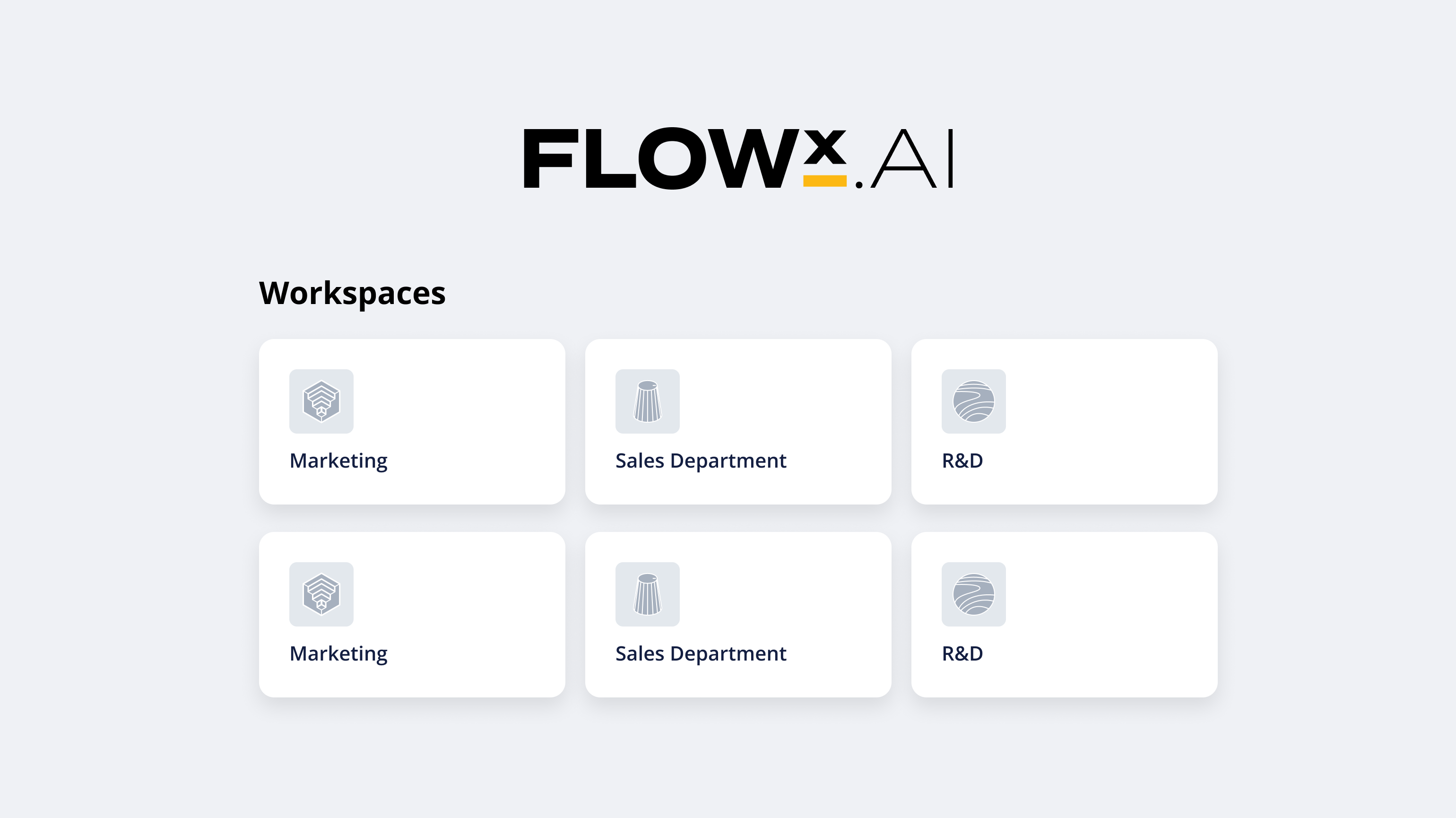
Workspaces enable organizations to manage multiple business contexts within one FlowX instance while maintaining logical data isolation.
Scope: New access management and permission mechanism applies only to FlowX Designer access. Runtime permissions through Keycloak roles (at process level) remain unchanged.
Key benefits
Faster Onboarding
Onboard new business verticals in days instead of weeks with shared platform capabilities
Data Isolation
Provide secure separation between different business contexts while allowing controlled resource sharing
Enhanced Access Control
Implement granular permissions with role-based access control (RBAC) and access control lists (ACLs)
Key concepts
Workspace
A workspace is a logical grouping of entities and assets defined in FlowX that are only available to a subset of users who are given explicit access. Each workspace operates independently, ensuring data and configuration separation between different business contexts.
Multi-workspace user access
Users can be granted access to multiple workspaces and can switch between them as needed. When a user has access to multiple workspaces, they can select which workspace to enter after authentication.
Data isolation
Workspaces provide logical data isolation, meaning that resources (projects, libraries, themes, etc.) are scoped to specific workspaces and cannot be accessed from other workspaces without explicit sharing configurations.
Additional terminology
Group: A collection of users who share common characteristics, responsibilities, or access needs within a system. Groups are used to simplify access control by managing permissions collectively rather than assigning them individually to each user.
Permissions: Define what actions can be performed on resources. They are fine-grained access controls that specify privileges for a resource type, such as: read process, edit process, delete process.
Roles: Collections of permissions grouped together based on job functions or responsibilities. They simplify permission management by assigning a set of permissions to users instead of managing them individually.
Role assignment rule: Roles are never assigned directly to users or groups. A user or group is assigned a role ONLY when given access to a workspace OR a project/library. Exception: org_admin role is the only one assigned to users directly at the organization level.
When a user has multiple roles assigned in the context of a workspace or project, their access level is the union of all permissions from all roles associated with the user.
Workspace use cases
Multiple Business Lines
Isolation Level: HighDifferent use cases, projects, permissions, and users between business verticals (e.g., retail vs. corporate vs. investment banking).Shared Resources:
Shared users across business lines
Shared library builds
Shared themes (configurable)
Example: A multinational bank with separate workspaces for Retail Banking, Corporate Banking, and Investment Banking, each with its own processes but sharing common user authentication and compliance libraries.
Regional Separation
Isolation Level: MediumSame business line across different regions, subject to local regulations.Shared Resources:
Libraries and common processes
Some shared users with multi-region access
Example: An insurance company with workspaces for US, EU, and APAC operations, sharing global insurance processes but maintaining region-specific compliance and regulatory processes.
Distinct Organizations
Isolation Level: HighestComplete separation for different customers or organizations.Shared Resources: NoneExample: A consulting firm providing FlowX services to multiple clients, with completely isolated workspaces for each client organization.
How workspaces work
Authentication and access flow
1
User Authentication
User logs in using OAuth 2.0 through the configured identity provider (Keycloak or client’s existing provider). Authenticated users are saved with subject ID in FlowX database.
2
Permission Retrieval
System fetches the user’s workspace permissions and available workspaces
3
Workspace Selection
If user has access to multiple workspaces, they select which workspace to enter
4
Context Loading
FlowX Designer loads with workspace-specific content, projects, and permissions
Workspace selection experience
The workspace selection experience varies based on user access:
Single Workspace Access
Multiple Workspace Access
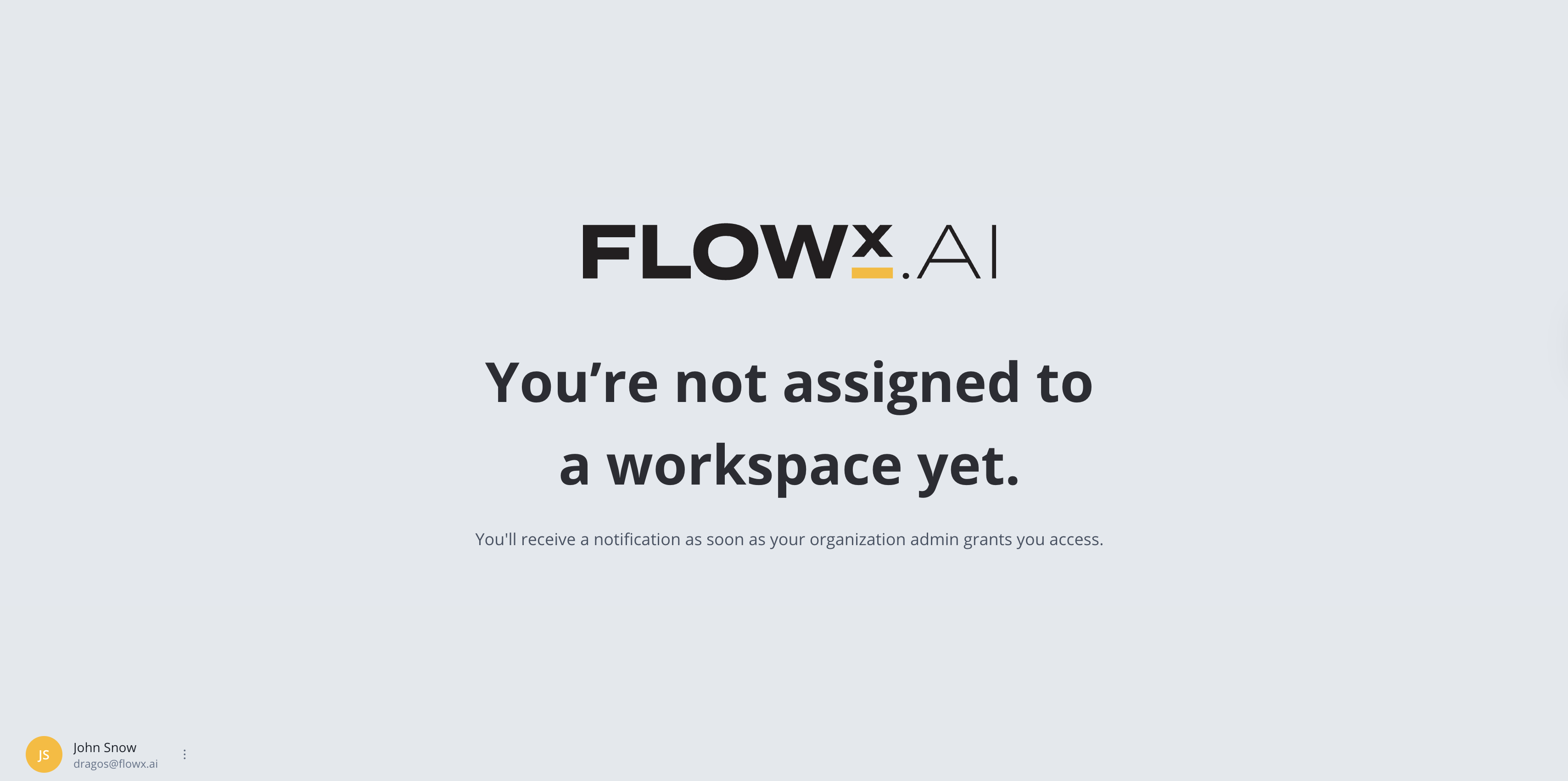
No Workspace Access
Direct Navigation: Users with access to only one workspace are automatically redirected to the projects page within their workspace.UI Behavior: The workspace dropdown selector is disabled since no selection is needed.Session Flow: Simplified experience with no additional selection steps required.
Homepage Display: Users see a “Your Workspaces” homepage after authentication.Workspace Layout:
Workspaces displayed in alphabetical order
3 workspace tiles per row
Name truncation with ”…” for long names
Hover tooltips show full workspace names
Navigation to Organization Admin view: when a logged in user is an organization admin, Organization Settings button appears on Select Workspace page in top right corner.
Empty State Display: Users without access to any workspace see an informational message instead of the workspace list.Message Content: “You’re not assigned to a workspace yet” or similar notification
Next Steps: User must wait for an organization admin to grant workspace access before they can proceed
This scenario commonly occurs for new users from LDAP/Active Directory after their first login, before an admin assigns workspace access.
Session management
Session Persistence: Workspace selection is saved for the user session. On subsequent visits within the same session, users are automatically redirected to their previously selected workspace.
Error handling and access denied scenarios
No Access to Selected Workspace
Trigger: User attempts to access a workspace they don’t have permissions for, or workspace ID is incorrectSystem Response: User is redirected to workspace/403 error pageCommon Causes:
Workspace access was revoked
User navigated to an invalid workspace ID
Workspace was deleted or renamed
Resolution: Contact workspace admin or organization admin to restore access
No Access to Resource
Trigger: User attempts to access a specific resource (project, library, etc.) they don’t have permissions forSystem Response: User is redirected to 403 error pageCommon Causes:
Insufficient project-level permissions
Resource is restricted to specific roles or groups
Project access was revoked
Resolution: Request access from the project owner or workspace admin
Resource management
Project Isolation
Library Sharing
Theme Management
Media Files & Fonts
Workspace Scoping: Each project is tagged with its workspace ID and only accessible within that workspaceIndependent Lifecycle: Projects in different workspaces can have the same names and follow independent versioningCross-Workspace Import: The same project can now be imported into multiple workspaces on the same environment. Each imported project maintains its own independent lifecycle with separate active policies and access controls.Import Behavior: Projects created from version or build import are created with access only for the currently logged in user with ‘Project Owner’ role. Workspace admins are also able to view projects. Access can be extended to required users subsequently.Runtime Permissions: Permissions for Runtime section are received by users with workspace role. Users inherit runtime permissions from workspace role for ALL projects/libraries they have access to.
Build Sharing: Library builds can be reused across workspaces on the same environmentControlled Access: Libraries from other workspaces can be added as dependencies if permissions allowVersion Management: Single version constraint applies across workspace boundaries for shared librariesWorkspace Access: All builds created in workspace for any library have ‘public’ access within workspace. When adding library dependencies, all libraries with builds are available as dependencies.Cross-Workspace Sharing: Library builds can be shared across workspaces using export/import mechanism
Important: Library builds from Workspace A can be imported into Workspace B on same environment. However, in FlowX 5.1 the libraries containing only builds will not be viewable to workspace users outside Dependencies page.
Library Creation: Libraries are created only with version import (not created when importing a build of a library).
Workspace Themes: Each workspace can have its own themes and brandingShared Themes: Themes can be shared between workspaces when configured appropriatelyBrand Consistency: Maintain consistent branding across business units or customize per workspaceDefault Theme: Default theme can be set in each workspace. When creating a project or library, the project/library version inherits the workspace default theme as the configured theme in Version settings.Export/Import: Themes can be shared across workspaces using export/import.
Media Files: Each workspace can create and manage workspace specific media files, not accessible to be used by other workspaces. However, when exporting themes, media files will also be exported and can be imported easily in other workspace together with the theme.Fonts: Fonts can be uploaded from Organization Settings or from a workspace, under Design Assets → Fonts. Every uploaded font is shared by all workspaces in the organization.
Additional workspace features
Command Center (AI Agents)
AI Agents permission is a project level permission starting in FlowX 5.1 release. Consequence: Command center will be available only on projects or libraries pages.
Audit Logs
The Audit Log entry under General Settings in the main menu shows the workspace audit log, which includes entries for every project and library in the workspace. It is visible to users whose workspace role includes the wks_audit_log_read permission. Every built-in workspace role includes it. See the permission reference guide.
Project editor - Can modify project content, processes, and configurations. Includes all Project Viewer permissions.
Project viewer - Read-only access to project content and processes. Cannot make modifications.
Workspace user - View only access to workspace entities. Can create projects, but only sees projects they have explicit access to.
Owner - Automatically assigned to project creators. Full control over project settings, access management, and can delete the project.
Theme editor - Extends workspace user role to include permissions to manage themes and associated resources (global media files).
Workspace admin - Manages all workspace level resources including users, roles, themes. Can configure access and content, but cannot manage organization-wide settings.
Runtime editor - Enables users to test runtime functionality and manage runtime policies without full configurator permissions. Commonly used by QA teams and testers who need to manage “change active policy” operations and test processes during runtime without broader editing capabilities.
Workspace-Specific
Roles are specific to each workspace - a user can have different roles in different workspaces
In FlowX 5.1 release, only pre-defined roles will be available to use for workspace and project/library access.
Detailed role permissions
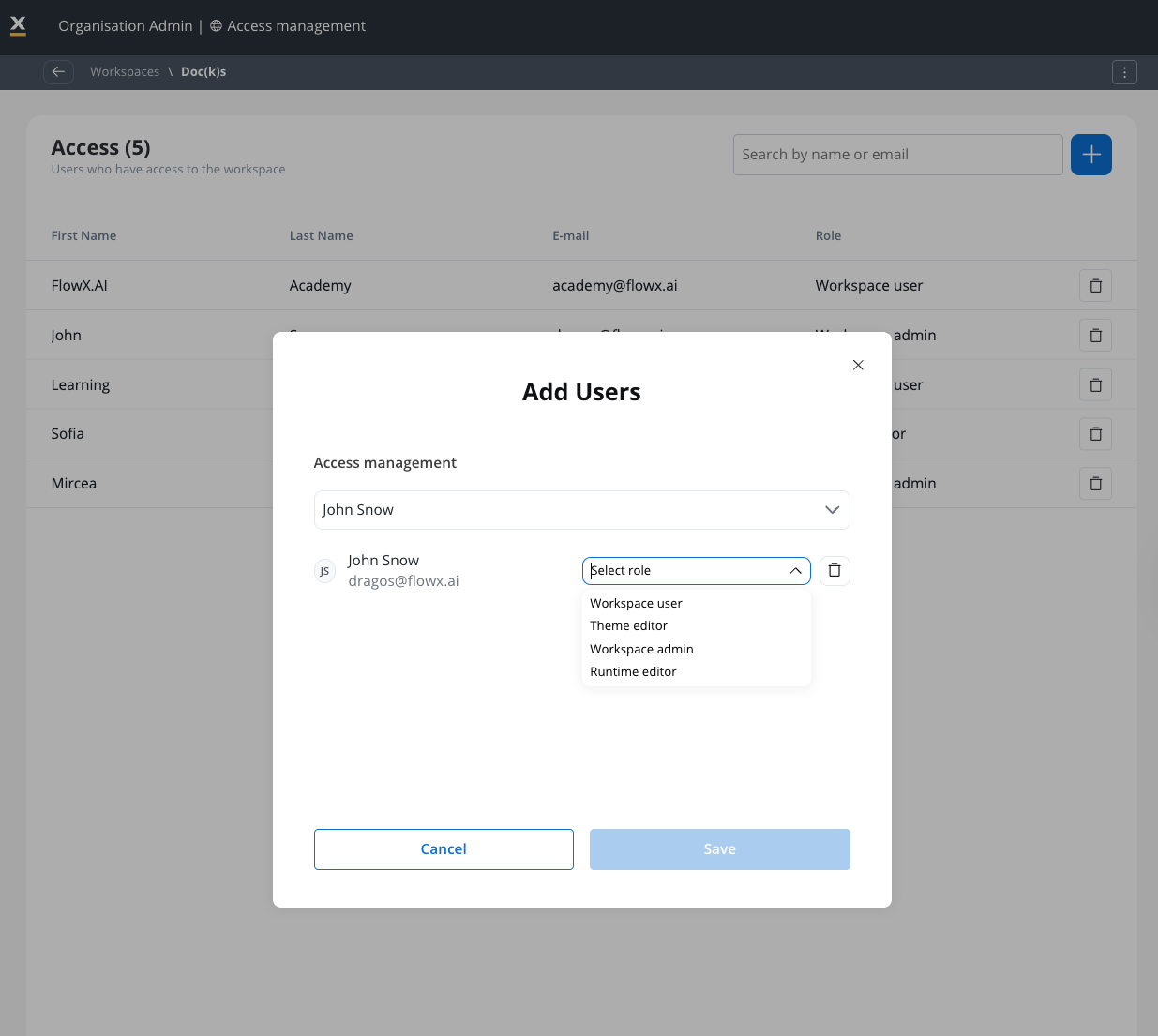
To add a user to a workspace, and to assign a role to the user, you need to go to Organization settings page and select your desired workspace, then add the user to the workspace and assign the role to the user.
Workspace admin: Manages all workspace level resources including users, roles, themes. Can configure access and content, but cannot manage organization-wide settings.
Workspace admins will be able to view and edit ALL projects and libraries in workspace, regardless of project/library access settings.
Workspace user: View only access to workspace entities. Can create projects, but only sees projects they have explicit access to.
Theme editor: Extends workspace user role to include permissions to manage themes and associated resources (global media files).
Runtime editor: Enables users to test runtime functionality and manage runtime policies without full configurator permissions. Commonly used by QA teams and testers who need to manage “change active policy” operations and test processes during runtime without broader editing capabilities.
User groups
User groups simplify permission management by allowing you to assign permissions to groups rather than individual users.
Default Groups: Each workspace includes an “Everyone in workspace” default group
Custom Groups: Create groups based on teams, departments, or project requirements
Inherited Permissions: Users automatically inherit permissions from their group memberships
Access control lists (ACLs)
Resource-Specific Permissions
Grant fine-grained control over individual resources within a workspace, allowing exceptions to general role permissions.Example: A user with project_viewer role can be granted edit access to a specific project without becoming a full configurator.
Exception-Based Access
Provide specific users or groups access to individual resources without requiring full platform permissions.Use Case: External consultants can be given access to specific projects they’re working on without broader workspace access.
Owner Management
Resource creators can manage access to their specific resources without requiring full admin intervention.Benefit: Project owners can add team members to their projects without needing admin approval for each addition.
Project-level access control
Projects and libraries support fine-grained access control through dedicated project roles that work alongside workspace-level permissions.
Project Owner
Automatically assigned to project creators. Full control over project settings, access management, and can delete the project.
Project Editor
Can modify project content, processes, and configurations. Includes all Project Viewer permissions.
Project Viewer
Read-only access to project content and processes. Cannot make modifications.
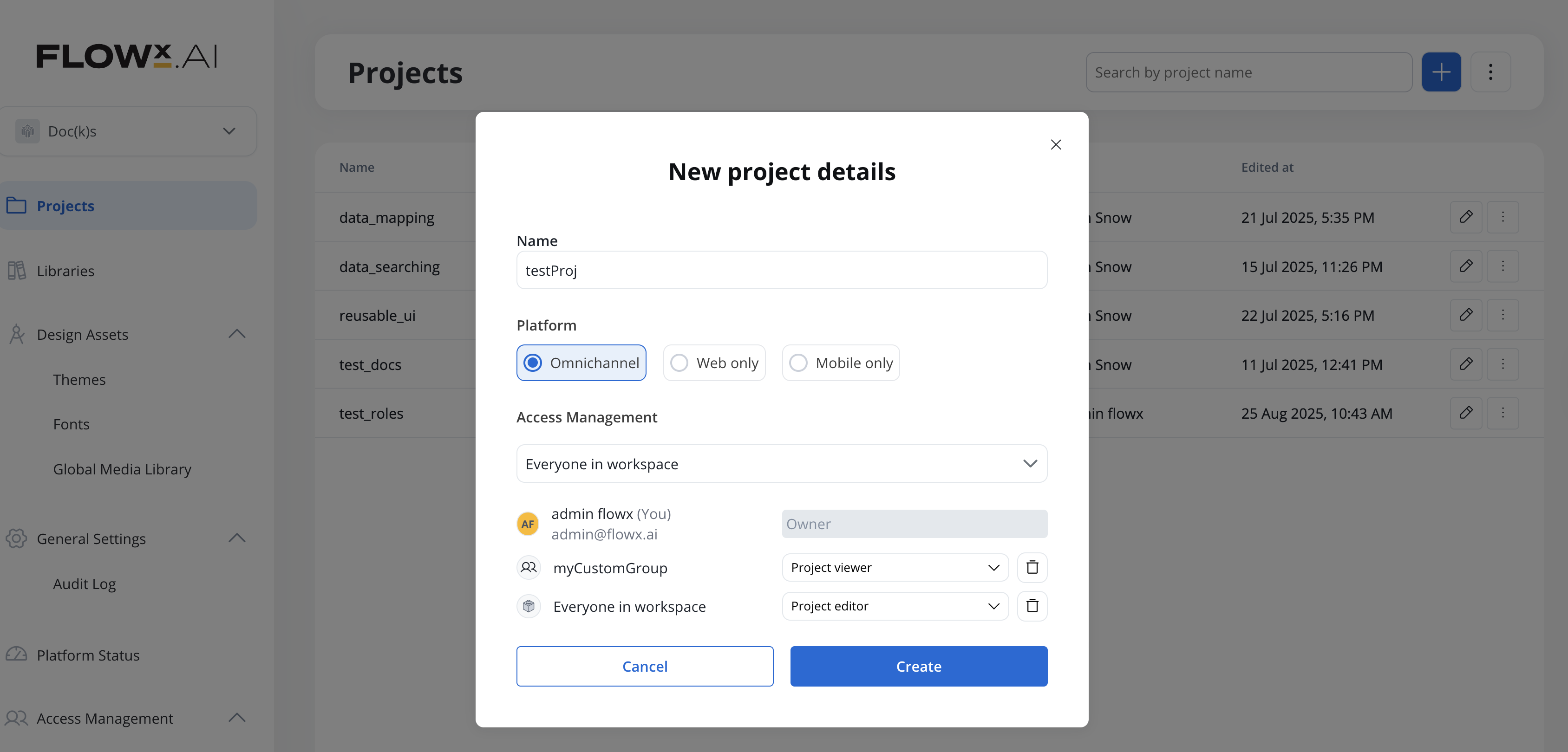
Creating a project
1
Create Project
Create a new project by clicking the + icon in the top-right corner of the Projects page.
2
Owner Assignment
The currently logged-in user is automatically assigned as Project Owner with full access rights.
3
Extend Access
Project owners can subsequently add users or groups with Project Editor or Project Viewer roles as needed.
Access management inheritance
Project Editor role automatically includes Project Viewer permissions
Multiple roles: Users can have both workspace-level and project-level roles simultaneously
Permission union: When users have multiple roles, their access is the combination of all permissions from all assigned roles
Organization administration
Organization admin role
The org_admin role is the only role assigned directly to users at the organization level, not workspace level.
Organization admins will be able to see all workspaces and have the same permissions as Workspace Admins inside each workspace. Multiple users can have this role assigned. Role can be assigned/revoked by other org admins.To promote an existing Designer user to organization admin:
Go to Organization Settings → Users.
Find the user in the list and open their context menu (the three-dot menu).
Select Set as ORG Admin.
Only an existing organization admin can promote another user. Use Set as ORG Admin directly — changing the role through the user’s Edit form is a different flow and is not how the organization admin role is assigned.
User management
Users are created in FlowX only after their first login in FlowX Designer.
The Organization Users page lists only Designer users — users who have logged into FlowX Designer at least once, or who were manually created by an organization admin. It does not list Runtime users (Keycloak roles/groups used for process-level permissions at runtime). Designer users and Runtime users are managed separately:
Designer users — managed in Organization Settings → Users. Control access to the FlowX Designer, workspaces, projects, and libraries.
Runtime users — managed in Organization Settings → Runtime Roles and Runtime Groups. Control access to process instances at runtime (e.g., who can start or view a process).
The User Details page shows the Designer user’s Workspace access summary (which workspaces they belong to and what roles they hold).
User creation scenarios
LDAP/Active Directory Users
Direct FlowX Creation
Sync Behavior: Users from customer’s LDAP/Active Directory are not automatically created in FlowX.Onboarding Steps:
User logs into FlowX Designer for the first time
They are redirected to a “You’re not assigned to a workspace yet” message page
User account is now created in FlowX and appears in the Users list in Organization Settings
Organization admin assigns workspace access with appropriate role (Workspace User, Workspace Admin, Theme Editor, or Runtime Editor)
On next login, user will have access to assigned workspaces
Users synced from LDAP will only appear in FlowX after their first login attempt.
Prerequisites: Only available when using Keycloak as the authentication provider.Creation Process:
Organization admin clicks the + icon in Users section
Enter user details (name, email, password, runtime roles)
User is immediately created in both Keycloak and FlowX Designer
Organization admin can immediately assign workspace access
User can log in directly without the initial “no workspace” flow
This method is primarily for internal use and may not be available in all FlowX 5.1 deployments. If direct user creation is needed, users should be created directly in Keycloak.
Additional organization settings
Runtime roles and groups
Legacy Roles and Groups pages (for managing roles and groups only in Keycloak) are accessible in Organization Settings section and renamed Runtime Roles and Runtime Groups.Will be used going forward to manage any roles needed for process permission configuration.
Runtime authorization changes in 5.9 LTS. End-user groups move from Keycloak into FlowX, and role grants become per-solution rather than global. If you are planning an upgrade, review the 5.1 → 5.9 migration guide before designing your runtime-role strategy.
All workspaces will share the same list of runtime roles and groups.
If Keycloak is not used as authentication provider, Runtime Roles and Runtime Groups pages will return errors in FlowX 5.1.
Set environment info
Configuring client and environment information is available only in Organization settings section under Platform status page.
Workspace management
Creating and managing workspaces
1
Admin Access Required
Only users with organization administrator permissions can create new workspaces
2
Workspace Configuration
Set workspace name, description, and basic settings during creation
3
User Assignment
Add initial users and assign appropriate roles to get started
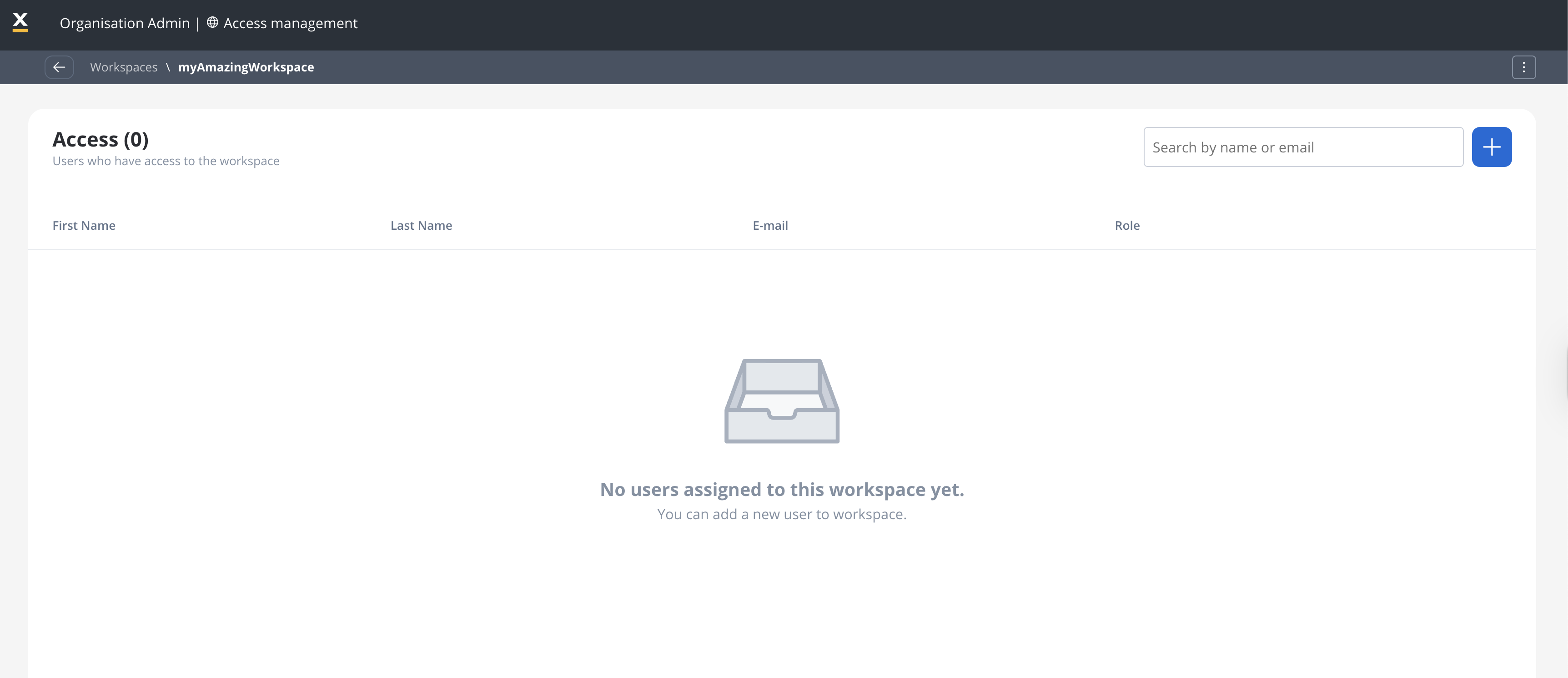
Deleting a workspace is not available in FlowX 5.1.
Workspace environment type
Workspaces can be labeled with an Environment Type to indicate their purpose within your deployment. This helps administrators and users quickly identify the context of each workspace.Available environment types:
Type
Description
Sandbox
For development, experimentation, and testing
Staging
For pre-production validation and QA
Production
For live, end-user facing deployments
To set the environment type, go to Organization Settings → select your workspace → set the Environment Type dropdown.
Use environment type labels to provide visual context when working across multiple workspaces, especially in organizations that use workspaces to represent different stages of their deployment pipeline.
User management within workspaces
Adding Users
Role Assignment
Access Matrix
Direct Assignment: Add users directly to workspace with specific roles
Group Membership: Add users to groups that inherit workspace permissions
Multi-Workspace Access: Users can be members of multiple workspaces
Multiple Roles: Users can have multiple roles within a workspace
Role Inheritance: Roles can inherit permissions from other roles
Workspace Scoping: User roles are specific to each workspace
Visual Interface: See all users, groups, and their permissions at a glance
Quick Adjustments: Easily modify permissions and access levels
Audit Capabilities: Track who has access to what resources
Migration and compatibility
Initial setup requirements
Critical Setup Step: Before starting any FlowX 5.1 environment, the initial organization admin must be configured.
To create the first user in FlowX Designer with organization admin role, an environment variable SPRING_LIQUIBASE_PARAMETERS_DEFAULTORGADMINUSERNAME needs to be configured with the username of the user from Identity Store (Keycloak/ other Identity Store from where the users are used to login in FlowX.AI).
If request to Keycloak fails, the fallback is to use SPRING_LIQUIBASE_PARAMETERS_DEFAULTORGADMINUSERSUBJECTID to create the organization admin user. Value that must be set is the subject identifier. (sub in JWT token OR user’s id in Keycloak).
This step is important for creating any environment, no matter if there’s a pre-existing env or a newly created one.
IMPORTANT: Instruct DeevOps team to set this user id BEFORE system startup. Otherwise the authorization-service startup will fail. Ensure the correct value is set. The correct value is the subject id of the user, value that will be populated by the authorization service in the access token used for FlowX login.
For existing FlowX customers
When upgrading to FlowX 5.1, a default workspace is automatically created containing all your existing resources.
What Happens During Migration:
All existing projects, libraries, and themes are moved to a default workspace
All existing functionality continues to work without changes
Default workspace details:
Name: “Default workspace” (can be changed following the migration)
UUID: “00000000-0000-0000-0000-000000000001”
What gets migrated:
All active process instances will be migrated under default workspace
Failed process start instances migration
Workflow instances migration
Scheduled processes migration
Audit logs migration
Out of office and Fonts will not be migrated under default workspace, as they are managed at organization level.
For clients who need inactive process instances migrated, we’ll provide migration script which will be run post migration.
Post-migration manual steps:
Important: Existing users will not be migrated; they will need to log into FlowX so that their user is created.
Organization admin will need to provide individual access to workspace for each user
Access to projects and libraries should be additionally configured as per workspace requirements
Existing admin roles and groups used for FlowX Designer access are deprecated and should be removed post-migration from Keycloak
Step is optional, but encouraged so that the role list for runtime permissions is manageable. List of deprecated roles (which can be removed) will be provided in documentation.
For new FlowX 5.x installations
Initial Setup Process:
Configure the first workspace administrator user
Create the initial workspace
Set up users and role assignments
Begin creating projects and processes
Best practices
Workspace design
Clear Boundaries
Define workspaces based on clear business, regulatory, or organizational boundaries
Naming Conventions
Use consistent naming conventions for workspaces, roles, and resources
Documentation
Document workspace purposes, user access patterns, and governance policies
Scalability Planning
Plan workspace structure to accommodate future growth and organizational changes
Permission management
Principle of Least Privilege: Grant minimum necessary permissions
Group-Based Management: Use groups for permission management rather than individual assignments
Regular Audits: Periodically review and audit workspace permissions
Clear Ownership: Establish clear ownership models for workspace resources
Resource sharing
Controlled Sharing: Implement clear policies for resource sharing between workspaces
Dependency Management: Track and manage dependencies between shared resources
Version Control: Maintain version control for shared libraries and themes
Common use cases
Banking - Multi-Division Operations
Scenario: Large bank with retail, corporate, and investment banking divisionsWorkspace Structure:
Retail Banking Workspace
Corporate Banking Workspace
Investment Banking Workspace
Shared Compliance Workspace (for common libraries)
Benefits: Division autonomy while sharing compliance processes and user management
Insurance - Geographic Separation
Scenario: Insurance company operating in multiple countriesWorkspace Structure:
US Operations Workspace
EU Operations Workspace
APAC Operations Workspace
Benefits: Region-specific regulatory compliance while sharing global insurance processes
Cross-workspace project import
You can import the same project into multiple workspaces on the same environment. This feature enables organizations to use workspaces to represent different operational environments (such as UAT, staging, pre-production) on a single FlowX deployment, reducing operational costs.
How it works
Import to Multiple Workspaces
Import a project build (and optionally a version) into different workspaces on the same environment
Independent Lifecycle
Each imported project maintains its own lifecycle with separate active policies and access controls
No Impact on Original
Importing to another workspace does not affect the original project’s settings, policies, or process instances
Separate Process Instances
Process instances are workspace-specific; imported projects have no instances initially until processes run in the new workspace
Import behavior
Aspect
Behavior
Active Policy
The imported build is automatically set as the active policy in the new workspace
User Access
Workspace users must be granted appropriate rights on the imported project (e.g., project viewer) to interact with it
Database
Projects across workspaces on the same environment share the same database
Configuration
All project configuration lives within each specific workspace independently
Use case: Organizations like banks and insurance companies can use this feature to represent different upper environments (UAT, Staging, Production) as separate workspaces on the same FlowX deployment, significantly reducing infrastructure and DevOps costs.
Limitations and considerations
Current limitations
Resource Isolation: Direct access to resources from other workspaces is not possible
Single Environment Sharing: Library sharing only works within the same FlowX environment
Permission Inheritance: Workspace permissions don’t automatically inherit across workspace boundaries
FlowX 5.1 specific limitations
Additional limitations in current releases:
Move projects or libraries to another workspace feature is not available. Initially (when upgrading to FlowX 5.1), all existing projects and libraries are migrated to Default Workspace.
Workspace import/export is out of scope; each FlowX environment will have a default workspace configured initially and workspaces are managed independently on each instance.
Library builds from other workspaces are only visible on the Dependencies page after import, not as full library entries in the workspace.
Planning considerations
Change Management: Organizational alignment needed for governance models
User Training: Users need to understand workspace selection and navigation
Governance Policies: Clear policies needed for resource sharing and access management
Migration Planning: Existing customers should plan workspace structure before creating additional workspaces
{"docsConfig":{"theme":"mint","$schema":"https://mintlify.com/docs.json","name":"FlowX.AI","description":"Comprehensive documentation for FlowX.AI, the AI-driven process automation platform.","colors":{"primary":"#fcb813","light":"#fcb813","dark":"#fcb813"},"logo":{"light":"https://mintcdn.com/flowxai/38fXEM0a7v86Lg2m/logo/light.png?fit=max\u0026auto=format\u0026n=38fXEM0a7v86Lg2m\u0026q=85\u0026s=d767c06cef433b0a02f40a1f4f785eab","dark":"https://mintcdn.com/flowxai/38fXEM0a7v86Lg2m/logo/dark.png?fit=max\u0026auto=format\u0026n=38fXEM0a7v86Lg2m\u0026q=85\u0026s=6b8b8c3e7abd17acf6be8bffce4e599d"},"favicon":"https://mintcdn.com/flowxai/VVxnbzjz7JuL1Ngt/favicon2.svg?fit=max\u0026auto=format\u0026n=VVxnbzjz7JuL1Ngt\u0026q=85\u0026s=ef6a780a1ed3894c7b276bcc7b3c6c69","appearance":{"default":"dark","strict":false},"background":{"decoration":"grid","color":{"light":"#f4f4f5","dark":"#0a0b0d"}},"navbar":{"links":[],"primary":{"type":"button","label":"Academy","href":"https://academy.flowx.ai/"}},"footer":{"socials":{"linkedin":"https://www.linkedin.com/company/flowxai","x":"https://x.com/FlowX_ai","youtube":"https://www.youtube.com/@FlowX_AI"},"links":[{"header":"Documentation","items":[{"label":"Introduction","href":"https://docs.flowx.ai/5.9/docs/introduction"},{"label":"Platform overview","href":"https://docs.flowx.ai/5.9/docs/platform-overview/flowx-architecture"},{"label":"Designer","href":"https://docs.flowx.ai/5.9/docs/flowx-designer/overview"},{"label":"AI Platform","href":"https://docs.flowx.ai/5.9/ai-platform/ai-in-flowx"},{"label":"Use the docs with AI","href":"https://docs.flowx.ai/5.9/docs/getting-started/using-flowx-docs-with-ai"},{"label":"Release notes","href":"https://docs.flowx.ai/release-notes/overview"}]},{"header":"Resources","items":[{"label":"FlowX.AI Academy","href":"https://academy.flowx.ai"},{"label":"Support","href":"https://flowxai.zendesk.com/"}]},{"header":"Company","items":[{"label":"About FlowX.AI","href":"https://www.flowx.ai/about"},{"label":"Contact us","href":"mailto:hello@flowx.ai"},{"label":"Careers","href":"https://apply.workable.com/flowxai"}]},{"header":"Legal","items":[{"label":"Privacy Policy","href":"https://www.flowx.ai/privacy-policy"},{"label":"Cookie Policy","href":"https://www.flowx.ai/cookie-policy"},{"label":"Cookie settings","href":"https://docs.flowx.ai/?cookie-settings"},{"label":"Terms and Conditions","href":"https://www.flowx.ai/terms-and-conditions"}]}]},"search":{"prompt":"Search the docs"},"seo":{"metatags":{"zd-site-verification":"94tteg5ir5of8gkb4twzh"}},"fonts":{"heading":{"family":"Sora"},"body":{"family":"Geist"}},"styling":{"eyebrows":"breadcrumbs","codeblocks":"dark","latex":true},"integrations":{"ga4":{"measurementId":"G-CGW0FVK9YM"},"cookies":{"key":"flowx-docs-analytics-consent","value":"granted"}},"banner":{"content":"🚀 [See the latest FlowX.AI releases →](/release-notes/overview)","dismissible":true},"contextual":{"options":["copy","view","chatgpt","claude","perplexity","mcp","cursor","vscode"],"display":"header"},"metadata":{"timestamp":true},"navigation":{"pages":[]}},"deployment":{"deploymentMetadataValue":{"subdomain":"flowxai","hasAudioNarration":false,"actualSubdomain":"flowxai","customDomains":["docs.flowx.ai"],"gitSource":{"type":"github","owner":"flowx-ai","repo":"flowx-docs","deployBranch":"main","contentDirectory":"","isPrivate":true,"mountPath":"","label":""},"feedback":{"thumbs":true,"contextualFeedback":{"allowEmail":true},"agentFeedback":true},"entitlements":{"AI_CHAT":{"status":"ENABLED"},"CONTEXTUAL_FEEDBACK":{"status":"ENABLED"},"CODE_SNIPPET_FEEDBACK":{"status":"ENABLED"},"WEB_MCP":{"status":"ENABLED"},"NARRATION":{"status":"ENABLED"}},"buildId":"6b058b43b460ddeb8b55d59b","clientVersion":"0.0.4286","searchFilterCounts":[{"language":"default","tag":"Documentation","count":800},{"language":"default","tag":"Building blocks","count":331},{"language":"default","tag":"Platform deep dive","count":267},{"language":"default","tag":"Setup guides","count":194},{"language":"default","tag":"UI Designer","count":140},{"language":"default","tag":"Release notes","count":139},{"language":"default","tag":"Release Notes","count":139},{"language":"default","tag":"Microservices","count":112},{"language":"default","tag":"Core extensions","count":107},{"language":"default","tag":"v5.x","count":89}],"searchSettings":{"isFiltersEnabled":true}},"assistantConfig":{"enableAskAiButton":false,"enableStarterQuestions":false,"enableContextualStarterQuestions":true,"enableAskAiSearchBar":true,"deflection":{"enabled":true,"type":"email","email":"learning.team@flowx.ai","showHelpButton":true}},"basePath":"","hasChatPermissions":true,"hasWebMcpPermissions":true,"toggles":[{"name":"kill-isr","enabled":true,"variant":{"name":"disabled","enabled":false,"feature_enabled":true},"impressionData":false},{"name":"custom-rbac-roles","enabled":true,"variant":{"name":"disabled","enabled":false,"feature_enabled":true},"impressionData":false},{"name":"agent-mintlify-slack","enabled":true,"variant":{"name":"disabled","enabled":false,"feature_enabled":true},"impressionData":false},{"name":"agent-integrations-settings","enabled":true,"variant":{"name":"disabled","enabled":false,"feature_enabled":true},"impressionData":false},{"name":"rbac-expansion","enabled":true,"variant":{"name":"disabled","enabled":false,"feature_enabled":true},"impressionData":false},{"name":"automations-pr-grouping","enabled":true,"variant":{"name":"disabled","enabled":false,"feature_enabled":true},"impressionData":false},{"name":"custom-prefix","enabled":true,"variant":{"name":"disabled","enabled":false,"feature_enabled":true},"impressionData":false},{"name":"analytics-v7","enabled":true,"variant":{"name":"disabled","enabled":false,"feature_enabled":true},"impressionData":false},{"name":"user-flows-analytics","enabled":true,"variant":{"name":"disabled","enabled":false,"feature_enabled":true},"impressionData":false},{"name":"no-publish-flow","enabled":true,"variant":{"name":"disabled","enabled":false,"feature_enabled":true},"impressionData":false},{"name":"workos-onboarding","enabled":true,"variant":{"name":"disabled","enabled":false,"feature_enabled":true},"impressionData":false},{"name":"snapshot-serving-live","enabled":true,"variant":{"name":"disabled","enabled":false,"feature_enabled":true},"impressionData":false},{"name":"stripTemperatureMiddleware","enabled":true,"variant":{"name":"disabled","enabled":false,"feature_enabled":true},"impressionData":false},{"name":"support-platform-pylon-zendesk","enabled":true,"variant":{"name":"disabled","enabled":false,"feature_enabled":true},"impressionData":false},{"name":"snapshot-serving","enabled":true,"variant":{"name":"disabled","enabled":false,"feature_enabled":true},"impressionData":false},{"name":"instant-rollback","enabled":true,"variant":{"name":"disabled","enabled":false,"feature_enabled":true},"impressionData":false},{"name":"granular-notifications-server","enabled":true,"variant":{"name":"disabled","enabled":false,"feature_enabled":true},"impressionData":false},{"name":"granular-notifications","enabled":true,"variant":{"name":"disabled","enabled":false,"feature_enabled":true},"impressionData":false},{"name":"automations-fable","enabled":true,"variant":{"name":"disabled","enabled":false,"feature_enabled":true},"impressionData":false},{"name":"fixed-ai-action-pricing","enabled":true,"variant":{"name":"disabled","enabled":false,"feature_enabled":true},"impressionData":false},{"name":"site-roles","enabled":true,"variant":{"name":"disabled","enabled":false,"feature_enabled":true},"impressionData":false},{"name":"automation-resolve-merge-conflict","enabled":true,"variant":{"name":"disabled","enabled":false,"feature_enabled":true},"impressionData":false},{"name":"scoped-publishing","enabled":true,"variant":{"name":"disabled","enabled":false,"feature_enabled":true},"impressionData":false},{"name":"mintql","enabled":true,"variant":{"name":"disabled","enabled":false,"feature_enabled":true},"impressionData":false},{"name":"page-level-analytics","enabled":true,"variant":{"name":"disabled","enabled":false,"feature_enabled":true},"impressionData":false},{"name":"editor-version-history-v2","enabled":true,"variant":{"name":"disabled","enabled":false,"feature_enabled":true},"impressionData":false},{"name":"billing-page-v2","enabled":true,"variant":{"name":"disabled","enabled":false,"feature_enabled":true},"impressionData":false},{"name":"full-page-search","enabled":true,"variant":{"name":"disabled","enabled":false,"feature_enabled":true},"impressionData":false},{"name":"workspace-projects","enabled":true,"variant":{"name":"disabled","enabled":false,"feature_enabled":true},"impressionData":false},{"name":"assistant-v5","enabled":true,"variant":{"name":"disabled","enabled":false,"feature_enabled":true},"impressionData":false},{"name":"fork-pr-previews","enabled":true,"variant":{"name":"disabled","enabled":false,"feature_enabled":true},"impressionData":false},{"name":"revalidation-jwt","enabled":true,"variant":{"name":"disabled","enabled":false,"feature_enabled":true},"impressionData":false},{"name":"workos-sso-scim","enabled":true,"variant":{"name":"disabled","enabled":false,"feature_enabled":true},"impressionData":false},{"name":"hobby-abuse-scan","enabled":true,"variant":{"name":"disabled","enabled":false,"feature_enabled":true},"impressionData":false},{"name":"dashboard-inbox","enabled":true,"variant":{"name":"disabled","enabled":false,"feature_enabled":true},"impressionData":false},{"name":"workos-signup","enabled":true,"variant":{"name":"disabled","enabled":false,"feature_enabled":true},"impressionData":false},{"name":"turbopuffer-dual-write","enabled":true,"variant":{"name":"disabled","enabled":false,"feature_enabled":true},"impressionData":false},{"name":"workos-enabled","enabled":true,"variant":{"name":"disabled","enabled":false,"feature_enabled":true},"impressionData":false},{"name":"approve-review-flow","enabled":true,"variant":{"name":"disabled","enabled":false,"feature_enabled":true},"impressionData":false},{"name":"editor-metadata","enabled":true,"variant":{"name":"disabled","enabled":false,"feature_enabled":true},"impressionData":false},{"name":"sso-setup-deadline-banner","enabled":true,"variant":{"name":"disabled","enabled":false,"feature_enabled":true},"impressionData":false},{"name":"turbopuffer-serve","enabled":true,"variant":{"name":"disabled","enabled":false,"feature_enabled":true},"impressionData":false},{"name":"live-agents","enabled":true,"variant":{"name":"disabled","enabled":false,"feature_enabled":true},"impressionData":false},{"name":"starter-pricing","enabled":true,"variant":{"name":"control","enabled":true,"payload":{"type":"string","value":"control"},"feature_enabled":true},"impressionData":false},{"name":"llms-txt-v2","enabled":true,"variant":{"name":"disabled","enabled":false,"feature_enabled":true},"impressionData":false},{"name":"wildcard-email-auth","enabled":true,"variant":{"name":"disabled","enabled":false,"feature_enabled":true},"impressionData":false}],"privacy":{"consentBanner":{"enabled":false}},"googleFontsInlined":true},"customCss":[{"filePath":"custom.css","content":"/* cyrillic-ext */\n@font-face {\n font-family: 'Geist Mono';\n font-style: normal;\n font-weight: 400;\n font-display: swap;\n src: url(/_mintlify/assets/fonts/google/s/geistmono/v6/or3nQ6H-1_WfwkMZI_qYFrodmgPn.woff2) format('woff2');\n unicode-range: U+0460-052F, U+1C80-1C8A, U+20B4, U+2DE0-2DFF, U+A640-A69F, U+FE2E-FE2F;\n}\n/* cyrillic */\n@font-face {\n font-family: 'Geist Mono';\n font-style: normal;\n font-weight: 400;\n font-display: swap;\n src: url(/_mintlify/assets/fonts/google/s/geistmono/v6/or3nQ6H-1_WfwkMZI_qYFrMdmgPn.woff2) format('woff2');\n unicode-range: U+0301, U+0400-045F, U+0490-0491, U+04B0-04B1, U+2116;\n}\n/* symbols2 */\n@font-face {\n font-family: 'Geist Mono';\n font-style: normal;\n font-weight: 400;\n font-display: swap;\n src: url(/_mintlify/assets/fonts/google/s/geistmono/v6/or3nQ6H-1_WfwkMZI_qYFg08vz7ehw.woff2) format('woff2');\n unicode-range: U+2000-2001, U+2004-2008, U+200A, U+23B8-23BD, U+2500-259F;\n}\n/* vietnamese */\n@font-face {\n font-family: 'Geist Mono';\n font-style: normal;\n font-weight: 400;\n font-display: swap;\n src: url(/_mintlify/assets/fonts/google/s/geistmono/v6/or3nQ6H-1_WfwkMZI_qYFrgdmgPn.woff2) format('woff2');\n unicode-range: U+0102-0103, U+0110-0111, U+0128-0129, U+0168-0169, U+01A0-01A1, U+01AF-01B0, U+0300-0301, U+0303-0304, U+0308-0309, U+0323, U+0329, U+1EA0-1EF9, U+20AB;\n}\n/* latin-ext */\n@font-face {\n font-family: 'Geist Mono';\n font-style: normal;\n font-weight: 400;\n font-display: swap;\n src: url(/_mintlify/assets/fonts/google/s/geistmono/v6/or3nQ6H-1_WfwkMZI_qYFrkdmgPn.woff2) format('woff2');\n unicode-range: U+0100-02BA, U+02BD-02C5, U+02C7-02CC, U+02CE-02D7, U+02DD-02FF, U+0304, U+0308, U+0329, U+1D00-1DBF, U+1E00-1E9F, U+1EF2-1EFF, U+2020, U+20A0-20AB, U+20AD-20C4, U+2113, U+2C60-2C7F, U+A720-A7FF;\n}\n/* latin */\n@font-face {\n font-family: 'Geist Mono';\n font-style: normal;\n font-weight: 400;\n font-display: swap;\n src: url(/_mintlify/assets/fonts/google/s/geistmono/v6/or3nQ6H-1_WfwkMZI_qYFrcdmg.woff2) format('woff2');\n unicode-range: U+0000-00FF, U+0131, U+0152-0153, U+02BB-02BC, U+02C6, U+02DA, U+02DC, U+0304, U+0308, U+0329, U+2000-206F, U+20AC, U+2122, U+2191, U+2193, U+2212, U+2215, U+FEFF, U+FFFD;\n}\n/* cyrillic-ext */\n@font-face {\n font-family: 'Geist Mono';\n font-style: normal;\n font-weight: 500;\n font-display: swap;\n src: url(/_mintlify/assets/fonts/google/s/geistmono/v6/or3nQ6H-1_WfwkMZI_qYFrodmgPn.woff2) format('woff2');\n unicode-range: U+0460-052F, U+1C80-1C8A, U+20B4, U+2DE0-2DFF, U+A640-A69F, U+FE2E-FE2F;\n}\n/* cyrillic */\n@font-face {\n font-family: 'Geist Mono';\n font-style: normal;\n font-weight: 500;\n font-display: swap;\n src: url(/_mintlify/assets/fonts/google/s/geistmono/v6/or3nQ6H-1_WfwkMZI_qYFrMdmgPn.woff2) format('woff2');\n unicode-range: U+0301, U+0400-045F, U+0490-0491, U+04B0-04B1, U+2116;\n}\n/* symbols2 */\n@font-face {\n font-family: 'Geist Mono';\n font-style: normal;\n font-weight: 500;\n font-display: swap;\n src: url(/_mintlify/assets/fonts/google/s/geistmono/v6/or3nQ6H-1_WfwkMZI_qYFg08vz7ehw.woff2) format('woff2');\n unicode-range: U+2000-2001, U+2004-2008, U+200A, U+23B8-23BD, U+2500-259F;\n}\n/* vietnamese */\n@font-face {\n font-family: 'Geist Mono';\n font-style: normal;\n font-weight: 500;\n font-display: swap;\n src: url(/_mintlify/assets/fonts/google/s/geistmono/v6/or3nQ6H-1_WfwkMZI_qYFrgdmgPn.woff2) format('woff2');\n unicode-range: U+0102-0103, U+0110-0111, U+0128-0129, U+0168-0169, U+01A0-01A1, U+01AF-01B0, U+0300-0301, U+0303-0304, U+0308-0309, U+0323, U+0329, U+1EA0-1EF9, U+20AB;\n}\n/* latin-ext */\n@font-face {\n font-family: 'Geist Mono';\n font-style: normal;\n font-weight: 500;\n font-display: swap;\n src: url(/_mintlify/assets/fonts/google/s/geistmono/v6/or3nQ6H-1_WfwkMZI_qYFrkdmgPn.woff2) format('woff2');\n unicode-range: U+0100-02BA, U+02BD-02C5, U+02C7-02CC, U+02CE-02D7, U+02DD-02FF, U+0304, U+0308, U+0329, U+1D00-1DBF, U+1E00-1E9F, U+1EF2-1EFF, U+2020, U+20A0-20AB, U+20AD-20C4, U+2113, U+2C60-2C7F, U+A720-A7FF;\n}\n/* latin */\n@font-face {\n font-family: 'Geist Mono';\n font-style: normal;\n font-weight: 500;\n font-display: swap;\n src: url(/_mintlify/assets/fonts/google/s/geistmono/v6/or3nQ6H-1_WfwkMZI_qYFrcdmg.woff2) format('woff2');\n unicode-range: U+0000-00FF, U+0131, U+0152-0153, U+02BB-02BC, U+02C6, U+02DA, U+02DC, U+0304, U+0308, U+0329, U+2000-206F, U+20AC, U+2122, U+2191, U+2193, U+2212, U+2215, U+FEFF, U+FFFD;\n}\n/* cyrillic-ext */\n@font-face {\n font-family: 'Geist Mono';\n font-style: normal;\n font-weight: 600;\n font-display: swap;\n src: url(/_mintlify/assets/fonts/google/s/geistmono/v6/or3nQ6H-1_WfwkMZI_qYFrodmgPn.woff2) format('woff2');\n unicode-range: U+0460-052F, U+1C80-1C8A, U+20B4, U+2DE0-2DFF, U+A640-A69F, U+FE2E-FE2F;\n}\n/* cyrillic */\n@font-face {\n font-family: 'Geist Mono';\n font-style: normal;\n font-weight: 600;\n font-display: swap;\n src: url(/_mintlify/assets/fonts/google/s/geistmono/v6/or3nQ6H-1_WfwkMZI_qYFrMdmgPn.woff2) format('woff2');\n unicode-range: U+0301, U+0400-045F, U+0490-0491, U+04B0-04B1, U+2116;\n}\n/* symbols2 */\n@font-face {\n font-family: 'Geist Mono';\n font-style: normal;\n font-weight: 600;\n font-display: swap;\n src: url(/_mintlify/assets/fonts/google/s/geistmono/v6/or3nQ6H-1_WfwkMZI_qYFg08vz7ehw.woff2) format('woff2');\n unicode-range: U+2000-2001, U+2004-2008, U+200A, U+23B8-23BD, U+2500-259F;\n}\n/* vietnamese */\n@font-face {\n font-family: 'Geist Mono';\n font-style: normal;\n font-weight: 600;\n font-display: swap;\n src: url(/_mintlify/assets/fonts/google/s/geistmono/v6/or3nQ6H-1_WfwkMZI_qYFrgdmgPn.woff2) format('woff2');\n unicode-range: U+0102-0103, U+0110-0111, U+0128-0129, U+0168-0169, U+01A0-01A1, U+01AF-01B0, U+0300-0301, U+0303-0304, U+0308-0309, U+0323, U+0329, U+1EA0-1EF9, U+20AB;\n}\n/* latin-ext */\n@font-face {\n font-family: 'Geist Mono';\n font-style: normal;\n font-weight: 600;\n font-display: swap;\n src: url(/_mintlify/assets/fonts/google/s/geistmono/v6/or3nQ6H-1_WfwkMZI_qYFrkdmgPn.woff2) format('woff2');\n unicode-range: U+0100-02BA, U+02BD-02C5, U+02C7-02CC, U+02CE-02D7, U+02DD-02FF, U+0304, U+0308, U+0329, U+1D00-1DBF, U+1E00-1E9F, U+1EF2-1EFF, U+2020, U+20A0-20AB, U+20AD-20C4, U+2113, U+2C60-2C7F, U+A720-A7FF;\n}\n/* latin */\n@font-face {\n font-family: 'Geist Mono';\n font-style: normal;\n font-weight: 600;\n font-display: swap;\n src: url(/_mintlify/assets/fonts/google/s/geistmono/v6/or3nQ6H-1_WfwkMZI_qYFrcdmg.woff2) format('woff2');\n unicode-range: U+0000-00FF, U+0131, U+0152-0153, U+02BB-02BC, U+02C6, U+02DA, U+02DC, U+0304, U+0308, U+0329, U+2000-206F, U+20AC, U+2122, U+2191, U+2193, U+2212, U+2215, U+FEFF, U+FFFD;\n}\ncode,pre,kbd,samp{font-family:\"Geist Mono\", ui-monospace, SFMono-Regular, Menlo, monospace}#topbar-cta-button{color:#131007!important}.label-version{display:inline-block;font-weight:bold;color:#ffffff;background-color:#007bff;padding:0.5px 15px;border-radius:12px;box-shadow:0 2px 4px rgba(0, 0, 0, 0.1);font-size:0.9em;text-transform:uppercase;letter-spacing:0.5px;margin-right:5px;transition:background-color 0.3s ease;text-decoration:none}.label-version:hover{background-color:#0056b3}#banner{background:linear-gradient(90deg, #0a0b0d 0%, #0e1013 55%, #2a2310 100%)!important;border-bottom:1px solid rgba(252, 184, 19, 0.30);backdrop-filter:saturate(120%)}#banner a{color:#fcb813!important;text-decoration-color:rgba(252, 184, 19, 0.55)!important;transition:opacity 0.2s ease}#banner a:hover{opacity:0.85}:root{--flowx-yellow-50: #fff8e7;--flowx-yellow-200: #ffdf92;--flowx-yellow-400: #ffc739;--flowx-yellow-500: #fcb813;--flowx-yellow-800: #8a5e00;--flowx-yellow-900: #6b4e08;--flowx-neutrals-50: #f7f8f9;--flowx-neutrals-100: #e3e8ed;--flowx-neutrals-200: #cbd1db;--flowx-neutrals-300: #a6b0be;--flowx-neutrals-400: #8390a2;--flowx-neutrals-500: #64748b;--flowx-neutrals-700: #475263;--flowx-neutrals-800: #2a313a;--flowx-neutrals-900: #1d232c;--flowx-blue-50: #e6f0fb;--flowx-blue-200: #8abbed;--flowx-blue-700: #004c99;--flowx-blue-900: #002d5b;--flowx-elevation-m: 0 8px 16px #1634621a}.cb-wrap{margin-top:32px}.cb-filters{display:flex;flex-wrap:wrap;gap:8px;margin-bottom:24px}.cb-filters input{position:absolute;width:1px;height:1px;overflow:hidden;clip:rect(0 0 0 0);white-space:nowrap}.cb-filters label{cursor:pointer;user-select:none;font-size:12px;line-height:16px;font-weight:600;padding:8px 16px;border-radius:120px;border:1px solid var(--flowx-neutrals-200);color:var(--flowx-neutrals-500);background:transparent;transition:border-color 0.15s ease, background 0.15s ease, color 0.15s ease}.cb-filters label span{margin-left:6px;opacity:0.55;font-variant-numeric:tabular-nums}.cb-filters label:hover{border-color:var(--flowx-yellow-500);color:var(--flowx-neutrals-900)}.cb-filters input:checked+label{background:var(--flowx-yellow-500);border-color:var(--flowx-yellow-500);color:var(--flowx-neutrals-900)}.cb-filters input:focus-visible+label{outline:2px solid var(--flowx-yellow-500);outline-offset:2px}.dark .cb-filters label{border-color:var(--flowx-neutrals-700);color:var(--flowx-neutrals-400)}.dark .cb-filters label:hover{border-color:var(--flowx-yellow-400);color:var(--flowx-neutrals-50)}.dark .cb-filters input:checked+label{background:var(--flowx-yellow-500);border-color:var(--flowx-yellow-500);color:var(--flowx-neutrals-900)}.cb-grid{display:grid;grid-template-columns:repeat(3, minmax(0, 1fr));gap:16px}@media (max-width: 1024px){.cb-grid{grid-template-columns:repeat(2, minmax(0, 1fr))}}@media (max-width: 640px){.cb-grid{grid-template-columns:1fr}}.cb-wrap:has(#cb-cookbook:checked) .cb-card:not([data-f~=\"cookbook\"]),.cb-wrap:has(#cb-tutorial:checked) .cb-card:not([data-f~=\"tutorial\"]),.cb-wrap:has(#cb-guide:checked) .cb-card:not([data-f~=\"guide\"]),.cb-wrap:has(#cb-pattern:checked) .cb-card:not([data-f~=\"pattern\"]),.cb-wrap:has(#cb-docs:checked) .cb-card:not([data-f~=\"docs\"]),.cb-wrap:has(#cb-conv:checked) .cb-card:not([data-f~=\"conversational\"]),.cb-wrap:has(#cb-integr:checked) .cb-card:not([data-f~=\"integrations\"]),.cb-wrap:has(#cb-ui:checked) .cb-card:not([data-f~=\"ui\"]){display:none}.cb-card{position:relative;display:flex;flex-direction:column;gap:12px;padding:24px;border:1px solid var(--flowx-neutrals-100);border-radius:16px;background:transparent;text-decoration:none!important;transition:border-color 0.2s ease, transform 0.2s ease, box-shadow 0.2s ease}.cb-card::after{content:\"\\2192\";position:absolute;top:20px;right:24px;font-size:14px;line-height:22px;color:var(--flowx-neutrals-300);transition:color 0.2s ease, transform 0.2s ease}.cb-card:hover{transform:translateY(-2px);border-color:var(--flowx-yellow-500);box-shadow:var(--flowx-elevation-m)}.cb-card:hover::after{color:var(--flowx-neutrals-900);transform:translateX(4px)}.dark .cb-card{border-color:var(--flowx-neutrals-800)}.dark .cb-card:hover{border-color:var(--flowx-yellow-400);box-shadow:0 8px 16px rgba(0, 0, 0, 0.4)}.dark .cb-card:hover::after{color:var(--flowx-yellow-400)}@media (prefers-reduced-motion: reduce){.cb-card,.cb-card::after{transition:none}.cb-card:hover{transform:none}.cb-card:hover::after{transform:none}}.cb-tags{display:flex;flex-wrap:wrap;gap:6px;padding-right:24px}.cb-tag{font-size:10px;line-height:12px;font-weight:600;letter-spacing:0.05em;text-transform:uppercase;padding:4px 8px;border-radius:4px;background:var(--flowx-neutrals-50);color:var(--flowx-neutrals-500)}.cb-tag-tut{background:var(--flowx-yellow-50);color:var(--flowx-yellow-800)}.cb-tag-pat{background:var(--flowx-neutrals-900);color:#ffffff}.cb-tag-cook{background:var(--flowx-yellow-500);color:var(--flowx-neutrals-900)}.cb-tag-gui{background:var(--flowx-blue-50);color:var(--flowx-blue-700)}.dark .cb-tag{background:var(--flowx-neutrals-800);color:var(--flowx-neutrals-400)}.dark .cb-tag-tut{background:var(--flowx-yellow-900);color:var(--flowx-yellow-200)}.dark .cb-tag-pat{background:var(--flowx-neutrals-50);color:var(--flowx-neutrals-900)}.dark .cb-tag-cook{background:var(--flowx-yellow-500);color:var(--flowx-neutrals-900)}.dark .cb-tag-gui{background:var(--flowx-blue-900);color:var(--flowx-blue-200)}.cb-title{display:block;font-size:14px;line-height:22px;font-weight:600;letter-spacing:-0.01em;color:var(--flowx-neutrals-900)}.dark .cb-title{color:var(--flowx-neutrals-50)}.cb-desc{display:block;font-size:12px;line-height:18px;font-weight:400;color:var(--flowx-neutrals-500)}.dark .cb-desc{color:var(--flowx-neutrals-400)}.cb-foot{display:flex;flex-wrap:wrap;align-items:baseline;gap:16px;margin-top:40px;padding-top:24px;border-top:1px solid var(--flowx-neutrals-100);font-size:12px;line-height:16px}.dark .cb-foot{border-top-color:var(--flowx-neutrals-800)}.cb-foot span{color:var(--flowx-neutrals-400)}.dark .cb-foot span{color:var(--flowx-neutrals-500)}.cb-foot a{font-weight:600;text-decoration:none;color:var(--flowx-neutrals-900);border-bottom:1px solid var(--flowx-yellow-500);padding-bottom:1px}.dark .cb-foot a{color:var(--flowx-neutrals-50)}.cb-foot a:hover{color:var(--flowx-yellow-800)}.dark .cb-foot a:hover{color:var(--flowx-yellow-400)}#content-area:has(.fxh-hero) #header{display:none}main#content-container:has(.fxh-hero){max-width:none}#content-area:has(.fxh-hero){width:100%!important}#content-area:has(.fxh-hero) #content{max-width:none;margin-top:0}#content-area:has(.fxh-hero) #content div[class*=\"--page-padding\"]{--page-padding: 0px}#content-area:has(.fxh-hero) #content>:not(.fxh-hero){max-width:1360px;margin-left:auto;margin-right:auto}.fxh-hero{position:relative;text-align:center}@media (min-width: 1024px){.fxh-hero{margin-top:-2.5rem}}.fxh-hero__bg{position:sticky;top:0;z-index:0;height:100dvh;overflow:clip;border-radius:18px;background:#0a0b0d;border:1px solid rgba(255, 255, 255, 0.08)}.fxh-hero__bg::before{content:\"\";position:absolute;inset:0;background-image:linear-gradient(rgba(255, 255, 255, 0.045) 1px, transparent 1px),\n linear-gradient(90deg, rgba(255, 255, 255, 0.045) 1px, transparent 1px);background-size:56px 56px;-webkit-mask-image:radial-gradient(ellipse at 50% 0%, #000 25%, transparent 75%);mask-image:radial-gradient(ellipse at 50% 0%, #000 25%, transparent 75%);pointer-events:none}.fxh-hero__bg::after{content:\"\";position:absolute;top:-45%;left:25%;width:50%;height:90%;background:radial-gradient(closest-side, rgba(252, 184, 19, 0.10), transparent 70%);pointer-events:none}.fxh-hero__steps{position:relative;z-index:1;margin-top:-100dvh}.fxh-hero__step{position:relative;min-height:calc(100dvh - 9.5rem);display:grid;grid-template-columns:minmax(0, 1fr);align-content:center;padding:48px clamp(24px, 5vw, 56px) 96px}.fxh-hero__step:not(:first-child){min-height:72dvh;padding-top:48px;padding-bottom:48px}.fxh-hero--single .fxh-hero__bg{position:absolute;inset:0;height:auto;z-index:0}.fxh-hero--single .fxh-hero__steps{margin-top:0}.fxh-hero--single .fxh-hero__step{min-height:calc(100dvh - 9.5rem)}.fxh-hero--slim .fxh-hero__step{min-height:min(46dvh, 480px);padding-top:clamp(40px, 6vh, 64px);padding-bottom:clamp(40px, 6vh, 64px)}.fxh-step-title{display:block;font-family:\"Sora\", sans-serif;font-size:clamp(1.7rem, 3.4vw, 2.6rem);font-weight:700;letter-spacing:-0.02em;line-height:1.1;color:#f5f5f0;max-width:20ch;margin:0 auto clamp(18px, 3vh, 28px)}.fxh-vs{display:flex;flex-wrap:wrap;justify-content:center;gap:clamp(9px, 1.1vw, 14px);max-width:min(780px, 100%);margin:clamp(14px, 3vh, 30px) auto 0;padding:0;list-style:none}.fxh-vs li{display:flex;align-items:center;gap:12px;padding:11px clamp(18px, 1.6vw, 24px);border:1px solid rgba(255, 255, 255, 0.14);background:rgba(255, 255, 255, 0.035);-webkit-backdrop-filter:blur(12px);backdrop-filter:blur(12px);border-radius:999px}.fxh-vs__no{font-family:\"Geist Mono\", ui-monospace, SFMono-Regular, Menlo, monospace;font-size:11px;color:rgba(255, 255, 255, 0.42)}.fxh-vs__name{font-family:\"Sora\", sans-serif;font-size:clamp(12.5px, 1.1vw, 15px);font-weight:600;letter-spacing:0.01em;color:rgba(255, 255, 255, 0.9)}.fxh-scroll{position:absolute;bottom:clamp(20px, 4vh, 40px);left:50%;transform:translateX(-50%);display:flex;flex-direction:column;align-items:center;gap:8px;font-family:\"Geist Mono\", ui-monospace, SFMono-Regular, Menlo, monospace;font-size:10px;letter-spacing:0.3em;text-transform:uppercase;color:rgba(255, 255, 255, 0.42)}.fxh-scroll-line{width:1px;height:46px;background:linear-gradient(rgba(255, 255, 255, 0.45), transparent)}.fxh-eyebrow{font-family:\"Geist Mono\", ui-monospace, SFMono-Regular, Menlo, monospace;display:inline-flex;align-items:center;gap:12px;font-size:13px;font-weight:400;letter-spacing:0.22em;text-transform:uppercase;color:#a3a39a;margin-bottom:28px}.fxh-tick{display:inline-block;width:8px;height:8px;flex-shrink:0;background:#fcb813;animation:fxh-tick-pulse 2.6s ease-in-out infinite}@keyframes fxh-tick-pulse{0%,100%{opacity:1}50%{opacity:0.35}}.fxh-title{display:block;font-family:\"Sora\", sans-serif;font-weight:700;letter-spacing:-0.02em;line-height:1.08;max-width:920px;margin:0 auto clamp(20px, 3vh, 28px);text-wrap:balance}.fxh-line{display:block;font-size:clamp(1.7rem, 3.4vw, 2.7rem);color:#f5f5f0}.fxh-line--dim{color:rgba(244, 245, 243, 0.58);margin-top:0.06em}.fxh-amber{color:#fcb813}.fxh-sub{display:block;max-width:62ch;margin:0 auto clamp(20px, 3vh, 28px);font-size:15px;line-height:1.55;color:#b9b9b1}.fxh-ctas{display:flex;flex-wrap:wrap;justify-content:center;gap:12px;position:relative}.fxh-cta{display:inline-flex;align-items:center;justify-content:center;gap:8px;white-space:nowrap;padding:12px 22px;border-radius:10px;font-size:15px;font-weight:550;text-decoration:none!important;transition:background 0.2s ease, border-color 0.2s ease, color 0.2s ease}.fxh-cta--primary{background:#fcb813;color:#131007!important;font-weight:640}.fxh-cta--primary:hover{background:#ffc739}.fxh-cta--ghost{border:1px solid rgba(255, 255, 255, 0.16);color:#f4f5f3!important}.fxh-cta--ghost:hover{border-color:rgba(255, 255, 255, 0.42);background:rgba(255, 255, 255, 0.04)}.fxh-term{position:relative;width:min(680px, 100%);margin:clamp(24px, 4vh, 36px) auto clamp(22px, 3.5vh, 32px);text-align:left;border:1px solid rgba(255, 255, 255, 0.12);border-radius:18px;overflow:hidden;background:linear-gradient(180deg, rgba(255, 255, 255, 0.10) 0, rgba(255, 255, 255, 0.03) 20%, rgba(255, 255, 255, 0.01) 60%, rgba(255, 255, 255, 0.045) 100%),\n rgba(10, 11, 13, 0.91);box-shadow:0 24px 60px rgba(0, 0, 0, 0.5)}.fxh-term__bar{display:flex;align-items:center;gap:16px;padding:14px 22px;font-family:\"Geist Mono\", ui-monospace, SFMono-Regular, Menlo, monospace;font-size:13px;letter-spacing:0.06em;color:rgba(255, 255, 255, 0.62);border-bottom:1px solid rgba(255, 255, 255, 0.12)}.fxh-term__dots{display:inline-flex;gap:7px}.fxh-term__dots i{width:11px;height:11px;border-radius:50%;border:1px solid rgba(255, 255, 255, 0.12)}.fxh-term__body{display:flex;flex-direction:column;gap:14px;padding:24px 26px 26px;font-family:\"Geist Mono\", ui-monospace, SFMono-Regular, Menlo, monospace;font-size:14px}.fxh-term__body p{margin:0;color:rgba(255, 255, 255, 0.72)}.fxh-term__prompt{color:#fcb813;margin-right:8px}.fxh-caret{display:inline-block;width:9px;height:1.05em;margin-left:6px;vertical-align:text-bottom;background:rgba(252, 184, 19, 0.85);animation:fxh-caret-blink 1.1s steps(1) infinite}@keyframes fxh-caret-blink{50%{opacity:0}}.fxh-term__log{display:grid;gap:5px;align-content:start}.fxh-term__log:empty{display:none}.fxh-term__log .ln{display:flex;justify-content:space-between;gap:16px;font-size:12.5px;color:rgba(255, 255, 255, 0.58);opacity:0;transform:translateY(6px);animation:fxh-ln-in 0.45s cubic-bezier(0.16, 1, 0.3, 1) forwards}.fxh-term__log .ok{color:#fcb813;margin-right:8px}.fxh-term__log .t{color:rgba(255, 255, 255, 0.34)}@keyframes fxh-ln-in{to{opacity:1;transform:none}}.fxh-term__ver{margin-left:auto;color:rgba(255, 255, 255, 0.34)}.fxh-field{position:absolute;inset:0;width:100%;height:100%;pointer-events:none;opacity:0.55}.fxh-hero--live .fxh-hero__bg::before{display:none}.fxh-hero--live .fxh-hero__step:first-child .fxh-eyebrow,.fxh-hero--live .fxh-hero__step:first-child .fxh-title,.fxh-hero--live .fxh-hero__step:first-child .fxh-sub,.fxh-hero--live .fxh-hero__step:first-child .fxh-ctas,.fxh-hero--live .fxh-hero__step:first-child .fxh-scroll{opacity:0;transform:translateY(26px);animation:fxh-rv-in 0.9s cubic-bezier(0.16, 1, 0.3, 1) forwards}.fxh-hero--live .fxh-hero__step:first-child .fxh-eyebrow{animation-delay:0.15s}.fxh-hero--live .fxh-hero__step:first-child .fxh-title{animation-delay:0.26s}.fxh-hero--live .fxh-hero__step:first-child .fxh-sub{animation-delay:0.48s}.fxh-hero--live .fxh-hero__step:first-child .fxh-ctas{animation-delay:0.59s}.fxh-hero--live .fxh-hero__step:first-child .fxh-scroll{animation-delay:0.92s}@keyframes fxh-rv-in{to{opacity:1;transform:none}}@media (max-width: 640px){.fxh-hero__step{padding:72px 20px}}@media (prefers-reduced-motion: reduce){.fxh-tick,.fxh-caret{animation:none}.fxh-hero--live .fxh-hero__step:first-child .fxh-eyebrow,.fxh-hero--live .fxh-hero__step:first-child .fxh-title,.fxh-hero--live .fxh-hero__step:first-child .fxh-sub,.fxh-hero--live .fxh-hero__step:first-child .fxh-ctas,.fxh-hero--live .fxh-hero__step:first-child .fxh-scroll{animation:none;opacity:1;transform:none}}.cb-grid--2{grid-template-columns:repeat(2, minmax(0, 1fr))}@media (max-width: 640px){.cb-grid--2{grid-template-columns:1fr}}:root{--fxl-mono: \"Geist Mono\", ui-monospace, SFMono-Regular, Menlo, monospace;--fxl-display: \"Sora\", sans-serif;--fxl-ease: cubic-bezier(0.16, 1, 0.3, 1);--fxl-text: #17181b;--fxl-dim: rgba(23, 24, 27, 0.64);--fxl-faint: rgba(23, 24, 27, 0.44);--fxl-line: rgba(24, 24, 27, 0.12);--fxl-line-soft: rgba(24, 24, 27, 0.07);--fxl-amber-text: #8a5e00;--fxl-bg: #f4f4f5;--fxl-panel: #fcfcfd;--fxl-amber-soft: rgba(252, 184, 19, 0.12)}.dark{--fxl-text: #f4f5f3;--fxl-dim: rgba(244, 245, 243, 0.58);--fxl-faint: rgba(244, 245, 243, 0.34);--fxl-line: rgba(255, 255, 255, 0.08);--fxl-line-soft: rgba(255, 255, 255, 0.05);--fxl-amber-text: #fcb813;--fxl-bg: #0a0b0d;--fxl-panel: #0c0e11;--fxl-amber-soft: rgba(252, 184, 19, 0.08)}.fxl-no{display:flex;align-items:center;gap:12px;font-family:var(--fxl-mono);font-size:12px;letter-spacing:0.18em;text-transform:uppercase;color:var(--fxl-faint);margin-top:8px}.fxl-no::after{content:\"\";flex:1;height:1px;background:var(--fxl-line-soft)}.fxl-no+h2{margin-top:10px}.fxl-grid{display:grid;grid-template-columns:repeat(2, 1fr);gap:1px;background:var(--fxl-line);border:1px solid var(--fxl-line);border-radius:16px;overflow:hidden}.fxl-cell{position:relative;display:block;background:var(--fxl-panel);padding:clamp(24px, 2.6vw, 34px);text-decoration:none!important;transition:background 0.2s ease}.fxl-cell:hover{background:var(--fxl-amber-soft)}.fxl-cell::after{content:\"\\2192\";position:absolute;top:24px;right:26px;font-family:var(--fxl-mono);font-size:14px;color:var(--fxl-faint);transition:color 0.2s ease, transform 0.2s ease}.fxl-cell:hover::after{color:var(--fxl-amber-text);transform:translateX(4px)}.fxl-cell__no{display:block;font-family:var(--fxl-mono);font-size:11px;letter-spacing:0.2em;color:var(--fxl-amber-text);margin-bottom:14px}.fxl-cell__title{display:block;font-family:var(--fxl-display);font-size:18px;font-weight:600;letter-spacing:-0.01em;color:var(--fxl-text);margin-bottom:6px}.fxl-cell__desc{display:block;font-size:13.5px;line-height:1.5;color:var(--fxl-dim);max-width:46ch}.fxl-grid--1{grid-template-columns:1fr}.fxl-grid--3{grid-template-columns:repeat(3, 1fr)}@media (max-width: 1024px){.fxl-grid--3{grid-template-columns:repeat(2, 1fr)}}@media (max-width: 640px){.fxl-grid,.fxl-grid--3{grid-template-columns:1fr}}.fxl-cell--eval{grid-column:1 / -1;display:grid;grid-template-columns:minmax(0, 1fr) minmax(0, 1.05fr);gap:32px;align-items:center}.fxl-cell--eval::after{content:none}.fxl-cell--eval:hover{background:var(--fxl-panel)}.fxl-eval__links{display:flex;flex-wrap:wrap;gap:8px 18px;margin-top:18px}.fxl-eval__links a{font-family:var(--fxl-mono);font-size:12px;color:var(--fxl-amber-text);text-decoration:none!important;border-bottom:1px solid rgba(252, 184, 19, 0.45);padding-bottom:1px}.fxl-eval__links a:hover{border-bottom-color:var(--fxl-amber-text)}.fxl-stack{font-family:var(--fxl-mono);font-size:12px;color:var(--fxl-faint)}.fxl-stack__row{position:relative;display:flex;align-items:center;justify-content:space-between;gap:12px;padding:7px 12px 7px 30px;border-bottom:1px solid var(--fxl-line-soft)}.fxl-stack__row:last-child{border-bottom:none}.fxl-stack__row span:last-child{font-size:10.5px;letter-spacing:0.08em;opacity:0.8}.fxl-stack__tick{position:absolute;left:10px;top:50%;width:7px;height:7px;margin-top:-3.5px;border-radius:2px;background:var(--fxl-line)}.fxl-stack__client{border:1px solid var(--fxl-line);border-radius:10px;color:var(--fxl-dim)}.fxl-stack__client .fxl-stack__tick{background:#fcb813}.fxl-stack__gw{display:flex;align-items:center;gap:10px;padding:10px 0 10px 30px;font-size:10.5px;letter-spacing:0.16em;text-transform:uppercase}.fxl-stack__gw::after{content:\"\";flex:1;height:1px;background:repeating-linear-gradient(90deg, var(--fxl-line) 0 4px, transparent 4px 8px)}.fxl-stack__svc{position:relative;border:1px solid var(--fxl-line);border-radius:10px;overflow:hidden}.fxl-stack__spine{position:absolute;left:13px;top:0;bottom:0;width:1px;background:var(--fxl-line)}.fxl-stack__pulse{position:absolute;left:10px;top:0;width:7px;height:7px;border-radius:50%;background:#fcb813;box-shadow:0 0 0 4px rgba(252, 184, 19, 0.18);opacity:0;animation:fxl-stack-ride 6.6s linear infinite}.fxl-stack__svc .fxl-stack__row,.fxl-stack__svc .fxl-stack__tick{animation:6.6s linear infinite}.fxl-stack__svc .fxl-stack__row{animation-name:fxl-stack-lit}.fxl-stack__svc .fxl-stack__tick{animation-name:fxl-stack-tick}.fxl-stack__svc .fxl-stack__row:nth-child(4),.fxl-stack__svc .fxl-stack__row:nth-child(4) .fxl-stack__tick{animation-delay:0.55s}.fxl-stack__svc .fxl-stack__row:nth-child(5),.fxl-stack__svc .fxl-stack__row:nth-child(5) .fxl-stack__tick{animation-delay:1.1s}.fxl-stack__svc .fxl-stack__row:nth-child(6),.fxl-stack__svc .fxl-stack__row:nth-child(6) .fxl-stack__tick{animation-delay:1.65s}.fxl-stack__svc .fxl-stack__row:nth-child(7),.fxl-stack__svc .fxl-stack__row:nth-child(7) .fxl-stack__tick{animation-delay:2.2s}.fxl-stack__svc .fxl-stack__row:nth-child(8),.fxl-stack__svc .fxl-stack__row:nth-child(8) .fxl-stack__tick{animation-delay:2.75s}.fxl-stack__foot{display:flex;justify-content:space-between;margin-top:8px;font-size:10.5px;letter-spacing:0.14em;text-transform:uppercase}.fxl-stack__bus{color:var(--fxl-amber-text)}@keyframes fxl-stack-ride{0%{top:0;opacity:0}4%{opacity:1}52%{top:calc(100% - 7px);opacity:1}58%,100%{top:calc(100% - 7px);opacity:0}}@keyframes fxl-stack-lit{0%,2%{color:var(--fxl-faint)}6%,18%{color:var(--fxl-text)}30%,100%{color:var(--fxl-faint)}}@keyframes fxl-stack-tick{0%,2%{background:var(--fxl-line)}6%,18%{background:#fcb813}30%,100%{background:var(--fxl-line)}}@media (prefers-reduced-motion: reduce){.fxl-stack__pulse,.fxl-stack__svc .fxl-stack__row,.fxl-stack__svc .fxl-stack__tick{animation:none}.fxl-stack__svc .fxl-stack__row{color:var(--fxl-dim)}}@media (max-width: 768px){.fxl-cell--eval{grid-template-columns:1fr;gap:24px}}.fxl-flow{display:flex;align-items:stretch;gap:14px}.fxl-flow__stage{flex:1;border:1px solid var(--fxl-line);background:var(--fxl-panel);border-radius:14px;padding:20px 22px}.fxl-flow__no{display:block;font-family:var(--fxl-mono);font-size:11px;letter-spacing:0.18em;text-transform:uppercase;color:var(--fxl-amber-text);margin-bottom:10px}.fxl-flow__title{display:block;font-family:var(--fxl-display);font-size:15px;font-weight:600;letter-spacing:-0.01em;color:var(--fxl-text)}.fxl-flow__desc{display:block;margin-top:6px;font-size:12.5px;line-height:1.5;color:var(--fxl-dim)}.fxl-flow__arrow{align-self:center;flex-shrink:0;font-family:var(--fxl-mono);font-size:16px;color:var(--fxl-amber-text)}@media (max-width: 768px){.fxl-flow{flex-direction:column}.fxl-flow__arrow{transform:rotate(90deg)}}.fxl-rails{list-style:none;padding:0;margin:0;font-family:var(--fxl-mono);font-size:13px;color:var(--fxl-dim)}.fxl-rails li{display:flex;align-items:baseline;gap:12px;padding:12px 0;border-bottom:1px solid var(--fxl-line-soft)}.fxl-rails li:last-child{border-bottom:none}.fxl-rails__state{align-self:center;flex-shrink:0;width:7px;height:7px;border-radius:2px;background:#fcb813}.fxl-rails a{color:var(--fxl-text);text-decoration:none;border-bottom:1px solid rgba(252, 184, 19, 0.45);padding-bottom:1px;transition:color 0.15s ease}.fxl-rails a:hover{color:var(--fxl-amber-text)}.fxl-rails em{margin-left:auto;padding-left:16px;flex-shrink:0;font-style:normal;font-size:11px;letter-spacing:0.1em;color:var(--fxl-faint)}.fxl-proc{display:grid;grid-template-columns:repeat(4, 1fr);gap:1px;list-style:none;padding:0;margin:0;background:var(--fxl-line);border:1px solid var(--fxl-line);border-radius:16px;overflow:hidden}.fxl-proc li{background:var(--fxl-bg);padding:clamp(22px, 2.4vw, 32px);margin:0}.fxl-proc__no{display:block;font-family:var(--fxl-mono);font-size:11px;letter-spacing:0.2em;color:var(--fxl-amber-text);margin-bottom:16px}.fxl-proc__title{display:block;font-family:var(--fxl-display);font-size:17px;font-weight:600;letter-spacing:-0.01em;color:var(--fxl-text);margin-bottom:8px}.fxl-proc__desc{display:block;font-size:13.5px;line-height:1.55;color:var(--fxl-dim)}.fxl-proc a{display:inline-block;margin-top:12px;font-family:var(--fxl-mono);font-size:12px;color:var(--fxl-amber-text);text-decoration:none;border-bottom:1px solid rgba(252, 184, 19, 0.45);padding-bottom:1px}.fxl-proc a:hover{border-bottom-color:var(--fxl-amber-text)}@media (max-width: 1024px){.fxl-proc{grid-template-columns:repeat(2, 1fr)}}@media (max-width: 640px){.fxl-proc{grid-template-columns:1fr}}.fxl-reg{border:1px solid var(--fxl-line);background:var(--fxl-panel);border-radius:16px;padding:clamp(16px, 2.5vw, 28px)}.fxl-reg__hd,.fxl-reg__row{display:grid;grid-template-columns:minmax(180px, 1.2fr) 2fr 150px 24px;gap:16px;align-items:baseline;font-family:var(--fxl-mono)}.fxl-reg__hd{font-size:11px;letter-spacing:0.08em;color:var(--fxl-faint);padding-bottom:10px;border-bottom:1px solid var(--fxl-line-soft)}.fxl-reg__item{border-bottom:1px solid var(--fxl-line-soft)}.fxl-reg__item:last-child{border-bottom:none}.fxl-reg__toggle{position:absolute;width:1px;height:1px;overflow:hidden;clip:rect(0 0 0 0);white-space:nowrap}.fxl-reg__row{padding:14px 0;cursor:pointer;font-size:12.5px;user-select:none}.fxl-reg__toggle:focus-visible+.fxl-reg__row{outline:2px solid #fcb813;outline-offset:2px}.fxl-reg__type{font-size:10px;letter-spacing:0.12em;color:var(--fxl-faint);margin-left:6px}.fxl-reg__type--lts{color:var(--fxl-amber-text)}a.fxl-reg__row{text-decoration:none!important;transition:background 0.15s ease}a.fxl-reg__row:hover{background:var(--fxl-amber-soft)}a.fxl-reg__row:hover .fxl-reg__name{color:var(--fxl-amber-text)}.fxl-reg__name{color:var(--fxl-text);font-weight:500}.fxl-reg__caps{color:var(--fxl-dim)}.fxl-reg__status{color:var(--fxl-amber-text);white-space:nowrap}.fxl-reg__mark{color:var(--fxl-amber-text);font-size:14px;text-align:right;transition:transform 0.3s var(--fxl-ease)}.fxl-reg__item:has(.fxl-reg__toggle:checked) .fxl-reg__mark{transform:rotate(45deg)}.fxl-reg__body{display:none;padding:2px 0 18px;font-size:13.5px;line-height:1.6;color:var(--fxl-dim);max-width:72ch}.fxl-reg__item:has(.fxl-reg__toggle:checked) .fxl-reg__body{display:block}.fxl-reg__body p{margin:0 0 8px}.fxl-reg__body strong{color:var(--fxl-text);font-weight:600}@media (max-width: 768px){.fxl-reg__hd,.fxl-reg__row{grid-template-columns:1fr 132px 20px;gap:10px}.fxl-reg__caps,.fxl-reg__hd span:nth-child(2){display:none}}.fxl-dgv{display:grid;gap:10px}.fxl-dgv__row{display:grid;grid-template-columns:150px 1fr;gap:18px;align-items:baseline;border:1px solid var(--fxl-line);border-radius:12px;padding:14px 20px}.fxl-dgv__key{font-family:var(--fxl-mono);font-size:12.5px;color:var(--fxl-amber-text)}.fxl-dgv__val{font-size:13.5px;line-height:1.55;color:var(--fxl-dim)}@media (max-width: 640px){.fxl-dgv__row{grid-template-columns:1fr;gap:6px}}.fxl-cta{position:relative;overflow:hidden;border-radius:18px;padding:clamp(40px, 6vw, 64px) clamp(24px, 5vw, 56px);background:#0a0b0d;border:1px solid rgba(255, 255, 255, 0.08);text-align:center}.fxl-cta::before{content:\"\";position:absolute;inset:0;background-image:linear-gradient(rgba(255, 255, 255, 0.045) 1px, transparent 1px),\n linear-gradient(90deg, rgba(255, 255, 255, 0.045) 1px, transparent 1px);background-size:56px 56px;-webkit-mask-image:radial-gradient(ellipse at 50% 100%, #000 25%, transparent 75%);mask-image:radial-gradient(ellipse at 50% 100%, #000 25%, transparent 75%);pointer-events:none}.fxl-cta>*{position:relative;z-index:1}.fxl-cta__title{display:block;font-family:var(--fxl-display);font-size:clamp(1.5rem, 3vw, 2.2rem);font-weight:700;letter-spacing:-0.02em;line-height:1.1;color:#f5f5f0;margin-bottom:12px}.fxl-cta__sub{display:block;font-size:14.5px;color:#b9b9b1;max-width:56ch;margin:0 auto 24px}html.fxl-js .rv{opacity:0;transform:translateY(12px);transition:opacity 0.6s var(--fxl-ease), transform 0.6s var(--fxl-ease);transition-delay:calc(var(--i, 0) * 0.06s)}html.fxl-js .rv.in{opacity:1;transform:none}@media (prefers-reduced-motion: reduce){html.fxl-js .rv{opacity:1;transform:none;transition:none}.fxl-rails__state{animation:none}}#footer a[href*=\"utm_campaign=poweredBy\"]{display:none}"}]}
{"page":{"pagePath":"5.1/docs/projects/workspaces","slug":"/5.1/docs/projects/workspaces","pageMetadata":{"title":"Workspaces","description":"Workspaces enable organizations to manage multiple business contexts within one FlowX instance while maintaining logical data isolation.","icon":"building-columns","owner":"docs","last_reviewed":"2026-06-30T00:00:00.000Z","href":"/5.1/docs/projects/workspaces"},"description":{"compiledSource":"\"use strict\";\nconst {jsx: _jsx} = arguments[0];\nconst {useMDXComponents: _provideComponents} = arguments[0];\nfunction _createMdxContent(props) {\n const _components = {\n p: \"p\",\n ..._provideComponents(),\n ...props.components\n };\n return _jsx(_components.p, {\n children: \"Workspaces enable organizations to manage multiple business contexts within one FlowX instance while maintaining logical data isolation.\"\n });\n}\nfunction MDXContent(props = {}) {\n const {wrapper: MDXLayout} = {\n ..._provideComponents(),\n ...props.components\n };\n return MDXLayout ? _jsx(MDXLayout, {\n ...props,\n children: _jsx(_createMdxContent, {\n ...props\n })\n }) : _createMdxContent(props);\n}\nreturn {\n default: MDXContent\n};\n","frontmatter":{},"scope":{}},"pageType":"default","mdx":{"mdxSource":{"compiledSource":"\"use strict\";const{Fragment:_Fragment,jsx:_jsx,jsxs:_jsxs}=arguments[0];const{useMDXComponents:_provideComponents}=arguments[0];function _createMdxContent(props){const _components={a:`a`,code:`code`,em:`em`,hr:`hr`,img:`img`,li:`li`,ol:`ol`,p:`p`,strong:`strong`,tbody:`tbody`,td:`td`,th:`th`,thead:`thead`,tr:`tr`,ul:`ul`,..._provideComponents(),...props.components},{Accordion,AccordionGroup,Card,CardGroup,Frame,Heading,Info,Note,Step,Steps,Tab,Table,Tabs,Tip,Warning}=_components;if(!Accordion)_missingMdxReference(`Accordion`,true);if(!AccordionGroup)_missingMdxReference(`AccordionGroup`,true);if(!Card)_missingMdxReference(`Card`,true);if(!CardGroup)_missingMdxReference(`CardGroup`,true);if(!Frame)_missingMdxReference(`Frame`,true);if(!Heading)_missingMdxReference(`Heading`,true);if(!Info)_missingMdxReference(`Info`,true);if(!Note)_missingMdxReference(`Note`,true);if(!Step)_missingMdxReference(`Step`,true);if(!Steps)_missingMdxReference(`Steps`,true);if(!Tab)_missingMdxReference(`Tab`,true);if(!Table)_missingMdxReference(`Table`,true);if(!Tabs)_missingMdxReference(`Tabs`,true);if(!Tip)_missingMdxReference(`Tip`,true);if(!Warning)_missingMdxReference(`Warning`,true);return _jsxs(_Fragment,{children:[_jsx(Frame,{children:_jsx(_components.p,{children:_jsx(_components.img,{src:`https://s3.eu-west-1.amazonaws.com/docx.flowx.ai/5.x/org%20Admin.png`,alt:`Workspaces multi-tenant architecture`})})}),`\n`,_jsx(Info,{children:_jsxs(_components.p,{children:[_jsx(_components.strong,{children:`Scope`}),`: New access management and permission mechanism applies only to FlowX Designer access. Runtime permissions through Keycloak roles (at process level) remain unchanged.`]})}),`\n`,_jsx(Heading,{level:`3`,id:`key-benefits`,children:`Key benefits`}),`\n`,_jsxs(CardGroup,{cols:2,children:[_jsx(Card,{title:`Faster Onboarding`,icon:`rocket`,children:_jsx(_components.p,{children:`Onboard new business verticals in days instead of weeks with shared platform capabilities`})}),_jsx(Card,{title:`Data Isolation`,icon:`shield-check`,children:_jsx(_components.p,{children:`Provide secure separation between different business contexts while allowing controlled resource sharing`})}),_jsx(Card,{title:`Enhanced Access Control`,icon:`key`,children:_jsx(_components.p,{children:`Implement granular permissions with role-based access control (RBAC) and access control lists (ACLs)`})})]}),`\n`,_jsx(Heading,{level:`2`,id:`key-concepts`,children:`Key concepts`}),`\n`,_jsx(Heading,{level:`3`,id:`workspace`,children:`Workspace`}),`\n`,_jsx(_components.p,{children:`A workspace is a logical grouping of entities and assets defined in FlowX that are only available to a subset of users who are given explicit access. Each workspace operates independently, ensuring data and configuration separation between different business contexts.`}),`\n`,_jsx(Heading,{level:`3`,id:`multi-workspace-user-access`,children:`Multi-workspace user access`}),`\n`,_jsx(_components.p,{children:`Users can be granted access to multiple workspaces and can switch between them as needed. When a user has access to multiple workspaces, they can select which workspace to enter after authentication.`}),`\n`,_jsx(Heading,{level:`3`,id:`data-isolation`,children:`Data isolation`}),`\n`,_jsx(_components.p,{children:`Workspaces provide logical data isolation, meaning that resources (projects, libraries, themes, etc.) are scoped to specific workspaces and cannot be accessed from other workspaces without explicit sharing configurations.`}),`\n`,_jsx(Heading,{level:`3`,id:`additional-terminology`,children:`Additional terminology`}),`\n`,_jsxs(_components.ul,{children:[`\n`,_jsxs(_components.li,{children:[_jsx(_components.strong,{children:`Group`}),`: A collection of users who share common characteristics, responsibilities, or access needs within a system. Groups are used to simplify access control by managing permissions collectively rather than assigning them individually to each user.`]}),`\n`,_jsxs(_components.li,{children:[_jsx(_components.strong,{children:`Permissions`}),`: Define what actions can be performed on resources. They are fine-grained access controls that specify privileges for a resource type, such as: read process, edit process, delete process.`]}),`\n`,_jsxs(_components.li,{children:[_jsx(_components.strong,{children:`Roles`}),`: Collections of permissions grouped together based on job functions or responsibilities. They simplify permission management by assigning a set of permissions to users instead of managing them individually.`]}),`\n`]}),`\n`,_jsx(Info,{children:_jsxs(_components.p,{children:[_jsx(_components.strong,{children:`Role assignment rule`}),`: Roles are never assigned directly to users or groups. A user or group is assigned a role ONLY when given access to a workspace OR a project/library. `,_jsx(_components.strong,{children:`Exception`}),`: `,_jsx(_components.code,{children:`org_admin`}),` role is the only one assigned to users directly at the organization level.`]})}),`\n`,_jsx(Note,{children:_jsx(_components.p,{children:`When a user has multiple roles assigned in the context of a workspace or project, their access level is the union of all permissions from all roles associated with the user.`})}),`\n`,_jsx(Heading,{level:`2`,id:`workspace-use-cases`,children:`Workspace use cases`}),`\n`,_jsxs(AccordionGroup,{children:[_jsxs(Accordion,{title:`Multiple Business Lines`,icon:`building`,id:`multiple-business-lines`,children:[_jsxs(_components.p,{children:[_jsx(_components.strong,{children:`Isolation Level`}),`: High`]}),_jsx(_components.p,{children:`Different use cases, projects, permissions, and users between business verticals (e.g., retail vs. corporate vs. investment banking).`}),_jsxs(_components.p,{children:[_jsx(_components.strong,{children:`Shared Resources`}),`:`]}),_jsxs(_components.ul,{children:[`\n`,_jsx(_components.li,{children:`Shared users across business lines`}),`\n`,_jsx(_components.li,{children:`Shared library builds`}),`\n`,_jsx(_components.li,{children:`Shared themes (configurable)`}),`\n`]}),_jsxs(_components.p,{children:[_jsx(_components.strong,{children:`Example`}),`: A multinational bank with separate workspaces for Retail Banking, Corporate Banking, and Investment Banking, each with its own processes but sharing common user authentication and compliance libraries.`]})]}),_jsxs(Accordion,{title:`Regional Separation`,icon:`globe`,id:`regional-separation`,children:[_jsxs(_components.p,{children:[_jsx(_components.strong,{children:`Isolation Level`}),`: Medium`]}),_jsx(_components.p,{children:`Same business line across different regions, subject to local regulations.`}),_jsxs(_components.p,{children:[_jsx(_components.strong,{children:`Shared Resources`}),`:`]}),_jsxs(_components.ul,{children:[`\n`,_jsx(_components.li,{children:`Libraries and common processes`}),`\n`,_jsx(_components.li,{children:`Some shared users with multi-region access`}),`\n`]}),_jsxs(_components.p,{children:[_jsx(_components.strong,{children:`Example`}),`: An insurance company with workspaces for US, EU, and APAC operations, sharing global insurance processes but maintaining region-specific compliance and regulatory processes.`]})]}),_jsxs(Accordion,{title:`Distinct Organizations`,icon:`users`,id:`distinct-organizations`,children:[_jsxs(_components.p,{children:[_jsx(_components.strong,{children:`Isolation Level`}),`: Highest`]}),_jsx(_components.p,{children:`Complete separation for different customers or organizations.`}),_jsxs(_components.p,{children:[_jsx(_components.strong,{children:`Shared Resources`}),`: None`]}),_jsxs(_components.p,{children:[_jsx(_components.strong,{children:`Example`}),`: A consulting firm providing FlowX services to multiple clients, with completely isolated workspaces for each client organization.`]})]})]}),`\n`,_jsx(Heading,{level:`2`,id:`how-workspaces-work`,children:`How workspaces work`}),`\n`,_jsx(Heading,{level:`3`,id:`authentication-and-access-flow`,children:`Authentication and access flow`}),`\n`,_jsxs(Steps,{children:[_jsx(Step,{title:`User Authentication`,children:_jsx(_components.p,{children:`User logs in using OAuth 2.0 through the configured identity provider (Keycloak or client’s existing provider). Authenticated users are saved with subject ID in FlowX database.`})}),_jsx(Step,{title:`Permission Retrieval`,children:_jsx(_components.p,{children:`System fetches the user’s workspace permissions and available workspaces`})}),_jsx(Step,{title:`Workspace Selection`,children:_jsx(_components.p,{children:`If user has access to multiple workspaces, they select which workspace to enter`})}),_jsx(Step,{title:`Context Loading`,children:_jsx(_components.p,{children:`FlowX Designer loads with workspace-specific content, projects, and permissions`})})]}),`\n`,_jsx(Heading,{level:`3`,id:`workspace-selection-experience`,children:`Workspace selection experience`}),`\n`,_jsx(_components.p,{children:`The workspace selection experience varies based on user access:`}),`\n`,_jsxs(Tabs,{children:[_jsxs(Tab,{title:`Single Workspace Access`,id:`single-workspace-access`,children:[_jsxs(_components.p,{children:[_jsx(_components.strong,{children:`Direct Navigation`}),`: Users with access to only one workspace are automatically redirected to the projects page within their workspace.`]}),_jsxs(_components.p,{children:[_jsx(_components.strong,{children:`UI Behavior`}),`: The workspace dropdown selector is disabled since no selection is needed.`]}),_jsxs(_components.p,{children:[_jsx(_components.strong,{children:`Session Flow`}),`: Simplified experience with no additional selection steps required.`]})]}),_jsxs(Tab,{title:`Multiple Workspace Access`,id:`multiple-workspace-access`,children:[_jsxs(_components.p,{children:[_jsx(_components.strong,{children:`Homepage Display`}),`: Users see a “Your Workspaces” homepage after authentication.`]}),_jsxs(_components.p,{children:[_jsx(_components.strong,{children:`Workspace Layout`}),`:`]}),_jsxs(_components.ul,{children:[`\n`,_jsx(_components.li,{children:`Workspaces displayed in alphabetical order`}),`\n`,_jsx(_components.li,{children:`3 workspace tiles per row`}),`\n`,_jsx(_components.li,{children:`Name truncation with ”…” for long names`}),`\n`,_jsx(_components.li,{children:`Hover tooltips show full workspace names`}),`\n`]}),_jsxs(_components.p,{children:[_jsx(_components.strong,{children:`Navigation to Organization Admin view`}),`: when a logged in user is an organization admin, Organization Settings button appears on Select Workspace page in top right corner.`]})]}),_jsxs(Tab,{title:`No Workspace Access`,id:`no-workspace-access`,children:[_jsxs(_components.p,{children:[_jsx(_components.strong,{children:`Empty State Display`}),`: Users without access to any workspace see an informational message instead of the workspace list.`]}),_jsxs(_components.p,{children:[_jsx(_components.strong,{children:`Message Content`}),`: “You’re not assigned to a workspace yet” or similar notification`]}),_jsx(Frame,{children:_jsx(_components.p,{children:_jsx(_components.img,{src:`https://s3.eu-west-1.amazonaws.com/docx.flowx.ai/5.x/no_workspace.png`,alt:``})})}),_jsxs(_components.p,{children:[_jsx(_components.strong,{children:`Next Steps`}),`: User must wait for an organization admin to grant workspace access before they can proceed`]}),_jsx(Note,{children:_jsx(_components.p,{children:`This scenario commonly occurs for new users from LDAP/Active Directory after their first login, before an admin assigns workspace access.`})})]})]}),`\n`,_jsx(Heading,{level:`4`,id:`session-management`,children:`Session management`}),`\n`,_jsx(Info,{children:_jsxs(_components.p,{children:[_jsx(_components.strong,{children:`Session Persistence`}),`: Workspace selection is saved for the user session. On subsequent visits within the same session, users are automatically redirected to their previously selected workspace.`]})}),`\n`,_jsx(Heading,{level:`4`,id:`error-handling-and-access-denied-scenarios`,children:`Error handling and access denied scenarios`}),`\n`,_jsxs(AccordionGroup,{children:[_jsxs(Accordion,{title:`No Access to Selected Workspace`,icon:`ban`,id:`no-access-to-selected-workspace`,children:[_jsxs(_components.p,{children:[_jsx(_components.strong,{children:`Trigger`}),`: User attempts to access a workspace they don’t have permissions for, or workspace ID is incorrect`]}),_jsxs(_components.p,{children:[_jsx(_components.strong,{children:`System Response`}),`: User is redirected to `,_jsx(_components.code,{children:`workspace/403`}),` error page`]}),_jsxs(_components.p,{children:[_jsx(_components.strong,{children:`Common Causes`}),`:`]}),_jsxs(_components.ul,{children:[`\n`,_jsx(_components.li,{children:`Workspace access was revoked`}),`\n`,_jsx(_components.li,{children:`User navigated to an invalid workspace ID`}),`\n`,_jsx(_components.li,{children:`Workspace was deleted or renamed`}),`\n`]}),_jsxs(_components.p,{children:[_jsx(_components.strong,{children:`Resolution`}),`: Contact workspace admin or organization admin to restore access`]})]}),_jsxs(Accordion,{title:`No Access to Resource`,icon:`lock`,id:`no-access-to-resource`,children:[_jsxs(_components.p,{children:[_jsx(_components.strong,{children:`Trigger`}),`: User attempts to access a specific resource (project, library, etc.) they don’t have permissions for`]}),_jsxs(_components.p,{children:[_jsx(_components.strong,{children:`System Response`}),`: User is redirected to `,_jsx(_components.code,{children:`403`}),` error page`]}),_jsxs(_components.p,{children:[_jsx(_components.strong,{children:`Common Causes`}),`:`]}),_jsxs(_components.ul,{children:[`\n`,_jsx(_components.li,{children:`Insufficient project-level permissions`}),`\n`,_jsx(_components.li,{children:`Resource is restricted to specific roles or groups`}),`\n`,_jsx(_components.li,{children:`Project access was revoked`}),`\n`]}),_jsxs(_components.p,{children:[_jsx(_components.strong,{children:`Resolution`}),`: Request access from the project owner or workspace admin`]})]})]}),`\n`,_jsx(Heading,{level:`3`,id:`resource-management`,children:`Resource management`}),`\n`,_jsxs(Tabs,{children:[_jsxs(Tab,{title:`Project Isolation`,id:`project-isolation`,children:[_jsxs(_components.p,{children:[_jsx(_components.strong,{children:`Workspace Scoping`}),`: Each project is tagged with its workspace ID and only accessible within that workspace`]}),_jsxs(_components.p,{children:[_jsx(_components.strong,{children:`Independent Lifecycle`}),`: Projects in different workspaces can have the same names and follow independent versioning`]}),_jsxs(_components.p,{children:[_jsx(_components.strong,{children:`Cross-Workspace Import`}),`: The same project can now be imported into multiple workspaces on the same environment. Each imported project maintains its own independent lifecycle with separate active policies and access controls.`]}),_jsxs(_components.p,{children:[_jsx(_components.strong,{children:`Import Behavior`}),`: Projects created from version or build import are created with access only for the currently logged in user with ‘Project Owner’ role. Workspace admins are also able to view projects. Access can be extended to required users subsequently.`]}),_jsxs(_components.p,{children:[_jsx(_components.strong,{children:`Runtime Permissions`}),`: Permissions for Runtime section are received by users with workspace role. Users inherit runtime permissions from workspace role for ALL projects/libraries they have access to.`]})]}),_jsxs(Tab,{title:`Library Sharing`,id:`library-sharing`,children:[_jsxs(_components.p,{children:[_jsx(_components.strong,{children:`Build Sharing`}),`: Library builds can be reused across workspaces on the same environment`]}),_jsxs(_components.p,{children:[_jsx(_components.strong,{children:`Controlled Access`}),`: Libraries from other workspaces can be added as dependencies if permissions allow`]}),_jsxs(_components.p,{children:[_jsx(_components.strong,{children:`Version Management`}),`: Single version constraint applies across workspace boundaries for shared libraries`]}),_jsxs(_components.p,{children:[_jsx(_components.strong,{children:`Workspace Access`}),`: All builds created in workspace for any library have ‘public’ access within workspace. When adding library dependencies, all libraries with builds are available as dependencies.`]}),_jsxs(_components.p,{children:[_jsx(_components.strong,{children:`Cross-Workspace Sharing`}),`: Library builds can be shared across workspaces using export/import mechanism`]}),_jsx(Warning,{children:_jsxs(_components.p,{children:[_jsx(_components.strong,{children:`Important`}),`: Library builds from Workspace A can be imported into Workspace B on same environment. However, in FlowX 5.1 the libraries containing only builds will not be viewable to workspace users outside Dependencies page.`]})}),_jsxs(_components.p,{children:[_jsx(_components.strong,{children:`Library Creation`}),`: Libraries are created only with version import (not created when importing a build of a library).`]})]}),_jsxs(Tab,{title:`Theme Management`,id:`theme-management`,children:[_jsxs(_components.p,{children:[_jsx(_components.strong,{children:`Workspace Themes`}),`: Each workspace can have its own themes and branding`]}),_jsxs(_components.p,{children:[_jsx(_components.strong,{children:`Shared Themes`}),`: Themes can be shared between workspaces when configured appropriately`]}),_jsxs(_components.p,{children:[_jsx(_components.strong,{children:`Brand Consistency`}),`: Maintain consistent branding across business units or customize per workspace`]}),_jsxs(_components.p,{children:[_jsx(_components.strong,{children:`Default Theme`}),`: Default theme can be set in each workspace. When creating a project or library, the project/library version inherits the workspace default theme as the configured theme in Version settings.`]}),_jsxs(_components.p,{children:[_jsx(_components.strong,{children:`Export/Import`}),`: Themes can be shared across workspaces using export/import.`]})]}),_jsxs(Tab,{title:`Media Files \u0026 Fonts`,id:`media-files-%26-fonts`,children:[_jsxs(_components.p,{children:[_jsx(_components.strong,{children:`Media Files`}),`: Each workspace can create and manage workspace specific media files, not accessible to be used by other workspaces. However, when exporting themes, media files will also be exported and can be imported easily in other workspace together with the theme.`]}),_jsxs(_components.p,{children:[_jsx(_components.strong,{children:`Fonts`}),`: Fonts can be uploaded from `,_jsx(_components.strong,{children:`Organization Settings`}),` or from a workspace, under `,_jsx(_components.strong,{children:`Design Assets → Fonts`}),`. Every uploaded font is shared by all workspaces in the organization.`]})]})]}),`\n`,_jsx(Heading,{level:`3`,id:`additional-workspace-features`,children:`Additional workspace features`}),`\n`,_jsx(Heading,{level:`4`,id:`command-center-ai-agents`,children:`Command Center (AI Agents)`}),`\n`,_jsx(Info,{children:_jsxs(_components.p,{children:[`AI Agents permission is a project level permission starting in FlowX 5.1 release. `,_jsx(_components.strong,{children:`Consequence`}),`: Command center will be available only on projects or libraries pages.`]})}),`\n`,_jsx(Heading,{level:`4`,id:`audit-logs`,children:`Audit Logs`}),`\n`,_jsxs(_components.p,{children:[`The `,_jsx(_components.strong,{children:`Audit Log`}),` entry under `,_jsx(_components.strong,{children:`General Settings`}),` in the main menu shows the workspace audit log, which includes entries for every project and library in the workspace. It is visible to users whose workspace role includes the `,_jsx(_components.code,{children:`wks_audit_log_read`}),` permission. Every built-in workspace role includes it. See the `,_jsx(_components.a,{href:`/5.1/setup-guides/access-management/permission-reference-guide`,children:`permission reference guide`}),`.`]}),`\n`,_jsx(Heading,{level:`2`,id:`access-control`,children:`Access control`}),`\n`,_jsx(Heading,{level:`3`,id:`role-based-access-control-rbac`,children:`Role-based access control (RBAC)`}),`\n`,_jsx(Info,{children:_jsxs(_components.p,{children:[`For detailed role permissions and setup instructions, see `,_jsx(_components.a,{href:`/5.1/setup-guides/access-management/workspaces-access-rights`,children:`Workspaces Access Rights`}),`.`]})}),`\n`,_jsxs(CardGroup,{cols:2,children:[_jsx(Card,{title:`Predefined Roles`,icon:`user-tag`,children:_jsxs(_components.ul,{children:[`\n`,_jsxs(_components.li,{children:[_jsx(_components.strong,{children:`Project editor`}),` - Can modify project content, processes, and configurations. Includes all Project Viewer permissions.`]}),`\n`,_jsxs(_components.li,{children:[_jsx(_components.strong,{children:`Project viewer`}),` - Read-only access to project content and processes. Cannot make modifications.`]}),`\n`,_jsxs(_components.li,{children:[_jsx(_components.strong,{children:`Workspace user`}),` - View only access to workspace entities. Can create projects, but only sees projects they have explicit access to.`]}),`\n`,_jsxs(_components.li,{children:[_jsx(_components.strong,{children:`Owner`}),` - Automatically assigned to project creators. Full control over project settings, access management, and can delete the project.`]}),`\n`,_jsxs(_components.li,{children:[_jsx(_components.strong,{children:`Theme editor`}),` - Extends workspace user role to include permissions to manage themes and associated resources (global media files).`]}),`\n`,_jsxs(_components.li,{children:[_jsx(_components.strong,{children:`Workspace admin`}),` - Manages all workspace level resources including users, roles, themes. Can configure access and content, but cannot manage organization-wide settings.`]}),`\n`,_jsxs(_components.li,{children:[_jsx(_components.strong,{children:`Runtime editor`}),` - Enables users to test runtime functionality and manage runtime policies without full configurator permissions. Commonly used by QA teams and testers who need to manage “change active policy” operations and test processes during runtime without broader editing capabilities.`]}),`\n`]})}),_jsx(Card,{title:`Workspace-Specific`,icon:`building`,children:_jsx(_components.p,{children:`Roles are specific to each workspace - a user can have different roles in different workspaces`})})]}),`\n`,_jsx(Note,{children:_jsx(_components.p,{children:`In FlowX 5.1 release, only pre-defined roles will be available to use for workspace and project/library access.`})}),`\n`,_jsx(Heading,{level:`4`,id:`detailed-role-permissions`,children:`Detailed role permissions`}),`\n`,_jsxs(_components.p,{children:[`To add a user to a workspace, and to assign a role to the user, you need to go to `,_jsx(_components.strong,{children:`Organization settings`}),` page and select your desired workspace, then add the user to the workspace and assign the role to the user.`]}),`\n`,_jsxs(_components.ul,{children:[`\n`,_jsxs(_components.li,{children:[_jsx(_components.strong,{children:`Workspace admin`}),`: Manages all workspace level resources including users, roles, themes. Can configure access and content, but cannot manage organization-wide settings.`]}),`\n`]}),`\n`,_jsx(Warning,{children:_jsx(_components.p,{children:`Workspace admins will be able to view and edit ALL projects and libraries in workspace, regardless of project/library access settings.`})}),`\n`,_jsxs(_components.ul,{children:[`\n`,_jsxs(_components.li,{children:[`\n`,_jsxs(_components.p,{children:[_jsx(_components.strong,{children:`Workspace user`}),`: View only access to workspace entities. Can create projects, but only sees projects they have explicit access to.`]}),`\n`]}),`\n`,_jsxs(_components.li,{children:[`\n`,_jsxs(_components.p,{children:[_jsx(_components.strong,{children:`Theme editor`}),`: Extends workspace user role to include permissions to manage themes and associated resources (global media files).`]}),`\n`]}),`\n`,_jsxs(_components.li,{children:[`\n`,_jsxs(_components.p,{children:[_jsx(_components.strong,{children:`Runtime editor`}),`: Enables users to test runtime functionality and manage runtime policies without full configurator permissions. Commonly used by QA teams and testers who need to manage “change active policy” operations and test processes during runtime without broader editing capabilities.`]}),`\n`]}),`\n`]}),`\n`,_jsx(Frame,{children:_jsx(_components.p,{children:_jsx(_components.img,{src:`https://s3.eu-west-1.amazonaws.com/docx.flowx.ai/5.x/wks1.png`,alt:``})})}),`\n`,_jsx(Heading,{level:`3`,id:`user-groups`,children:`User groups`}),`\n`,_jsx(Info,{children:_jsx(_components.p,{children:`User groups simplify permission management by allowing you to assign permissions to groups rather than individual users.`})}),`\n`,_jsxs(_components.ul,{children:[`\n`,_jsxs(_components.li,{children:[_jsx(_components.strong,{children:`Default Groups`}),`: Each workspace includes an “Everyone in workspace” default group`]}),`\n`,_jsxs(_components.li,{children:[_jsx(_components.strong,{children:`Custom Groups`}),`: Create groups based on teams, departments, or project requirements`]}),`\n`,_jsxs(_components.li,{children:[_jsx(_components.strong,{children:`Inherited Permissions`}),`: Users automatically inherit permissions from their group memberships`]}),`\n`]}),`\n`,_jsx(Heading,{level:`3`,id:`access-control-lists-acls`,children:`Access control lists (ACLs)`}),`\n`,_jsxs(AccordionGroup,{children:[_jsxs(Accordion,{title:`Resource-Specific Permissions`,icon:`file-shield`,id:`resource-specific-permissions`,children:[_jsx(_components.p,{children:`Grant fine-grained control over individual resources within a workspace, allowing exceptions to general role permissions.`}),_jsxs(_components.p,{children:[_jsx(_components.strong,{children:`Example`}),`: A user with `,_jsx(_components.code,{children:`project_viewer`}),` role can be granted edit access to a specific project without becoming a full `,_jsx(_components.code,{children:`configurator`}),`.`]})]}),_jsxs(Accordion,{title:`Exception-Based Access`,icon:`user-check`,id:`exception-based-access`,children:[_jsx(_components.p,{children:`Provide specific users or groups access to individual resources without requiring full platform permissions.`}),_jsxs(_components.p,{children:[_jsx(_components.strong,{children:`Use Case`}),`: External consultants can be given access to specific projects they’re working on without broader workspace access.`]})]}),_jsxs(Accordion,{title:`Owner Management`,icon:`crown`,id:`owner-management`,children:[_jsx(_components.p,{children:`Resource creators can manage access to their specific resources without requiring full admin intervention.`}),_jsxs(_components.p,{children:[_jsx(_components.strong,{children:`Benefit`}),`: Project owners can add team members to their projects without needing admin approval for each addition.`]})]})]}),`\n`,_jsx(Heading,{level:`3`,id:`project-level-access-control`,children:`Project-level access control`}),`\n`,_jsx(_components.p,{children:`Projects and libraries support fine-grained access control through dedicated project roles that work alongside workspace-level permissions.`}),`\n`,_jsxs(CardGroup,{cols:3,children:[_jsx(Card,{title:`Project Owner`,icon:`crown`,children:_jsx(_components.p,{children:`Automatically assigned to project creators. Full control over project settings, access management, and can delete the project.`})}),_jsx(Card,{title:`Project Editor`,icon:`pen-to-square`,children:_jsx(_components.p,{children:`Can modify project content, processes, and configurations. Includes all Project Viewer permissions.`})}),_jsx(Card,{title:`Project Viewer`,icon:`eye`,children:_jsx(_components.p,{children:`Read-only access to project content and processes. Cannot make modifications.`})})]}),`\n`,_jsx(Heading,{level:`4`,id:`creating-a-project`,children:`Creating a project`}),`\n`,_jsxs(Steps,{children:[_jsx(Step,{title:`Create Project`,children:_jsxs(_components.p,{children:[`Create a new project by clicking the `,_jsx(_components.strong,{children:`+`}),` icon in the top-right corner of the Projects page.`]})}),_jsx(Step,{title:`Owner Assignment`,children:_jsx(_components.p,{children:`The currently logged-in user is automatically assigned as Project Owner with full access rights.`})}),_jsx(Step,{title:`Extend Access`,children:_jsx(_components.p,{children:`Project owners can subsequently add users or groups with Project Editor or Project Viewer roles as needed.`})})]}),`\n`,_jsx(Frame,{children:_jsx(_components.p,{children:_jsx(_components.img,{src:`https://s3.eu-west-1.amazonaws.com/docx.flowx.ai/5.x/wks2.png`,alt:``})})}),`\n`,_jsx(Heading,{level:`4`,id:`access-management-inheritance`,children:`Access management inheritance`}),`\n`,_jsxs(_components.ul,{children:[`\n`,_jsxs(_components.li,{children:[_jsx(_components.strong,{children:`Project Editor role`}),` automatically includes Project Viewer permissions`]}),`\n`,_jsxs(_components.li,{children:[_jsx(_components.strong,{children:`Multiple roles`}),`: Users can have both workspace-level and project-level roles simultaneously`]}),`\n`,_jsxs(_components.li,{children:[_jsx(_components.strong,{children:`Permission union`}),`: When users have multiple roles, their access is the combination of all permissions from all assigned roles`]}),`\n`]}),`\n`,_jsx(Heading,{level:`2`,id:`organization-administration`,children:`Organization administration`}),`\n`,_jsx(Heading,{level:`3`,id:`organization-admin-role`,children:`Organization admin role`}),`\n`,_jsx(Info,{children:_jsxs(_components.p,{children:[`The `,_jsx(_components.code,{children:`org_admin`}),` role is the only role assigned directly to users at the organization level, not workspace level.`]})}),`\n`,_jsx(_components.p,{children:`Organization admins will be able to see all workspaces and have the same permissions as Workspace Admins inside each workspace. Multiple users can have this role assigned. Role can be assigned/revoked by other org admins.`}),`\n`,_jsx(_components.p,{children:`To promote an existing Designer user to organization admin:`}),`\n`,_jsxs(_components.ol,{children:[`\n`,_jsxs(_components.li,{children:[`Go to `,_jsx(_components.strong,{children:`Organization Settings`}),` → `,_jsx(_components.strong,{children:`Users`}),`.`]}),`\n`,_jsx(_components.li,{children:`Find the user in the list and open their context menu (the three-dot menu).`}),`\n`,_jsxs(_components.li,{children:[`Select `,_jsx(_components.strong,{children:`Set as ORG Admin`}),`.`]}),`\n`]}),`\n`,_jsx(Note,{children:_jsxs(_components.p,{children:[`Only an existing organization admin can promote another user. Use `,_jsx(_components.strong,{children:`Set as ORG Admin`}),` directly — changing the role through the user’s `,_jsx(_components.strong,{children:`Edit`}),` form is a different flow and is not how the organization admin role is assigned.`]})}),`\n`,_jsx(Heading,{level:`3`,id:`user-management`,children:`User management`}),`\n`,_jsx(Warning,{children:_jsx(_components.p,{children:`Users are created in FlowX only after their first login in FlowX Designer.`})}),`\n`,_jsxs(_components.p,{children:[`The `,_jsx(_components.strong,{children:`Organization Users`}),` page lists only `,_jsx(_components.strong,{children:`Designer users`}),` — users who have logged into FlowX Designer at least once, or who were manually created by an organization admin. It does not list `,_jsx(_components.strong,{children:`Runtime users`}),` (Keycloak roles/groups used for process-level permissions at runtime). Designer users and Runtime users are managed separately:`]}),`\n`,_jsxs(_components.ul,{children:[`\n`,_jsxs(_components.li,{children:[_jsx(_components.strong,{children:`Designer users`}),` — managed in `,_jsx(_components.strong,{children:`Organization Settings → Users`}),`. Control access to the FlowX Designer, workspaces, projects, and libraries.`]}),`\n`,_jsxs(_components.li,{children:[_jsx(_components.strong,{children:`Runtime users`}),` — managed in `,_jsx(_components.strong,{children:`Organization Settings → Runtime Roles`}),` and `,_jsx(_components.strong,{children:`Runtime Groups`}),`. Control access to process instances at runtime (e.g., who can start or view a process).`]}),`\n`]}),`\n`,_jsxs(_components.p,{children:[`The `,_jsx(_components.strong,{children:`User Details`}),` page shows the Designer user’s Workspace access summary (which workspaces they belong to and what roles they hold).`]}),`\n`,_jsx(Heading,{level:`4`,id:`user-creation-scenarios`,children:`User creation scenarios`}),`\n`,_jsxs(Tabs,{children:[_jsxs(Tab,{title:`LDAP/Active Directory Users`,id:`ldap%2Factive-directory-users`,children:[_jsxs(_components.p,{children:[_jsx(_components.strong,{children:`Sync Behavior`}),`: Users from customer’s LDAP/Active Directory are not automatically created in FlowX.`]}),_jsxs(_components.p,{children:[_jsx(_components.strong,{children:`Onboarding Steps`}),`:`]}),_jsxs(_components.ol,{children:[`\n`,_jsx(_components.li,{children:`User logs into FlowX Designer for the first time`}),`\n`,_jsx(_components.li,{children:`They are redirected to a “You’re not assigned to a workspace yet” message page`}),`\n`,_jsx(_components.li,{children:`User account is now created in FlowX and appears in the Users list in Organization Settings`}),`\n`,_jsx(_components.li,{children:`Organization admin assigns workspace access with appropriate role (Workspace User, Workspace Admin, Theme Editor, or Runtime Editor)`}),`\n`,_jsx(_components.li,{children:`On next login, user will have access to assigned workspaces`}),`\n`]}),_jsx(Note,{children:_jsx(_components.p,{children:`Users synced from LDAP will only appear in FlowX after their first login attempt.`})})]}),_jsxs(Tab,{title:`Direct FlowX Creation`,id:`direct-flowx-creation`,children:[_jsxs(_components.p,{children:[_jsx(_components.strong,{children:`Prerequisites`}),`: Only available when using Keycloak as the authentication provider.`]}),_jsxs(_components.p,{children:[_jsx(_components.strong,{children:`Creation Process`}),`:`]}),_jsxs(_components.ol,{children:[`\n`,_jsx(_components.li,{children:`Organization admin clicks the + icon in Users section`}),`\n`,_jsx(_components.li,{children:`Enter user details (name, email, password, runtime roles)`}),`\n`,_jsx(_components.li,{children:`User is immediately created in both Keycloak and FlowX Designer`}),`\n`,_jsx(_components.li,{children:`Organization admin can immediately assign workspace access`}),`\n`,_jsx(_components.li,{children:`User can log in directly without the initial “no workspace” flow`}),`\n`]}),_jsx(Note,{children:_jsx(_components.p,{children:`This method is primarily for internal use and may not be available in all FlowX 5.1 deployments. If direct user creation is needed, users should be created directly in Keycloak.`})})]})]}),`\n`,_jsx(Heading,{level:`3`,id:`additional-organization-settings`,children:`Additional organization settings`}),`\n`,_jsx(Heading,{level:`4`,id:`runtime-roles-and-groups`,children:`Runtime roles and groups`}),`\n`,_jsxs(_components.p,{children:[`Legacy Roles and Groups pages (for managing roles and groups only in Keycloak) are accessible in Organization Settings section and renamed `,_jsx(_components.strong,{children:`Runtime Roles`}),` and `,_jsx(_components.strong,{children:`Runtime Groups`}),`.`]}),`\n`,_jsx(_components.p,{children:`Will be used going forward to manage any roles needed for process permission configuration.`}),`\n`,_jsx(Warning,{children:_jsxs(_components.p,{children:[_jsx(_components.strong,{children:`Runtime authorization changes in 5.9 LTS.`}),` End-user groups move from Keycloak into FlowX, and role grants become per-solution rather than global. If you are planning an upgrade, review the `,_jsx(_components.a,{href:`/5.9/migrating-from-5.1-lts/runtime-authorization`,children:`5.1 → 5.9 migration guide`}),` before designing your runtime-role strategy.`]})}),`\n`,_jsx(Info,{children:_jsx(_components.p,{children:`All workspaces will share the same list of runtime roles and groups.`})}),`\n`,_jsx(Warning,{children:_jsx(_components.p,{children:`If Keycloak is not used as authentication provider, Runtime Roles and Runtime Groups pages will return errors in FlowX 5.1.`})}),`\n`,_jsx(Heading,{level:`4`,id:`set-environment-info`,children:`Set environment info`}),`\n`,_jsx(_components.p,{children:`Configuring client and environment information is available only in Organization settings section under Platform status page.`}),`\n`,_jsx(Heading,{level:`2`,id:`workspace-management`,children:`Workspace management`}),`\n`,_jsx(Heading,{level:`3`,id:`creating-and-managing-workspaces`,children:`Creating and managing workspaces`}),`\n`,_jsxs(Steps,{children:[_jsx(Step,{title:`Admin Access Required`,children:_jsx(_components.p,{children:`Only users with organization administrator permissions can create new workspaces`})}),_jsx(Step,{title:`Workspace Configuration`,children:_jsx(_components.p,{children:`Set workspace name, description, and basic settings during creation`})}),_jsxs(Step,{title:`User Assignment`,children:[_jsx(_components.p,{children:`Add initial users and assign appropriate roles to get started`}),_jsx(Frame,{children:_jsx(_components.p,{children:_jsx(_components.img,{src:`https://s3.eu-west-1.amazonaws.com/docx.flowx.ai/5.x/wks3.png`,alt:``})})})]})]}),`\n`,_jsx(Warning,{children:_jsx(_components.p,{children:`Deleting a workspace is not available in FlowX 5.1.`})}),`\n`,_jsx(Heading,{level:`3`,id:`workspace-environment-type`,children:`Workspace environment type`}),`\n`,_jsxs(_components.p,{children:[`Workspaces can be labeled with an `,_jsx(_components.strong,{children:`Environment Type`}),` to indicate their purpose within your deployment. This helps administrators and users quickly identify the context of each workspace.`]}),`\n`,_jsx(_components.p,{children:`Available environment types:`}),`\n`,_jsxs(Table,{children:[_jsx(_components.thead,{children:_jsxs(_components.tr,{children:[_jsx(_components.th,{children:`Type`}),_jsx(_components.th,{children:`Description`})]})}),_jsxs(_components.tbody,{children:[_jsxs(_components.tr,{children:[_jsx(_components.td,{children:_jsx(_components.strong,{children:`Sandbox`})}),_jsx(_components.td,{children:`For development, experimentation, and testing`})]}),_jsxs(_components.tr,{children:[_jsx(_components.td,{children:_jsx(_components.strong,{children:`Staging`})}),_jsx(_components.td,{children:`For pre-production validation and QA`})]}),_jsxs(_components.tr,{children:[_jsx(_components.td,{children:_jsx(_components.strong,{children:`Production`})}),_jsx(_components.td,{children:`For live, end-user facing deployments`})]})]})]}),`\n`,_jsxs(_components.p,{children:[`To set the environment type, go to `,_jsx(_components.strong,{children:`Organization Settings`}),` → select your workspace → set the `,_jsx(_components.strong,{children:`Environment Type`}),` dropdown.`]}),`\n`,_jsx(Tip,{children:_jsx(_components.p,{children:`Use environment type labels to provide visual context when working across multiple workspaces, especially in organizations that use workspaces to represent different stages of their deployment pipeline.`})}),`\n`,_jsx(Heading,{level:`3`,id:`user-management-within-workspaces`,children:`User management within workspaces`}),`\n`,_jsxs(Tabs,{children:[_jsx(Tab,{title:`Adding Users`,id:`adding-users`,children:_jsxs(_components.ul,{children:[`\n`,_jsxs(_components.li,{children:[_jsx(_components.strong,{children:`Direct Assignment`}),`: Add users directly to workspace with specific roles`]}),`\n`,_jsxs(_components.li,{children:[_jsx(_components.strong,{children:`Group Membership`}),`: Add users to groups that inherit workspace permissions`]}),`\n`,_jsxs(_components.li,{children:[_jsx(_components.strong,{children:`Multi-Workspace Access`}),`: Users can be members of multiple workspaces`]}),`\n`]})}),_jsx(Tab,{title:`Role Assignment`,id:`role-assignment`,children:_jsxs(_components.ul,{children:[`\n`,_jsxs(_components.li,{children:[_jsx(_components.strong,{children:`Multiple Roles`}),`: Users can have multiple roles within a workspace`]}),`\n`,_jsxs(_components.li,{children:[_jsx(_components.strong,{children:`Role Inheritance`}),`: Roles can inherit permissions from other roles`]}),`\n`,_jsxs(_components.li,{children:[_jsx(_components.strong,{children:`Workspace Scoping`}),`: User roles are specific to each workspace`]}),`\n`]})}),_jsx(Tab,{title:`Access Matrix`,id:`access-matrix`,children:_jsxs(_components.ul,{children:[`\n`,_jsxs(_components.li,{children:[_jsx(_components.strong,{children:`Visual Interface`}),`: See all users, groups, and their permissions at a glance`]}),`\n`,_jsxs(_components.li,{children:[_jsx(_components.strong,{children:`Quick Adjustments`}),`: Easily modify permissions and access levels`]}),`\n`,_jsxs(_components.li,{children:[_jsx(_components.strong,{children:`Audit Capabilities`}),`: Track who has access to what resources`]}),`\n`]})})]}),`\n`,_jsx(Heading,{level:`2`,id:`migration-and-compatibility`,children:`Migration and compatibility`}),`\n`,_jsx(Heading,{level:`3`,id:`initial-setup-requirements`,children:`Initial setup requirements`}),`\n`,_jsx(Warning,{children:_jsxs(_components.p,{children:[_jsx(_components.strong,{children:`Critical Setup Step`}),`: Before starting any FlowX 5.1 environment, the initial organization admin must be configured.`]})}),`\n`,_jsx(Note,{children:_jsxs(_components.p,{children:[`Complete setup instructions are available in the `,_jsx(_components.a,{href:`/5.1/setup-guides/authorization-setup-guide`,children:`Workspaces Setup Guide`}),`.`]})}),`\n`,_jsxs(_components.ol,{children:[`\n`,_jsxs(_components.li,{children:[`To create the first user in FlowX Designer with organization admin role, an environment variable `,_jsx(_components.code,{children:`SPRING_LIQUIBASE_PARAMETERS_DEFAULTORGADMINUSERNAME`}),` needs to be configured with the username of the user from Identity Store (Keycloak/ other Identity Store from where the users are used to login in FlowX.AI).`]}),`\n`,_jsxs(_components.li,{children:[`If request to Keycloak fails, the fallback is to use `,_jsx(_components.code,{children:`SPRING_LIQUIBASE_PARAMETERS_DEFAULTORGADMINUSERSUBJECTID`}),` to create the organization admin user. Value that must be set is the `,_jsx(_components.em,{children:_jsx(_components.strong,{children:`subject identifier`})}),`. (`,_jsx(_components.em,{children:_jsx(_components.strong,{children:`sub`})}),` in `,_jsx(_components.em,{children:`JWT token OR`}),` user’s id in Keycloak).`]}),`\n`]}),`\n`,_jsx(Info,{children:_jsx(_components.p,{children:`This step is important for creating any environment, no matter if there’s a pre-existing env or a newly created one.`})}),`\n`,_jsx(Warning,{children:_jsxs(_components.p,{children:[_jsx(_components.strong,{children:`IMPORTANT`}),`: Instruct DeevOps team to set this user id `,_jsx(_components.strong,{children:`BEFORE`}),` system startup. Otherwise the authorization-service startup will fail. Ensure the correct value is set. The correct value is the subject id of the user, value that will be populated by the authorization service in the access token used for FlowX login.`]})}),`\n`,_jsxs(AccordionGroup,{children:[_jsxs(Accordion,{title:`For existing FlowX customers`,icon:`building`,id:`for-existing-flowx-customers`,children:[_jsx(Warning,{children:_jsx(_components.p,{children:`When upgrading to FlowX 5.1, a default workspace is automatically created containing all your existing resources.`})}),_jsx(_components.p,{children:_jsx(_components.strong,{children:`What Happens During Migration:`})}),_jsxs(_components.ul,{children:[`\n`,_jsx(_components.li,{children:`All existing projects, libraries, and themes are moved to a default workspace`}),`\n`,_jsx(_components.li,{children:`All existing functionality continues to work without changes`}),`\n`]}),_jsx(_components.p,{children:_jsx(_components.strong,{children:`Default workspace details:`})}),_jsxs(_components.ul,{children:[`\n`,_jsxs(_components.li,{children:[`Name: `,_jsx(_components.strong,{children:`“Default workspace”`}),` (can be changed following the migration)`]}),`\n`,_jsxs(_components.li,{children:[`UUID: `,_jsx(_components.strong,{children:`“00000000-0000-0000-0000-000000000001”`})]}),`\n`]}),_jsx(_components.p,{children:_jsx(_components.strong,{children:`What gets migrated:`})}),_jsxs(_components.ul,{children:[`\n`,_jsx(_components.li,{children:`All active process instances will be migrated under default workspace`}),`\n`,_jsx(_components.li,{children:`Failed process start instances migration`}),`\n`,_jsx(_components.li,{children:`Workflow instances migration`}),`\n`,_jsx(_components.li,{children:`Scheduled processes migration`}),`\n`,_jsx(_components.li,{children:`Audit logs migration`}),`\n`]}),_jsx(Note,{children:_jsx(_components.p,{children:`Out of office and Fonts will not be migrated under default workspace, as they are managed at organization level.`})}),_jsx(Warning,{children:_jsx(_components.p,{children:`For clients who need inactive process instances migrated, we’ll provide migration script which will be run post migration.`})}),_jsx(_components.p,{children:_jsx(_components.strong,{children:`Post-migration manual steps:`})}),_jsx(Warning,{children:_jsxs(_components.p,{children:[_jsx(_components.strong,{children:`Important`}),`: Existing users will not be migrated; they will need to log into FlowX so that their user is created.`]})}),_jsxs(_components.ul,{children:[`\n`,_jsx(_components.li,{children:`Organization admin will need to provide individual access to workspace for each user`}),`\n`,_jsx(_components.li,{children:`Access to projects and libraries should be additionally configured as per workspace requirements`}),`\n`,_jsxs(_components.li,{children:[`Existing admin roles and groups used for FlowX Designer access are deprecated and should be `,_jsx(_components.strong,{children:`removed`}),` post-migration from Keycloak`]}),`\n`]}),_jsx(Note,{children:_jsx(_components.p,{children:`Step is optional, but encouraged so that the role list for runtime permissions is manageable. List of deprecated roles (which can be removed) will be provided in documentation.`})})]}),_jsxs(Accordion,{title:`For new FlowX 5.x installations`,icon:`building`,id:`for-new-flowx-5-x-installations`,children:[_jsx(_components.p,{children:_jsx(_components.strong,{children:`Initial Setup Process:`})}),_jsxs(_components.ol,{children:[`\n`,_jsx(_components.li,{children:`Configure the first workspace administrator user`}),`\n`,_jsx(_components.li,{children:`Create the initial workspace`}),`\n`,_jsx(_components.li,{children:`Set up users and role assignments`}),`\n`,_jsx(_components.li,{children:`Begin creating projects and processes`}),`\n`]})]})]}),`\n`,_jsx(Heading,{level:`2`,id:`best-practices`,children:`Best practices`}),`\n`,_jsx(Heading,{level:`3`,id:`workspace-design`,children:`Workspace design`}),`\n`,_jsxs(CardGroup,{cols:2,children:[_jsx(Card,{title:`Clear Boundaries`,icon:`compass`,children:_jsx(_components.p,{children:`Define workspaces based on clear business, regulatory, or organizational boundaries`})}),_jsx(Card,{title:`Naming Conventions`,icon:`tag`,children:_jsx(_components.p,{children:`Use consistent naming conventions for workspaces, roles, and resources`})}),_jsx(Card,{title:`Documentation`,icon:`text`,children:_jsx(_components.p,{children:`Document workspace purposes, user access patterns, and governance policies`})}),_jsx(Card,{title:`Scalability Planning`,icon:`chart-line-up`,children:_jsx(_components.p,{children:`Plan workspace structure to accommodate future growth and organizational changes`})})]}),`\n`,_jsx(Heading,{level:`3`,id:`permission-management`,children:`Permission management`}),`\n`,_jsxs(_components.ul,{children:[`\n`,_jsxs(_components.li,{children:[_jsx(_components.strong,{children:`Principle of Least Privilege`}),`: Grant minimum necessary permissions`]}),`\n`,_jsxs(_components.li,{children:[_jsx(_components.strong,{children:`Group-Based Management`}),`: Use groups for permission management rather than individual assignments`]}),`\n`,_jsxs(_components.li,{children:[_jsx(_components.strong,{children:`Regular Audits`}),`: Periodically review and audit workspace permissions`]}),`\n`,_jsxs(_components.li,{children:[_jsx(_components.strong,{children:`Clear Ownership`}),`: Establish clear ownership models for workspace resources`]}),`\n`]}),`\n`,_jsx(Heading,{level:`3`,id:`resource-sharing`,children:`Resource sharing`}),`\n`,_jsxs(_components.ul,{children:[`\n`,_jsxs(_components.li,{children:[_jsx(_components.strong,{children:`Controlled Sharing`}),`: Implement clear policies for resource sharing between workspaces`]}),`\n`,_jsxs(_components.li,{children:[_jsx(_components.strong,{children:`Dependency Management`}),`: Track and manage dependencies between shared resources`]}),`\n`,_jsxs(_components.li,{children:[_jsx(_components.strong,{children:`Version Control`}),`: Maintain version control for shared libraries and themes`]}),`\n`]}),`\n`,_jsx(Heading,{level:`2`,id:`common-use-cases`,children:`Common use cases`}),`\n`,_jsxs(AccordionGroup,{children:[_jsxs(Accordion,{title:`Banking - Multi-Division Operations`,icon:`building-columns`,id:`banking-multi-division-operations`,children:[_jsxs(_components.p,{children:[_jsx(_components.strong,{children:`Scenario`}),`: Large bank with retail, corporate, and investment banking divisions`]}),_jsxs(_components.p,{children:[_jsx(_components.strong,{children:`Workspace Structure`}),`:`]}),_jsxs(_components.ul,{children:[`\n`,_jsx(_components.li,{children:`Retail Banking Workspace`}),`\n`,_jsx(_components.li,{children:`Corporate Banking Workspace`}),`\n`,_jsx(_components.li,{children:`Investment Banking Workspace`}),`\n`,_jsx(_components.li,{children:`Shared Compliance Workspace (for common libraries)`}),`\n`]}),_jsxs(_components.p,{children:[_jsx(_components.strong,{children:`Benefits`}),`: Division autonomy while sharing compliance processes and user management`]})]}),_jsxs(Accordion,{title:`Insurance - Geographic Separation`,icon:`globe`,id:`insurance-geographic-separation`,children:[_jsxs(_components.p,{children:[_jsx(_components.strong,{children:`Scenario`}),`: Insurance company operating in multiple countries`]}),_jsxs(_components.p,{children:[_jsx(_components.strong,{children:`Workspace Structure`}),`:`]}),_jsxs(_components.ul,{children:[`\n`,_jsx(_components.li,{children:`US Operations Workspace`}),`\n`,_jsx(_components.li,{children:`EU Operations Workspace`}),`\n`,_jsx(_components.li,{children:`APAC Operations Workspace`}),`\n`]}),_jsxs(_components.p,{children:[_jsx(_components.strong,{children:`Benefits`}),`: Region-specific regulatory compliance while sharing global insurance processes`]})]})]}),`\n`,_jsx(Heading,{level:`2`,id:`cross-workspace-project-import`,children:`Cross-workspace project import`}),`\n`,_jsx(_components.p,{children:`You can import the same project into multiple workspaces on the same environment. This feature enables organizations to use workspaces to represent different operational environments (such as UAT, staging, pre-production) on a single FlowX deployment, reducing operational costs.`}),`\n`,_jsx(Heading,{level:`3`,id:`how-it-works`,children:`How it works`}),`\n`,_jsxs(CardGroup,{cols:2,children:[_jsx(Card,{title:`Import to Multiple Workspaces`,icon:`copy`,children:_jsx(_components.p,{children:`Import a project build (and optionally a version) into different workspaces on the same environment`})}),_jsx(Card,{title:`Independent Lifecycle`,icon:`arrows-spin`,children:_jsx(_components.p,{children:`Each imported project maintains its own lifecycle with separate active policies and access controls`})}),_jsx(Card,{title:`No Impact on Original`,icon:`shield-check`,children:_jsx(_components.p,{children:`Importing to another workspace does not affect the original project’s settings, policies, or process instances`})}),_jsx(Card,{title:`Separate Process Instances`,icon:`layer-group`,children:_jsx(_components.p,{children:`Process instances are workspace-specific; imported projects have no instances initially until processes run in the new workspace`})})]}),`\n`,_jsx(Heading,{level:`3`,id:`import-behavior`,children:`Import behavior`}),`\n`,_jsxs(Table,{children:[_jsx(_components.thead,{children:_jsxs(_components.tr,{children:[_jsx(_components.th,{children:`Aspect`}),_jsx(_components.th,{children:`Behavior`})]})}),_jsxs(_components.tbody,{children:[_jsxs(_components.tr,{children:[_jsx(_components.td,{children:_jsx(_components.strong,{children:`Active Policy`})}),_jsx(_components.td,{children:`The imported build is automatically set as the active policy in the new workspace`})]}),_jsxs(_components.tr,{children:[_jsx(_components.td,{children:_jsx(_components.strong,{children:`User Access`})}),_jsx(_components.td,{children:`Workspace users must be granted appropriate rights on the imported project (e.g., project viewer) to interact with it`})]}),_jsxs(_components.tr,{children:[_jsx(_components.td,{children:_jsx(_components.strong,{children:`Database`})}),_jsx(_components.td,{children:`Projects across workspaces on the same environment share the same database`})]}),_jsxs(_components.tr,{children:[_jsx(_components.td,{children:_jsx(_components.strong,{children:`Configuration`})}),_jsx(_components.td,{children:`All project configuration lives within each specific workspace independently`})]})]})]}),`\n`,_jsx(Tip,{children:_jsxs(_components.p,{children:[_jsx(_components.strong,{children:`Use case`}),`: Organizations like banks and insurance companies can use this feature to represent different upper environments (UAT, Staging, Production) as separate workspaces on the same FlowX deployment, significantly reducing infrastructure and DevOps costs.`]})}),`\n`,_jsx(_components.hr,{}),`\n`,_jsx(Heading,{level:`2`,id:`limitations-and-considerations`,children:`Limitations and considerations`}),`\n`,_jsx(Heading,{level:`3`,id:`current-limitations`,children:`Current limitations`}),`\n`,_jsxs(_components.ul,{children:[`\n`,_jsxs(_components.li,{children:[_jsx(_components.strong,{children:`Resource Isolation`}),`: Direct access to resources from other workspaces is not possible`]}),`\n`,_jsxs(_components.li,{children:[_jsx(_components.strong,{children:`Single Environment Sharing`}),`: Library sharing only works within the same FlowX environment`]}),`\n`,_jsxs(_components.li,{children:[_jsx(_components.strong,{children:`Permission Inheritance`}),`: Workspace permissions don’t automatically inherit across workspace boundaries`]}),`\n`]}),`\n`,_jsx(Heading,{level:`3`,id:`flowx-5-1-specific-limitations`,children:`FlowX 5.1 specific limitations`}),`\n`,_jsxs(Warning,{children:[_jsxs(_components.p,{children:[_jsx(_components.strong,{children:`Additional limitations in current releases`}),`:`]}),_jsxs(_components.ul,{children:[`\n`,_jsx(_components.li,{children:`Move projects or libraries to another workspace feature is not available. Initially (when upgrading to FlowX 5.1), all existing projects and libraries are migrated to Default Workspace.`}),`\n`,_jsx(_components.li,{children:`Workspace import/export is out of scope; each FlowX environment will have a default workspace configured initially and workspaces are managed independently on each instance.`}),`\n`,_jsx(_components.li,{children:`Library builds from other workspaces are only visible on the Dependencies page after import, not as full library entries in the workspace.`}),`\n`]})]}),`\n`,_jsx(Heading,{level:`3`,id:`planning-considerations`,children:`Planning considerations`}),`\n`,_jsxs(_components.ul,{children:[`\n`,_jsxs(_components.li,{children:[_jsx(_components.strong,{children:`Change Management`}),`: Organizational alignment needed for governance models`]}),`\n`,_jsxs(_components.li,{children:[_jsx(_components.strong,{children:`User Training`}),`: Users need to understand workspace selection and navigation`]}),`\n`,_jsxs(_components.li,{children:[_jsx(_components.strong,{children:`Governance Policies`}),`: Clear policies needed for resource sharing and access management`]}),`\n`,_jsxs(_components.li,{children:[_jsx(_components.strong,{children:`Migration Planning`}),`: Existing customers should plan workspace structure before creating additional workspaces`]}),`\n`]}),`\n`,_jsx(_components.hr,{}),`\n`,_jsx(Heading,{level:`2`,id:`related-documentation`,children:`Related documentation`}),`\n`,_jsxs(_components.ul,{children:[`\n`,_jsx(_components.li,{children:_jsx(_components.a,{href:`/5.1/setup-guides/authorization-setup-guide`,children:`Workspaces Setup Guide`})}),`\n`,_jsx(_components.li,{children:_jsx(_components.a,{href:`/5.1/setup-guides/access-management/workspaces-access-rights`,children:`Workspaces Access Rights`})}),`\n`]})]})}function MDXContent(props={}){const{wrapper:MDXLayout}={..._provideComponents(),...props.components};return MDXLayout?_jsx(MDXLayout,{...props,children:_jsx(_createMdxContent,{...props})}):_createMdxContent(props)}return{default:MDXContent};function _missingMdxReference(id,component){throw new Error(`Expected `+(component?`component`:`object`)+\" `\"+id+\"` to be defined: you likely forgot to import, pass, or provide it.\")}","frontmatter":{},"scope":{"codeStyling":"dark","config":{},"pageMetadata":{"title":"Workspaces","description":"Workspaces enable organizations to manage multiple business contexts within one FlowX instance while maintaining logical data isolation.","icon":"building-columns","owner":"docs","last_reviewed":"2026-06-30T00:00:00.000Z","href":"/5.1/docs/projects/workspaces"}}},"mdxSourceWithNoJs":null},"mdxExtracts":{"tableOfContents":[{"title":"Key benefits","slug":"key-benefits","depth":3,"children":[]},{"title":"Key concepts","slug":"key-concepts","depth":2,"children":[{"title":"Workspace","slug":"workspace","depth":3,"children":[]},{"title":"Multi-workspace user access","slug":"multi-workspace-user-access","depth":3,"children":[]},{"title":"Data isolation","slug":"data-isolation","depth":3,"children":[]},{"title":"Additional terminology","slug":"additional-terminology","depth":3,"children":[]}]},{"title":"Workspace use cases","slug":"workspace-use-cases","depth":2,"children":[]},{"title":"How workspaces work","slug":"how-workspaces-work","depth":2,"children":[{"title":"Authentication and access flow","slug":"authentication-and-access-flow","depth":3,"children":[]},{"title":"Workspace selection experience","slug":"workspace-selection-experience","depth":3,"children":[]},{"title":"Session management","slug":"session-management","depth":4,"children":[]},{"title":"Error handling and access denied scenarios","slug":"error-handling-and-access-denied-scenarios","depth":4,"children":[]},{"title":"Resource management","slug":"resource-management","depth":3,"children":[]},{"title":"Additional workspace features","slug":"additional-workspace-features","depth":3,"children":[]},{"title":"Command Center (AI Agents)","slug":"command-center-ai-agents","depth":4,"children":[]},{"title":"Audit Logs","slug":"audit-logs","depth":4,"children":[]}]},{"title":"Access control","slug":"access-control","depth":2,"children":[{"title":"Role-based access control (RBAC)","slug":"role-based-access-control-rbac","depth":3,"children":[]},{"title":"Detailed role permissions","slug":"detailed-role-permissions","depth":4,"children":[]},{"title":"User groups","slug":"user-groups","depth":3,"children":[]},{"title":"Access control lists (ACLs)","slug":"access-control-lists-acls","depth":3,"children":[]},{"title":"Project-level access control","slug":"project-level-access-control","depth":3,"children":[]},{"title":"Creating a project","slug":"creating-a-project","depth":4,"children":[]},{"title":"Access management inheritance","slug":"access-management-inheritance","depth":4,"children":[]}]},{"title":"Organization administration","slug":"organization-administration","depth":2,"children":[{"title":"Organization admin role","slug":"organization-admin-role","depth":3,"children":[]},{"title":"User management","slug":"user-management","depth":3,"children":[]},{"title":"User creation scenarios","slug":"user-creation-scenarios","depth":4,"children":[]},{"title":"Additional organization settings","slug":"additional-organization-settings","depth":3,"children":[]},{"title":"Runtime roles and groups","slug":"runtime-roles-and-groups","depth":4,"children":[]},{"title":"Set environment info","slug":"set-environment-info","depth":4,"children":[]}]},{"title":"Workspace management","slug":"workspace-management","depth":2,"children":[{"title":"Creating and managing workspaces","slug":"creating-and-managing-workspaces","depth":3,"children":[]},{"title":"Workspace environment type","slug":"workspace-environment-type","depth":3,"children":[]},{"title":"User management within workspaces","slug":"user-management-within-workspaces","depth":3,"children":[]}]},{"title":"Migration and compatibility","slug":"migration-and-compatibility","depth":2,"children":[{"title":"Initial setup requirements","slug":"initial-setup-requirements","depth":3,"children":[]}]},{"title":"Best practices","slug":"best-practices","depth":2,"children":[{"title":"Workspace design","slug":"workspace-design","depth":3,"children":[]},{"title":"Permission management","slug":"permission-management","depth":3,"children":[]},{"title":"Resource sharing","slug":"resource-sharing","depth":3,"children":[]}]},{"title":"Common use cases","slug":"common-use-cases","depth":2,"children":[]},{"title":"Cross-workspace project import","slug":"cross-workspace-project-import","depth":2,"children":[{"title":"How it works","slug":"how-it-works","depth":3,"children":[]},{"title":"Import behavior","slug":"import-behavior","depth":3,"children":[]}]},{"title":"Limitations and considerations","slug":"limitations-and-considerations","depth":2,"children":[{"title":"Current limitations","slug":"current-limitations","depth":3,"children":[]},{"title":"FlowX 5.1 specific limitations","slug":"flowx-5-1-specific-limitations","depth":3,"children":[]},{"title":"Planning considerations","slug":"planning-considerations","depth":3,"children":[]}]},{"title":"Related documentation","slug":"related-documentation","depth":2,"children":[]}],"codeExamples":{}},"jsLinks":["/_mintlify/custom/flowxai/9795f3937492dd76/snippets/zendesk-verification.js","/_mintlify/custom/flowxai/93d12cb97573b7cd/snippets/intro-hero.js","/_mintlify/custom/flowxai/90103fefc8b4bea0/snippets/footer-horizon.js","/_mintlify/custom/flowxai/c10c09f87ac600bb/snippets/cookiebot.js"],"subdomain":"flowxai","siteName":"FlowX.AI","title":"Workspaces - FlowX.AI","relatedPagesConfig":{"enabled":true,"limit":5,"mode":"automatic"},"contextualStarterQuestions":[{"_id":"6aedcd7823e8c57161ecf5e3","deploymentId":"694954a421c35c020852b639","questionText":"How do I access multiple workspaces?","status":"active","generatedBy":"contextual","path":"5.1/docs/projects/workspaces","createdAt":"2026-11-06T12:52:08.612Z","updatedAt":"2026-11-06T12:52:08.612Z","__v":0},{"_id":"6aedcd7823e8c57161ecf5e2","deploymentId":"694954a421c35c020852b639","questionText":"What is a workspace?","status":"active","generatedBy":"contextual","path":"5.1/docs/projects/workspaces","createdAt":"2026-11-06T12:52:08.612Z","updatedAt":"2026-11-06T12:52:08.612Z","__v":0},{"_id":"6aedcd7823e8c57161ecf5e4","deploymentId":"694954a421c35c020852b639","questionText":"How does data isolation work?","status":"active","generatedBy":"contextual","path":"5.1/docs/projects/workspaces","createdAt":"2026-11-06T12:52:08.612Z","updatedAt":"2026-11-06T12:52:08.612Z","__v":0}],"navMaps":{"firstHrefInVersion":{"v6.x":{"href":"/6.x/docs/projects/workspaces","matchLevel":1},"v5.9.x":{"href":"/5.9/docs/projects/workspaces","matchLevel":1},"v5.1.x":{"href":"/5.1/docs/projects/workspaces","matchLevel":0},"v4.7.x":{"href":"/4.7.x/docs/projects/resources","matchLevel":2},"v4.1.x":{"href":"/4.1.x/docs/introduction","matchLevel":4},"v3.x":{"href":"/3.x/docs/introduction","matchLevel":4}},"firstHrefInLanguage":{},"searchTabScopes":[{"version":"v6.x","tab":"Documentation"},{"version":"v6.x","tab":"AI Platform"},{"version":"v6.x","tab":"SDKs"},{"version":"v6.x","tab":"Release notes"},{"version":"v6.x","tab":"Cookbooks"},{"version":"v6.x","tab":"Observatory"},{"version":"v6.x","tab":"FlowX SaaS"},{"version":"v6.x","tab":"Setup guides"},{"version":"v5.9.x","tab":"Documentation"},{"version":"v5.9.x","tab":"AI Platform"},{"version":"v5.9.x","tab":"SDKs"},{"version":"v5.9.x","tab":"Release notes"},{"version":"v5.9.x","tab":"Cookbooks"},{"version":"v5.9.x","tab":"Observatory"},{"version":"v5.9.x","tab":"FlowX SaaS"},{"version":"v5.9.x","tab":"Setup guides"},{"version":"v5.9.x","tab":"Migrating from 5.1 LTS"},{"version":"v5.1.x","tab":"Documentation"},{"version":"v5.1.x","tab":"Release notes"},{"version":"v5.1.x","tab":"SDKs"},{"version":"v5.1.x","tab":"Setup guides"},{"version":"v4.7.x","tab":"Documentation"},{"version":"v4.7.x","tab":"Release notes"},{"version":"v4.7.x","tab":"SDKs"},{"version":"v4.7.x","tab":"Setup guides"},{"version":"v4.1.x","tab":"Documentation"},{"version":"v4.1.x","tab":"Release notes"},{"version":"v4.1.x","tab":"SDKs"},{"version":"v4.1.x","tab":"Setup guides"},{"version":"v3.x","tab":"Documentation"},{"version":"v3.x","tab":"Release notes"},{"version":"v3.x","tab":"SDKs"},{"version":"v3.x","tab":"Setup guides"}]},"lastModified":"2026-11-06T12:51:58.411Z","gitLastModified":"2026-11-06T12:51:48.000Z","originalFileLocation":"5.1/docs/projects/workspaces.mdx"},"headHtml":"\u003cscript data-mint-head>(function(){var d=document.documentElement,p=null;if(!p){try{p=localStorage.getItem(\"isDarkMode\")}catch(e){}if(p==='true')p='dark';else if(p==='false')p='light';if(p!=='light'\u0026\u0026p!=='dark'\u0026\u0026p!=='system')p=\"dark\"}var r=p==='system'?(matchMedia(\"(prefers-color-scheme: dark)\").matches?'dark':'light'):p;d.classList.remove(r==='dark'?'light':'dark');d.classList.add(r);d.setAttribute(\"data-theme-preference\",p)})();\u003c/script>\u003cmeta data-mint-head name=\"description\" content=\"Workspaces enable organizations to manage multiple business contexts within one FlowX instance while maintaining logical data isolation.\">\u003cmeta data-mint-head name=\"application-name\" content=\"FlowX.AI\">\u003cmeta data-mint-head name=\"generator\" content=\"Mintlify\">\u003clink data-mint-head rel=\"icon\" type=\"image/png\" sizes=\"192x192\" href=\"/mintlify-assets/_mintlify/favicons/flowxai/tLAtpK66JQ6LptNv/_generated/favicon/android-chrome-192x192.png\" media=\"(prefers-color-scheme: light)\">\u003clink data-mint-head rel=\"apple-touch-icon\" type=\"image/png\" sizes=\"180x180\" href=\"/mintlify-assets/_mintlify/favicons/flowxai/tLAtpK66JQ6LptNv/_generated/favicon/apple-touch-icon.png\">\u003clink data-mint-head rel=\"icon\" type=\"image/png\" sizes=\"16x16\" href=\"/mintlify-assets/_mintlify/favicons/flowxai/tLAtpK66JQ6LptNv/_generated/favicon/favicon-16x16.png\" media=\"(prefers-color-scheme: light)\">\u003clink data-mint-head rel=\"icon\" type=\"image/png\" sizes=\"32x32\" href=\"/mintlify-assets/_mintlify/favicons/flowxai/tLAtpK66JQ6LptNv/_generated/favicon/favicon-32x32.png\" media=\"(prefers-color-scheme: light)\">\u003clink data-mint-head rel=\"shortcut icon\" type=\"image/x-icon\" href=\"/mintlify-assets/_mintlify/favicons/flowxai/tLAtpK66JQ6LptNv/_generated/favicon/favicon.ico\" media=\"(prefers-color-scheme: light)\">\u003clink data-mint-head rel=\"icon\" type=\"image/png\" sizes=\"192x192\" href=\"/mintlify-assets/_mintlify/favicons/flowxai/tLAtpK66JQ6LptNv/_generated/favicon-dark/android-chrome-192x192.png\" media=\"(prefers-color-scheme: dark)\">\u003clink data-mint-head rel=\"icon\" type=\"image/png\" sizes=\"16x16\" href=\"/mintlify-assets/_mintlify/favicons/flowxai/tLAtpK66JQ6LptNv/_generated/favicon-dark/favicon-16x16.png\" media=\"(prefers-color-scheme: dark)\">\u003clink data-mint-head rel=\"icon\" type=\"image/png\" sizes=\"32x32\" href=\"/mintlify-assets/_mintlify/favicons/flowxai/tLAtpK66JQ6LptNv/_generated/favicon-dark/favicon-32x32.png\" media=\"(prefers-color-scheme: dark)\">\u003clink data-mint-head rel=\"shortcut icon\" type=\"image/x-icon\" href=\"/mintlify-assets/_mintlify/favicons/flowxai/tLAtpK66JQ6LptNv/_generated/favicon-dark/favicon.ico\" media=\"(prefers-color-scheme: dark)\">\u003cmeta data-mint-head property=\"og:title\" content=\"Workspaces - FlowX.AI\">\u003cmeta data-mint-head property=\"og:description\" content=\"Workspaces enable organizations to manage multiple business contexts within one FlowX instance while maintaining logical data isolation.\">\u003cmeta data-mint-head property=\"og:site_name\" content=\"FlowX.AI\">\u003cmeta data-mint-head property=\"og:url\" content=\"https://docs.flowx.ai/5.1/docs/projects/workspaces\">\u003cmeta data-mint-head property=\"og:type\" content=\"website\">\u003cmeta data-mint-head property=\"og:image\" content=\"https://flowxai.mintlify.site/_mintlify/api/og/v2?division=Building+projects\u0026amp;title=Workspaces\u0026amp;description=Workspaces+enable+organizations+to+manage+multiple+business+contexts+within+one+FlowX+instance+while+maintaining+logical+data+isolation.\u0026amp;theme=3cf14baeb844d8250f9e8ff4\u0026amp;signature=9b1e1035bae70b800e515cb46013e7542dd4bb2a3f0a701ff4cfead53fdf82f3\">\u003cmeta data-mint-head property=\"og:image:width\" content=\"1200\">\u003cmeta data-mint-head property=\"og:image:height\" content=\"630\">\u003cmeta data-mint-head name=\"twitter:card\" content=\"summary_large_image\">\u003cmeta data-mint-head name=\"twitter:title\" content=\"Workspaces - FlowX.AI\">\u003cmeta data-mint-head name=\"twitter:description\" content=\"Workspaces enable organizations to manage multiple business contexts within one FlowX instance while maintaining logical data isolation.\">\u003cmeta data-mint-head name=\"twitter:image\" content=\"https://flowxai.mintlify.site/_mintlify/api/og/v2?division=Building+projects\u0026amp;title=Workspaces\u0026amp;description=Workspaces+enable+organizations+to+manage+multiple+business+contexts+within+one+FlowX+instance+while+maintaining+logical+data+isolation.\u0026amp;theme=3cf14baeb844d8250f9e8ff4\u0026amp;signature=9b1e1035bae70b800e515cb46013e7542dd4bb2a3f0a701ff4cfead53fdf82f3\">\u003cmeta data-mint-head name=\"twitter:image:width\" content=\"1200\">\u003cmeta data-mint-head name=\"twitter:image:height\" content=\"630\">\u003cmeta data-mint-head name=\"msapplication-config\" content=\"/mintlify-assets/_mintlify/favicons/flowxai/tLAtpK66JQ6LptNv/_generated/favicon/browserconfig.xml\">\u003cmeta data-mint-head name=\"apple-mobile-web-app-title\" content=\"FlowX.AI\">\u003cmeta data-mint-head name=\"msapplication-TileColor\" content=\"#fcb813\">\u003cmeta data-mint-head name=\"zd-site-verification\" content=\"94tteg5ir5of8gkb4twzh\">\u003clink data-mint-head rel=\"canonical\" href=\"https://docs.flowx.ai/5.1/docs/projects/workspaces\">\u003clink data-mint-head rel=\"alternate\" type=\"application/xml\" href=\"/sitemap.xml\">\u003clink data-mint-head rel=\"alternate\" type=\"text/markdown\" href=\"/5.1/docs/projects/workspaces.md\">\u003cscript data-mint-head type=\"application/ld+json\">{\"@context\":\"https://schema.org\",\"@graph\":[{\"@type\":\"Organization\",\"@id\":\"https://docs.flowx.ai/#organization\",\"name\":\"FlowX.AI\",\"url\":\"https://docs.flowx.ai\",\"logo\":{\"@type\":\"ImageObject\",\"url\":\"https://mintcdn.com/flowxai/38fXEM0a7v86Lg2m/logo/light.png?fit=max\u0026auto=format\u0026n=38fXEM0a7v86Lg2m\u0026q=85\u0026s=d767c06cef433b0a02f40a1f4f785eab\"}},{\"@type\":\"WebSite\",\"@id\":\"https://docs.flowx.ai#website\",\"name\":\"FlowX.AI\",\"url\":\"https://docs.flowx.ai\",\"publisher\":{\"@id\":\"https://docs.flowx.ai/#organization\"}},{\"@type\":\"WebPage\",\"@id\":\"https://docs.flowx.ai/5.1/docs/projects/workspaces#webpage\",\"url\":\"https://docs.flowx.ai/5.1/docs/projects/workspaces\",\"name\":\"Workspaces\",\"description\":\"Workspaces enable organizations to manage multiple business contexts within one FlowX instance while maintaining logical data isolation.\",\"dateModified\":\"2026-11-06T12:51:48.000Z\",\"isPartOf\":{\"@id\":\"https://docs.flowx.ai#website\"},\"breadcrumb\":{\"@id\":\"https://docs.flowx.ai/5.1/docs/projects/workspaces#breadcrumb\"}},{\"@type\":\"BreadcrumbList\",\"@id\":\"https://docs.flowx.ai/5.1/docs/projects/workspaces#breadcrumb\",\"itemListElement\":[{\"@type\":\"ListItem\",\"position\":1,\"name\":\"FlowX.AI\",\"item\":\"https://docs.flowx.ai\"},{\"@type\":\"ListItem\",\"position\":2,\"name\":\"Workspaces\",\"item\":\"https://docs.flowx.ai/5.1/docs/projects/workspaces\"}]},{\"@type\":[\"Article\",\"TechArticle\"],\"@id\":\"https://docs.flowx.ai/5.1/docs/projects/workspaces#article\",\"headline\":\"Workspaces\",\"name\":\"Workspaces\",\"description\":\"Workspaces enable organizations to manage multiple business contexts within one FlowX instance while maintaining logical data isolation.\",\"url\":\"https://docs.flowx.ai/5.1/docs/projects/workspaces\",\"mainEntityOfPage\":{\"@id\":\"https://docs.flowx.ai/5.1/docs/projects/workspaces#webpage\"},\"dateModified\":\"2026-11-06T12:51:48.000Z\",\"publisher\":{\"@id\":\"https://docs.flowx.ai/#organization\"},\"isPartOf\":{\"@id\":\"https://docs.flowx.ai#website\"}}]}\u003c/script>\u003cscript data-mint-head type=\"application/ld+json\">{\"@context\":\"https://schema.org\",\"@type\":\"WebSite\",\"name\":\"FlowX.AI\",\"publisher\":{\"@type\":\"Organization\",\"name\":\"FlowX.AI\"},\"provider\":{\"@type\":\"Organization\",\"name\":\"Mintlify\",\"url\":\"https://mintlify.com\"}}\u003c/script>","agentPointerHref":"/5.1/docs/projects/workspaces.md","siteName":"FlowX.AI","nav":{"global":null,"versions":[{"version":"v6.x","tag":"Preview","pages":[{"title":"v6.x","href":"/6.x/docs/projects/workspaces"}]},{"version":"v5.9.x","default":true,"tag":"Latest LTS","pages":[{"title":"v5.9.x","href":"/5.9/docs/projects/workspaces"}]},{"version":"v5.1.x","tag":"LTS","tabs":[{"tab":"Documentation","groups":[{"group":"Getting Started","pages":[{"title":"FlowX.AI documentation","icon":"book-open","mode":"wide","href":"/5.1/docs/introduction"},{"title":"Tutorial: Build a credit card application","icon":"rocket","href":"/5.1/docs/getting-started/building-your-first-proc"},{"title":"Using FlowX docs with AI assistants","icon":"robot","href":"/5.1/docs/getting-started/using-flowx-docs-with-ai"}]},{"group":"Concepts","pages":[{"title":"FlowX.AI architecture: services, layers, and data flow","sidebarTitle":"FlowX.AI architecture","icon":"diagram-project","href":"/5.1/docs/platform-overview/flowx-architecture"},{"title":"FlowX.AI data architecture: which service uses which store","sidebarTitle":"Data architecture","icon":"database","href":"/5.1/docs/platform-overview/data-architecture"},{"title":"Intro to BPMN","icon":"diagram-project","href":"/5.1/docs/platform-overview/frameworks-and-standards/business-process-industry-standards/intro-to-bpmn"},{"group":"Infrastructure technologies","icon":"server","pages":[{"title":"Intro to Elasticsearch","href":"/5.1/docs/platform-overview/frameworks-and-standards/event-driven-architecture-frameworks/intro-to-elasticsearch"},{"title":"Intro to Kafka concepts","href":"/5.1/docs/platform-overview/frameworks-and-standards/event-driven-architecture-frameworks/intro-to-kafka-concepts"},{"title":"Intro to Kubernetes","href":"/5.1/docs/platform-overview/frameworks-and-standards/event-driven-architecture-frameworks/intro-to-kubernetes"},{"title":"Intro to NGINX","href":"/5.1/docs/platform-overview/frameworks-and-standards/event-driven-architecture-frameworks/intro-to-nginx"},{"title":"Intro to Redis","href":"/5.1/docs/platform-overview/frameworks-and-standards/event-driven-architecture-frameworks/intro-to-redis"}]}]},{"group":"FlowX.AI Designer","pages":[{"title":"FlowX.AI Designer","icon":"pen-ruler","href":"/5.1/docs/flowx-designer/overview"},{"group":"Design Assets","icon":"pen","pages":[{"title":"Themes","href":"/5.1/docs/flowx-designer/design-assets/themes"},{"title":"Fonts","href":"/5.1/docs/flowx-designer/design-assets/font-files"},{"title":"Global Media Library","href":"/5.1/docs/flowx-designer/design-assets/global-media-library"}]},{"group":"Managing a project flow","icon":"arrow-progress","pages":[{"title":"Creating a new project","href":"/5.1/docs/flowx-designer/managing-a-project-flow/creating-a-project"},{"title":"Creating and managing process definitions","href":"/5.1/docs/flowx-designer/managing-a-project-flow/creating-a-new-process-definition"},{"title":"Adding a new node","href":"/5.1/docs/flowx-designer/managing-a-project-flow/adding-a-new-node"},{"title":"Adding an action to a node","href":"/5.1/docs/flowx-designer/managing-a-project-flow/adding-an-action-to-a-node"},{"title":"Handling decisions in the flow","href":"/5.1/docs/flowx-designer/managing-a-project-flow/handling-decisions-in-the-flow"},{"title":"Adding parallel flow branches","href":"/5.1/docs/flowx-designer/managing-a-project-flow/adding-more-flow-branches"},{"title":"Creating a User interface","href":"/5.1/docs/flowx-designer/managing-a-project-flow/creating-a-user-interface"},{"title":"Moving a token backwards in a process","href":"/5.1/docs/flowx-designer/managing-a-project-flow/moving-a-token-backwards-in-a-process"},{"title":"Exporting and importing projects","href":"/5.1/docs/flowx-designer/managing-a-project-flow/export-import-a-process-definition"},{"title":"Initiating/starting processes","description":"Learn the different methods for starting process instances in FlowX.AI, including user interaction, automated triggers, and system integration options.","href":"/5.1/docs/flowx-designer/managing-a-project-flow/starting-a-process"}]}]},{"group":"Building projects","pages":[{"title":"Workspaces","icon":"building-columns","href":"/5.1/docs/projects/workspaces"},{"title":"Resources","icon":"building-wheat","description":"Overview of Global and project resources, including their usage, dependencies, promotion, and configuration within the platform.","href":"/5.1/docs/projects/resources"},{"title":"Reference types in resources usage","icon":"link","href":"/5.1/docs/projects/reference-types"},{"group":"Configuration","icon":"box","pages":[{"title":"Projects","href":"/5.1/docs/projects/managing-applications/application"},{"title":"Libraries","href":"/5.1/docs/projects/managing-applications/libraries"},{"title":"Versioning","href":"/5.1/docs/projects/managing-applications/versioning"},{"title":"Dependencies","href":"/5.1/docs/projects/managing-applications/dependencies"}]},{"group":"Runtime","icon":"play","pages":[{"title":"Builds","href":"/5.1/docs/projects/runtime/builds"},{"title":"Active policy","href":"/5.1/docs/projects/runtime/active-policy"},{"title":"Configuration parameters overrides","href":"/5.1/docs/projects/runtime/configuration-parameters-overrides"},{"group":"Active process","pages":[{"title":"Process instance","href":"/5.1/docs/projects/runtime/active-process/process-instance"},{"title":"Failed process start (exceptions)","href":"/5.1/docs/projects/runtime/active-process/failed-process-start"}]},{"title":"Scheduled processes","href":"/5.1/docs/projects/runtime/scheduled-processes"}]}]},{"group":"Building blocks","pages":[{"group":"Processes","icon":"network-wired","pages":[{"title":"Process Designer","href":"/5.1/docs/building-blocks/process/process"},{"title":"Process definition","href":"/5.1/docs/building-blocks/process/process-definition"},{"title":"Permission-based expressions","href":"/5.1/docs/building-blocks/process/permission-based-expressions"},{"title":"Process data model","href":"/5.1/docs/building-blocks/process/data-model"},{"title":"Data mappers","href":"/5.1/docs/building-blocks/process/data-mappers"},{"title":"Passing data between nodes","icon":"arrow-right-arrow-left","href":"/5.1/docs/building-blocks/process/passing-data-between-nodes"},{"title":"Subprocess management","href":"/5.1/docs/building-blocks/process/subprocess"},{"title":"Navigation areas","href":"/5.1/docs/building-blocks/process/navigation-areas"},{"title":"Navigation best practices","href":"/5.1/docs/building-blocks/process/navigation-best-practices"},{"title":"Process design principles","href":"/5.1/docs/building-blocks/process/design-principles"},{"title":"Call Activity or embedded subprocess - which to use","href":"/5.1/docs/building-blocks/process/call-activity-vs-embedded-subprocess"}]},{"group":"Nodes","icon":"circle-nodes","pages":[{"title":"Process nodes (BPMN)","href":"/5.1/docs/building-blocks/node/node"},{"title":"Start/end nodes","href":"/5.1/docs/building-blocks/node/start-end-node"},{"title":"Send message/receive message tasks","href":"/5.1/docs/building-blocks/node/message-send-received-task-node"},{"title":"Service Task node","href":"/5.1/docs/building-blocks/node/task-node"},{"title":"User task node","href":"/5.1/docs/building-blocks/node/user-task-node"},{"title":"Exclusive gateway","href":"/5.1/docs/building-blocks/node/exclusive-gateway-node"},{"title":"Parallel gateway","href":"/5.1/docs/building-blocks/node/parallel-gateway"},{"group":"Call subprocess tasks","pages":[{"title":"Call activity node","href":"/5.1/docs/building-blocks/node/call-subprocess-tasks/call-activity-node"},{"title":"Start embedded subprocess","href":"/5.1/docs/building-blocks/node/call-subprocess-tasks/start-embedded-subprocess"}]},{"group":"Message events","pages":[{"title":"Message Events","href":"/5.1/docs/building-blocks/node/message-events/message-events"},{"title":"Message Start Event","href":"/5.1/docs/building-blocks/node/message-events/message-catch-start-event"},{"group":"Message intermediate events","pages":[{"title":"Message intermediate events overview","href":"/5.1/docs/building-blocks/node/message-events/message-intermediate/message-intermediate"},{"title":"Message throw intermediate event","href":"/5.1/docs/building-blocks/node/message-events/message-intermediate/message-throw-intermediate-event"},{"title":"Message catch intermediate event","href":"/5.1/docs/building-blocks/node/message-events/message-intermediate/message-catch-intermediate-event"},{"title":"Intermediate message events in business processes","href":"/5.1/docs/building-blocks/node/message-events/message-intermediate/example-intermediate-message-events"}]},{"title":"Message catch boundary events","href":"/5.1/docs/building-blocks/node/message-events/message-catch-boundary-event"}]},{"group":"Timer events","pages":[{"title":"Timer events","href":"/5.1/docs/building-blocks/node/timer-events/timer-events"},{"title":"Timer start event","href":"/5.1/docs/building-blocks/node/timer-events/timer-start-event"},{"title":"Timer Intermediate Event (interrupting)","href":"/5.1/docs/building-blocks/node/timer-events/timer-intermediate-event"},{"title":"Timer boundary event","href":"/5.1/docs/building-blocks/node/timer-events/timer-boundary-event"},{"title":"Timer expressions","href":"/5.1/docs/building-blocks/node/timer-events/timer-expressions"}]},{"title":"Error events","href":"/5.1/docs/building-blocks/node/error-events"}]},{"group":"Actions","icon":"bolt","pages":[{"title":"Node actions","href":"/5.1/docs/building-blocks/actions/actions"},{"group":"Business rule actions","pages":[{"title":"Business rules types","href":"/5.1/docs/building-blocks/actions/business-rule-action/business-rule-action"},{"title":"Extracting additional data in business rules","href":"/5.1/docs/building-blocks/actions/business-rule-action/extracting-additional-data"}]},{"title":"Send data to user interface","href":"/5.1/docs/building-blocks/actions/send-data-to-user-interface"},{"title":"Upload file action","href":"/5.1/docs/building-blocks/actions/upload-file-action"},{"title":"Start subprocess action","href":"/5.1/docs/building-blocks/actions/start-subprocess-action"},{"title":"Append params to parent process","href":"/5.1/docs/building-blocks/actions/append-params-to-parent-process"},{"title":"Kafka send action","href":"/5.1/docs/building-blocks/actions/kafka-send-action"},{"title":"Start integration workflow action","href":"/5.1/docs/building-blocks/actions/start-integration-workflow"},{"title":"Start new project instance","href":"/5.1/docs/building-blocks/actions/start-new-project-instance"}]},{"group":"UI Designer","icon":"paintbrush","pages":[{"title":"UI Designer","href":"/5.1/docs/building-blocks/ui-designer/ui-designer"},{"title":"Platform-specific considerations","href":"/5.1/docs/building-blocks/ui-designer/platform-considerations"},{"title":"Screen configuration guide","href":"/5.1/docs/building-blocks/ui-designer/screen-configuration-guide"},{"title":"UI Designer best practices","href":"/5.1/docs/building-blocks/ui-designer/best-practices"},{"group":"Root components","pages":[{"title":"Root Components in UI Design","href":"/5.1/docs/building-blocks/ui-designer/ui-component-types/root-components/root-components"},{"title":"Container","href":"/5.1/docs/building-blocks/ui-designer/ui-component-types/root-components/container"},{"title":"Card","href":"/5.1/docs/building-blocks/ui-designer/ui-component-types/root-components/card"},{"title":"Custom component","href":"/5.1/docs/building-blocks/ui-designer/ui-component-types/root-components/custom"}]},{"group":"Collections UI elements","pages":[{"title":"Collection","href":"/5.1/docs/building-blocks/ui-designer/ui-component-types/collection/collection"},{"title":"Collection Prototype","href":"/5.1/docs/building-blocks/ui-designer/ui-component-types/collection/collection-prototype"}]},{"group":"Form elements","pages":[{"title":"Input field","href":"/5.1/docs/building-blocks/ui-designer/ui-component-types/form-elements/input-form-field"},{"title":"Text area","href":"/5.1/docs/building-blocks/ui-designer/ui-component-types/form-elements/text-area"},{"title":"Single Select","href":"/5.1/docs/building-blocks/ui-designer/ui-component-types/form-elements/select-form-field"},{"title":"Multi select","href":"/5.1/docs/building-blocks/ui-designer/ui-component-types/form-elements/multi-select"},{"title":"Checkbox","href":"/5.1/docs/building-blocks/ui-designer/ui-component-types/form-elements/checkbox-form-field"},{"title":"Radio","href":"/5.1/docs/building-blocks/ui-designer/ui-component-types/form-elements/radio-form-field"},{"title":"Switch","href":"/5.1/docs/building-blocks/ui-designer/ui-component-types/form-elements/switch-form-field"},{"title":"Datepicker","href":"/5.1/docs/building-blocks/ui-designer/ui-component-types/form-elements/datepicker-form-field"},{"title":"Slider","href":"/5.1/docs/building-blocks/ui-designer/ui-component-types/form-elements/slider"},{"title":"Segmented button","href":"/5.1/docs/building-blocks/ui-designer/ui-component-types/form-elements/segmented-button"}]},{"title":"Buttons","href":"/5.1/docs/building-blocks/ui-designer/ui-component-types/buttons"},{"title":"File preview","href":"/5.1/docs/building-blocks/ui-designer/ui-component-types/file-preview"},{"title":"Table","href":"/5.1/docs/building-blocks/ui-designer/ui-component-types/table"},{"title":"Image","href":"/5.1/docs/building-blocks/ui-designer/ui-component-types/image"},{"title":"Indicators","href":"/5.1/docs/building-blocks/ui-designer/ui-component-types/indicators"},{"title":"Typography","href":"/5.1/docs/building-blocks/ui-designer/ui-component-types/typography"},{"title":"UI actions","href":"/5.1/docs/building-blocks/ui-designer/ui-actions"},{"title":"Validators","href":"/5.1/docs/building-blocks/ui-designer/validators"},{"title":"Dynamic \u0026 computed values","href":"/5.1/docs/building-blocks/ui-designer/dynamic-and-computed-values"},{"title":"Localization and internationalization","href":"/5.1/docs/building-blocks/ui-designer/localization-and-i18n"},{"title":"Layout configuration","href":"/5.1/docs/building-blocks/ui-designer/layout-configuration"},{"title":"Conditional styling","href":"/5.1/docs/building-blocks/ui-designer/conditional-styling"}]},{"title":"Project data model","icon":"square-binary","href":"/5.1/docs/building-blocks/project-data-model"},{"title":"Token","icon":"coins","href":"/5.1/docs/building-blocks/token"},{"title":"Supported scripts","icon":"file-code","href":"/5.1/docs/building-blocks/supported-scripts"},{"group":"Reusable resources","icon":"puzzle-piece","pages":[{"title":"Reusable Functions","href":"/5.1/docs/building-blocks/reusable-resources/reusable-functions"},{"title":"Reusable UI Templates","href":"/5.1/docs/building-blocks/reusable-resources/reusable-ui"}]}]},{"group":"Platform deep dive","pages":[{"group":"Core components","icon":"puzzle","pages":[{"title":"FlowX.AI Engine","href":"/5.1/docs/platform-deep-dive/core-components/flowx-engine"},{"title":"FlowX.AI Advancing Controller","href":"/5.1/docs/platform-deep-dive/core-components/advancing-controller"},{"title":"FlowX.AI Events Gateway","href":"/5.1/docs/platform-deep-dive/core-components/events-gateway"}]},{"group":"Core extensions","icon":"puzzle-piece","pages":[{"group":"Content management","pages":[{"title":"FlowX.AI CMS","href":"/5.1/docs/platform-deep-dive/core-extensions/content-management/content-management"},{"title":"Enumerations","href":"/5.1/docs/platform-deep-dive/core-extensions/content-management/enumerations"},{"title":"Substitution tags","href":"/5.1/docs/platform-deep-dive/core-extensions/content-management/substitution-tags"},{"title":"Media library","href":"/5.1/docs/platform-deep-dive/core-extensions/content-management/media-library"},{"group":"Document Templates","pages":[{"title":"Document Templates","href":"/5.1/docs/platform-deep-dive/core-extensions/content-management/documents-plugin/documents-plugin-overview"},{"title":"Generating documents","href":"/5.1/docs/platform-deep-dive/core-extensions/content-management/documents-plugin/generating-from-html-templates"},{"title":"Managing templates","href":"/5.1/docs/platform-deep-dive/core-extensions/content-management/documents-plugin/managing-html-templates"},{"title":"Creating and uploading a new document","href":"/5.1/docs/platform-deep-dive/core-extensions/content-management/documents-plugin/uploading-a-new-document"},{"title":"Converting files","href":"/5.1/docs/platform-deep-dive/core-extensions/content-management/documents-plugin/converting-documents-to-different-formats"},{"title":"Splitting documents","href":"/5.1/docs/platform-deep-dive/core-extensions/content-management/documents-plugin/splitting-a-document"},{"title":"Combining files","href":"/5.1/docs/platform-deep-dive/core-extensions/content-management/documents-plugin/combining-files"},{"title":"Deleting files","href":"/5.1/docs/platform-deep-dive/core-extensions/content-management/documents-plugin/deleting-a-file"},{"title":"Getting URLs","href":"/5.1/docs/platform-deep-dive/core-extensions/content-management/documents-plugin/getting-urls-to-documents"},{"title":"Listing stored files","href":"/5.1/docs/platform-deep-dive/core-extensions/content-management/documents-plugin/listing-stored-files"}]},{"group":"Notification Templates","pages":[{"title":"Notification Templates","href":"/5.1/docs/platform-deep-dive/core-extensions/content-management/notifications-plugin/notifications-plugin-overview"},{"title":"Managing notification templates","href":"/5.1/docs/platform-deep-dive/core-extensions/content-management/notifications-plugin/managing-notification-templates"},{"title":"Sending a notification","href":"/5.1/docs/platform-deep-dive/core-extensions/content-management/notifications-plugin/sending-a-notification"},{"title":"Sending an email","href":"/5.1/docs/platform-deep-dive/core-extensions/content-management/notifications-plugin/sending-an-email-with-attachments"},{"title":"Forwarding notifications","href":"/5.1/docs/platform-deep-dive/core-extensions/content-management/notifications-plugin/forwarding-notifications-to-an-external-system"},{"group":"OTP flow","pages":[{"title":"Handling OTP","href":"/5.1/docs/platform-deep-dive/core-extensions/content-management/notifications-plugin/otp-flow/otp-flow"},{"title":"Generate OTP","href":"/5.1/docs/platform-deep-dive/core-extensions/content-management/notifications-plugin/otp-flow/generate-otp"},{"title":"Validate OTP","href":"/5.1/docs/platform-deep-dive/core-extensions/content-management/notifications-plugin/otp-flow/validate-otp"}]}]}]},{"group":"Task management","pages":[{"title":"Task management","href":"/5.1/docs/platform-deep-dive/core-extensions/task-management/task-management-overview"},{"title":"Task Management localization","href":"/5.1/docs/platform-deep-dive/core-extensions/task-management/task-management-localization"},{"title":"Using allocation rules","href":"/5.1/docs/platform-deep-dive/core-extensions/task-management/using-allocation-rules"},{"title":"Using out of office records","href":"/5.1/docs/platform-deep-dive/core-extensions/task-management/using-out-of-office-records"},{"title":"Using stages","href":"/5.1/docs/platform-deep-dive/core-extensions/task-management/using-stages"}]},{"title":"Configuration parameters","href":"/5.1/docs/platform-deep-dive/core-extensions/configuration-parameters"},{"title":"FlowX.AI Audit","href":"/5.1/docs/platform-deep-dive/core-extensions/audit"},{"title":"FlowX.AI Scheduler","href":"/5.1/docs/platform-deep-dive/core-extensions/scheduler"},{"title":"FlowX.AI Data Search","href":"/5.1/docs/platform-deep-dive/core-extensions/search-data-service"}]},{"group":"Plugins","icon":"puzzle-piece-simple","pages":[{"title":"FlowX custom plugins","href":"/5.1/docs/platform-deep-dive/plugins/custom-plugins"},{"title":"OCR plugin","href":"/5.1/docs/platform-deep-dive/plugins/custom-plugins/ocr-plugin"},{"group":"Reporting plugin","pages":[{"title":"Reporting plugin","href":"/5.1/docs/platform-deep-dive/plugins/custom-plugins/reporting/reporting-overview"},{"title":"Authorization \u0026 access roles","href":"/5.1/docs/platform-deep-dive/plugins/custom-plugins/reporting/access-and-authorization"}]},{"title":"WYSIWYG editor","href":"/5.1/docs/platform-deep-dive/plugins/wysiwyg"}]},{"group":"Integrations","icon":"link","pages":[{"title":"Overview","href":"/5.1/docs/platform-deep-dive/integrations/integrations-overview"},{"title":"Consuming FlowX from external apps","href":"/5.1/docs/platform-deep-dive/integrations/consuming-flowx-from-external-apps"},{"title":"Finding identifiers and parameters","href":"/5.1/docs/platform-deep-dive/integrations/finding-identifiers-and-parameters"},{"group":"Integration Designer","pages":[{"title":"Integration Designer","href":"/5.1/docs/platform-deep-dive/integrations/integration-designer"},{"title":"AI nodes in Integration Designer","icon":"brain","href":"/5.1/docs/platform-deep-dive/integrations/ai-nodes"}]},{"group":"Data sources","pages":[{"title":"FlowX Database","href":"/5.1/docs/platform-deep-dive/integrations/flowx-database"}]},{"group":"Custom integrations","pages":[{"title":"Building a connector","href":"/5.1/docs/platform-deep-dive/integrations/building-a-connector"},{"title":"Creating a Kafka consumer","href":"/5.1/docs/platform-deep-dive/integrations/creating-a-kafka-consumer"},{"title":"Creating a Kafka producer","href":"/5.1/docs/platform-deep-dive/integrations/creating-a-kafka-producer"}]},{"group":"Testing \u0026 monitoring","pages":[{"title":"Mock integrations","href":"/5.1/docs/platform-deep-dive/integrations/mock-integrations"},{"title":"Observability with OpenTelemetry","href":"/5.1/docs/platform-deep-dive/integrations/open-telemetry"}]}]},{"title":"Third-party components","icon":"cube","href":"/5.1/docs/platform-deep-dive/third-party-components"},{"title":"Accessibility","icon":"universal-access","href":"/5.1/docs/platform-deep-dive/accessibility"},{"group":"User roles management","icon":"user","pages":[{"title":"Swimlanes","href":"/5.1/docs/platform-deep-dive/user-roles-management/swimlanes"},{"title":"Business filters","href":"/5.1/docs/platform-deep-dive/user-roles-management/business-filters"}]}]},{"group":"API reference","pages":[{"group":"Start processes","pages":[{"title":"Get Build Info","api":"GET https://admin.devmain.flowxai.dev/rtm/api/runtime/wks/{workspaceId}/app/{appId}/build/info","href":"/5.1/docs/api/start-process/get-build-info"},{"title":"Get build info by process instance","api":"GET {BASE_URL}/api/runtime/process-instance/{processInstanceUuid}/build/info","href":"/5.1/docs/api/start-process/build-info-by-process-instance"},{"title":"Start process by workspace, app, and process name","api":"POST {BASE_URL}/api/runtime/wks/{workspaceId}/app/{appId}/process-name/{processName}/start","href":"/5.1/docs/api/start-process/start-by-process-name"},{"title":"Start process by build id and process name","api":"POST https://admin.devmain.flowxai.dev/rtm/api/runtime/app/{appId}/build/{buildId}/process-name/{processDefinitionName}/start","href":"/5.1/docs/api/start-process/rest2"},{"title":"Start process and copy data from another instance","api":"POST {BASE_URL}/api/runtime/wks/{workspaceId}/app/{appId}/process-name/{processName}/start/copyDataFrom/{processInstanceId}","href":"/5.1/docs/api/start-process/start-with-copy-data"},{"title":"Start process from UI with resource definition and inherit values","api":"POST {BASE_URL}/api/runtime/wks/{workspaceId}/app/{appId}/rdi/{resourceDefinitionId}/start/inherit-from/{processInstanceId}","href":"/5.1/docs/api/start-process/start-process-rdi-inherit"}]},{"group":"Mocks","pages":[{"title":"Add new Kafka exchange mock","api":"POST {MOCK_ADAPTER_URL}/api/kafka-exchanges/","href":"/5.1/docs/api/mocks/add-kafka-mock"},{"title":"View Kafka Exchanges","api":"GET {MOCK_ADAPTER_URL}/api/kafka-exchanges","href":"/5.1/docs/api/mocks/view-kafka-exchanges"}]},{"group":"Storage","pages":[{"title":"List storage buckets","api":"GET {{documentUrl}}/internal/storage/buckets","href":"/5.1/docs/api/storage/list-buckets"},{"title":"List objects in a bucket","api":"GET {{documentURL}}/internal/storage/buckets/{BUCKET_NAME}","href":"/5.1/docs/api/storage/list-objects-in-buckets"},{"title":"Download a file","api":"GET documentURL/internal/storage/download","href":"/5.1/docs/api/storage/download-file"}]},{"title":"Clear cache","api":"POST {{baseUrlAdmin}}/api/internal/cache/clear","href":"/5.1/docs/api/clear-cache"},{"title":"Force platform rescan","api":"GET {baseUrl}/api/platform/discover","href":"/5.1/docs/api/force-rescan"}]}]},{"tab":"Release notes","pages":[{"title":"Release notes","href":"/release-notes/overview"}]},{"tab":"SDKs","pages":[{"title":"SDKs","href":"/5.1/sdks/sdks-overview"}]},{"tab":"Setup guides","pages":[{"title":"Setup guides","href":"/5.1/setup-guides/setup-guides-overview"}]}]},{"version":"v4.7.x","tag":"Legacy","pages":[{"title":"v4.7.x","href":"/4.7.x/docs/projects/resources"}]},{"version":"v4.1.x","tag":"Legacy","pages":[{"title":"v4.1.x","href":"/4.1.x/docs/introduction"}]},{"version":"v3.x","tag":"Legacy","pages":[{"title":"v3.x","href":"/3.x/docs/introduction"}]}]},"basePath":"","title":"Workspaces - FlowX.AI","deploymentId":"dpl_G6E2ur2Zjq51xGTVZPSFXsWoTxCu","buildId":"dpl_G6E2ur2Zjq51xGTVZPSFXsWoTxCu","dynamics":["10e4515597","07c022d89b","a74be98ba7"],"chunks":["BannerMarkdown-CoLHY196.js","dist-C-58LlaB.js","lib-DMeTj1gb.js","lib-B8HbPgcC.js","katex-Dbtb6Wk7.js","html-void-elements-mCSPHezU.js","marked.esm-CZWythHk.js","Frame-2hRFysAg.js","DynamicMarkdown-Bg54PExR.js","zoom-image-lightbox-D1ofL3wq.js","lightbox-handle-r17bVUz3.js"]}