

Overview
The Context Retrieval node is a specialized Integration Designer workflow node that performs RAG (Retrieval-Augmented Generation) searches against a Knowledge Base. Unlike the Custom Agent node, Context Retrieval does not call an LLM — it retrieves and returns matching chunks directly, giving you full control over how the results are processed downstream.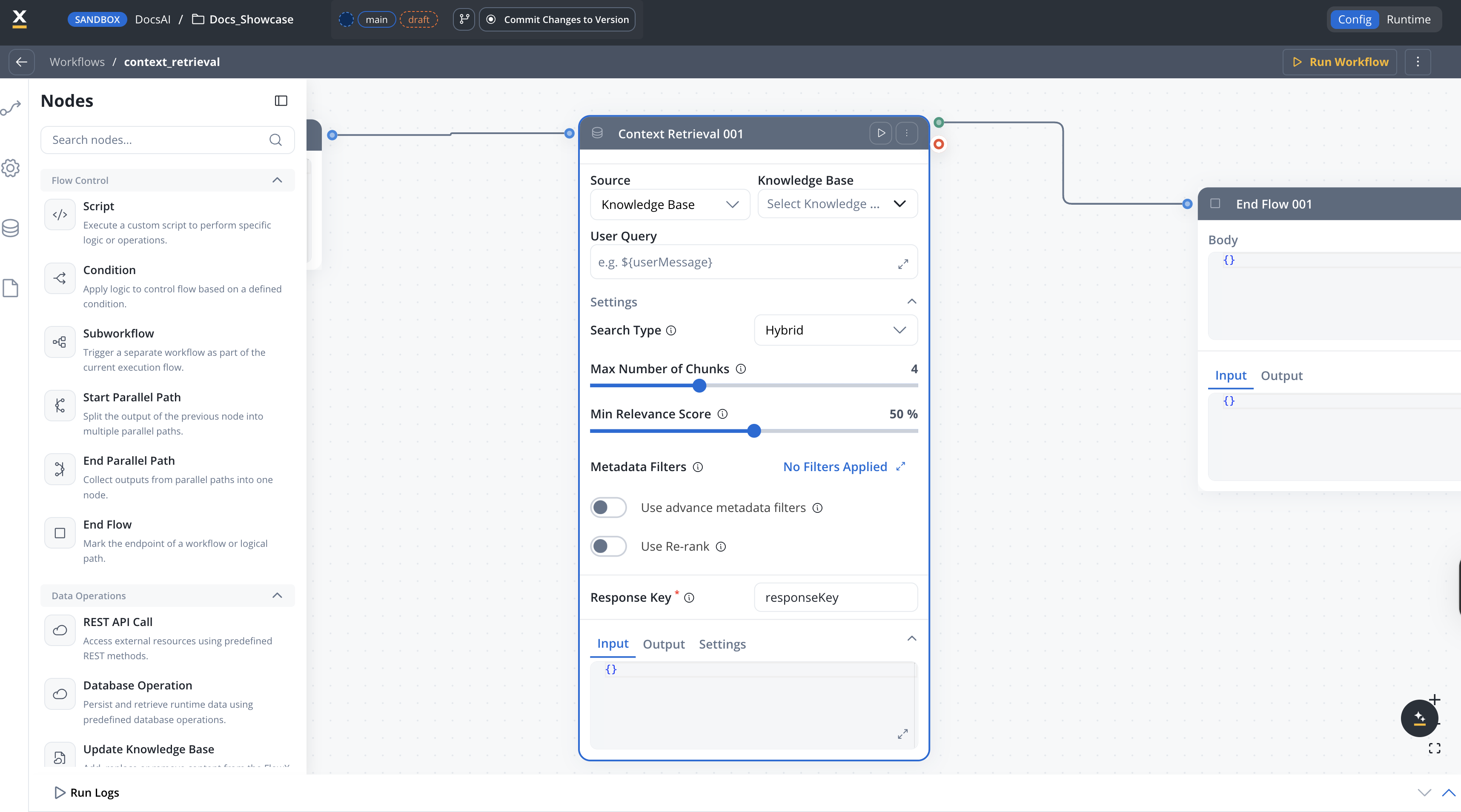
When to use Context Retrieval vs Custom Agent
Configuration
Knowledge Base
select
required
Select one or more Knowledge Base resource references to query.
Source
enum
The source to query.Options:
- Knowledge Base — Search the selected Knowledge Base (default)
- Memory — Search conversation memory
Settings
The settings below are available inside the Settings expander on the node configuration panel.Search type
enum
The strategy used for retrieving context from the Knowledge Base.Options:
Hybrid— Combines semantic and keyword search for balanced results (default)Semantic— Uses vector similarity for meaning-based searchKeywords— Uses traditional keyword matching
HYBRIDQuery parameters
number
Maximum number of relevant chunks to return. Configurable from 1 to 10.Default:
4number
Minimum relevance score threshold, expressed as a percentage (0–100). Only chunks with a relevance score above this threshold are returned. Not available when search type is set to Keywords.Default:
50Metadata filters
button
Opens a query builder modal where you compose conditions as field / operator / value triples. Operators depend on the metadata key type (equals, not equals, contains, in, not in, before, after, exists, etc.). Conditions can be grouped and combined with AND or OR.To filter by store, add a condition on the system metadata key
source.Typed operators and AND/OR grouping are supported. See Filtering by metadata for the full operator list.
boolean
Toggle to turn on advanced metadata filter expressions for more complex filtering logic. When turned on, a JSON expression field becomes available for defining property-based filters.Default:
falseRe-ranking
boolean
When turned on, applies a re-ranking model to the retrieved chunks, reordering them by relevance to the query. This can improve result quality at the cost of slightly higher latency.Default:
falseUser Query
string
required
The query text sent to the Knowledge Base. Supports Both runtime input variables and configuration parameters are available for placeholder resolution.
${} placeholder syntax for dynamic values from workflow input and configuration parameters.Example:Response Key
string
required
Key under which the retrieved chunks are stored in the workflow data, so downstream nodes can reference them.Default:
responseKeyOutput format
The Context Retrieval node returns an array of chunk objects. Each chunk contains:Example output
Error handling
If the Context Retrieval node fails, the workflow produces aWORKFLOW_NODE_CONTEXT_RETRIEVAL_ERROR error. Common causes include:
Knowledge Base not found
Knowledge Base not found
The referenced Knowledge Base does not exist or is not accessible.Solution: Verify the Knowledge Base exists in your project or dependencies and that you have the required permissions.
Invalid query
Invalid query
The operation prompt resolved to an empty or invalid query.Solution: Check that the
${} placeholders in your operation prompt reference valid input or config variables.Timeout
Timeout
The RAG search exceeded the configured timeout.Solution: The default timeout is 600 seconds (
flowx.ai-service.nodeRunnerTimeoutSeconds). Consider simplifying your query or reducing the topK value.Best practices
Related resources
Knowledge Base overview
Create and manage Knowledge Bases
Using Knowledge Base in workflows
Query Knowledge Bases with Custom Agent nodes
Custom Agent node
AI agents with MCP tools and Knowledge Base access
Integration Designer
Build and manage integration workflows