Learn how to upload documents, manage stores, and work with chunks in FlowX Knowledge Bases.
Overview
Stores are the building blocks of a Knowledge Base. Each store represents a collection of related information that has been ingested, processed, and indexed for semantic search.
Store types
There are two types of stores:
Manual
Files uploaded directly through the Knowledge Base admin interface
Workflow
Content added from a workflow through the Update Knowledge Base node: a file path or a pasted payload
Viewing stores
Navigate to your Knowledge Base to see all stores. The Stores tab displays:
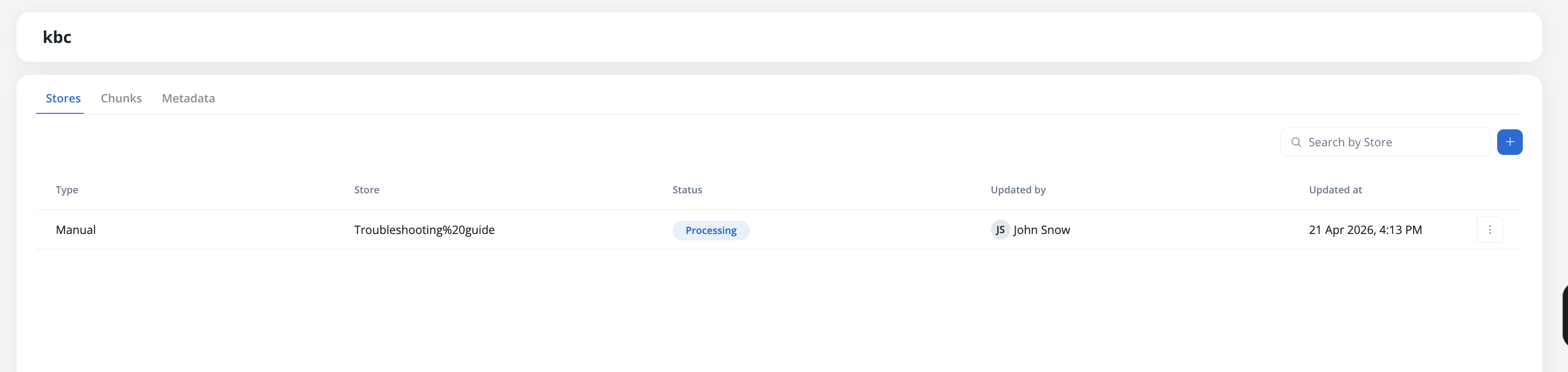
Store information
Each row shows:
string
Manual: Files uploaded in the Knowledge Base page
Workflow: Content added from a workflow through the Update Knowledge Base node
Test Operation: Content created from the Test Knowledge Base modal
string
The unique name of the store within the Knowledge Base
string
Current processing state:
New: Store created, awaiting content upload
Processing: Content is being uploaded, chunked, and indexed
Ready: Content is fully processed and available for queries
Failed: An error occurred during processing, or content is partially degraded
Status badges update in real-time — you don’t need to refresh the page to see status changes.
string
Username: For files uploaded in the Knowledge Base page
Workflow name: For content ingested through workflows
timestamp
Timestamp of the last upload or workflow operation execution
Uploading documents
1
Navigate to Knowledge Base
Open your Knowledge Base in FlowX Designer and select the Stores tab.
2
Open the upload dialog
Click the + button in the top-right of the Stores tab. A file picker opens.
3
Select file
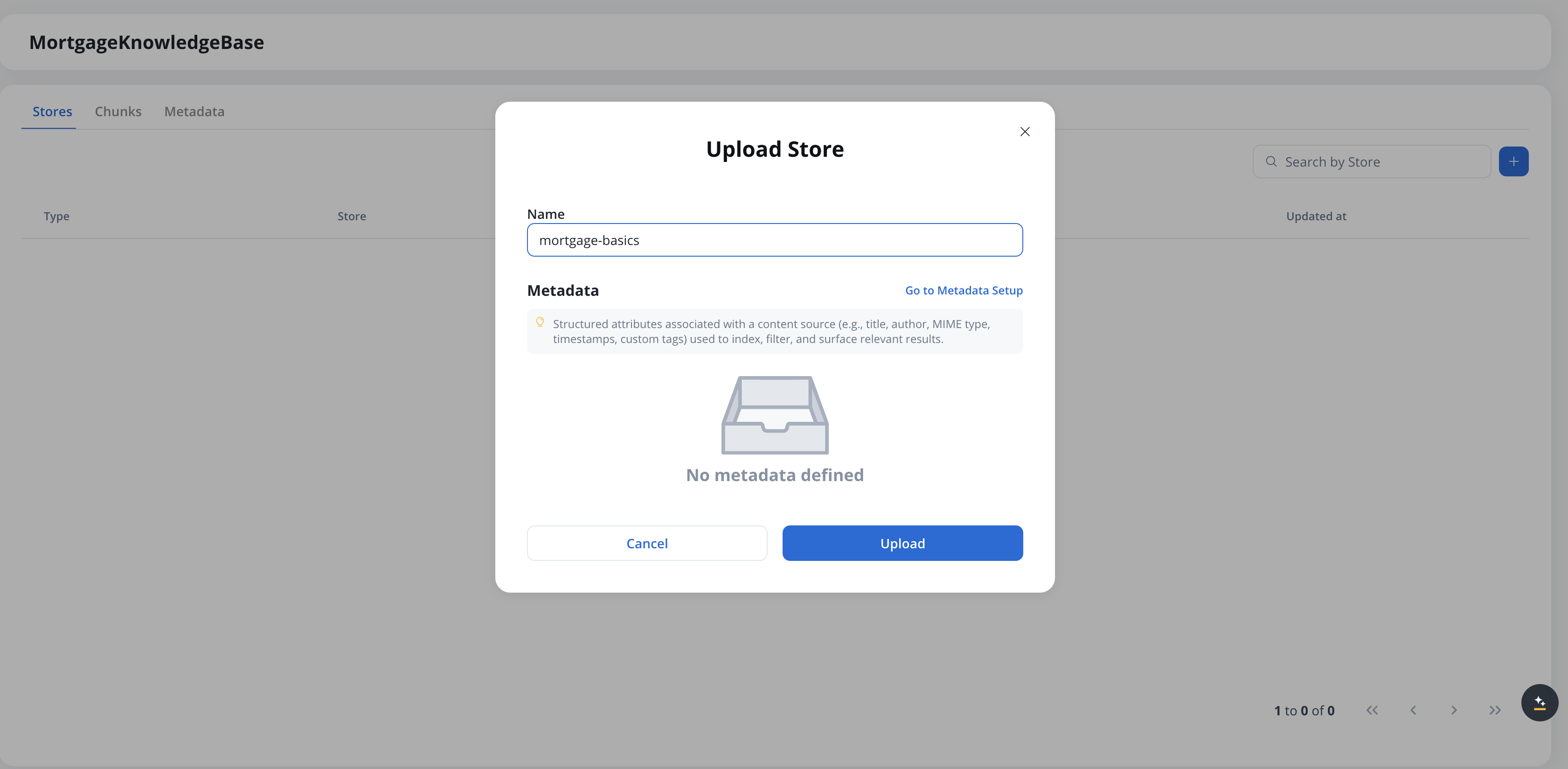
Choose a PDF file from your computer and click Open. The Upload Store modal appears.
4
Set the store name
The Name field is pre-filled with the file name (without extension). Edit it if needed — the name must be unique within the Knowledge Base.
5
Review metadata (optional)
The Metadata section shows the metadata schema defined for this Knowledge Base. If no metadata is defined, a “No metadata defined” placeholder appears — click Go to Metadata Setup to configure a schema on the Metadata tab before uploading. See User-defined metadata for details.
6
Upload
Click Upload to start the ingestion process. The store appears in the list with status Processing, and transitions to Ready once chunking and indexing complete.
File requirements
Supported formats:
PDF files
File size:
Maximum file size: 20 MB (can be changed using environment variables)
Future releases will support:
Images
PowerPoint presentations
Excel spreadsheets
Word document support
SaaS · 5.11
Available on SaaS with FlowX.AI 5.11. This feature is live on managed (SaaS) deployments now. Self-hosted deployments will receive it with the next LTS release family.
Word documents (.docx) can also be uploaded as stores, and are chunked and indexed the same way as PDFs. This applies to store uploads in the Designer; the Test Knowledge Base modal accepts PDF only — see Testing the Knowledge Base.
Each store operation takes one document or one payload. There is no multi-file selector and no folder-based ingestion, in the upload dialog or on the Update Knowledge Base node.To load a set of documents in one pass, see Ingesting many documents.
Store naming
When uploading a document, you must provide a unique store name:
Store name rules:
Must be unique within the Knowledge Base
Default name is the file name without extension
Choose descriptive names for easy identification
Consider using versioning in names (e.g., “Product Guide v2.1”)
Duplicate stores
If you select a file with the same name as an existing store, you’ll see a warning:
A Store with this name already exists. We recommend updating the existing store instead.
Available options:
Append Content: Add the new document’s content to the existing store
Replace Content: Replace the existing content with the new document
Cancel: Choose a different name or file
Adding content from a payload
SaaS · 5.11
Available on SaaS with FlowX.AI 5.11. This feature is live on managed (SaaS) deployments now. Self-hosted deployments will receive it with the next LTS release family.
Besides uploading a file, you can add content to a store by pasting a payload — free text, Markdown, or JSON — directly into a code editor. This is useful for seeding or updating a store quickly without producing a file, for example pasting a documentation snippet, a block of guidelines, or a JSON blob.The store add flow has a Source toggle:
Payload works for all three content operations — create, append, and replace — and is available both in the Knowledge Base admin (design time) and in the Data Sources Content view of a running app.
1
Switch Source to Payload
In the store’s add or update flow, set the Source toggle to Payload.
2
Paste the content
Enter text, Markdown, or JSON. JSON is not validated — content is accepted as-is.
3
Name the store (create only)
When creating a store, type a unique name. Append and replace derive the entry name automatically.
4
Submit
Content is processed and indexed asynchronously — the store shows Processing until Ready. Replacing a populated store asks for confirmation first, since it deletes existing content.
A payload is stored as plain text — wrapped into a text file and chunked like a document. JSON is kept as an opaque text blob, so it is not stored or queried field by field.
The store’s History distinguishes how each operation was performed — for example Append Content - Payload vs Append Content - Document.
Managing stores
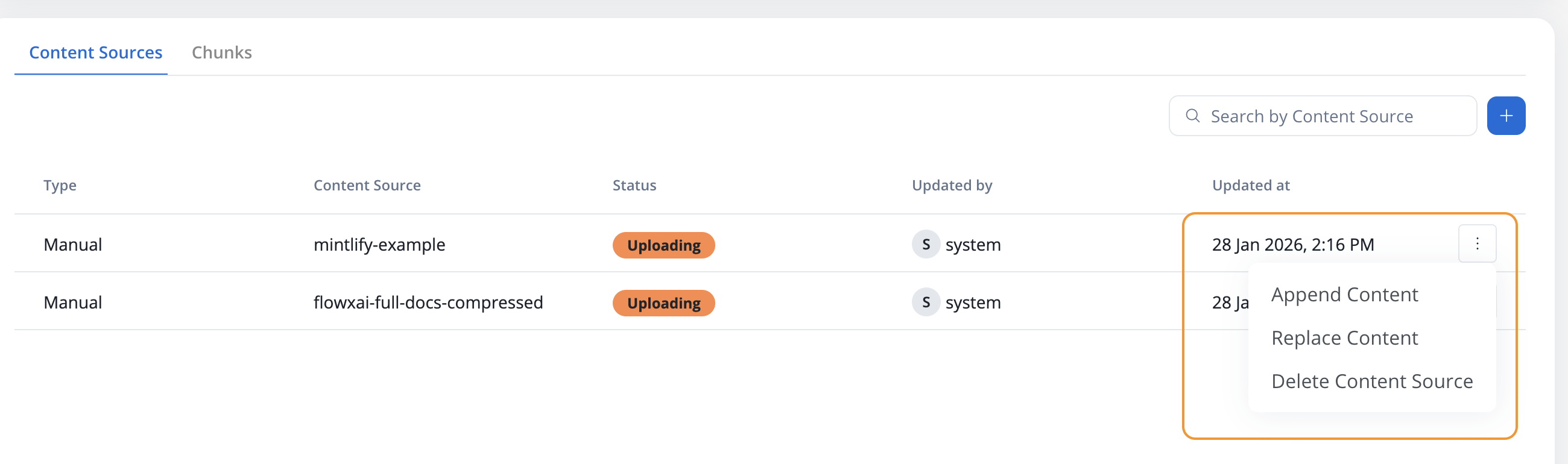
Once content is uploaded and processed, you can perform the following operations:
Append content
Add new content to an existing store without removing the existing chunks.
1
Select store
Click on the store you want to update
2
Choose Append Content
Select the Append Content operation
3
Upload new file
Select a new PDF file with additional content
4
Confirm
The new content will be processed and added to the existing chunks
Use case: Adding a new chapter to existing documentation or supplementing information without losing the original content.
Replace content
Replace all existing content in a store with new content.
1
Select store
Click on the store you want to replace
2
Choose Replace Content
Select the Replace Content operation
3
Upload new file
Select a new PDF file that will replace the existing content
4
Confirm
All existing chunks will be deleted and new chunks will be created from the new content
Replace Content will permanently delete all existing chunks from the store. This operation cannot be undone.
Use case: Updating documentation to a new version where the old content is no longer relevant.
Delete store
Remove a store and all its associated chunks from the Knowledge Base.
1
Select store
Click on the store you want to delete
2
Choose Delete
Select the Delete Store operation
3
Confirm deletion
Confirm that you want to permanently delete the store
Deleting a store will:
Remove all chunks generated from that content
Remove the store’s embeddings from the vector database (removal is asynchronous and may take a few moments to complete)
Permanently delete the content from the Knowledge Base
This operation cannot be undone
Delete entries
SaaS · 5.11
Available on SaaS with FlowX.AI 5.11. This feature is live on managed (SaaS) deployments now. Self-hosted deployments will receive it with the next LTS release family.
Remove individual chunks and entries from a store by matching their metadata, without deleting the whole store. This is a workflow-driven operation on the Update Knowledge Base node, useful when you need to retire a subset of content (for example, entries for a region or a document version) while keeping the rest of the store intact.
1
Add an Update Knowledge Base node
In your workflow, add an Update Knowledge Base node and select the target Knowledge Base and store.
2
Choose Delete entries
Set the operation to Delete entries.
3
Build the metadata filter
Define a metadata filter that matches the entries you want to remove. The filter uses the same query builder as chunk search (field / operator / value, grouped with AND / OR). See Filtering by metadata for the operator list.
4
Confirm
Matching entries and their chunks are soft-deleted from the store. Removal from the vector database is asynchronous and may take a few moments to complete.
A Delete entries operation requires a non-empty metadata filter. An empty or match-all filter is rejected, so a mis-configured node cannot wipe an entire store or Knowledge Base by accident.
Use case: Removing entries for a specific document version, region, or department while keeping the rest of the store’s content available for retrieval.
How do I disable, re-activate, or permanently delete an entry?
SaaS · 6.0
Available on SaaS with FlowX.AI 6.0. This feature is live on managed (SaaS) deployments now. Self-hosted deployments will receive it with the next LTS release family.
Open the menu on an entry in a store to manage it from FlowX Designer:
Disable Entry: takes a ready entry out of retrieval while keeping it in the store. The entry card shows a Disabled tag, and the store list shows how many entries are disabled. Entries removed by a Delete entries operation show as disabled too.
Activate Entry: puts a disabled entry back into retrieval.
Permanent delete: removes the entry, its indexed content, and its source document. FlowX Designer asks you to confirm with Delete, and the action can’t be undone. It isn’t available while the entry is still being indexed.
Disable and activate apply in one click, without a confirmation, because each reverses the other. The actions you see depend on your access rights on the Knowledge Base.
Update Knowledge Base node failure handling
SaaS · 5.11
Available on SaaS with FlowX.AI 5.11. This feature is live on managed (SaaS) deployments now. Self-hosted deployments will receive it with the next LTS release family.
When an Update Knowledge Base operation fails during a workflow run, the platform rolls back any partial changes and routes the node to its FAIL branch with a structured error payload. Nothing is left half-applied: the store returns to the state it was in before the operation started.The error payload is available on the FAIL branch (in paramValues) and in the workflow run console. It carries the following keys:
Key
Description
error
Human-readable message: “The operation [<operation>] on store [<store>] failed. Any partial changes were reversed.”
operation
The operation that failed: APPEND, REPLACE, DELETE, or DELETE_ENTRIES
storeName
The name of the store the operation targeted
errorReason
A machine-readable reason (see table below)
chunksRolledBack
The number of chunks reverted by the rollback
Use errorReason to branch your workflow’s error handling:
errorReason
Meaning
Automatically retried
size_exceeded
The content exceeded the allowed size
No
extraction_failed
Text could not be extracted from the document
Yes
chunking_failed
The content could not be chunked or embedded
Yes
timeout
The operation did not complete in time
No
unknown
The cause could not be determined
Yes
When an operation is automatically retried, the console shows a retry notification with the original error and a “Retrying [<operation>] on store [<store>].” message.
Retryable reasons (extraction_failed, chunking_failed, unknown) are retried automatically before the node fails. Non-retryable reasons (size_exceeded, timeout) route to the FAIL branch immediately.
Ingesting many documents
Each Update Knowledge Base execution ingests a single document or payload, so loading a set of documents means running the node once per file. Collect the files first, then fan out.
1
Collect the files in one action
Add a Multiple File Upload component to the screen where the documents are submitted. It uploads the whole selection in a single request and writes the per-file results back as a list.
2
Fan out over the list
Add a Call Activity node in parallel multi-instance mode and set that list as its input array. One subprocess instance starts per element.The input array must be an array of objects — the per-file result list qualifies, a plain list of path strings does not, and only arrays of objects appear in the Input Array picker. Map the fields you need into the subprocess in the node’s Data Mapping section: a child that receives no mapping knows only its position in the collection, not which file it is handling.
3
Ingest one file per instance
In the subprocess, call the workflow that holds the Update Knowledge Base node and pass it the single file path from item. Use Append Content so every instance adds to the same store.
If the documents already sit in object storage, you can skip the upload step: set the node’s File Source to S3 Protocol and drive the same fan-out from your own list. Build it as an array of objects, one per file carrying its path, so the Call Activity can bind it as an input array.
A wide fan-out issues many concurrent append operations against one store. Start with a small set to confirm the mapping before scaling up, and handle per-instance errors on the node’s FAIL branch — a subprocess that ends any way other than reaching an end node never reports back to its parent.
Emptying a knowledge base
Stores are the unit of deletion: there is no bulk operation that clears all content from a Knowledge Base at once. To empty a Knowledge Base while keeping it available for re-ingestion, delete each of its stores individually. You can automate this from a workflow with the Update Knowledge Base node using the Delete operation.
Deleting the Knowledge Base data source itself does not remove content that was already ingested. To remove a Knowledge Base completely, delete all of its stores first, then delete the data source.
Stores and version export
Store contents stay on the workspace where they were ingested. A project version export carries the Knowledge Base data-source definition (system, endpoints, metadata keys), but not the stores’ documents or their indexed embeddings. After importing the version on another workspace or environment, the Knowledge Base appears with empty stores — upload the content again there to rebuild the index. See Export/import a project for the full export behavior.
Store states
Stores progress through different states during their lifecycle. Status badges update in real-time — you don’t need to refresh the page to see transitions.
New
The initial state after content is uploaded to the Knowledge Base.What’s happening:
File has been transferred to the FlowX platform
Content is being validated and queued for processing
Duration: Usually a few seconds, depending on file size
Processing
Content is being chunked, embedded, and indexed in the vector database.What’s happening:
Content is being extracted from the document
Text is being split into semantically meaningful chunks
Chunks are being embedded and indexed in the vector database
Duration: Can take from seconds to minutes depending on content size
Ready
Store is fully processed and available for queries.What you can do:
Query the store in AI agents
View individual chunks
Append or replace content
Delete the store
Failed
An error occurred during processing, or the store is partially degraded.What to do:
Check the error message in the Store History modal
Verify the file format and content
Retry the operation
Error handling
When processing fails, the store will show a warning indicator.
Error states and recovery
Upload failed
Cause: File upload was interrupted or the file format is invalidSolution:
Cause: Error occurred while processing the contentSolution:
Check the Store History for specific error details
Verify the file is not corrupted
Contact support if the issue persists
Retry behavior
When retrying a failed operation:
Any chunks already created will be deleted
The content will be processed entirely from the beginning
No duplicate chunks will be created
Warning indicators
When a store has a failed update:
Yellow warning icon appears on the store row
Tooltip message: “Last Store update failed. Check history.”
Dismiss trigger: The warning is automatically dismissed after a successful update
Viewing store history
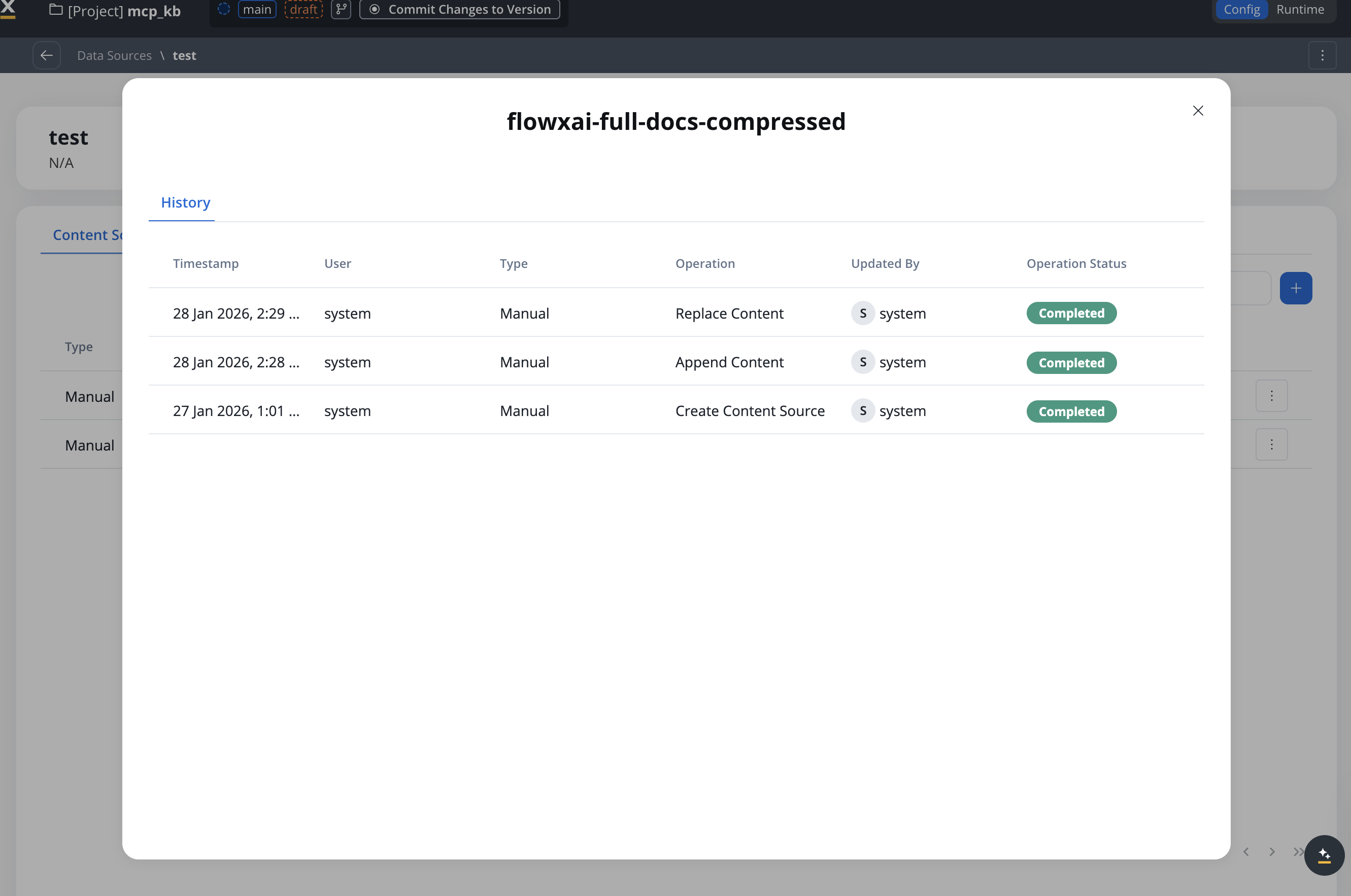
Store History lists every operation performed on a store. Open it from the store’s actions menu with View History.
Operation
Description
Create KB Store
Creates the store and inserts content
Append Content
Adds new content to existing chunks
Replace Content
Deletes existing content and inserts new content
Delete KB Store
Removes the store and all chunks
Update Content Metadata
Changes an entry’s metadata values
Each history entry includes:
Timestamp
User
Type (Manual/Workflow/Test Operation)
Operation performed
Updated By (user or workflow name)
Operation Status
Working with chunks
Chunks are the individual pieces of content that AI agents query. To view and test chunks:
1
Navigate to Chunks tab
Click the Chunks tab in your Knowledge Base
2
Search chunks
Enter a query to search for relevant chunks
3
Filter results
Apply filters to refine the search results
4
Review chunks
Examine the returned chunks, their relevance scores, and metadata
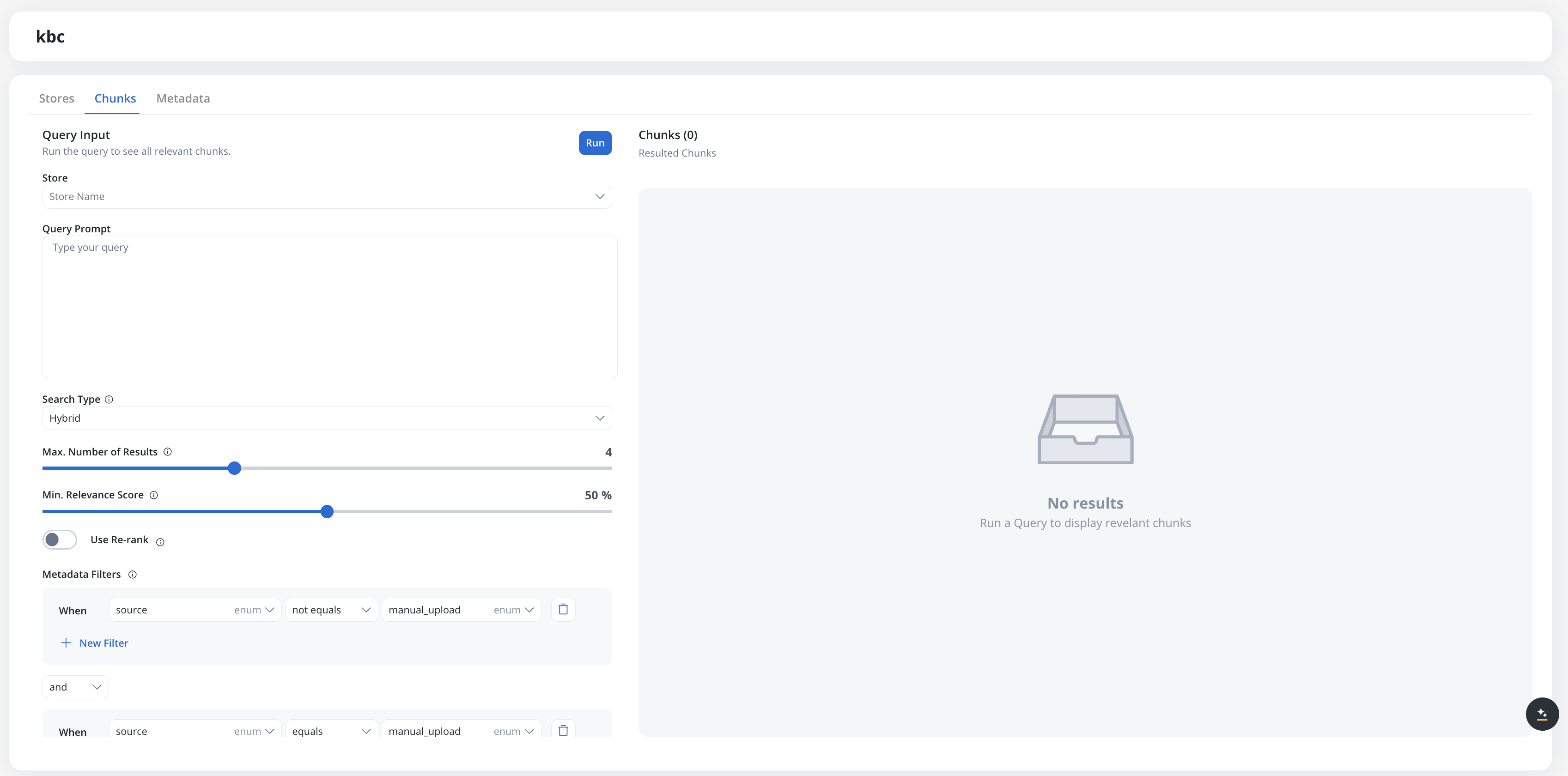
Chunk information
Each chunk displays:
percentage
How relevant the chunk is to your query (0-100%)
string
The store that generated this chunk (clickable link)
link
Link to the original document or JSON payload that created this chunk
text
The actual text content of the chunk
object
System metadata associated with the chunk:
source: manual_upload or from_workflow
path: Document filepath or JSON payload
chunk_id: UUID from the vector database
knowledge_base: Knowledge Base ID
User-defined metadata keys (if configured) are also included.
User-defined metadata
You can define custom metadata keys on a Knowledge Base and assign values to stores. User-defined metadata enables filtering and scoping when searching chunks — for example, filtering by department, document version, or region.
Defining metadata keys
Metadata keys are managed on the Metadata tab of the Knowledge Base data source.
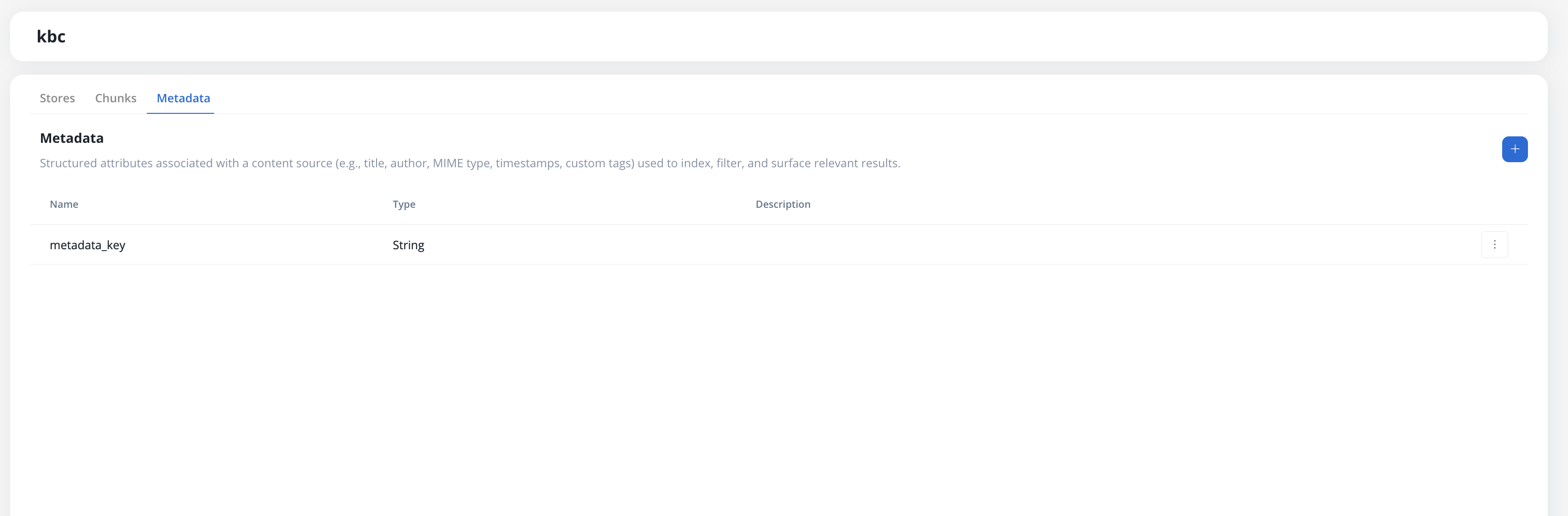
To add a key, click Add Metadata Key and fill in the following fields:
Field
Description
Name
Unique key name. Cannot be changed after creation.
Type
Data type: String, Number, Boolean, Enum, or Date. Cannot be changed after creation.
Enum values
Allowed values (only visible when Type is Enum). Values defined at creation cannot be removed.
Description
Optional free-text description of the key’s purpose.
Name and type are locked after a key is saved. Only description and enum values (additions only) can be updated later.
Assigning metadata values
When uploading or appending a store (manually or through the Update Knowledge Base workflow node), a Metadata section appears in the upload modal listing all defined keys for the Knowledge Base. Assign a value to each relevant key before uploading. The values are stored alongside the content and propagated to the vector database.
Filtering by metadata
When searching chunks (in the Chunks tab or through the Context Retrieval workflow node), you can add metadata filters using the query builder. System metadata keys are always available as filter options alongside any user-defined keys.
The metadata filter UI is a full query builder with typed operators, AND/OR logic, and grouping.
System metadata keys
System metadata keys are reserved names populated automatically by the platform. They are listed in the filter picker with human-readable labels and can be combined with user-defined keys.
Key
Type
Scope
Description
source
Enum
Entry
How the entry was added: manual_upload, from_workflow, test_operation
uploaded
Date
Entry
UTC timestamp set when the entry was added to the Knowledge Base
docName
String
Entry
File name of the uploaded document
docType
Enum
Entry
Document type derived from the file extension, lower-cased (starter values include pdf, xlsx, docx, txt)
docPages
Number
Entry
Total page count, reported once document parsing completes (a re-index refreshes the value)
storeOrigin
String
Entry
Name of the store the entry was added to
chunkCounter
Number
Chunk
Sequential position of the chunk within its source document
chunkType
Enum
Chunk
Structural element the chunk was extracted from (starter values include table, header, section_header, picture, paragraph)
chunkSection
String
Chunk
Document section heading the chunk belongs to
chunkPageStart
Number
Chunk
Page number where the chunk starts in the source document
chunkEntry
String
Chunk
Document name of the entry the chunk belongs to (equivalent to docName)
If a user-defined metadata key collides with a reserved system name, it is automatically renamed to <name>_user on upgrade. Wire-level identifiers stay plain; the filter picker shows human labels (for example, Doc type for docType).
Filters are expressed as conditions made of field / operator / value. Each condition uses operators appropriate to the metadata key’s type:
Type
Available operators
String
equals, not equals, contains, starts with, ends with, matches regex, in, not in, exists, is null
Number
equals, not equals, greater than, greater or equal, less than, less or equal, between, in, exists, is null
Boolean
is true, is false, exists
Date
equals, before, after, between, exists, is null
Enum
equals, not equals, in, not in, exists
Conditions are organized in groups. Within a group, conditions can be combined with and or or. Groups themselves are also combined with and or or, which lets you express non-trivial logic such as (region = "EU" AND tier IN ["gold", "platinum"]) OR priority >= 5.Use New Filter to add a condition and New Group to add a nested group.
Searching chunks
Use the Chunks tab to test how chunks will be retrieved by AI agents:
string
Filter by a specific store. Default: all stores
string
Enter a natural language question or search query
select
Strategy used for retrieving context:
Hybrid (default) — combines semantic and keyword search
Semantic — vector similarity only
Keywords — lexical match only (hides Min. Relevance Score)
number
Maximum number of chunks to return. Range: 1-10. Default: 4.
percentage
Only return chunks with relevance score above this threshold. Range: 0-100%. Hidden when Search Type is Keywords.
boolean
Reorders results to surface the best matches. Improves quality but takes slightly longer.
Use chunk search to understand what information AI agents will receive for different queries. This helps you optimize your Knowledge Base content and structure.
Best practices
Content organization
Organize by topic or version:
Create separate stores for different topics
Use versioning in store names (e.g., “User Guide v1.0”, “User Guide v2.0”)
Group related documents in the same store using Append Content
Content updates
Choose the right operation:
Use Append Content when adding supplementary information
Use Replace Content when updating to a new version
Test queries after updates to verify the changes work as expected
Error prevention
Avoid common errors:
Ensure PDF files are not corrupted before uploading
Use unique, descriptive names for stores
Monitor the status of stores during processing
Check Store History when errors occur
Next steps
Using in Workflows
Learn how to query Knowledge Bases from workflows
Related resources
Knowledge Base Overview
Understanding Knowledge Base capabilities
Last modified on October 27, 2026
{"docsConfig":{"theme":"mint","$schema":"https://mintlify.com/docs.json","name":"FlowX.AI","description":"Comprehensive documentation for FlowX.AI, the AI-driven process automation platform.","colors":{"primary":"#fcb813","light":"#fcb813","dark":"#fcb813"},"logo":{"light":"https://mintcdn.com/flowxai/38fXEM0a7v86Lg2m/logo/light.png?fit=max\u0026auto=format\u0026n=38fXEM0a7v86Lg2m\u0026q=85\u0026s=d767c06cef433b0a02f40a1f4f785eab","dark":"https://mintcdn.com/flowxai/38fXEM0a7v86Lg2m/logo/dark.png?fit=max\u0026auto=format\u0026n=38fXEM0a7v86Lg2m\u0026q=85\u0026s=6b8b8c3e7abd17acf6be8bffce4e599d"},"favicon":"https://mintcdn.com/flowxai/VVxnbzjz7JuL1Ngt/favicon2.svg?fit=max\u0026auto=format\u0026n=VVxnbzjz7JuL1Ngt\u0026q=85\u0026s=ef6a780a1ed3894c7b276bcc7b3c6c69","appearance":{"default":"dark","strict":false},"background":{"decoration":"grid","color":{"light":"#f4f4f5","dark":"#0a0b0d"}},"navbar":{"links":[],"primary":{"type":"button","label":"Academy","href":"https://academy.flowx.ai/"}},"footer":{"socials":{"linkedin":"https://www.linkedin.com/company/flowxai","x":"https://x.com/FlowX_ai","youtube":"https://www.youtube.com/@FlowX_AI"},"links":[{"header":"Documentation","items":[{"label":"Introduction","href":"https://docs.flowx.ai/5.9/docs/introduction"},{"label":"Platform overview","href":"https://docs.flowx.ai/5.9/docs/platform-overview/flowx-architecture"},{"label":"Designer","href":"https://docs.flowx.ai/5.9/docs/flowx-designer/overview"},{"label":"AI Platform","href":"https://docs.flowx.ai/5.9/ai-platform/ai-in-flowx"},{"label":"Use the docs with AI","href":"https://docs.flowx.ai/5.9/docs/getting-started/using-flowx-docs-with-ai"},{"label":"Release notes","href":"https://docs.flowx.ai/release-notes/overview"}]},{"header":"Resources","items":[{"label":"FlowX.AI Academy","href":"https://academy.flowx.ai"},{"label":"Support","href":"https://flowxai.zendesk.com/"}]},{"header":"Company","items":[{"label":"About FlowX.AI","href":"https://www.flowx.ai/about"},{"label":"Contact us","href":"mailto:hello@flowx.ai"},{"label":"Careers","href":"https://apply.workable.com/flowxai"}]},{"header":"Legal","items":[{"label":"Privacy Policy","href":"https://www.flowx.ai/privacy-policy"},{"label":"Cookie Policy","href":"https://www.flowx.ai/cookie-policy"},{"label":"Cookie settings","href":"https://docs.flowx.ai/?cookie-settings"},{"label":"Terms and Conditions","href":"https://www.flowx.ai/terms-and-conditions"}]}]},"search":{"prompt":"Search the docs"},"seo":{"metatags":{"zd-site-verification":"94tteg5ir5of8gkb4twzh"}},"fonts":{"heading":{"family":"Sora"},"body":{"family":"Geist"}},"styling":{"eyebrows":"breadcrumbs","codeblocks":"dark","latex":true},"integrations":{"ga4":{"measurementId":"G-CGW0FVK9YM"},"cookies":{"key":"flowx-docs-analytics-consent","value":"granted"}},"banner":{"content":"🚀 [See the latest FlowX.AI releases →](/release-notes/overview)","dismissible":true},"contextual":{"options":["copy","view","chatgpt","claude","perplexity","mcp","cursor","vscode"],"display":"header"},"metadata":{"timestamp":true},"navigation":{"pages":[]}},"deployment":{"deploymentMetadataValue":{"subdomain":"flowxai","hasAudioNarration":false,"actualSubdomain":"flowxai","customDomains":["docs.flowx.ai"],"gitSource":{"type":"github","owner":"flowx-ai","repo":"flowx-docs","deployBranch":"main","contentDirectory":"","isPrivate":true,"mountPath":"","label":""},"feedback":{"thumbs":true,"contextualFeedback":{"allowEmail":true},"agentFeedback":true},"entitlements":{"AI_CHAT":{"status":"ENABLED"},"CONTEXTUAL_FEEDBACK":{"status":"ENABLED"},"CODE_SNIPPET_FEEDBACK":{"status":"ENABLED"},"WEB_MCP":{"status":"ENABLED"},"NARRATION":{"status":"ENABLED"}},"buildId":"6afdcfb837a1d08643348e0b","clientVersion":"0.0.4177","searchFilterCounts":[{"language":"default","tag":"Documentation","count":800},{"language":"default","tag":"Building blocks","count":331},{"language":"default","tag":"Platform deep dive","count":267},{"language":"default","tag":"Setup guides","count":192},{"language":"default","tag":"UI Designer","count":140},{"language":"default","tag":"Release notes","count":139},{"language":"default","tag":"Release Notes","count":139},{"language":"default","tag":"Microservices","count":112},{"language":"default","tag":"Core extensions","count":107},{"language":"default","tag":"v5.x","count":89}],"searchSettings":{"isFiltersEnabled":true}},"assistantConfig":{"enableAskAiButton":false,"enableStarterQuestions":false,"enableContextualStarterQuestions":true,"enableAskAiSearchBar":true,"deflection":{"enabled":true,"type":"email","email":"learning.team@flowx.ai","showHelpButton":true}},"basePath":"","hasChatPermissions":true,"hasWebMcpPermissions":true,"toggles":[{"name":"kill-isr","enabled":true,"variant":{"name":"disabled","enabled":false,"feature_enabled":true},"impressionData":false},{"name":"custom-rbac-roles","enabled":true,"variant":{"name":"disabled","enabled":false,"feature_enabled":true},"impressionData":false},{"name":"agent-mintlify-slack","enabled":true,"variant":{"name":"disabled","enabled":false,"feature_enabled":true},"impressionData":false},{"name":"agent-integrations-settings","enabled":true,"variant":{"name":"disabled","enabled":false,"feature_enabled":true},"impressionData":false},{"name":"rbac-expansion","enabled":true,"variant":{"name":"disabled","enabled":false,"feature_enabled":true},"impressionData":false},{"name":"automations-pr-grouping","enabled":true,"variant":{"name":"disabled","enabled":false,"feature_enabled":true},"impressionData":false},{"name":"custom-prefix","enabled":true,"variant":{"name":"disabled","enabled":false,"feature_enabled":true},"impressionData":false},{"name":"analytics-v7","enabled":true,"variant":{"name":"disabled","enabled":false,"feature_enabled":true},"impressionData":false},{"name":"user-flows-analytics","enabled":true,"variant":{"name":"disabled","enabled":false,"feature_enabled":true},"impressionData":false},{"name":"no-publish-flow","enabled":true,"variant":{"name":"disabled","enabled":false,"feature_enabled":true},"impressionData":false},{"name":"workos-onboarding","enabled":true,"variant":{"name":"disabled","enabled":false,"feature_enabled":true},"impressionData":false},{"name":"snapshot-serving-live","enabled":true,"variant":{"name":"disabled","enabled":false,"feature_enabled":true},"impressionData":false},{"name":"stripTemperatureMiddleware","enabled":true,"variant":{"name":"disabled","enabled":false,"feature_enabled":true},"impressionData":false},{"name":"support-platform-pylon-zendesk","enabled":true,"variant":{"name":"disabled","enabled":false,"feature_enabled":true},"impressionData":false},{"name":"snapshot-serving","enabled":true,"variant":{"name":"disabled","enabled":false,"feature_enabled":true},"impressionData":false},{"name":"instant-rollback","enabled":true,"variant":{"name":"disabled","enabled":false,"feature_enabled":true},"impressionData":false},{"name":"granular-notifications-server","enabled":true,"variant":{"name":"disabled","enabled":false,"feature_enabled":true},"impressionData":false},{"name":"granular-notifications","enabled":true,"variant":{"name":"disabled","enabled":false,"feature_enabled":true},"impressionData":false},{"name":"automations-fable","enabled":true,"variant":{"name":"disabled","enabled":false,"feature_enabled":true},"impressionData":false},{"name":"fixed-ai-action-pricing","enabled":true,"variant":{"name":"disabled","enabled":false,"feature_enabled":true},"impressionData":false},{"name":"automation-resolve-merge-conflict","enabled":true,"variant":{"name":"disabled","enabled":false,"feature_enabled":true},"impressionData":false},{"name":"scoped-publishing","enabled":true,"variant":{"name":"disabled","enabled":false,"feature_enabled":true},"impressionData":false},{"name":"mintql","enabled":true,"variant":{"name":"disabled","enabled":false,"feature_enabled":true},"impressionData":false},{"name":"page-level-analytics","enabled":true,"variant":{"name":"disabled","enabled":false,"feature_enabled":true},"impressionData":false},{"name":"editor-version-history-v2","enabled":true,"variant":{"name":"disabled","enabled":false,"feature_enabled":true},"impressionData":false},{"name":"billing-page-v2","enabled":true,"variant":{"name":"disabled","enabled":false,"feature_enabled":true},"impressionData":false},{"name":"full-page-search","enabled":true,"variant":{"name":"disabled","enabled":false,"feature_enabled":true},"impressionData":false},{"name":"workspace-projects","enabled":true,"variant":{"name":"disabled","enabled":false,"feature_enabled":true},"impressionData":false},{"name":"assistant-v5","enabled":true,"variant":{"name":"disabled","enabled":false,"feature_enabled":true},"impressionData":false},{"name":"fork-pr-previews","enabled":true,"variant":{"name":"disabled","enabled":false,"feature_enabled":true},"impressionData":false},{"name":"revalidation-jwt","enabled":true,"variant":{"name":"disabled","enabled":false,"feature_enabled":true},"impressionData":false},{"name":"workos-sso-scim","enabled":true,"variant":{"name":"disabled","enabled":false,"feature_enabled":true},"impressionData":false},{"name":"hobby-abuse-scan","enabled":true,"variant":{"name":"disabled","enabled":false,"feature_enabled":true},"impressionData":false},{"name":"dashboard-inbox","enabled":true,"variant":{"name":"disabled","enabled":false,"feature_enabled":true},"impressionData":false},{"name":"workos-signup","enabled":true,"variant":{"name":"disabled","enabled":false,"feature_enabled":true},"impressionData":false},{"name":"turbopuffer-dual-write","enabled":true,"variant":{"name":"disabled","enabled":false,"feature_enabled":true},"impressionData":false},{"name":"workos-enabled","enabled":true,"variant":{"name":"disabled","enabled":false,"feature_enabled":true},"impressionData":false},{"name":"approve-review-flow","enabled":true,"variant":{"name":"disabled","enabled":false,"feature_enabled":true},"impressionData":false},{"name":"editor-metadata","enabled":true,"variant":{"name":"disabled","enabled":false,"feature_enabled":true},"impressionData":false},{"name":"sso-setup-deadline-banner","enabled":true,"variant":{"name":"disabled","enabled":false,"feature_enabled":true},"impressionData":false},{"name":"turbopuffer-serve","enabled":true,"variant":{"name":"disabled","enabled":false,"feature_enabled":true},"impressionData":false},{"name":"live-agents","enabled":true,"variant":{"name":"disabled","enabled":false,"feature_enabled":true},"impressionData":false},{"name":"starter-pricing","enabled":true,"variant":{"name":"treatment","enabled":true,"payload":{"type":"string","value":"treatment"},"feature_enabled":true},"impressionData":false},{"name":"llms-txt-v2","enabled":true,"variant":{"name":"disabled","enabled":false,"feature_enabled":true},"impressionData":false},{"name":"wildcard-email-auth","enabled":true,"variant":{"name":"disabled","enabled":false,"feature_enabled":true},"impressionData":false}],"privacy":{"consentBanner":{"enabled":false}},"googleFontsInlined":true},"customCss":[{"filePath":"custom.css","content":"@import url('https://fonts.googleapis.com/css2?family=Geist+Mono:wght@400;500;600\u0026display=swap');code,pre,kbd,samp{font-family:\"Geist Mono\", ui-monospace, SFMono-Regular, Menlo, monospace}#topbar-cta-button{color:#131007!important}.label-version{display:inline-block;font-weight:bold;color:#ffffff;background-color:#007bff;padding:0.5px 15px;border-radius:12px;box-shadow:0 2px 4px rgba(0, 0, 0, 0.1);font-size:0.9em;text-transform:uppercase;letter-spacing:0.5px;margin-right:5px;transition:background-color 0.3s ease;text-decoration:none}.label-version:hover{background-color:#0056b3}#banner{background:linear-gradient(90deg, #0a0b0d 0%, #0e1013 55%, #2a2310 100%)!important;border-bottom:1px solid rgba(252, 184, 19, 0.30);backdrop-filter:saturate(120%)}#banner a{color:#fcb813!important;text-decoration-color:rgba(252, 184, 19, 0.55)!important;transition:opacity 0.2s ease}#banner a:hover{opacity:0.85}:root{--flowx-yellow-50: #fff8e7;--flowx-yellow-200: #ffdf92;--flowx-yellow-400: #ffc739;--flowx-yellow-500: #fcb813;--flowx-yellow-800: #8a5e00;--flowx-yellow-900: #6b4e08;--flowx-neutrals-50: #f7f8f9;--flowx-neutrals-100: #e3e8ed;--flowx-neutrals-200: #cbd1db;--flowx-neutrals-300: #a6b0be;--flowx-neutrals-400: #8390a2;--flowx-neutrals-500: #64748b;--flowx-neutrals-700: #475263;--flowx-neutrals-800: #2a313a;--flowx-neutrals-900: #1d232c;--flowx-blue-50: #e6f0fb;--flowx-blue-200: #8abbed;--flowx-blue-700: #004c99;--flowx-blue-900: #002d5b;--flowx-elevation-m: 0 8px 16px #1634621a}.cb-wrap{margin-top:32px}.cb-filters{display:flex;flex-wrap:wrap;gap:8px;margin-bottom:24px}.cb-filters input{position:absolute;width:1px;height:1px;overflow:hidden;clip:rect(0 0 0 0);white-space:nowrap}.cb-filters label{cursor:pointer;user-select:none;font-size:12px;line-height:16px;font-weight:600;padding:8px 16px;border-radius:120px;border:1px solid var(--flowx-neutrals-200);color:var(--flowx-neutrals-500);background:transparent;transition:border-color 0.15s ease, background 0.15s ease, color 0.15s ease}.cb-filters label span{margin-left:6px;opacity:0.55;font-variant-numeric:tabular-nums}.cb-filters label:hover{border-color:var(--flowx-yellow-500);color:var(--flowx-neutrals-900)}.cb-filters input:checked+label{background:var(--flowx-yellow-500);border-color:var(--flowx-yellow-500);color:var(--flowx-neutrals-900)}.cb-filters input:focus-visible+label{outline:2px solid var(--flowx-yellow-500);outline-offset:2px}.dark .cb-filters label{border-color:var(--flowx-neutrals-700);color:var(--flowx-neutrals-400)}.dark .cb-filters label:hover{border-color:var(--flowx-yellow-400);color:var(--flowx-neutrals-50)}.dark .cb-filters input:checked+label{background:var(--flowx-yellow-500);border-color:var(--flowx-yellow-500);color:var(--flowx-neutrals-900)}.cb-grid{display:grid;grid-template-columns:repeat(3, minmax(0, 1fr));gap:16px}@media (max-width: 1024px){.cb-grid{grid-template-columns:repeat(2, minmax(0, 1fr))}}@media (max-width: 640px){.cb-grid{grid-template-columns:1fr}}.cb-wrap:has(#cb-cookbook:checked) .cb-card:not([data-f~=\"cookbook\"]),.cb-wrap:has(#cb-tutorial:checked) .cb-card:not([data-f~=\"tutorial\"]),.cb-wrap:has(#cb-guide:checked) .cb-card:not([data-f~=\"guide\"]),.cb-wrap:has(#cb-pattern:checked) .cb-card:not([data-f~=\"pattern\"]),.cb-wrap:has(#cb-docs:checked) .cb-card:not([data-f~=\"docs\"]),.cb-wrap:has(#cb-conv:checked) .cb-card:not([data-f~=\"conversational\"]),.cb-wrap:has(#cb-integr:checked) .cb-card:not([data-f~=\"integrations\"]),.cb-wrap:has(#cb-ui:checked) .cb-card:not([data-f~=\"ui\"]){display:none}.cb-card{position:relative;display:flex;flex-direction:column;gap:12px;padding:24px;border:1px solid var(--flowx-neutrals-100);border-radius:16px;background:transparent;text-decoration:none!important;transition:border-color 0.2s ease, transform 0.2s ease, box-shadow 0.2s ease}.cb-card::after{content:\"\\2192\";position:absolute;top:20px;right:24px;font-size:14px;line-height:22px;color:var(--flowx-neutrals-300);transition:color 0.2s ease, transform 0.2s ease}.cb-card:hover{transform:translateY(-2px);border-color:var(--flowx-yellow-500);box-shadow:var(--flowx-elevation-m)}.cb-card:hover::after{color:var(--flowx-neutrals-900);transform:translateX(4px)}.dark .cb-card{border-color:var(--flowx-neutrals-800)}.dark .cb-card:hover{border-color:var(--flowx-yellow-400);box-shadow:0 8px 16px rgba(0, 0, 0, 0.4)}.dark .cb-card:hover::after{color:var(--flowx-yellow-400)}@media (prefers-reduced-motion: reduce){.cb-card,.cb-card::after{transition:none}.cb-card:hover{transform:none}.cb-card:hover::after{transform:none}}.cb-tags{display:flex;flex-wrap:wrap;gap:6px;padding-right:24px}.cb-tag{font-size:10px;line-height:12px;font-weight:600;letter-spacing:0.05em;text-transform:uppercase;padding:4px 8px;border-radius:4px;background:var(--flowx-neutrals-50);color:var(--flowx-neutrals-500)}.cb-tag-tut{background:var(--flowx-yellow-50);color:var(--flowx-yellow-800)}.cb-tag-pat{background:var(--flowx-neutrals-900);color:#ffffff}.cb-tag-cook{background:var(--flowx-yellow-500);color:var(--flowx-neutrals-900)}.cb-tag-gui{background:var(--flowx-blue-50);color:var(--flowx-blue-700)}.dark .cb-tag{background:var(--flowx-neutrals-800);color:var(--flowx-neutrals-400)}.dark .cb-tag-tut{background:var(--flowx-yellow-900);color:var(--flowx-yellow-200)}.dark .cb-tag-pat{background:var(--flowx-neutrals-50);color:var(--flowx-neutrals-900)}.dark .cb-tag-cook{background:var(--flowx-yellow-500);color:var(--flowx-neutrals-900)}.dark .cb-tag-gui{background:var(--flowx-blue-900);color:var(--flowx-blue-200)}.cb-title{display:block;font-size:14px;line-height:22px;font-weight:600;letter-spacing:-0.01em;color:var(--flowx-neutrals-900)}.dark .cb-title{color:var(--flowx-neutrals-50)}.cb-desc{display:block;font-size:12px;line-height:18px;font-weight:400;color:var(--flowx-neutrals-500)}.dark .cb-desc{color:var(--flowx-neutrals-400)}.cb-foot{display:flex;flex-wrap:wrap;align-items:baseline;gap:16px;margin-top:40px;padding-top:24px;border-top:1px solid var(--flowx-neutrals-100);font-size:12px;line-height:16px}.dark .cb-foot{border-top-color:var(--flowx-neutrals-800)}.cb-foot span{color:var(--flowx-neutrals-400)}.dark .cb-foot span{color:var(--flowx-neutrals-500)}.cb-foot a{font-weight:600;text-decoration:none;color:var(--flowx-neutrals-900);border-bottom:1px solid var(--flowx-yellow-500);padding-bottom:1px}.dark .cb-foot a{color:var(--flowx-neutrals-50)}.cb-foot a:hover{color:var(--flowx-yellow-800)}.dark .cb-foot a:hover{color:var(--flowx-yellow-400)}#content-area:has(.fxh-hero) #header{display:none}main#content-container:has(.fxh-hero){max-width:none}#content-area:has(.fxh-hero){width:100%!important}#content-area:has(.fxh-hero) #content{max-width:none;margin-top:0}#content-area:has(.fxh-hero) #content div[class*=\"--page-padding\"]{--page-padding: 0px}#content-area:has(.fxh-hero) #content>:not(.fxh-hero){max-width:1360px;margin-left:auto;margin-right:auto}.fxh-hero{position:relative;text-align:center}@media (min-width: 1024px){.fxh-hero{margin-top:-2.5rem}}.fxh-hero__bg{position:sticky;top:0;z-index:0;height:100dvh;overflow:clip;border-radius:18px;background:#0a0b0d;border:1px solid rgba(255, 255, 255, 0.08)}.fxh-hero__bg::before{content:\"\";position:absolute;inset:0;background-image:linear-gradient(rgba(255, 255, 255, 0.045) 1px, transparent 1px),\n linear-gradient(90deg, rgba(255, 255, 255, 0.045) 1px, transparent 1px);background-size:56px 56px;-webkit-mask-image:radial-gradient(ellipse at 50% 0%, #000 25%, transparent 75%);mask-image:radial-gradient(ellipse at 50% 0%, #000 25%, transparent 75%);pointer-events:none}.fxh-hero__bg::after{content:\"\";position:absolute;top:-45%;left:25%;width:50%;height:90%;background:radial-gradient(closest-side, rgba(252, 184, 19, 0.10), transparent 70%);pointer-events:none}.fxh-hero__steps{position:relative;z-index:1;margin-top:-100dvh}.fxh-hero__step{position:relative;min-height:calc(100dvh - 9.5rem);display:grid;grid-template-columns:minmax(0, 1fr);align-content:center;padding:48px clamp(24px, 5vw, 56px) 96px}.fxh-hero__step:not(:first-child){min-height:72dvh;padding-top:48px;padding-bottom:48px}.fxh-hero--single .fxh-hero__bg{position:absolute;inset:0;height:auto;z-index:0}.fxh-hero--single .fxh-hero__steps{margin-top:0}.fxh-hero--single .fxh-hero__step{min-height:calc(100dvh - 9.5rem)}.fxh-hero--slim .fxh-hero__step{min-height:min(46dvh, 480px);padding-top:clamp(40px, 6vh, 64px);padding-bottom:clamp(40px, 6vh, 64px)}.fxh-step-title{display:block;font-family:\"Sora\", sans-serif;font-size:clamp(1.7rem, 3.4vw, 2.6rem);font-weight:700;letter-spacing:-0.02em;line-height:1.1;color:#f5f5f0;max-width:20ch;margin:0 auto clamp(18px, 3vh, 28px)}.fxh-vs{display:flex;flex-wrap:wrap;justify-content:center;gap:clamp(9px, 1.1vw, 14px);max-width:min(780px, 100%);margin:clamp(14px, 3vh, 30px) auto 0;padding:0;list-style:none}.fxh-vs li{display:flex;align-items:center;gap:12px;padding:11px clamp(18px, 1.6vw, 24px);border:1px solid rgba(255, 255, 255, 0.14);background:rgba(255, 255, 255, 0.035);-webkit-backdrop-filter:blur(12px);backdrop-filter:blur(12px);border-radius:999px}.fxh-vs__no{font-family:\"Geist Mono\", ui-monospace, SFMono-Regular, Menlo, monospace;font-size:11px;color:rgba(255, 255, 255, 0.42)}.fxh-vs__name{font-family:\"Sora\", sans-serif;font-size:clamp(12.5px, 1.1vw, 15px);font-weight:600;letter-spacing:0.01em;color:rgba(255, 255, 255, 0.9)}.fxh-scroll{position:absolute;bottom:clamp(20px, 4vh, 40px);left:50%;transform:translateX(-50%);display:flex;flex-direction:column;align-items:center;gap:8px;font-family:\"Geist Mono\", ui-monospace, SFMono-Regular, Menlo, monospace;font-size:10px;letter-spacing:0.3em;text-transform:uppercase;color:rgba(255, 255, 255, 0.42)}.fxh-scroll-line{width:1px;height:46px;background:linear-gradient(rgba(255, 255, 255, 0.45), transparent)}.fxh-eyebrow{font-family:\"Geist Mono\", ui-monospace, SFMono-Regular, Menlo, monospace;display:inline-flex;align-items:center;gap:12px;font-size:13px;font-weight:400;letter-spacing:0.22em;text-transform:uppercase;color:#a3a39a;margin-bottom:28px}.fxh-tick{display:inline-block;width:8px;height:8px;flex-shrink:0;background:#fcb813;animation:fxh-tick-pulse 2.6s ease-in-out infinite}@keyframes fxh-tick-pulse{0%,100%{opacity:1}50%{opacity:0.35}}.fxh-title{display:block;font-family:\"Sora\", sans-serif;font-weight:700;letter-spacing:-0.02em;line-height:1.08;max-width:920px;margin:0 auto clamp(20px, 3vh, 28px);text-wrap:balance}.fxh-line{display:block;font-size:clamp(1.7rem, 3.4vw, 2.7rem);color:#f5f5f0}.fxh-line--dim{color:rgba(244, 245, 243, 0.58);margin-top:0.06em}.fxh-amber{color:#fcb813}.fxh-sub{display:block;max-width:62ch;margin:0 auto clamp(20px, 3vh, 28px);font-size:15px;line-height:1.55;color:#b9b9b1}.fxh-ctas{display:flex;flex-wrap:wrap;justify-content:center;gap:12px;position:relative}.fxh-cta{display:inline-flex;align-items:center;justify-content:center;gap:8px;white-space:nowrap;padding:12px 22px;border-radius:10px;font-size:15px;font-weight:550;text-decoration:none!important;transition:background 0.2s ease, border-color 0.2s ease, color 0.2s ease}.fxh-cta--primary{background:#fcb813;color:#131007!important;font-weight:640}.fxh-cta--primary:hover{background:#ffc739}.fxh-cta--ghost{border:1px solid rgba(255, 255, 255, 0.16);color:#f4f5f3!important}.fxh-cta--ghost:hover{border-color:rgba(255, 255, 255, 0.42);background:rgba(255, 255, 255, 0.04)}.fxh-term{position:relative;width:min(680px, 100%);margin:clamp(24px, 4vh, 36px) auto clamp(22px, 3.5vh, 32px);text-align:left;border:1px solid rgba(255, 255, 255, 0.12);border-radius:18px;overflow:hidden;background:linear-gradient(180deg, rgba(255, 255, 255, 0.10) 0, rgba(255, 255, 255, 0.03) 20%, rgba(255, 255, 255, 0.01) 60%, rgba(255, 255, 255, 0.045) 100%),\n rgba(10, 11, 13, 0.91);box-shadow:0 24px 60px rgba(0, 0, 0, 0.5)}.fxh-term__bar{display:flex;align-items:center;gap:16px;padding:14px 22px;font-family:\"Geist Mono\", ui-monospace, SFMono-Regular, Menlo, monospace;font-size:13px;letter-spacing:0.06em;color:rgba(255, 255, 255, 0.62);border-bottom:1px solid rgba(255, 255, 255, 0.12)}.fxh-term__dots{display:inline-flex;gap:7px}.fxh-term__dots i{width:11px;height:11px;border-radius:50%;border:1px solid rgba(255, 255, 255, 0.12)}.fxh-term__body{display:flex;flex-direction:column;gap:14px;padding:24px 26px 26px;font-family:\"Geist Mono\", ui-monospace, SFMono-Regular, Menlo, monospace;font-size:14px}.fxh-term__body p{margin:0;color:rgba(255, 255, 255, 0.72)}.fxh-term__prompt{color:#fcb813;margin-right:8px}.fxh-caret{display:inline-block;width:9px;height:1.05em;margin-left:6px;vertical-align:text-bottom;background:rgba(252, 184, 19, 0.85);animation:fxh-caret-blink 1.1s steps(1) infinite}@keyframes fxh-caret-blink{50%{opacity:0}}.fxh-term__log{display:grid;gap:5px;align-content:start}.fxh-term__log:empty{display:none}.fxh-term__log .ln{display:flex;justify-content:space-between;gap:16px;font-size:12.5px;color:rgba(255, 255, 255, 0.58);opacity:0;transform:translateY(6px);animation:fxh-ln-in 0.45s cubic-bezier(0.16, 1, 0.3, 1) forwards}.fxh-term__log .ok{color:#fcb813;margin-right:8px}.fxh-term__log .t{color:rgba(255, 255, 255, 0.34)}@keyframes fxh-ln-in{to{opacity:1;transform:none}}.fxh-term__ver{margin-left:auto;color:rgba(255, 255, 255, 0.34)}.fxh-field{position:absolute;inset:0;width:100%;height:100%;pointer-events:none;opacity:0.55}.fxh-hero--live .fxh-hero__bg::before{display:none}.fxh-hero--live .fxh-hero__step:first-child .fxh-eyebrow,.fxh-hero--live .fxh-hero__step:first-child .fxh-title,.fxh-hero--live .fxh-hero__step:first-child .fxh-sub,.fxh-hero--live .fxh-hero__step:first-child .fxh-ctas,.fxh-hero--live .fxh-hero__step:first-child .fxh-scroll{opacity:0;transform:translateY(26px);animation:fxh-rv-in 0.9s cubic-bezier(0.16, 1, 0.3, 1) forwards}.fxh-hero--live .fxh-hero__step:first-child .fxh-eyebrow{animation-delay:0.15s}.fxh-hero--live .fxh-hero__step:first-child .fxh-title{animation-delay:0.26s}.fxh-hero--live .fxh-hero__step:first-child .fxh-sub{animation-delay:0.48s}.fxh-hero--live .fxh-hero__step:first-child .fxh-ctas{animation-delay:0.59s}.fxh-hero--live .fxh-hero__step:first-child .fxh-scroll{animation-delay:0.92s}@keyframes fxh-rv-in{to{opacity:1;transform:none}}@media (max-width: 640px){.fxh-hero__step{padding:72px 20px}}@media (prefers-reduced-motion: reduce){.fxh-tick,.fxh-caret{animation:none}.fxh-hero--live .fxh-hero__step:first-child .fxh-eyebrow,.fxh-hero--live .fxh-hero__step:first-child .fxh-title,.fxh-hero--live .fxh-hero__step:first-child .fxh-sub,.fxh-hero--live .fxh-hero__step:first-child .fxh-ctas,.fxh-hero--live .fxh-hero__step:first-child .fxh-scroll{animation:none;opacity:1;transform:none}}.cb-grid--2{grid-template-columns:repeat(2, minmax(0, 1fr))}@media (max-width: 640px){.cb-grid--2{grid-template-columns:1fr}}:root{--fxl-mono: \"Geist Mono\", ui-monospace, SFMono-Regular, Menlo, monospace;--fxl-display: \"Sora\", sans-serif;--fxl-ease: cubic-bezier(0.16, 1, 0.3, 1);--fxl-text: #17181b;--fxl-dim: rgba(23, 24, 27, 0.64);--fxl-faint: rgba(23, 24, 27, 0.44);--fxl-line: rgba(24, 24, 27, 0.12);--fxl-line-soft: rgba(24, 24, 27, 0.07);--fxl-amber-text: #8a5e00;--fxl-bg: #f4f4f5;--fxl-panel: #fcfcfd;--fxl-amber-soft: rgba(252, 184, 19, 0.12)}.dark{--fxl-text: #f4f5f3;--fxl-dim: rgba(244, 245, 243, 0.58);--fxl-faint: rgba(244, 245, 243, 0.34);--fxl-line: rgba(255, 255, 255, 0.08);--fxl-line-soft: rgba(255, 255, 255, 0.05);--fxl-amber-text: #fcb813;--fxl-bg: #0a0b0d;--fxl-panel: #0c0e11;--fxl-amber-soft: rgba(252, 184, 19, 0.08)}.fxl-no{display:flex;align-items:center;gap:12px;font-family:var(--fxl-mono);font-size:12px;letter-spacing:0.18em;text-transform:uppercase;color:var(--fxl-faint);margin-top:8px}.fxl-no::after{content:\"\";flex:1;height:1px;background:var(--fxl-line-soft)}.fxl-no+h2{margin-top:10px}.fxl-grid{display:grid;grid-template-columns:repeat(2, 1fr);gap:1px;background:var(--fxl-line);border:1px solid var(--fxl-line);border-radius:16px;overflow:hidden}.fxl-cell{position:relative;display:block;background:var(--fxl-panel);padding:clamp(24px, 2.6vw, 34px);text-decoration:none!important;transition:background 0.2s ease}.fxl-cell:hover{background:var(--fxl-amber-soft)}.fxl-cell::after{content:\"\\2192\";position:absolute;top:24px;right:26px;font-family:var(--fxl-mono);font-size:14px;color:var(--fxl-faint);transition:color 0.2s ease, transform 0.2s ease}.fxl-cell:hover::after{color:var(--fxl-amber-text);transform:translateX(4px)}.fxl-cell__no{display:block;font-family:var(--fxl-mono);font-size:11px;letter-spacing:0.2em;color:var(--fxl-amber-text);margin-bottom:14px}.fxl-cell__title{display:block;font-family:var(--fxl-display);font-size:18px;font-weight:600;letter-spacing:-0.01em;color:var(--fxl-text);margin-bottom:6px}.fxl-cell__desc{display:block;font-size:13.5px;line-height:1.5;color:var(--fxl-dim);max-width:46ch}.fxl-grid--1{grid-template-columns:1fr}.fxl-grid--3{grid-template-columns:repeat(3, 1fr)}@media (max-width: 1024px){.fxl-grid--3{grid-template-columns:repeat(2, 1fr)}}@media (max-width: 640px){.fxl-grid,.fxl-grid--3{grid-template-columns:1fr}}.fxl-cell--eval{grid-column:1 / -1;display:grid;grid-template-columns:minmax(0, 1fr) minmax(0, 1.05fr);gap:32px;align-items:center}.fxl-cell--eval::after{content:none}.fxl-cell--eval:hover{background:var(--fxl-panel)}.fxl-eval__links{display:flex;flex-wrap:wrap;gap:8px 18px;margin-top:18px}.fxl-eval__links a{font-family:var(--fxl-mono);font-size:12px;color:var(--fxl-amber-text);text-decoration:none!important;border-bottom:1px solid rgba(252, 184, 19, 0.45);padding-bottom:1px}.fxl-eval__links a:hover{border-bottom-color:var(--fxl-amber-text)}.fxl-stack{font-family:var(--fxl-mono);font-size:12px;color:var(--fxl-faint)}.fxl-stack__row{position:relative;display:flex;align-items:center;justify-content:space-between;gap:12px;padding:7px 12px 7px 30px;border-bottom:1px solid var(--fxl-line-soft)}.fxl-stack__row:last-child{border-bottom:none}.fxl-stack__row span:last-child{font-size:10.5px;letter-spacing:0.08em;opacity:0.8}.fxl-stack__tick{position:absolute;left:10px;top:50%;width:7px;height:7px;margin-top:-3.5px;border-radius:2px;background:var(--fxl-line)}.fxl-stack__client{border:1px solid var(--fxl-line);border-radius:10px;color:var(--fxl-dim)}.fxl-stack__client .fxl-stack__tick{background:#fcb813}.fxl-stack__gw{display:flex;align-items:center;gap:10px;padding:10px 0 10px 30px;font-size:10.5px;letter-spacing:0.16em;text-transform:uppercase}.fxl-stack__gw::after{content:\"\";flex:1;height:1px;background:repeating-linear-gradient(90deg, var(--fxl-line) 0 4px, transparent 4px 8px)}.fxl-stack__svc{position:relative;border:1px solid var(--fxl-line);border-radius:10px;overflow:hidden}.fxl-stack__spine{position:absolute;left:13px;top:0;bottom:0;width:1px;background:var(--fxl-line)}.fxl-stack__pulse{position:absolute;left:10px;top:0;width:7px;height:7px;border-radius:50%;background:#fcb813;box-shadow:0 0 0 4px rgba(252, 184, 19, 0.18);opacity:0;animation:fxl-stack-ride 6.6s linear infinite}.fxl-stack__svc .fxl-stack__row,.fxl-stack__svc .fxl-stack__tick{animation:6.6s linear infinite}.fxl-stack__svc .fxl-stack__row{animation-name:fxl-stack-lit}.fxl-stack__svc .fxl-stack__tick{animation-name:fxl-stack-tick}.fxl-stack__svc .fxl-stack__row:nth-child(4),.fxl-stack__svc .fxl-stack__row:nth-child(4) .fxl-stack__tick{animation-delay:0.55s}.fxl-stack__svc .fxl-stack__row:nth-child(5),.fxl-stack__svc .fxl-stack__row:nth-child(5) .fxl-stack__tick{animation-delay:1.1s}.fxl-stack__svc .fxl-stack__row:nth-child(6),.fxl-stack__svc .fxl-stack__row:nth-child(6) .fxl-stack__tick{animation-delay:1.65s}.fxl-stack__svc .fxl-stack__row:nth-child(7),.fxl-stack__svc .fxl-stack__row:nth-child(7) .fxl-stack__tick{animation-delay:2.2s}.fxl-stack__svc .fxl-stack__row:nth-child(8),.fxl-stack__svc .fxl-stack__row:nth-child(8) .fxl-stack__tick{animation-delay:2.75s}.fxl-stack__foot{display:flex;justify-content:space-between;margin-top:8px;font-size:10.5px;letter-spacing:0.14em;text-transform:uppercase}.fxl-stack__bus{color:var(--fxl-amber-text)}@keyframes fxl-stack-ride{0%{top:0;opacity:0}4%{opacity:1}52%{top:calc(100% - 7px);opacity:1}58%,100%{top:calc(100% - 7px);opacity:0}}@keyframes fxl-stack-lit{0%,2%{color:var(--fxl-faint)}6%,18%{color:var(--fxl-text)}30%,100%{color:var(--fxl-faint)}}@keyframes fxl-stack-tick{0%,2%{background:var(--fxl-line)}6%,18%{background:#fcb813}30%,100%{background:var(--fxl-line)}}@media (prefers-reduced-motion: reduce){.fxl-stack__pulse,.fxl-stack__svc .fxl-stack__row,.fxl-stack__svc .fxl-stack__tick{animation:none}.fxl-stack__svc .fxl-stack__row{color:var(--fxl-dim)}}@media (max-width: 768px){.fxl-cell--eval{grid-template-columns:1fr;gap:24px}}.fxl-flow{display:flex;align-items:stretch;gap:14px}.fxl-flow__stage{flex:1;border:1px solid var(--fxl-line);background:var(--fxl-panel);border-radius:14px;padding:20px 22px}.fxl-flow__no{display:block;font-family:var(--fxl-mono);font-size:11px;letter-spacing:0.18em;text-transform:uppercase;color:var(--fxl-amber-text);margin-bottom:10px}.fxl-flow__title{display:block;font-family:var(--fxl-display);font-size:15px;font-weight:600;letter-spacing:-0.01em;color:var(--fxl-text)}.fxl-flow__desc{display:block;margin-top:6px;font-size:12.5px;line-height:1.5;color:var(--fxl-dim)}.fxl-flow__arrow{align-self:center;flex-shrink:0;font-family:var(--fxl-mono);font-size:16px;color:var(--fxl-amber-text)}@media (max-width: 768px){.fxl-flow{flex-direction:column}.fxl-flow__arrow{transform:rotate(90deg)}}.fxl-rails{list-style:none;padding:0;margin:0;font-family:var(--fxl-mono);font-size:13px;color:var(--fxl-dim)}.fxl-rails li{display:flex;align-items:baseline;gap:12px;padding:12px 0;border-bottom:1px solid var(--fxl-line-soft)}.fxl-rails li:last-child{border-bottom:none}.fxl-rails__state{align-self:center;flex-shrink:0;width:7px;height:7px;border-radius:2px;background:#fcb813}.fxl-rails a{color:var(--fxl-text);text-decoration:none;border-bottom:1px solid rgba(252, 184, 19, 0.45);padding-bottom:1px;transition:color 0.15s ease}.fxl-rails a:hover{color:var(--fxl-amber-text)}.fxl-rails em{margin-left:auto;padding-left:16px;flex-shrink:0;font-style:normal;font-size:11px;letter-spacing:0.1em;color:var(--fxl-faint)}.fxl-proc{display:grid;grid-template-columns:repeat(4, 1fr);gap:1px;list-style:none;padding:0;margin:0;background:var(--fxl-line);border:1px solid var(--fxl-line);border-radius:16px;overflow:hidden}.fxl-proc li{background:var(--fxl-bg);padding:clamp(22px, 2.4vw, 32px);margin:0}.fxl-proc__no{display:block;font-family:var(--fxl-mono);font-size:11px;letter-spacing:0.2em;color:var(--fxl-amber-text);margin-bottom:16px}.fxl-proc__title{display:block;font-family:var(--fxl-display);font-size:17px;font-weight:600;letter-spacing:-0.01em;color:var(--fxl-text);margin-bottom:8px}.fxl-proc__desc{display:block;font-size:13.5px;line-height:1.55;color:var(--fxl-dim)}.fxl-proc a{display:inline-block;margin-top:12px;font-family:var(--fxl-mono);font-size:12px;color:var(--fxl-amber-text);text-decoration:none;border-bottom:1px solid rgba(252, 184, 19, 0.45);padding-bottom:1px}.fxl-proc a:hover{border-bottom-color:var(--fxl-amber-text)}@media (max-width: 1024px){.fxl-proc{grid-template-columns:repeat(2, 1fr)}}@media (max-width: 640px){.fxl-proc{grid-template-columns:1fr}}.fxl-reg{border:1px solid var(--fxl-line);background:var(--fxl-panel);border-radius:16px;padding:clamp(16px, 2.5vw, 28px)}.fxl-reg__hd,.fxl-reg__row{display:grid;grid-template-columns:minmax(180px, 1.2fr) 2fr 150px 24px;gap:16px;align-items:baseline;font-family:var(--fxl-mono)}.fxl-reg__hd{font-size:11px;letter-spacing:0.08em;color:var(--fxl-faint);padding-bottom:10px;border-bottom:1px solid var(--fxl-line-soft)}.fxl-reg__item{border-bottom:1px solid var(--fxl-line-soft)}.fxl-reg__item:last-child{border-bottom:none}.fxl-reg__toggle{position:absolute;width:1px;height:1px;overflow:hidden;clip:rect(0 0 0 0);white-space:nowrap}.fxl-reg__row{padding:14px 0;cursor:pointer;font-size:12.5px;user-select:none}.fxl-reg__toggle:focus-visible+.fxl-reg__row{outline:2px solid #fcb813;outline-offset:2px}.fxl-reg__type{font-size:10px;letter-spacing:0.12em;color:var(--fxl-faint);margin-left:6px}.fxl-reg__type--lts{color:var(--fxl-amber-text)}a.fxl-reg__row{text-decoration:none!important;transition:background 0.15s ease}a.fxl-reg__row:hover{background:var(--fxl-amber-soft)}a.fxl-reg__row:hover .fxl-reg__name{color:var(--fxl-amber-text)}.fxl-reg__name{color:var(--fxl-text);font-weight:500}.fxl-reg__caps{color:var(--fxl-dim)}.fxl-reg__status{color:var(--fxl-amber-text);white-space:nowrap}.fxl-reg__mark{color:var(--fxl-amber-text);font-size:14px;text-align:right;transition:transform 0.3s var(--fxl-ease)}.fxl-reg__item:has(.fxl-reg__toggle:checked) .fxl-reg__mark{transform:rotate(45deg)}.fxl-reg__body{display:none;padding:2px 0 18px;font-size:13.5px;line-height:1.6;color:var(--fxl-dim);max-width:72ch}.fxl-reg__item:has(.fxl-reg__toggle:checked) .fxl-reg__body{display:block}.fxl-reg__body p{margin:0 0 8px}.fxl-reg__body strong{color:var(--fxl-text);font-weight:600}@media (max-width: 768px){.fxl-reg__hd,.fxl-reg__row{grid-template-columns:1fr 132px 20px;gap:10px}.fxl-reg__caps,.fxl-reg__hd span:nth-child(2){display:none}}.fxl-dgv{display:grid;gap:10px}.fxl-dgv__row{display:grid;grid-template-columns:150px 1fr;gap:18px;align-items:baseline;border:1px solid var(--fxl-line);border-radius:12px;padding:14px 20px}.fxl-dgv__key{font-family:var(--fxl-mono);font-size:12.5px;color:var(--fxl-amber-text)}.fxl-dgv__val{font-size:13.5px;line-height:1.55;color:var(--fxl-dim)}@media (max-width: 640px){.fxl-dgv__row{grid-template-columns:1fr;gap:6px}}.fxl-cta{position:relative;overflow:hidden;border-radius:18px;padding:clamp(40px, 6vw, 64px) clamp(24px, 5vw, 56px);background:#0a0b0d;border:1px solid rgba(255, 255, 255, 0.08);text-align:center}.fxl-cta::before{content:\"\";position:absolute;inset:0;background-image:linear-gradient(rgba(255, 255, 255, 0.045) 1px, transparent 1px),\n linear-gradient(90deg, rgba(255, 255, 255, 0.045) 1px, transparent 1px);background-size:56px 56px;-webkit-mask-image:radial-gradient(ellipse at 50% 100%, #000 25%, transparent 75%);mask-image:radial-gradient(ellipse at 50% 100%, #000 25%, transparent 75%);pointer-events:none}.fxl-cta>*{position:relative;z-index:1}.fxl-cta__title{display:block;font-family:var(--fxl-display);font-size:clamp(1.5rem, 3vw, 2.2rem);font-weight:700;letter-spacing:-0.02em;line-height:1.1;color:#f5f5f0;margin-bottom:12px}.fxl-cta__sub{display:block;font-size:14.5px;color:#b9b9b1;max-width:56ch;margin:0 auto 24px}html.fxl-js .rv{opacity:0;transform:translateY(12px);transition:opacity 0.6s var(--fxl-ease), transform 0.6s var(--fxl-ease);transition-delay:calc(var(--i, 0) * 0.06s)}html.fxl-js .rv.in{opacity:1;transform:none}@media (prefers-reduced-motion: reduce){html.fxl-js .rv{opacity:1;transform:none;transition:none}.fxl-rails__state{animation:none}}#footer a[href*=\"utm_campaign=poweredBy\"]{display:none}"}],"page":{"pagePath":"5.9/docs/platform-deep-dive/integrations/knowledge-base-integration/managing-content","slug":"/5.9/docs/platform-deep-dive/integrations/knowledge-base-integration/managing-content","pageMetadata":{"title":"Managing stores","description":"Learn how to upload documents, manage stores, and work with chunks in FlowX Knowledge Bases.","owner":"docs","last_reviewed":"2026-10-24T00:00:00.000Z","href":"/5.9/docs/platform-deep-dive/integrations/knowledge-base-integration/managing-content"},"description":{"compiledSource":"\"use strict\";\nconst {jsx: _jsx} = arguments[0];\nconst {useMDXComponents: _provideComponents} = arguments[0];\nfunction _createMdxContent(props) {\n const _components = {\n p: \"p\",\n ..._provideComponents(),\n ...props.components\n };\n return _jsx(_components.p, {\n children: \"Learn how to upload documents, manage stores, and work with chunks in FlowX Knowledge Bases.\"\n });\n}\nfunction MDXContent(props = {}) {\n const {wrapper: MDXLayout} = {\n ..._provideComponents(),\n ...props.components\n };\n return MDXLayout ? _jsx(MDXLayout, {\n ...props,\n children: _jsx(_createMdxContent, {\n ...props\n })\n }) : _createMdxContent(props);\n}\nreturn {\n default: MDXContent\n};\n","frontmatter":{},"scope":{}},"pageType":"default","mdx":{"mdxSource":{"compiledSource":"\"use strict\";const{Fragment:_Fragment,jsx:_jsx,jsxs:_jsxs}=arguments[0];const{useMDXComponents:_provideComponents}=arguments[0];function _createMdxContent(props){const _components={a:`a`,code:`code`,h5:`h5`,img:`img`,li:`li`,ol:`ol`,p:`p`,pre:`pre`,span:`span`,strong:`strong`,tbody:`tbody`,td:`td`,th:`th`,thead:`thead`,tr:`tr`,ul:`ul`,..._provideComponents(),...props.components},{Accordion,Badge,Card,CardGroup,CodeBlock,Frame,Heading,Info,Note,ParamField,ResponseField,Step,Steps,Table,Tip,Warning}=_components;if(!Accordion)_missingMdxReference(`Accordion`,true);if(!Badge)_missingMdxReference(`Badge`,true);if(!Card)_missingMdxReference(`Card`,true);if(!CardGroup)_missingMdxReference(`CardGroup`,true);if(!CodeBlock)_missingMdxReference(`CodeBlock`,true);if(!Frame)_missingMdxReference(`Frame`,true);if(!Heading)_missingMdxReference(`Heading`,true);if(!Info)_missingMdxReference(`Info`,true);if(!Note)_missingMdxReference(`Note`,true);if(!ParamField)_missingMdxReference(`ParamField`,true);if(!ResponseField)_missingMdxReference(`ResponseField`,true);if(!Step)_missingMdxReference(`Step`,true);if(!Steps)_missingMdxReference(`Steps`,true);if(!Table)_missingMdxReference(`Table`,true);if(!Tip)_missingMdxReference(`Tip`,true);if(!Warning)_missingMdxReference(`Warning`,true);return _jsxs(_Fragment,{children:[_jsx(Heading,{level:`2`,id:`overview`,children:`Overview`}),`\n`,_jsx(_components.p,{children:`Stores are the building blocks of a Knowledge Base. Each store represents a collection of related information that has been ingested, processed, and indexed for semantic search.`}),`\n`,_jsx(Heading,{level:`2`,id:`store-types`,children:`Store types`}),`\n`,_jsx(_components.p,{children:`There are two types of stores:`}),`\n`,_jsxs(CardGroup,{cols:2,children:[_jsx(Card,{title:`Manual`,icon:`upload`,children:_jsx(_components.p,{children:`Files uploaded directly through the Knowledge Base admin interface`})}),_jsx(Card,{title:`Workflow`,icon:`diagram-project`,children:_jsxs(_components.p,{children:[`Content added from a workflow through the `,_jsx(_components.strong,{children:`Update Knowledge Base`}),` node: a file path or a pasted payload`]})})]}),`\n`,_jsx(Heading,{level:`2`,id:`viewing-stores`,children:`Viewing stores`}),`\n`,_jsxs(_components.p,{children:[`Navigate to your Knowledge Base to see all stores. The `,_jsx(_components.strong,{children:`Stores`}),` tab displays:`]}),`\n`,_jsx(Frame,{children:_jsx(_components.p,{children:_jsx(_components.img,{src:`https://s3.eu-west-1.amazonaws.com/docx.flowx.ai/5.6/kb_stores.png`,alt:`Stores List`})})}),`\n`,_jsx(Heading,{level:`3`,id:`store-information`,children:`Store information`}),`\n`,_jsx(_components.p,{children:`Each row shows:`}),`\n`,_jsx(ResponseField,{name:`Type`,type:`string`,id:`param-type`,children:_jsxs(_components.ul,{children:[`\n`,_jsxs(_components.li,{children:[_jsx(_components.strong,{children:`Manual`}),`: Files uploaded in the Knowledge Base page`]}),`\n`,_jsxs(_components.li,{children:[_jsx(_components.strong,{children:`Workflow`}),`: Content added from a workflow through the `,_jsx(_components.strong,{children:`Update Knowledge Base`}),` node`]}),`\n`,_jsxs(_components.li,{children:[_jsx(_components.strong,{children:`Test Operation`}),`: Content created from the `,_jsx(_components.strong,{children:`Test Knowledge Base`}),` modal`]}),`\n`]})}),`\n`,_jsx(ResponseField,{name:`Store`,type:`string`,id:`param-store`,children:_jsx(_components.p,{children:`The unique name of the store within the Knowledge Base`})}),`\n`,_jsxs(ResponseField,{name:`Status`,type:`string`,id:`param-status`,children:[_jsx(_components.p,{children:`Current processing state:`}),_jsxs(_components.ul,{children:[`\n`,_jsxs(_components.li,{children:[_jsx(_components.strong,{children:`New`}),`: Store created, awaiting content upload`]}),`\n`,_jsxs(_components.li,{children:[_jsx(_components.strong,{children:`Processing`}),`: Content is being uploaded, chunked, and indexed`]}),`\n`,_jsxs(_components.li,{children:[_jsx(_components.strong,{children:`Ready`}),`: Content is fully processed and available for queries`]}),`\n`,_jsxs(_components.li,{children:[_jsx(_components.strong,{children:`Failed`}),`: An error occurred during processing, or content is partially degraded`]}),`\n`]}),_jsx(_components.p,{children:`Status badges update in real-time — you don’t need to refresh the page to see status changes.`})]}),`\n`,_jsx(ResponseField,{name:`Updated by`,type:`string`,id:`param-updated-by`,children:_jsxs(_components.ul,{children:[`\n`,_jsxs(_components.li,{children:[_jsx(_components.strong,{children:`Username`}),`: For files uploaded in the Knowledge Base page`]}),`\n`,_jsxs(_components.li,{children:[_jsx(_components.strong,{children:`Workflow name`}),`: For content ingested through workflows`]}),`\n`]})}),`\n`,_jsx(ResponseField,{name:`Updated at`,type:`timestamp`,id:`param-updated-at`,children:_jsx(_components.p,{children:`Timestamp of the last upload or workflow operation execution`})}),`\n`,_jsx(Heading,{level:`2`,id:`uploading-documents`,children:`Uploading documents`}),`\n`,_jsxs(Steps,{children:[_jsx(Step,{title:`Navigate to Knowledge Base`,children:_jsxs(_components.p,{children:[`Open your Knowledge Base in FlowX Designer and select the `,_jsx(_components.strong,{children:`Stores`}),` tab.`]})}),_jsx(Step,{title:`Open the upload dialog`,children:_jsxs(_components.p,{children:[`Click the `,_jsx(_components.strong,{children:`+`}),` button in the top-right of the Stores tab. A file picker opens.`]})}),_jsx(Step,{title:`Select file`,children:_jsxs(_components.p,{children:[`Choose a PDF file from your computer and click `,_jsx(_components.strong,{children:`Open`}),`. The `,_jsx(_components.strong,{children:`Upload Store`}),` modal appears.`]})}),_jsx(Step,{title:`Set the store name`,children:_jsxs(_components.p,{children:[`The `,_jsx(_components.strong,{children:`Name`}),` field is pre-filled with the file name (without extension). Edit it if needed — the name must be unique within the Knowledge Base.`]})}),_jsx(Step,{title:`Review metadata (optional)`,children:_jsxs(_components.p,{children:[`The `,_jsx(_components.strong,{children:`Metadata`}),` section shows the metadata schema defined for this Knowledge Base. If no metadata is defined, a “No metadata defined” placeholder appears — click `,_jsx(_components.strong,{children:`Go to Metadata Setup`}),` to configure a schema on the `,_jsx(_components.strong,{children:`Metadata`}),` tab before uploading. See `,_jsx(_components.a,{href:`#user-defined-metadata`,children:`User-defined metadata`}),` for details.`]})}),_jsx(Step,{title:`Upload`,children:_jsxs(_components.p,{children:[`Click `,_jsx(_components.strong,{children:`Upload`}),` to start the ingestion process. The store appears in the list with status `,_jsx(_components.strong,{children:`Processing`}),`, and transitions to `,_jsx(_components.strong,{children:`Ready`}),` once chunking and indexing complete.`]})})]}),`\n`,_jsx(Frame,{children:_jsx(_components.p,{children:_jsx(_components.img,{src:`https://s3.eu-west-1.amazonaws.com/docx.flowx.ai/5.6/upload-store.png`,alt:`Upload Store modal with Name field and Metadata section`})})}),`\n`,_jsx(Heading,{level:`3`,id:`file-requirements`,children:`File requirements`}),`\n`,_jsxs(Warning,{children:[_jsx(_components.p,{children:_jsx(_components.strong,{children:`Supported formats:`})}),_jsxs(_components.ul,{children:[`\n`,_jsx(_components.li,{children:`PDF files`}),`\n`]}),_jsx(_components.p,{children:_jsx(_components.strong,{children:`File size:`})}),_jsxs(_components.ul,{children:[`\n`,_jsx(_components.li,{children:`Maximum file size: 20 MB (can be changed using environment variables)`}),`\n`]}),_jsx(_components.p,{children:_jsx(_components.strong,{children:`Future releases will support:`})}),_jsxs(_components.ul,{children:[`\n`,_jsx(_components.li,{children:`Images`}),`\n`,_jsx(_components.li,{children:`PowerPoint presentations`}),`\n`,_jsx(_components.li,{children:`Excel spreadsheets`}),`\n`]})]}),`\n`,_jsx(Heading,{level:`4`,id:`word-document-support`,children:`Word document support`}),`\n`,_jsx(Badge,{color:`blue`,icon:`cloud`,children:`SaaS · 5.11`}),`\n`,_jsx(Info,{children:_jsxs(_components.p,{children:[_jsx(_components.strong,{children:`Available on SaaS with FlowX.AI 5.11.`}),` This feature is live on managed (SaaS) deployments now. Self-hosted deployments will receive it with the next LTS release family.`]})}),`\n`,_jsxs(_components.p,{children:[`Word documents (`,_jsx(_components.code,{children:`.docx`}),`) can also be uploaded as stores, and are chunked and indexed the same way as PDFs. This applies to store uploads in the Designer; the `,_jsx(_components.strong,{children:`Test Knowledge Base`}),` modal accepts PDF only — see `,_jsx(_components.a,{href:`/5.9/docs/platform-deep-dive/integrations/knowledge-base-integration/testing-knowledge-base`,children:`Testing the Knowledge Base`}),`.`]}),`\n`,_jsxs(Info,{children:[_jsxs(_components.p,{children:[`Each store operation takes `,_jsx(_components.strong,{children:`one`}),` document or `,_jsx(_components.strong,{children:`one`}),` payload. There is no multi-file selector and no folder-based ingestion, in the upload dialog or on the `,_jsx(_components.strong,{children:`Update Knowledge Base`}),` node.`]}),_jsxs(_components.p,{children:[`To load a set of documents in one pass, see `,_jsx(_components.a,{href:`#ingesting-many-documents`,children:`Ingesting many documents`}),`.`]})]}),`\n`,_jsx(Heading,{level:`3`,id:`store-naming`,children:`Store naming`}),`\n`,_jsx(_components.p,{children:`When uploading a document, you must provide a unique store name:`}),`\n`,_jsxs(Tip,{children:[_jsx(_components.p,{children:_jsx(_components.strong,{children:`Store name rules:`})}),_jsxs(_components.ul,{children:[`\n`,_jsx(_components.li,{children:`Must be unique within the Knowledge Base`}),`\n`,_jsx(_components.li,{children:`Default name is the file name without extension`}),`\n`,_jsx(_components.li,{children:`Choose descriptive names for easy identification`}),`\n`,_jsx(_components.li,{children:`Consider using versioning in names (e.g., “Product Guide v2.1”)`}),`\n`]})]}),`\n`,_jsx(Heading,{level:`3`,id:`duplicate-stores`,children:`Duplicate stores`}),`\n`,_jsx(_components.p,{children:`If you select a file with the same name as an existing store, you’ll see a warning:`}),`\n`,_jsx(CodeBlock,{numberOfLines:`2`,language:`text`,children:_jsx(_components.pre,{className:`shiki shiki-themes dark-plus dark-plus`,style:{backgroundColor:`#0B0C0E`,\"--shiki-dark-bg\":`#0B0C0E`,color:`#D4D4D4`,\"--shiki-dark\":`#D4D4D4`},language:`text`,children:_jsxs(_components.code,{language:`text`,numberOfLines:`2`,children:[_jsx(_components.span,{className:`line`,children:_jsx(_components.span,{children:`A Store with this name already exists. We recommend updating the existing store instead.`})}),`\n`,_jsx(_components.span,{className:`line`,children:_jsx(_components.span,{})})]})})}),`\n`,_jsx(_components.p,{children:_jsx(_components.strong,{children:`Available options:`})}),`\n`,_jsxs(_components.ul,{children:[`\n`,_jsxs(_components.li,{children:[_jsx(_components.strong,{children:`Append Content`}),`: Add the new document’s content to the existing store`]}),`\n`,_jsxs(_components.li,{children:[_jsx(_components.strong,{children:`Replace Content`}),`: Replace the existing content with the new document`]}),`\n`,_jsxs(_components.li,{children:[_jsx(_components.strong,{children:`Cancel`}),`: Choose a different name or file`]}),`\n`]}),`\n`,_jsx(Heading,{level:`2`,id:`adding-content-from-a-payload`,children:`Adding content from a payload`}),`\n`,_jsx(Badge,{color:`blue`,icon:`cloud`,children:`SaaS · 5.11`}),`\n`,_jsx(Info,{children:_jsxs(_components.p,{children:[_jsx(_components.strong,{children:`Available on SaaS with FlowX.AI 5.11.`}),` This feature is live on managed (SaaS) deployments now. Self-hosted deployments will receive it with the next LTS release family.`]})}),`\n`,_jsxs(_components.p,{children:[`Besides uploading a file, you can add content to a store by pasting a `,_jsx(_components.strong,{children:`payload`}),` — free text, Markdown, or JSON — directly into a code editor. This is useful for seeding or updating a store quickly without producing a file, for example pasting a documentation snippet, a block of guidelines, or a JSON blob.`]}),`\n`,_jsxs(_components.p,{children:[`The store add flow has a `,_jsx(_components.strong,{children:`Source`}),` toggle:`]}),`\n`,_jsxs(_components.ul,{children:[`\n`,_jsxs(_components.li,{children:[_jsx(_components.strong,{children:`Document`}),` (default) — upload a file, as described in `,_jsx(_components.a,{href:`#uploading-documents`,children:`Uploading documents`}),`.`]}),`\n`,_jsxs(_components.li,{children:[_jsx(_components.strong,{children:`Payload`}),` — paste content into the editor.`]}),`\n`]}),`\n`,_jsxs(_components.p,{children:[`Payload works for all three content operations — `,_jsx(_components.strong,{children:`create`}),`, `,_jsx(_components.strong,{children:`append`}),`, and `,_jsx(_components.strong,{children:`replace`}),` — and is available both in the Knowledge Base admin (design time) and in the `,_jsx(_components.strong,{children:`Data Sources Content`}),` view of a running app.`]}),`\n`,_jsxs(Steps,{children:[_jsx(Step,{title:`Switch Source to Payload`,children:_jsxs(_components.p,{children:[`In the store’s add or update flow, set the `,_jsx(_components.strong,{children:`Source`}),` toggle to `,_jsx(_components.strong,{children:`Payload`}),`.`]})}),_jsx(Step,{title:`Paste the content`,children:_jsx(_components.p,{children:`Enter text, Markdown, or JSON. JSON is not validated — content is accepted as-is.`})}),_jsx(Step,{title:`Name the store (create only)`,children:_jsx(_components.p,{children:`When creating a store, type a unique name. Append and replace derive the entry name automatically.`})}),_jsx(Step,{title:`Submit`,children:_jsxs(_components.p,{children:[`Content is processed and indexed asynchronously — the store shows `,_jsx(_components.strong,{children:`Processing`}),` until `,_jsx(_components.strong,{children:`Ready`}),`. Replacing a populated store asks for confirmation first, since it deletes existing content.`]})})]}),`\n`,_jsx(Note,{children:_jsx(_components.p,{children:`A payload is stored as plain text — wrapped into a text file and chunked like a document. JSON is kept as an opaque text blob, so it is not stored or queried field by field.`})}),`\n`,_jsxs(_components.p,{children:[`The store’s History distinguishes how each operation was performed — for example `,_jsx(_components.strong,{children:`Append Content - Payload`}),` vs `,_jsx(_components.strong,{children:`Append Content - Document`}),`.`]}),`\n`,_jsx(Heading,{level:`2`,id:`managing-stores`,children:`Managing stores`}),`\n`,_jsx(_components.p,{children:`Once content is uploaded and processed, you can perform the following operations:`}),`\n`,_jsx(Frame,{children:_jsx(_components.p,{children:_jsx(_components.img,{src:`https://s3.eu-west-1.amazonaws.com/docx.flowx.ai/5.x/content_ops.png`,alt:`Manage Stores`})})}),`\n`,_jsx(Heading,{level:`3`,id:`append-content`,children:`Append content`}),`\n`,_jsx(_components.p,{children:`Add new content to an existing store without removing the existing chunks.`}),`\n`,_jsxs(Steps,{children:[_jsx(Step,{title:`Select store`,children:_jsx(_components.p,{children:`Click on the store you want to update`})}),_jsx(Step,{title:`Choose Append Content`,children:_jsxs(_components.p,{children:[`Select the `,_jsx(_components.strong,{children:`Append Content`}),` operation`]})}),_jsx(Step,{title:`Upload new file`,children:_jsx(_components.p,{children:`Select a new PDF file with additional content`})}),_jsx(Step,{title:`Confirm`,children:_jsx(_components.p,{children:`The new content will be processed and added to the existing chunks`})})]}),`\n`,_jsxs(_components.p,{children:[_jsx(_components.strong,{children:`Use case:`}),` Adding a new chapter to existing documentation or supplementing information without losing the original content.`]}),`\n`,_jsx(Heading,{level:`3`,id:`replace-content`,children:`Replace content`}),`\n`,_jsx(_components.p,{children:`Replace all existing content in a store with new content.`}),`\n`,_jsxs(Steps,{children:[_jsx(Step,{title:`Select store`,children:_jsx(_components.p,{children:`Click on the store you want to replace`})}),_jsx(Step,{title:`Choose Replace Content`,children:_jsxs(_components.p,{children:[`Select the `,_jsx(_components.strong,{children:`Replace Content`}),` operation`]})}),_jsx(Step,{title:`Upload new file`,children:_jsx(_components.p,{children:`Select a new PDF file that will replace the existing content`})}),_jsx(Step,{title:`Confirm`,children:_jsx(_components.p,{children:`All existing chunks will be deleted and new chunks will be created from the new content`})})]}),`\n`,_jsx(Warning,{children:_jsxs(_components.p,{children:[_jsx(_components.strong,{children:`Replace Content`}),` will permanently delete all existing chunks from the store. This operation cannot be undone.`]})}),`\n`,_jsxs(_components.p,{children:[_jsx(_components.strong,{children:`Use case:`}),` Updating documentation to a new version where the old content is no longer relevant.`]}),`\n`,_jsx(Heading,{level:`3`,id:`delete-store`,children:`Delete store`}),`\n`,_jsx(_components.p,{children:`Remove a store and all its associated chunks from the Knowledge Base.`}),`\n`,_jsxs(Steps,{children:[_jsx(Step,{title:`Select store`,children:_jsx(_components.p,{children:`Click on the store you want to delete`})}),_jsx(Step,{title:`Choose Delete`,children:_jsxs(_components.p,{children:[`Select the `,_jsx(_components.strong,{children:`Delete Store`}),` operation`]})}),_jsx(Step,{title:`Confirm deletion`,children:_jsx(_components.p,{children:`Confirm that you want to permanently delete the store`})})]}),`\n`,_jsxs(Warning,{children:[_jsx(_components.p,{children:`Deleting a store will:`}),_jsxs(_components.ul,{children:[`\n`,_jsx(_components.li,{children:`Remove all chunks generated from that content`}),`\n`,_jsx(_components.li,{children:`Remove the store’s embeddings from the vector database (removal is asynchronous and may take a few moments to complete)`}),`\n`,_jsx(_components.li,{children:`Permanently delete the content from the Knowledge Base`}),`\n`,_jsx(_components.li,{children:`This operation cannot be undone`}),`\n`]})]}),`\n`,_jsx(Heading,{level:`3`,id:`delete-entries`,children:`Delete entries`}),`\n`,_jsx(Badge,{color:`blue`,icon:`cloud`,children:`SaaS · 5.11`}),`\n`,_jsx(Info,{children:_jsxs(_components.p,{children:[_jsx(_components.strong,{children:`Available on SaaS with FlowX.AI 5.11.`}),` This feature is live on managed (SaaS) deployments now. Self-hosted deployments will receive it with the next LTS release family.`]})}),`\n`,_jsxs(_components.p,{children:[`Remove individual chunks and entries from a store by matching their metadata, without deleting the whole store. This is a workflow-driven operation on the `,_jsx(_components.strong,{children:`Update Knowledge Base`}),` node, useful when you need to retire a subset of content (for example, entries for a region or a document version) while keeping the rest of the store intact.`]}),`\n`,_jsxs(Steps,{children:[_jsx(Step,{title:`Add an Update Knowledge Base node`,children:_jsxs(_components.p,{children:[`In your workflow, add an `,_jsx(_components.strong,{children:`Update Knowledge Base`}),` node and select the target Knowledge Base and store.`]})}),_jsx(Step,{title:`Choose Delete entries`,children:_jsxs(_components.p,{children:[`Set the operation to `,_jsx(_components.strong,{children:`Delete entries`}),`.`]})}),_jsx(Step,{title:`Build the metadata filter`,children:_jsxs(_components.p,{children:[`Define a metadata filter that matches the entries you want to remove. The filter uses the same query builder as chunk search (field / operator / value, grouped with `,_jsx(_components.strong,{children:`AND`}),` / `,_jsx(_components.strong,{children:`OR`}),`). See `,_jsx(_components.a,{href:`#filtering-by-metadata`,children:`Filtering by metadata`}),` for the operator list.`]})}),_jsx(Step,{title:`Confirm`,children:_jsx(_components.p,{children:`Matching entries and their chunks are soft-deleted from the store. Removal from the vector database is asynchronous and may take a few moments to complete.`})})]}),`\n`,_jsx(Warning,{children:_jsxs(_components.p,{children:[`A `,_jsx(_components.strong,{children:`Delete entries`}),` operation requires a non-empty metadata filter. An empty or match-all filter is rejected, so a mis-configured node cannot wipe an entire store or Knowledge Base by accident.`]})}),`\n`,_jsxs(_components.p,{children:[_jsx(_components.strong,{children:`Use case:`}),` Removing entries for a specific document version, region, or department while keeping the rest of the store’s content available for retrieval.`]}),`\n`,_jsx(Heading,{level:`3`,id:`how-do-i-disable-re-activate-or-permanently-delete-an-entry`,children:`How do I disable, re-activate, or permanently delete an entry?`}),`\n`,_jsx(Badge,{color:`blue`,icon:`cloud`,children:`SaaS · 6.0`}),`\n`,_jsx(Info,{children:_jsxs(_components.p,{children:[_jsx(_components.strong,{children:`Available on SaaS with FlowX.AI 6.0.`}),` This feature is live on managed (SaaS) deployments now. Self-hosted deployments will receive it with the next LTS release family.`]})}),`\n`,_jsx(_components.p,{children:`Open the menu on an entry in a store to manage it from FlowX Designer:`}),`\n`,_jsxs(_components.ul,{children:[`\n`,_jsxs(_components.li,{children:[_jsx(_components.strong,{children:`Disable Entry`}),`: takes a ready entry out of retrieval while keeping it in the store. The entry card shows a `,_jsx(_components.strong,{children:`Disabled`}),` tag, and the store list shows how many entries are disabled. Entries removed by a `,_jsx(_components.strong,{children:`Delete entries`}),` operation show as disabled too.`]}),`\n`,_jsxs(_components.li,{children:[_jsx(_components.strong,{children:`Activate Entry`}),`: puts a disabled entry back into retrieval.`]}),`\n`,_jsxs(_components.li,{children:[_jsx(_components.strong,{children:`Permanent delete`}),`: removes the entry, its indexed content, and its source document. FlowX Designer asks you to confirm with `,_jsx(_components.strong,{children:`Delete`}),`, and the action can’t be undone. It isn’t available while the entry is still being indexed.`]}),`\n`]}),`\n`,_jsx(_components.p,{children:`Disable and activate apply in one click, without a confirmation, because each reverses the other. The actions you see depend on your access rights on the Knowledge Base.`}),`\n`,_jsx(Heading,{level:`3`,id:`update-knowledge-base-node-failure-handling`,children:`Update Knowledge Base node failure handling`}),`\n`,_jsx(Badge,{color:`blue`,icon:`cloud`,children:`SaaS · 5.11`}),`\n`,_jsx(Info,{children:_jsxs(_components.p,{children:[_jsx(_components.strong,{children:`Available on SaaS with FlowX.AI 5.11.`}),` This feature is live on managed (SaaS) deployments now. Self-hosted deployments will receive it with the next LTS release family.`]})}),`\n`,_jsxs(_components.p,{children:[`When an `,_jsx(_components.strong,{children:`Update Knowledge Base`}),` operation fails during a workflow run, the platform rolls back any partial changes and routes the node to its `,_jsx(_components.strong,{children:`FAIL`}),` branch with a structured error payload. Nothing is left half-applied: the store returns to the state it was in before the operation started.`]}),`\n`,_jsxs(_components.p,{children:[`The error payload is available on the FAIL branch (in `,_jsx(_components.code,{children:`paramValues`}),`) and in the workflow run console. It carries the following keys:`]}),`\n`,_jsxs(Table,{children:[_jsx(_components.thead,{children:_jsxs(_components.tr,{children:[_jsx(_components.th,{children:`Key`}),_jsx(_components.th,{children:`Description`})]})}),_jsxs(_components.tbody,{children:[_jsxs(_components.tr,{children:[_jsx(_components.td,{children:_jsx(_components.code,{children:`error`})}),_jsx(_components.td,{children:`Human-readable message: “The operation [\u003coperation>] on store [\u003cstore>] failed. Any partial changes were reversed.”`})]}),_jsxs(_components.tr,{children:[_jsx(_components.td,{children:_jsx(_components.code,{children:`operation`})}),_jsxs(_components.td,{children:[`The operation that failed: `,_jsx(_components.code,{children:`APPEND`}),`, `,_jsx(_components.code,{children:`REPLACE`}),`, `,_jsx(_components.code,{children:`DELETE`}),`, or `,_jsx(_components.code,{children:`DELETE_ENTRIES`})]})]}),_jsxs(_components.tr,{children:[_jsx(_components.td,{children:_jsx(_components.code,{children:`storeName`})}),_jsx(_components.td,{children:`The name of the store the operation targeted`})]}),_jsxs(_components.tr,{children:[_jsx(_components.td,{children:_jsx(_components.code,{children:`errorReason`})}),_jsx(_components.td,{children:`A machine-readable reason (see table below)`})]}),_jsxs(_components.tr,{children:[_jsx(_components.td,{children:_jsx(_components.code,{children:`chunksRolledBack`})}),_jsx(_components.td,{children:`The number of chunks reverted by the rollback`})]})]})]}),`\n`,_jsxs(_components.p,{children:[`Use `,_jsx(_components.code,{children:`errorReason`}),` to branch your workflow’s error handling:`]}),`\n`,_jsxs(Table,{children:[_jsx(_components.thead,{children:_jsxs(_components.tr,{children:[_jsx(_components.th,{children:_jsx(_components.code,{children:`errorReason`})}),_jsx(_components.th,{children:`Meaning`}),_jsx(_components.th,{children:`Automatically retried`})]})}),_jsxs(_components.tbody,{children:[_jsxs(_components.tr,{children:[_jsx(_components.td,{children:_jsx(_components.code,{children:`size_exceeded`})}),_jsx(_components.td,{children:`The content exceeded the allowed size`}),_jsx(_components.td,{children:`No`})]}),_jsxs(_components.tr,{children:[_jsx(_components.td,{children:_jsx(_components.code,{children:`extraction_failed`})}),_jsx(_components.td,{children:`Text could not be extracted from the document`}),_jsx(_components.td,{children:`Yes`})]}),_jsxs(_components.tr,{children:[_jsx(_components.td,{children:_jsx(_components.code,{children:`chunking_failed`})}),_jsx(_components.td,{children:`The content could not be chunked or embedded`}),_jsx(_components.td,{children:`Yes`})]}),_jsxs(_components.tr,{children:[_jsx(_components.td,{children:_jsx(_components.code,{children:`timeout`})}),_jsx(_components.td,{children:`The operation did not complete in time`}),_jsx(_components.td,{children:`No`})]}),_jsxs(_components.tr,{children:[_jsx(_components.td,{children:_jsx(_components.code,{children:`unknown`})}),_jsx(_components.td,{children:`The cause could not be determined`}),_jsx(_components.td,{children:`Yes`})]})]})]}),`\n`,_jsx(_components.p,{children:`When an operation is automatically retried, the console shows a retry notification with the original error and a “Retrying [\u003coperation>] on store [\u003cstore>].” message.`}),`\n`,_jsx(Info,{children:_jsxs(_components.p,{children:[`Retryable reasons (`,_jsx(_components.code,{children:`extraction_failed`}),`, `,_jsx(_components.code,{children:`chunking_failed`}),`, `,_jsx(_components.code,{children:`unknown`}),`) are retried automatically before the node fails. Non-retryable reasons (`,_jsx(_components.code,{children:`size_exceeded`}),`, `,_jsx(_components.code,{children:`timeout`}),`) route to the FAIL branch immediately.`]})}),`\n`,_jsx(Heading,{level:`3`,id:`ingesting-many-documents`,children:`Ingesting many documents`}),`\n`,_jsxs(_components.p,{children:[`Each `,_jsx(_components.strong,{children:`Update Knowledge Base`}),` execution ingests a single document or payload, so loading a set of documents means running the node once per file. Collect the files first, then fan out.`]}),`\n`,_jsxs(Steps,{children:[_jsx(Step,{title:`Collect the files in one action`,children:_jsxs(_components.p,{children:[`Add a `,_jsx(_components.a,{href:`/5.9/docs/building-blocks/ui-designer/ui-component-types/multiple-file-upload`,children:`Multiple File Upload`}),` component to the screen where the documents are submitted. It uploads the whole selection in a single request and writes the per-file results back as a list.`]})}),_jsxs(Step,{title:`Fan out over the list`,children:[_jsxs(_components.p,{children:[`Add a `,_jsx(_components.a,{href:`/5.9/docs/building-blocks/node/call-subprocess-tasks/call-activity-node`,children:`Call Activity`}),` node in `,_jsx(_components.strong,{children:`parallel multi-instance`}),` mode and set that list as its `,_jsx(_components.strong,{children:`input array`}),`. One subprocess instance starts per element.`]}),_jsxs(_components.p,{children:[`The input array must be an `,_jsx(_components.strong,{children:`array of objects`}),` — the per-file result list qualifies, a plain list of path strings does not, and only arrays of objects appear in the `,_jsx(_components.strong,{children:`Input Array`}),` picker. Map the fields you need into the subprocess in the node’s `,_jsx(_components.strong,{children:`Data Mapping`}),` section: a child that receives no mapping knows only its position in the collection, not which file it is handling.`]})]}),_jsx(Step,{title:`Ingest one file per instance`,children:_jsxs(_components.p,{children:[`In the subprocess, call the workflow that holds the `,_jsx(_components.strong,{children:`Update Knowledge Base`}),` node and pass it the single file path from `,_jsx(_components.code,{children:`item`}),`. Use `,_jsx(_components.strong,{children:`Append Content`}),` so every instance adds to the same store.`]})})]}),`\n`,_jsx(Tip,{children:_jsxs(_components.p,{children:[`If the documents already sit in object storage, you can skip the upload step: set the node’s `,_jsx(_components.strong,{children:`File Source`}),` to `,_jsx(_components.strong,{children:`S3 Protocol`}),` and drive the same fan-out from your own list. Build it as an array of objects, one per file carrying its path, so the Call Activity can bind it as an input array.`]})}),`\n`,_jsx(Warning,{children:_jsxs(_components.p,{children:[`A wide fan-out issues many concurrent append operations against one store. Start with a small set to confirm the mapping before scaling up, and handle per-instance errors on the node’s `,_jsx(_components.a,{href:`#update-knowledge-base-node-failure-handling`,children:`FAIL branch`}),` — a subprocess that ends any way other than reaching an end node never reports back to its parent.`]})}),`\n`,_jsx(Heading,{level:`3`,id:`emptying-a-knowledge-base`,children:`Emptying a knowledge base`}),`\n`,_jsxs(_components.p,{children:[`Stores are the unit of deletion: there is no bulk operation that clears all content from a Knowledge Base at once. To empty a Knowledge Base while keeping it available for re-ingestion, delete each of its stores individually. You can automate this from a workflow with the `,_jsx(_components.strong,{children:`Update Knowledge Base`}),` node using the `,_jsx(_components.strong,{children:`Delete`}),` operation.`]}),`\n`,_jsx(Warning,{children:_jsx(_components.p,{children:`Deleting the Knowledge Base data source itself does not remove content that was already ingested. To remove a Knowledge Base completely, delete all of its stores first, then delete the data source.`})}),`\n`,_jsx(Heading,{level:`3`,id:`stores-and-version-export`,children:`Stores and version export`}),`\n`,_jsxs(_components.p,{children:[`Store contents stay on the workspace where they were ingested. A project version export carries the Knowledge Base data-source `,_jsx(_components.strong,{children:`definition`}),` (system, endpoints, metadata keys), but not the stores’ documents or their indexed embeddings. After importing the version on another workspace or environment, the Knowledge Base appears with empty stores — upload the content again there to rebuild the index. See `,_jsx(_components.a,{href:`/5.9/docs/flowx-designer/managing-a-project-flow/export-import-a-process-definition`,children:`Export/import a project`}),` for the full export behavior.`]}),`\n`,_jsx(Heading,{level:`2`,id:`store-states`,children:`Store states`}),`\n`,_jsx(_components.p,{children:`Stores progress through different states during their lifecycle. Status badges update in real-time — you don’t need to refresh the page to see transitions.`}),`\n`,_jsx(Heading,{level:`3`,id:`new`,children:`New`}),`\n`,_jsx(_components.p,{children:`The initial state after content is uploaded to the Knowledge Base.`}),`\n`,_jsx(_components.p,{children:_jsx(_components.strong,{children:`What’s happening:`})}),`\n`,_jsxs(_components.ul,{children:[`\n`,_jsx(_components.li,{children:`File has been transferred to the FlowX platform`}),`\n`,_jsx(_components.li,{children:`Content is being validated and queued for processing`}),`\n`]}),`\n`,_jsxs(_components.p,{children:[_jsx(_components.strong,{children:`Duration:`}),` Usually a few seconds, depending on file size`]}),`\n`,_jsx(Heading,{level:`3`,id:`processing`,children:`Processing`}),`\n`,_jsx(_components.p,{children:`Content is being chunked, embedded, and indexed in the vector database.`}),`\n`,_jsx(_components.p,{children:_jsx(_components.strong,{children:`What’s happening:`})}),`\n`,_jsxs(_components.ul,{children:[`\n`,_jsx(_components.li,{children:`Content is being extracted from the document`}),`\n`,_jsx(_components.li,{children:`Text is being split into semantically meaningful chunks`}),`\n`,_jsx(_components.li,{children:`Chunks are being embedded and indexed in the vector database`}),`\n`]}),`\n`,_jsxs(_components.p,{children:[_jsx(_components.strong,{children:`Duration:`}),` Can take from seconds to minutes depending on content size`]}),`\n`,_jsx(Heading,{level:`3`,id:`ready`,children:`Ready`}),`\n`,_jsx(_components.p,{children:`Store is fully processed and available for queries.`}),`\n`,_jsx(_components.p,{children:_jsx(_components.strong,{children:`What you can do:`})}),`\n`,_jsxs(_components.ul,{children:[`\n`,_jsx(_components.li,{children:`Query the store in AI agents`}),`\n`,_jsx(_components.li,{children:`View individual chunks`}),`\n`,_jsx(_components.li,{children:`Append or replace content`}),`\n`,_jsx(_components.li,{children:`Delete the store`}),`\n`]}),`\n`,_jsx(Heading,{level:`3`,id:`failed`,children:`Failed`}),`\n`,_jsx(_components.p,{children:`An error occurred during processing, or the store is partially degraded.`}),`\n`,_jsx(_components.p,{children:_jsx(_components.strong,{children:`What to do:`})}),`\n`,_jsxs(_components.ol,{children:[`\n`,_jsx(_components.li,{children:`Check the error message in the Store History modal`}),`\n`,_jsx(_components.li,{children:`Verify the file format and content`}),`\n`,_jsx(_components.li,{children:`Retry the operation`}),`\n`]}),`\n`,_jsx(Frame,{children:_jsx(_components.p,{children:_jsx(_components.img,{src:`https://s3.eu-west-1.amazonaws.com/docx.flowx.ai/5.x/console_history.png`,alt:`Failed State`})})}),`\n`,_jsx(Heading,{level:`2`,id:`error-handling`,children:`Error handling`}),`\n`,_jsx(_components.p,{children:`When processing fails, the store will show a warning indicator.`}),`\n`,_jsx(Heading,{level:`3`,id:`error-states-and-recovery`,children:`Error states and recovery`}),`\n`,_jsxs(Accordion,{title:`Upload failed`,id:`upload-failed`,children:[_jsxs(_components.p,{children:[_jsx(_components.strong,{children:`Cause:`}),` File upload was interrupted or the file format is invalid`]}),_jsx(_components.p,{children:_jsx(_components.strong,{children:`Solution:`})}),_jsxs(_components.ul,{children:[`\n`,_jsxs(_components.li,{children:[`Verify the file format is supported — see `,_jsx(_components.a,{href:`#file-requirements`,children:`File requirements`})]}),`\n`,_jsx(_components.li,{children:`Check your network connection`}),`\n`,_jsx(_components.li,{children:`Try uploading again`}),`\n`]})]}),`\n`,_jsxs(Accordion,{title:`Chunking failed`,id:`chunking-failed`,children:[_jsxs(_components.p,{children:[_jsx(_components.strong,{children:`Cause:`}),` Error occurred while processing the content`]}),_jsx(_components.p,{children:_jsx(_components.strong,{children:`Solution:`})}),_jsxs(_components.ul,{children:[`\n`,_jsx(_components.li,{children:`Check the Store History for specific error details`}),`\n`,_jsx(_components.li,{children:`Verify the file is not corrupted`}),`\n`,_jsx(_components.li,{children:`Contact support if the issue persists`}),`\n`]})]}),`\n`,_jsxs(Accordion,{title:`Retry behavior`,id:`retry-behavior`,children:[_jsx(_components.p,{children:`When retrying a failed operation:`}),_jsxs(_components.ul,{children:[`\n`,_jsx(_components.li,{children:`Any chunks already created will be deleted`}),`\n`,_jsx(_components.li,{children:`The content will be processed entirely from the beginning`}),`\n`,_jsx(_components.li,{children:`No duplicate chunks will be created`}),`\n`]})]}),`\n`,_jsx(Heading,{level:`3`,id:`warning-indicators`,children:`Warning indicators`}),`\n`,_jsx(_components.p,{children:`When a store has a failed update:`}),`\n`,_jsxs(_components.ul,{children:[`\n`,_jsxs(_components.li,{children:[_jsx(_components.strong,{children:`Yellow warning icon`}),` appears on the store row`]}),`\n`,_jsxs(_components.li,{children:[_jsx(_components.strong,{children:`Tooltip message`}),`: “Last Store update failed. Check history.”`]}),`\n`,_jsxs(_components.li,{children:[_jsx(_components.strong,{children:`Dismiss trigger`}),`: The warning is automatically dismissed after a successful update`]}),`\n`]}),`\n`,_jsx(Heading,{level:`2`,id:`viewing-store-history`,children:`Viewing store history`}),`\n`,_jsxs(_components.p,{children:[`Store History lists every operation performed on a store. Open it from the store’s actions menu with `,_jsx(_components.strong,{children:`View History`}),`.`]}),`\n`,_jsxs(Table,{children:[_jsx(_components.thead,{children:_jsxs(_components.tr,{children:[_jsx(_components.th,{children:`Operation`}),_jsx(_components.th,{children:`Description`})]})}),_jsxs(_components.tbody,{children:[_jsxs(_components.tr,{children:[_jsx(_components.td,{children:`Create KB Store`}),_jsx(_components.td,{children:`Creates the store and inserts content`})]}),_jsxs(_components.tr,{children:[_jsx(_components.td,{children:`Append Content`}),_jsx(_components.td,{children:`Adds new content to existing chunks`})]}),_jsxs(_components.tr,{children:[_jsx(_components.td,{children:`Replace Content`}),_jsx(_components.td,{children:`Deletes existing content and inserts new content`})]}),_jsxs(_components.tr,{children:[_jsx(_components.td,{children:`Delete KB Store`}),_jsx(_components.td,{children:`Removes the store and all chunks`})]}),_jsxs(_components.tr,{children:[_jsx(_components.td,{children:`Update Content Metadata`}),_jsx(_components.td,{children:`Changes an entry’s metadata values`})]})]})]}),`\n`,_jsx(_components.p,{children:`Each history entry includes:`}),`\n`,_jsxs(_components.ul,{children:[`\n`,_jsx(_components.li,{children:`Timestamp`}),`\n`,_jsx(_components.li,{children:`User`}),`\n`,_jsx(_components.li,{children:`Type (Manual/Workflow/Test Operation)`}),`\n`,_jsx(_components.li,{children:`Operation performed`}),`\n`,_jsx(_components.li,{children:`Updated By (user or workflow name)`}),`\n`,_jsx(_components.li,{children:`Operation Status`}),`\n`]}),`\n`,_jsx(Heading,{level:`2`,id:`working-with-chunks`,children:`Working with chunks`}),`\n`,_jsx(_components.p,{children:`Chunks are the individual pieces of content that AI agents query. To view and test chunks:`}),`\n`,_jsxs(Steps,{children:[_jsx(Step,{title:`Navigate to Chunks tab`,children:_jsxs(_components.p,{children:[`Click the `,_jsx(_components.strong,{children:`Chunks`}),` tab in your Knowledge Base`]})}),_jsx(Step,{title:`Search chunks`,children:_jsx(_components.p,{children:`Enter a query to search for relevant chunks`})}),_jsx(Step,{title:`Filter results`,children:_jsx(_components.p,{children:`Apply filters to refine the search results`})}),_jsx(Step,{title:`Review chunks`,children:_jsx(_components.p,{children:`Examine the returned chunks, their relevance scores, and metadata`})})]}),`\n`,_jsx(Frame,{children:_jsx(_components.p,{children:_jsx(_components.img,{src:`https://s3.eu-west-1.amazonaws.com/docx.flowx.ai/5.6/kb_chunks.png`,alt:`Chunks`})})}),`\n`,_jsx(Heading,{level:`3`,id:`chunk-information`,children:`Chunk information`}),`\n`,_jsx(_components.p,{children:`Each chunk displays:`}),`\n`,_jsx(ResponseField,{name:`Relevance Score`,type:`percentage`,id:`param-relevance-score`,children:_jsx(_components.p,{children:`How relevant the chunk is to your query (0-100%)`})}),`\n`,_jsx(ResponseField,{name:`Store`,type:`string`,id:`param-store-1`,children:_jsx(_components.p,{children:`The store that generated this chunk (clickable link)`})}),`\n`,_jsx(ResponseField,{name:`Submitted Content`,type:`link`,id:`param-submitted-content`,children:_jsx(_components.p,{children:`Link to the original document or JSON payload that created this chunk`})}),`\n`,_jsx(ResponseField,{name:`Chunk Content`,type:`text`,id:`param-chunk-content`,children:_jsx(_components.p,{children:`The actual text content of the chunk`})}),`\n`,_jsxs(ResponseField,{name:`Chunk Metadata`,type:`object`,id:`param-chunk-metadata`,children:[_jsx(_components.p,{children:`System metadata associated with the chunk:`}),_jsxs(_components.ul,{children:[`\n`,_jsxs(_components.li,{children:[_jsx(_components.code,{children:`source`}),`: manual_upload or from_workflow`]}),`\n`,_jsxs(_components.li,{children:[_jsx(_components.code,{children:`path`}),`: Document filepath or JSON payload`]}),`\n`,_jsxs(_components.li,{children:[_jsx(_components.code,{children:`chunk_id`}),`: UUID from the vector database`]}),`\n`,_jsxs(_components.li,{children:[_jsx(_components.code,{children:`knowledge_base`}),`: Knowledge Base ID`]}),`\n`]}),_jsx(_components.p,{children:`User-defined metadata keys (if configured) are also included.`})]}),`\n`,_jsx(Heading,{level:`3`,id:`user-defined-metadata`,children:`User-defined metadata`}),`\n`,_jsx(_components.p,{children:`You can define custom metadata keys on a Knowledge Base and assign values to stores. User-defined metadata enables filtering and scoping when searching chunks — for example, filtering by department, document version, or region.`}),`\n`,_jsx(Heading,{level:`4`,id:`defining-metadata-keys`,children:`Defining metadata keys`}),`\n`,_jsxs(_components.p,{children:[`Metadata keys are managed on the `,_jsx(_components.strong,{children:`Metadata`}),` tab of the Knowledge Base data source.`]}),`\n`,_jsx(Frame,{children:_jsx(_components.p,{children:_jsx(_components.img,{src:`https://s3.eu-west-1.amazonaws.com/docx.flowx.ai/5.6/kb_metadata.png`,alt:`Metadata tab`})})}),`\n`,_jsxs(_components.p,{children:[`To add a key, click `,_jsx(_components.strong,{children:`Add Metadata Key`}),` and fill in the following fields:`]}),`\n`,_jsxs(Table,{children:[_jsx(_components.thead,{children:_jsxs(_components.tr,{children:[_jsx(_components.th,{children:`Field`}),_jsx(_components.th,{children:`Description`})]})}),_jsxs(_components.tbody,{children:[_jsxs(_components.tr,{children:[_jsx(_components.td,{children:_jsx(_components.strong,{children:`Name`})}),_jsx(_components.td,{children:`Unique key name. Cannot be changed after creation.`})]}),_jsxs(_components.tr,{children:[_jsx(_components.td,{children:_jsx(_components.strong,{children:`Type`})}),_jsxs(_components.td,{children:[`Data type: `,_jsx(_components.code,{children:`String`}),`, `,_jsx(_components.code,{children:`Number`}),`, `,_jsx(_components.code,{children:`Boolean`}),`, `,_jsx(_components.code,{children:`Enum`}),`, or `,_jsx(_components.code,{children:`Date`}),`. Cannot be changed after creation.`]})]}),_jsxs(_components.tr,{children:[_jsx(_components.td,{children:_jsx(_components.strong,{children:`Enum values`})}),_jsxs(_components.td,{children:[`Allowed values (only visible when `,_jsx(_components.strong,{children:`Type`}),` is `,_jsx(_components.code,{children:`Enum`}),`). Values defined at creation cannot be removed.`]})]}),_jsxs(_components.tr,{children:[_jsx(_components.td,{children:_jsx(_components.strong,{children:`Description`})}),_jsx(_components.td,{children:`Optional free-text description of the key’s purpose.`})]})]})]}),`\n`,_jsx(Tip,{children:_jsx(_components.p,{children:`Name and type are locked after a key is saved. Only description and enum values (additions only) can be updated later.`})}),`\n`,_jsx(Heading,{level:`4`,id:`assigning-metadata-values`,children:`Assigning metadata values`}),`\n`,_jsxs(_components.p,{children:[`When uploading or appending a store (manually or through the `,_jsx(_components.strong,{children:`Update Knowledge Base`}),` workflow node), a `,_jsx(_components.strong,{children:`Metadata`}),` section appears in the upload modal listing all defined keys for the Knowledge Base. Assign a value to each relevant key before uploading. The values are stored alongside the content and propagated to the vector database.`]}),`\n`,_jsx(Heading,{level:`4`,id:`filtering-by-metadata`,children:`Filtering by metadata`}),`\n`,_jsxs(_components.p,{children:[`When searching chunks (in the `,_jsx(_components.strong,{children:`Chunks`}),` tab or through the Context Retrieval workflow node), you can add metadata filters using the query builder. System metadata keys are always available as filter options alongside any user-defined keys.`]}),`\n`,_jsx(Info,{children:_jsx(_components.p,{children:`The metadata filter UI is a full query builder with typed operators, AND/OR logic, and grouping.`})}),`\n`,_jsx(_components.h5,{children:`System metadata keys`}),`\n`,_jsx(_components.p,{children:`System metadata keys are reserved names populated automatically by the platform. They are listed in the filter picker with human-readable labels and can be combined with user-defined keys.`}),`\n`,_jsxs(Table,{children:[_jsx(_components.thead,{children:_jsxs(_components.tr,{children:[_jsx(_components.th,{children:`Key`}),_jsx(_components.th,{children:`Type`}),_jsx(_components.th,{children:`Scope`}),_jsx(_components.th,{children:`Description`})]})}),_jsxs(_components.tbody,{children:[_jsxs(_components.tr,{children:[_jsx(_components.td,{children:_jsx(_components.code,{children:`source`})}),_jsx(_components.td,{children:`Enum`}),_jsx(_components.td,{children:`Entry`}),_jsxs(_components.td,{children:[`How the entry was added: `,_jsx(_components.code,{children:`manual_upload`}),`, `,_jsx(_components.code,{children:`from_workflow`}),`, `,_jsx(_components.code,{children:`test_operation`})]})]}),_jsxs(_components.tr,{children:[_jsx(_components.td,{children:_jsx(_components.code,{children:`uploaded`})}),_jsx(_components.td,{children:`Date`}),_jsx(_components.td,{children:`Entry`}),_jsx(_components.td,{children:`UTC timestamp set when the entry was added to the Knowledge Base`})]}),_jsxs(_components.tr,{children:[_jsx(_components.td,{children:_jsx(_components.code,{children:`docName`})}),_jsx(_components.td,{children:`String`}),_jsx(_components.td,{children:`Entry`}),_jsx(_components.td,{children:`File name of the uploaded document`})]}),_jsxs(_components.tr,{children:[_jsx(_components.td,{children:_jsx(_components.code,{children:`docType`})}),_jsx(_components.td,{children:`Enum`}),_jsx(_components.td,{children:`Entry`}),_jsxs(_components.td,{children:[`Document type derived from the file extension, lower-cased (starter values include `,_jsx(_components.code,{children:`pdf`}),`, `,_jsx(_components.code,{children:`xlsx`}),`, `,_jsx(_components.code,{children:`docx`}),`, `,_jsx(_components.code,{children:`txt`}),`)`]})]}),_jsxs(_components.tr,{children:[_jsx(_components.td,{children:_jsx(_components.code,{children:`docPages`})}),_jsx(_components.td,{children:`Number`}),_jsx(_components.td,{children:`Entry`}),_jsx(_components.td,{children:`Total page count, reported once document parsing completes (a re-index refreshes the value)`})]}),_jsxs(_components.tr,{children:[_jsx(_components.td,{children:_jsx(_components.code,{children:`storeOrigin`})}),_jsx(_components.td,{children:`String`}),_jsx(_components.td,{children:`Entry`}),_jsx(_components.td,{children:`Name of the store the entry was added to`})]}),_jsxs(_components.tr,{children:[_jsx(_components.td,{children:_jsx(_components.code,{children:`chunkCounter`})}),_jsx(_components.td,{children:`Number`}),_jsx(_components.td,{children:`Chunk`}),_jsx(_components.td,{children:`Sequential position of the chunk within its source document`})]}),_jsxs(_components.tr,{children:[_jsx(_components.td,{children:_jsx(_components.code,{children:`chunkType`})}),_jsx(_components.td,{children:`Enum`}),_jsx(_components.td,{children:`Chunk`}),_jsxs(_components.td,{children:[`Structural element the chunk was extracted from (starter values include `,_jsx(_components.code,{children:`table`}),`, `,_jsx(_components.code,{children:`header`}),`, `,_jsx(_components.code,{children:`section_header`}),`, `,_jsx(_components.code,{children:`picture`}),`, `,_jsx(_components.code,{children:`paragraph`}),`)`]})]}),_jsxs(_components.tr,{children:[_jsx(_components.td,{children:_jsx(_components.code,{children:`chunkSection`})}),_jsx(_components.td,{children:`String`}),_jsx(_components.td,{children:`Chunk`}),_jsx(_components.td,{children:`Document section heading the chunk belongs to`})]}),_jsxs(_components.tr,{children:[_jsx(_components.td,{children:_jsx(_components.code,{children:`chunkPageStart`})}),_jsx(_components.td,{children:`Number`}),_jsx(_components.td,{children:`Chunk`}),_jsx(_components.td,{children:`Page number where the chunk starts in the source document`})]}),_jsxs(_components.tr,{children:[_jsx(_components.td,{children:_jsx(_components.code,{children:`chunkEntry`})}),_jsx(_components.td,{children:`String`}),_jsx(_components.td,{children:`Chunk`}),_jsxs(_components.td,{children:[`Document name of the entry the chunk belongs to (equivalent to `,_jsx(_components.code,{children:`docName`}),`)`]})]})]})]}),`\n`,_jsx(Note,{children:_jsxs(_components.p,{children:[`If a user-defined metadata key collides with a reserved system name, it is automatically renamed to `,_jsx(_components.code,{children:`\u003cname>_user`}),` on upgrade. Wire-level identifiers stay plain; the filter picker shows human labels (for example, `,_jsx(_components.code,{children:`Doc type`}),` for `,_jsx(_components.code,{children:`docType`}),`).`]})}),`\n`,_jsxs(_components.p,{children:[`Filters are expressed as conditions made of `,_jsx(_components.strong,{children:`field / operator / value`}),`. Each condition uses operators appropriate to the metadata key’s type:`]}),`\n`,_jsxs(Table,{children:[_jsx(_components.thead,{children:_jsxs(_components.tr,{children:[_jsx(_components.th,{children:`Type`}),_jsx(_components.th,{children:`Available operators`})]})}),_jsxs(_components.tbody,{children:[_jsxs(_components.tr,{children:[_jsx(_components.td,{children:_jsx(_components.strong,{children:`String`})}),_jsx(_components.td,{children:`equals, not equals, contains, starts with, ends with, matches regex, in, not in, exists, is null`})]}),_jsxs(_components.tr,{children:[_jsx(_components.td,{children:_jsx(_components.strong,{children:`Number`})}),_jsx(_components.td,{children:`equals, not equals, greater than, greater or equal, less than, less or equal, between, in, exists, is null`})]}),_jsxs(_components.tr,{children:[_jsx(_components.td,{children:_jsx(_components.strong,{children:`Boolean`})}),_jsx(_components.td,{children:`is true, is false, exists`})]}),_jsxs(_components.tr,{children:[_jsx(_components.td,{children:_jsx(_components.strong,{children:`Date`})}),_jsx(_components.td,{children:`equals, before, after, between, exists, is null`})]}),_jsxs(_components.tr,{children:[_jsx(_components.td,{children:_jsx(_components.strong,{children:`Enum`})}),_jsx(_components.td,{children:`equals, not equals, in, not in, exists`})]})]})]}),`\n`,_jsxs(_components.p,{children:[`Conditions are organized in `,_jsx(_components.strong,{children:`groups`}),`. Within a group, conditions can be combined with `,_jsx(_components.code,{children:`and`}),` or `,_jsx(_components.code,{children:`or`}),`. Groups themselves are also combined with `,_jsx(_components.code,{children:`and`}),` or `,_jsx(_components.code,{children:`or`}),`, which lets you express non-trivial logic such as `,_jsx(_components.code,{children:`(region = \"EU\" AND tier IN [\"gold\", \"platinum\"]) OR priority >= 5`}),`.`]}),`\n`,_jsxs(_components.p,{children:[`Use `,_jsx(_components.strong,{children:`New Filter`}),` to add a condition and `,_jsx(_components.strong,{children:`New Group`}),` to add a nested group.`]}),`\n`,_jsx(Heading,{level:`3`,id:`searching-chunks`,children:`Searching chunks`}),`\n`,_jsxs(_components.p,{children:[`Use the `,_jsx(_components.strong,{children:`Chunks`}),` tab to test how chunks will be retrieved by AI agents:`]}),`\n`,_jsx(ParamField,{path:`Store`,type:`string`,id:`param-store-2`,children:_jsx(_components.p,{children:`Filter by a specific store. Default: all stores`})}),`\n`,_jsx(ParamField,{path:`Query Prompt`,type:`string`,id:`param-query-prompt`,children:_jsx(_components.p,{children:`Enter a natural language question or search query`})}),`\n`,_jsxs(ParamField,{path:`Search Type`,type:`select`,id:`param-search-type`,children:[_jsx(_components.p,{children:`Strategy used for retrieving context:`}),_jsxs(_components.ul,{children:[`\n`,_jsxs(_components.li,{children:[_jsx(_components.strong,{children:`Hybrid`}),` (default) — combines semantic and keyword search`]}),`\n`,_jsxs(_components.li,{children:[_jsx(_components.strong,{children:`Semantic`}),` — vector similarity only`]}),`\n`,_jsxs(_components.li,{children:[_jsx(_components.strong,{children:`Keywords`}),` — lexical match only (hides `,_jsx(_components.strong,{children:`Min. Relevance Score`}),`)`]}),`\n`]})]}),`\n`,_jsx(ParamField,{path:`Max. Number of Results`,type:`number`,id:`param-max-number-of-results`,children:_jsx(_components.p,{children:`Maximum number of chunks to return. Range: 1-10. Default: 4.`})}),`\n`,_jsx(ParamField,{path:`Min. Relevance Score`,type:`percentage`,id:`param-min-relevance-score`,children:_jsxs(_components.p,{children:[`Only return chunks with relevance score above this threshold. Range: 0-100%. Hidden when `,_jsx(_components.strong,{children:`Search Type`}),` is `,_jsx(_components.strong,{children:`Keywords`}),`.`]})}),`\n`,_jsx(ParamField,{path:`Use Re-rank`,type:`boolean`,id:`param-use-re-rank`,children:_jsx(_components.p,{children:`Reorders results to surface the best matches. Improves quality but takes slightly longer.`})}),`\n`,_jsx(ParamField,{path:`Metadata Filters`,type:`object`,id:`param-metadata-filters`,children:_jsxs(_components.p,{children:[`Refine results using the query builder (see `,_jsx(_components.a,{href:`#filtering-by-metadata`,children:`Filtering by metadata`}),`)`]})}),`\n`,_jsx(Tip,{children:_jsx(_components.p,{children:`Use chunk search to understand what information AI agents will receive for different queries. This helps you optimize your Knowledge Base content and structure.`})}),`\n`,_jsx(Heading,{level:`2`,id:`best-practices`,children:`Best practices`}),`\n`,_jsx(Heading,{level:`3`,id:`content-organization`,children:`Content organization`}),`\n`,_jsxs(Tip,{children:[_jsx(_components.p,{children:_jsx(_components.strong,{children:`Organize by topic or version:`})}),_jsxs(_components.ul,{children:[`\n`,_jsx(_components.li,{children:`Create separate stores for different topics`}),`\n`,_jsx(_components.li,{children:`Use versioning in store names (e.g., “User Guide v1.0”, “User Guide v2.0”)`}),`\n`,_jsx(_components.li,{children:`Group related documents in the same store using Append Content`}),`\n`]})]}),`\n`,_jsx(Heading,{level:`3`,id:`content-updates`,children:`Content updates`}),`\n`,_jsxs(Tip,{children:[_jsx(_components.p,{children:_jsx(_components.strong,{children:`Choose the right operation:`})}),_jsxs(_components.ul,{children:[`\n`,_jsxs(_components.li,{children:[`Use `,_jsx(_components.strong,{children:`Append Content`}),` when adding supplementary information`]}),`\n`,_jsxs(_components.li,{children:[`Use `,_jsx(_components.strong,{children:`Replace Content`}),` when updating to a new version`]}),`\n`,_jsx(_components.li,{children:`Test queries after updates to verify the changes work as expected`}),`\n`]})]}),`\n`,_jsx(Heading,{level:`3`,id:`error-prevention`,children:`Error prevention`}),`\n`,_jsxs(Tip,{children:[_jsx(_components.p,{children:_jsx(_components.strong,{children:`Avoid common errors:`})}),_jsxs(_components.ul,{children:[`\n`,_jsx(_components.li,{children:`Ensure PDF files are not corrupted before uploading`}),`\n`,_jsx(_components.li,{children:`Use unique, descriptive names for stores`}),`\n`,_jsx(_components.li,{children:`Monitor the status of stores during processing`}),`\n`,_jsx(_components.li,{children:`Check Store History when errors occur`}),`\n`]})]}),`\n`,_jsx(Heading,{level:`2`,id:`next-steps`,children:`Next steps`}),`\n`,_jsx(Card,{title:`Using in Workflows`,href:`/5.9/docs/platform-deep-dive/integrations/knowledge-base-integration/using-knowledge-base-in-workflows`,icon:`diagram-project`,children:_jsx(_components.p,{children:`Learn how to query Knowledge Bases from workflows`})}),`\n`,_jsx(Heading,{level:`2`,id:`related-resources`,children:`Related resources`}),`\n`,_jsx(Card,{title:`Knowledge Base Overview`,href:`/5.9/docs/platform-deep-dive/integrations/knowledge-base-integration/knowledge-base-overview`,icon:`link`,children:_jsx(_components.p,{children:`Understanding Knowledge Base capabilities`})})]})}function MDXContent(props={}){const{wrapper:MDXLayout}={..._provideComponents(),...props.components};return MDXLayout?_jsx(MDXLayout,{...props,children:_jsx(_createMdxContent,{...props})}):_createMdxContent(props)}return{default:MDXContent};function _missingMdxReference(id,component){throw new Error(`Expected `+(component?`component`:`object`)+\" `\"+id+\"` to be defined: you likely forgot to import, pass, or provide it.\")}","frontmatter":{},"scope":{"codeStyling":"dark","config":{},"pageMetadata":{"title":"Managing stores","description":"Learn how to upload documents, manage stores, and work with chunks in FlowX Knowledge Bases.","owner":"docs","last_reviewed":"2026-10-24T00:00:00.000Z","href":"/5.9/docs/platform-deep-dive/integrations/knowledge-base-integration/managing-content"}}},"mdxSourceWithNoJs":null},"mdxExtracts":{"tableOfContents":[{"title":"Overview","slug":"overview","depth":2,"children":[]},{"title":"Store types","slug":"store-types","depth":2,"children":[]},{"title":"Viewing stores","slug":"viewing-stores","depth":2,"children":[{"title":"Store information","slug":"store-information","depth":3,"children":[]}]},{"title":"Uploading documents","slug":"uploading-documents","depth":2,"children":[{"title":"File requirements","slug":"file-requirements","depth":3,"children":[]},{"title":"Word document support","slug":"word-document-support","depth":4,"children":[]},{"title":"Store naming","slug":"store-naming","depth":3,"children":[]},{"title":"Duplicate stores","slug":"duplicate-stores","depth":3,"children":[]}]},{"title":"Adding content from a payload","slug":"adding-content-from-a-payload","depth":2,"children":[]},{"title":"Managing stores","slug":"managing-stores","depth":2,"children":[{"title":"Append content","slug":"append-content","depth":3,"children":[]},{"title":"Replace content","slug":"replace-content","depth":3,"children":[]},{"title":"Delete store","slug":"delete-store","depth":3,"children":[]},{"title":"Delete entries","slug":"delete-entries","depth":3,"children":[]},{"title":"How do I disable, re-activate, or permanently delete an entry?","slug":"how-do-i-disable-re-activate-or-permanently-delete-an-entry","depth":3,"children":[]},{"title":"Update Knowledge Base node failure handling","slug":"update-knowledge-base-node-failure-handling","depth":3,"children":[]},{"title":"Ingesting many documents","slug":"ingesting-many-documents","depth":3,"children":[]},{"title":"Emptying a knowledge base","slug":"emptying-a-knowledge-base","depth":3,"children":[]},{"title":"Stores and version export","slug":"stores-and-version-export","depth":3,"children":[]}]},{"title":"Store states","slug":"store-states","depth":2,"children":[{"title":"New","slug":"new","depth":3,"children":[]},{"title":"Processing","slug":"processing","depth":3,"children":[]},{"title":"Ready","slug":"ready","depth":3,"children":[]},{"title":"Failed","slug":"failed","depth":3,"children":[]}]},{"title":"Error handling","slug":"error-handling","depth":2,"children":[{"title":"Error states and recovery","slug":"error-states-and-recovery","depth":3,"children":[]},{"title":"Warning indicators","slug":"warning-indicators","depth":3,"children":[]}]},{"title":"Viewing store history","slug":"viewing-store-history","depth":2,"children":[]},{"title":"Working with chunks","slug":"working-with-chunks","depth":2,"children":[{"title":"Chunk information","slug":"chunk-information","depth":3,"children":[]},{"title":"User-defined metadata","slug":"user-defined-metadata","depth":3,"children":[]},{"title":"Defining metadata keys","slug":"defining-metadata-keys","depth":4,"children":[]},{"title":"Assigning metadata values","slug":"assigning-metadata-values","depth":4,"children":[]},{"title":"Filtering by metadata","slug":"filtering-by-metadata","depth":4,"children":[]},{"title":"Searching chunks","slug":"searching-chunks","depth":3,"children":[]}]},{"title":"Best practices","slug":"best-practices","depth":2,"children":[{"title":"Content organization","slug":"content-organization","depth":3,"children":[]},{"title":"Content updates","slug":"content-updates","depth":3,"children":[]},{"title":"Error prevention","slug":"error-prevention","depth":3,"children":[]}]},{"title":"Next steps","slug":"next-steps","depth":2,"children":[]},{"title":"Related resources","slug":"related-resources","depth":2,"children":[]}],"codeExamples":{}},"jsLinks":["/_mintlify/custom/flowxai/9795f3937492dd76/snippets/zendesk-verification.js","/_mintlify/custom/flowxai/93d12cb97573b7cd/snippets/intro-hero.js","/_mintlify/custom/flowxai/90103fefc8b4bea0/snippets/footer-horizon.js","/_mintlify/custom/flowxai/c10c09f87ac600bb/snippets/cookiebot.js"],"subdomain":"flowxai","siteName":"FlowX.AI","title":"Managing stores - FlowX.AI","relatedPagesConfig":{"enabled":true,"limit":5,"mode":"automatic"},"contextualStarterQuestions":[{"_id":"6ae090a69a432e283d0d8343","deploymentId":"694954a421c35c020852b639","questionText":"What does each store column mean?","status":"active","generatedBy":"contextual","path":"5.9/docs/platform-deep-dive/integrations/knowledge-base-integration/managing-content","createdAt":"2026-10-27T11:53:10.069Z","updatedAt":"2026-10-27T11:53:10.069Z","__v":0},{"_id":"6ae090a69a432e283d0d8342","deploymentId":"694954a421c35c020852b639","questionText":"How do I view store status?","status":"active","generatedBy":"contextual","path":"5.9/docs/platform-deep-dive/integrations/knowledge-base-integration/managing-content","createdAt":"2026-10-27T11:53:10.069Z","updatedAt":"2026-10-27T11:53:10.069Z","__v":0},{"_id":"6ae090a69a432e283d0d8341","deploymentId":"694954a421c35c020852b639","questionText":"What are store types?","status":"active","generatedBy":"contextual","path":"5.9/docs/platform-deep-dive/integrations/knowledge-base-integration/managing-content","createdAt":"2026-10-27T11:53:10.069Z","updatedAt":"2026-10-27T11:53:10.069Z","__v":0}],"navMaps":{"firstHrefInVersion":{"v6.x":{"href":"/6.x/docs/platform-deep-dive/integrations/knowledge-base-integration/managing-content","matchLevel":1},"v5.9.x":{"href":"/5.9/docs/platform-deep-dive/integrations/knowledge-base-integration/managing-content","matchLevel":0},"v5.1.x":{"href":"/5.1/docs/platform-deep-dive/core-components/flowx-engine","matchLevel":2},"v4.7.x":{"href":"/4.7.x/docs/platform-deep-dive/core-components/flowx-engine","matchLevel":2},"v4.1.x":{"href":"/4.1.x/docs/platform-deep-dive/core-components/flowx-engine","matchLevel":2},"v3.x":{"href":"/3.x/docs/platform-deep-dive/core-components/flowx-engine","matchLevel":2}},"firstHrefInLanguage":{}},"lastModified":"2026-10-27T11:52:28.374Z","gitLastModified":"2026-10-27T11:51:06.000Z","originalFileLocation":"5.9/docs/platform-deep-dive/integrations/knowledge-base-integration/managing-content.mdx"},"headHtml":"\u003cscript data-mint-head>(function(){var d=document.documentElement,p=null;if(!p){try{p=localStorage.getItem(\"isDarkMode\")}catch(e){}if(p==='true')p='dark';else if(p==='false')p='light';if(p!=='light'\u0026\u0026p!=='dark'\u0026\u0026p!=='system')p=\"dark\"}var r=p==='system'?(matchMedia(\"(prefers-color-scheme: dark)\").matches?'dark':'light'):p;d.classList.remove(r==='dark'?'light':'dark');d.classList.add(r);d.setAttribute(\"data-theme-preference\",p)})();\u003c/script>\u003cmeta data-mint-head name=\"description\" content=\"Learn how to upload documents, manage stores, and work with chunks in FlowX Knowledge Bases.\">\u003cmeta data-mint-head name=\"application-name\" content=\"FlowX.AI\">\u003cmeta data-mint-head name=\"generator\" content=\"Mintlify\">\u003clink data-mint-head rel=\"icon\" type=\"image/png\" sizes=\"192x192\" href=\"/mintlify-assets/_mintlify/favicons/flowxai/tLAtpK66JQ6LptNv/_generated/favicon/android-chrome-192x192.png\" media=\"(prefers-color-scheme: light)\">\u003clink data-mint-head rel=\"apple-touch-icon\" type=\"image/png\" sizes=\"180x180\" href=\"/mintlify-assets/_mintlify/favicons/flowxai/tLAtpK66JQ6LptNv/_generated/favicon/apple-touch-icon.png\">\u003clink data-mint-head rel=\"icon\" type=\"image/png\" sizes=\"16x16\" href=\"/mintlify-assets/_mintlify/favicons/flowxai/tLAtpK66JQ6LptNv/_generated/favicon/favicon-16x16.png\" media=\"(prefers-color-scheme: light)\">\u003clink data-mint-head rel=\"icon\" type=\"image/png\" sizes=\"32x32\" href=\"/mintlify-assets/_mintlify/favicons/flowxai/tLAtpK66JQ6LptNv/_generated/favicon/favicon-32x32.png\" media=\"(prefers-color-scheme: light)\">\u003clink data-mint-head rel=\"shortcut icon\" type=\"image/x-icon\" href=\"/mintlify-assets/_mintlify/favicons/flowxai/tLAtpK66JQ6LptNv/_generated/favicon/favicon.ico\" media=\"(prefers-color-scheme: light)\">\u003clink data-mint-head rel=\"icon\" type=\"image/png\" sizes=\"192x192\" href=\"/mintlify-assets/_mintlify/favicons/flowxai/tLAtpK66JQ6LptNv/_generated/favicon-dark/android-chrome-192x192.png\" media=\"(prefers-color-scheme: dark)\">\u003clink data-mint-head rel=\"icon\" type=\"image/png\" sizes=\"16x16\" href=\"/mintlify-assets/_mintlify/favicons/flowxai/tLAtpK66JQ6LptNv/_generated/favicon-dark/favicon-16x16.png\" media=\"(prefers-color-scheme: dark)\">\u003clink data-mint-head rel=\"icon\" type=\"image/png\" sizes=\"32x32\" href=\"/mintlify-assets/_mintlify/favicons/flowxai/tLAtpK66JQ6LptNv/_generated/favicon-dark/favicon-32x32.png\" media=\"(prefers-color-scheme: dark)\">\u003clink data-mint-head rel=\"shortcut icon\" type=\"image/x-icon\" href=\"/mintlify-assets/_mintlify/favicons/flowxai/tLAtpK66JQ6LptNv/_generated/favicon-dark/favicon.ico\" media=\"(prefers-color-scheme: dark)\">\u003cmeta data-mint-head property=\"og:title\" content=\"Managing stores - FlowX.AI\">\u003cmeta data-mint-head property=\"og:description\" content=\"Learn how to upload documents, manage stores, and work with chunks in FlowX Knowledge Bases.\">\u003cmeta data-mint-head property=\"og:site_name\" content=\"FlowX.AI\">\u003cmeta data-mint-head property=\"og:url\" content=\"https://docs.flowx.ai/5.9/docs/platform-deep-dive/integrations/knowledge-base-integration/managing-content\">\u003cmeta data-mint-head property=\"og:type\" content=\"website\">\u003cmeta data-mint-head property=\"og:image\" content=\"https://flowxai.mintlify.site/_mintlify/api/og/v2?division=Knowledge+Base+Integration\u0026amp;title=Managing+stores\u0026amp;description=Learn+how+to+upload+documents%2C+manage+stores%2C+and+work+with+chunks+in+FlowX+Knowledge+Bases.\u0026amp;theme=3cf14baeb844d8250f9e8ff4\u0026amp;signature=732dfe611d44c18830996441c39e754d6552936f5acebed87402fd190f2948fe\">\u003cmeta data-mint-head property=\"og:image:width\" content=\"1200\">\u003cmeta data-mint-head property=\"og:image:height\" content=\"630\">\u003cmeta data-mint-head name=\"twitter:card\" content=\"summary_large_image\">\u003cmeta data-mint-head name=\"twitter:title\" content=\"Managing stores - FlowX.AI\">\u003cmeta data-mint-head name=\"twitter:description\" content=\"Learn how to upload documents, manage stores, and work with chunks in FlowX Knowledge Bases.\">\u003cmeta data-mint-head name=\"twitter:image\" content=\"https://flowxai.mintlify.site/_mintlify/api/og/v2?division=Knowledge+Base+Integration\u0026amp;title=Managing+stores\u0026amp;description=Learn+how+to+upload+documents%2C+manage+stores%2C+and+work+with+chunks+in+FlowX+Knowledge+Bases.\u0026amp;theme=3cf14baeb844d8250f9e8ff4\u0026amp;signature=732dfe611d44c18830996441c39e754d6552936f5acebed87402fd190f2948fe\">\u003cmeta data-mint-head name=\"twitter:image:width\" content=\"1200\">\u003cmeta data-mint-head name=\"twitter:image:height\" content=\"630\">\u003cmeta data-mint-head name=\"msapplication-config\" content=\"/mintlify-assets/_mintlify/favicons/flowxai/tLAtpK66JQ6LptNv/_generated/favicon/browserconfig.xml\">\u003cmeta data-mint-head name=\"apple-mobile-web-app-title\" content=\"FlowX.AI\">\u003cmeta data-mint-head name=\"msapplication-TileColor\" content=\"#fcb813\">\u003cmeta data-mint-head name=\"zd-site-verification\" content=\"94tteg5ir5of8gkb4twzh\">\u003clink data-mint-head rel=\"canonical\" href=\"https://docs.flowx.ai/5.9/docs/platform-deep-dive/integrations/knowledge-base-integration/managing-content\">\u003clink data-mint-head rel=\"alternate\" type=\"application/xml\" href=\"/sitemap.xml\">\u003clink data-mint-head rel=\"alternate\" type=\"text/markdown\" href=\"/5.9/docs/platform-deep-dive/integrations/knowledge-base-integration/managing-content.md\">\u003cscript data-mint-head type=\"application/ld+json\">{\"@context\":\"https://schema.org\",\"@graph\":[{\"@type\":\"Organization\",\"@id\":\"https://docs.flowx.ai/#organization\",\"name\":\"FlowX.AI\",\"url\":\"https://docs.flowx.ai\",\"logo\":{\"@type\":\"ImageObject\",\"url\":\"https://mintcdn.com/flowxai/38fXEM0a7v86Lg2m/logo/light.png?fit=max\u0026auto=format\u0026n=38fXEM0a7v86Lg2m\u0026q=85\u0026s=d767c06cef433b0a02f40a1f4f785eab\"}},{\"@type\":\"WebSite\",\"@id\":\"https://docs.flowx.ai#website\",\"name\":\"FlowX.AI\",\"url\":\"https://docs.flowx.ai\",\"publisher\":{\"@id\":\"https://docs.flowx.ai/#organization\"}},{\"@type\":\"WebPage\",\"@id\":\"https://docs.flowx.ai/5.9/docs/platform-deep-dive/integrations/knowledge-base-integration/managing-content#webpage\",\"url\":\"https://docs.flowx.ai/5.9/docs/platform-deep-dive/integrations/knowledge-base-integration/managing-content\",\"name\":\"Managing stores\",\"description\":\"Learn how to upload documents, manage stores, and work with chunks in FlowX Knowledge Bases.\",\"dateModified\":\"2026-10-27T11:51:06.000Z\",\"isPartOf\":{\"@id\":\"https://docs.flowx.ai#website\"},\"breadcrumb\":{\"@id\":\"https://docs.flowx.ai/5.9/docs/platform-deep-dive/integrations/knowledge-base-integration/managing-content#breadcrumb\"}},{\"@type\":\"BreadcrumbList\",\"@id\":\"https://docs.flowx.ai/5.9/docs/platform-deep-dive/integrations/knowledge-base-integration/managing-content#breadcrumb\",\"itemListElement\":[{\"@type\":\"ListItem\",\"position\":1,\"name\":\"Platform deep dive\",\"item\":\"https://docs.flowx.ai/5.9/docs/platform-deep-dive/core-components/flowx-engine\"},{\"@type\":\"ListItem\",\"position\":2,\"name\":\"Integrations\",\"item\":\"https://docs.flowx.ai/5.9/docs/platform-deep-dive/integrations/integrations-overview\"},{\"@type\":\"ListItem\",\"position\":3,\"name\":\"Integration Designer\",\"item\":\"https://docs.flowx.ai/5.9/docs/platform-deep-dive/integrations/integration-designer\"},{\"@type\":\"ListItem\",\"position\":4,\"name\":\"Knowledge Base Integration\",\"item\":\"https://docs.flowx.ai/5.9/docs/platform-deep-dive/integrations/knowledge-base-integration/knowledge-base-overview\"},{\"@type\":\"ListItem\",\"position\":5,\"name\":\"Managing stores\",\"item\":\"https://docs.flowx.ai/5.9/docs/platform-deep-dive/integrations/knowledge-base-integration/managing-content\"}]},{\"@type\":[\"Article\",\"TechArticle\"],\"@id\":\"https://docs.flowx.ai/5.9/docs/platform-deep-dive/integrations/knowledge-base-integration/managing-content#article\",\"headline\":\"Managing stores\",\"name\":\"Managing stores\",\"description\":\"Learn how to upload documents, manage stores, and work with chunks in FlowX Knowledge Bases.\",\"url\":\"https://docs.flowx.ai/5.9/docs/platform-deep-dive/integrations/knowledge-base-integration/managing-content\",\"mainEntityOfPage\":{\"@id\":\"https://docs.flowx.ai/5.9/docs/platform-deep-dive/integrations/knowledge-base-integration/managing-content#webpage\"},\"dateModified\":\"2026-10-27T11:51:06.000Z\",\"publisher\":{\"@id\":\"https://docs.flowx.ai/#organization\"},\"isPartOf\":{\"@id\":\"https://docs.flowx.ai#website\"}}]}\u003c/script>\u003cscript data-mint-head type=\"application/ld+json\">{\"@context\":\"https://schema.org\",\"@type\":\"WebSite\",\"name\":\"FlowX.AI\",\"publisher\":{\"@type\":\"Organization\",\"name\":\"FlowX.AI\"},\"provider\":{\"@type\":\"Organization\",\"name\":\"Mintlify\",\"url\":\"https://mintlify.com\"}}\u003c/script>","agentPointerHref":"/5.9/docs/platform-deep-dive/integrations/knowledge-base-integration/managing-content.md","siteName":"FlowX.AI","nav":{"global":null,"versions":[{"version":"v6.x","tag":"Preview","pages":[{"title":"v6.x","href":"/6.x/docs/platform-deep-dive/integrations/knowledge-base-integration/managing-content"}]},{"version":"v5.9.x","default":true,"tag":"Latest LTS","tabs":[{"tab":"Documentation","icon":"book","groups":[{"group":"Getting Started","pages":[{"title":"FlowX.AI documentation","icon":"book-open","mode":"wide","href":"/5.9/docs/introduction"},{"title":"Tutorial: Build a credit card application","sidebarTitle":"Build your first process","icon":"rocket","href":"/5.9/docs/getting-started/building-your-first-proc"},{"title":"Tutorial: Build your first workflow","sidebarTitle":"Build your first workflow","icon":"diagram-next","href":"/5.9/docs/getting-started/building-your-first-workflow"},{"title":"Tutorial: Build your first UI Flow","sidebarTitle":"Build your first UI Flow","icon":"browser","href":"/5.9/docs/getting-started/building-your-first-ui-flow"},{"title":"Glossary","icon":"book","href":"/5.9/docs/getting-started/glossary"},{"title":"Using FlowX docs with AI assistants","icon":"robot","href":"/5.9/docs/getting-started/using-flowx-docs-with-ai"}]},{"group":"Concepts","pages":[{"title":"FlowX.AI architecture: services, layers, and data flow","sidebarTitle":"FlowX.AI architecture","icon":"diagram-project","href":"/5.9/docs/platform-overview/flowx-architecture"},{"title":"FlowX.AI data architecture: which service uses which store","sidebarTitle":"Data architecture","icon":"database","href":"/5.9/docs/platform-overview/data-architecture"},{"title":"Security","icon":"shield-check","href":"/5.9/docs/platform-overview/security"},{"title":"Intro to BPMN","icon":"diagram-project","href":"/5.9/docs/platform-overview/frameworks-and-standards/business-process-industry-standards/intro-to-bpmn"},{"group":"Infrastructure technologies","icon":"server","pages":[{"title":"Intro to Elasticsearch","href":"/5.9/docs/platform-overview/frameworks-and-standards/event-driven-architecture-frameworks/intro-to-elasticsearch"},{"title":"Intro to Kafka concepts","href":"/5.9/docs/platform-overview/frameworks-and-standards/event-driven-architecture-frameworks/intro-to-kafka-concepts"},{"title":"Intro to Kubernetes","href":"/5.9/docs/platform-overview/frameworks-and-standards/event-driven-architecture-frameworks/intro-to-kubernetes"},{"title":"Intro to NGINX","href":"/5.9/docs/platform-overview/frameworks-and-standards/event-driven-architecture-frameworks/intro-to-nginx"},{"title":"Intro to Redis","href":"/5.9/docs/platform-overview/frameworks-and-standards/event-driven-architecture-frameworks/intro-to-redis"}]}]},{"group":"FlowX.AI Designer","pages":[{"title":"FlowX.AI Designer","icon":"pen-ruler","href":"/5.9/docs/flowx-designer/overview"},{"title":"Notification center","icon":"bell","href":"/5.9/docs/flowx-designer/notification-center"},{"group":"Design Assets","icon":"pen","pages":[{"title":"Themes","href":"/5.9/docs/flowx-designer/design-assets/themes"},{"title":"Fonts","href":"/5.9/docs/flowx-designer/design-assets/font-files"},{"title":"Global Media Library","href":"/5.9/docs/flowx-designer/design-assets/global-media-library"}]},{"group":"Managing a project flow","icon":"arrow-progress","pages":[{"title":"Creating a new project","href":"/5.9/docs/flowx-designer/managing-a-project-flow/creating-a-project"},{"title":"Creating and managing process definitions","href":"/5.9/docs/flowx-designer/managing-a-project-flow/creating-a-new-process-definition"},{"title":"Adding a new node","href":"/5.9/docs/flowx-designer/managing-a-project-flow/adding-a-new-node"},{"title":"Adding an action to a node","href":"/5.9/docs/flowx-designer/managing-a-project-flow/adding-an-action-to-a-node"},{"title":"Handling decisions in the flow","href":"/5.9/docs/flowx-designer/managing-a-project-flow/handling-decisions-in-the-flow"},{"title":"Adding parallel flow branches","href":"/5.9/docs/flowx-designer/managing-a-project-flow/adding-more-flow-branches"},{"title":"Creating a user interface","href":"/5.9/docs/flowx-designer/managing-a-project-flow/creating-a-user-interface"},{"title":"Moving a token backwards in a process","href":"/5.9/docs/flowx-designer/managing-a-project-flow/moving-a-token-backwards-in-a-process"},{"title":"Exporting and importing projects","href":"/5.9/docs/flowx-designer/managing-a-project-flow/export-import-a-process-definition"},{"title":"Initiating/starting processes","href":"/5.9/docs/flowx-designer/managing-a-project-flow/starting-a-process"}]}]},{"group":"Building projects","pages":[{"title":"Workspaces","icon":"building-columns","href":"/5.9/docs/projects/workspaces"},{"title":"Resources","icon":"building-wheat","href":"/5.9/docs/projects/resources"},{"title":"Reference types in resources usage","icon":"link","href":"/5.9/docs/projects/reference-types"},{"group":"Configuration","icon":"box","pages":[{"title":"Projects","href":"/5.9/docs/projects/managing-applications/application"},{"title":"Libraries","href":"/5.9/docs/projects/managing-applications/libraries"},{"title":"Versioning","href":"/5.9/docs/projects/managing-applications/versioning"},{"title":"Checking a version for issues","icon":"triangle-exclamation","href":"/5.9/docs/projects/managing-applications/checking-for-issues"},{"title":"Dependencies","href":"/5.9/docs/projects/managing-applications/dependencies"}]},{"group":"Runtime","icon":"play","pages":[{"title":"Builds","href":"/5.9/docs/projects/runtime/builds"},{"title":"Active policy","href":"/5.9/docs/projects/runtime/active-policy"},{"title":"Configuration parameters overrides","href":"/5.9/docs/projects/runtime/configuration-parameters-overrides"},{"group":"Active process","pages":[{"title":"Process instance","href":"/5.9/docs/projects/runtime/active-process/process-instance"},{"title":"Update process variables","href":"/5.9/docs/projects/runtime/active-process/update-process-variables"},{"title":"Migrate process instances","href":"/5.9/docs/projects/runtime/active-process/migrate-process-instances"},{"title":"Move tokens","href":"/5.9/docs/projects/runtime/active-process/move-token"},{"title":"Failed process start (exceptions)","href":"/5.9/docs/projects/runtime/active-process/failed-process-start"}]},{"title":"Scheduled processes","href":"/5.9/docs/projects/runtime/scheduled-processes"},{"title":"Manage Triggers","href":"/5.9/docs/projects/runtime/manage-triggers"},{"title":"Workflow instances","icon":"diagram-project","href":"/5.9/docs/projects/runtime/workflow-instances"},{"title":"UI Flow Sessions","href":"/5.9/docs/projects/runtime/ui-flow-sessions"}]}]},{"group":"Building blocks","pages":[{"group":"Processes","icon":"network-wired","pages":[{"title":"Process Designer","href":"/5.9/docs/building-blocks/process/process"},{"title":"Process definition","href":"/5.9/docs/building-blocks/process/process-definition"},{"title":"Permission-based expressions","href":"/5.9/docs/building-blocks/process/permission-based-expressions"},{"title":"Process data model","href":"/5.9/docs/building-blocks/process/data-model"},{"title":"Data mappers","href":"/5.9/docs/building-blocks/process/data-mappers"},{"title":"Passing data between nodes","href":"/5.9/docs/building-blocks/process/passing-data-between-nodes"},{"title":"Subprocess management","href":"/5.9/docs/building-blocks/process/subprocess"},{"title":"Navigation areas","href":"/5.9/docs/building-blocks/process/navigation-areas"},{"title":"Navigation best practices","href":"/5.9/docs/building-blocks/process/navigation-best-practices"},{"title":"Process design principles","href":"/5.9/docs/building-blocks/process/design-principles"},{"title":"Call Activity or embedded subprocess - which to use","href":"/5.9/docs/building-blocks/process/call-activity-vs-embedded-subprocess"}]},{"group":"Nodes","icon":"circle-nodes","pages":[{"title":"Process nodes (BPMN)","href":"/5.9/docs/building-blocks/node/node"},{"title":"Start/end nodes","href":"/5.9/docs/building-blocks/node/start-end-node"},{"title":"Send message/receive message tasks","href":"/5.9/docs/building-blocks/node/message-send-received-task-node"},{"title":"Service Task node","href":"/5.9/docs/building-blocks/node/task-node"},{"title":"User task node","href":"/5.9/docs/building-blocks/node/user-task-node"},{"title":"Exclusive gateway","href":"/5.9/docs/building-blocks/node/exclusive-gateway-node"},{"title":"Parallel gateway","href":"/5.9/docs/building-blocks/node/parallel-gateway"},{"group":"Call subprocess tasks","pages":[{"title":"Call activity node","href":"/5.9/docs/building-blocks/node/call-subprocess-tasks/call-activity-node"},{"title":"Start embedded subprocess","href":"/5.9/docs/building-blocks/node/call-subprocess-tasks/start-embedded-subprocess"}]},{"group":"Message events","pages":[{"title":"Message Events","href":"/5.9/docs/building-blocks/node/message-events/message-events"},{"title":"Message Start Event","href":"/5.9/docs/building-blocks/node/message-events/message-catch-start-event"},{"group":"Message intermediate events","pages":[{"title":"Message intermediate events overview","href":"/5.9/docs/building-blocks/node/message-events/message-intermediate/message-intermediate"},{"title":"Message throw intermediate event","href":"/5.9/docs/building-blocks/node/message-events/message-intermediate/message-throw-intermediate-event"},{"title":"Message catch intermediate event","href":"/5.9/docs/building-blocks/node/message-events/message-intermediate/message-catch-intermediate-event"},{"title":"Intermediate message events in business processes","href":"/5.9/docs/building-blocks/node/message-events/message-intermediate/example-intermediate-message-events"}]},{"title":"Message catch boundary events","href":"/5.9/docs/building-blocks/node/message-events/message-catch-boundary-event"}]},{"group":"Timer events","pages":[{"title":"Timer events","href":"/5.9/docs/building-blocks/node/timer-events/timer-events"},{"title":"Timer start event","href":"/5.9/docs/building-blocks/node/timer-events/timer-start-event"},{"title":"Timer Intermediate Event (interrupting)","href":"/5.9/docs/building-blocks/node/timer-events/timer-intermediate-event"},{"title":"Timer boundary event","href":"/5.9/docs/building-blocks/node/timer-events/timer-boundary-event"},{"title":"Timer expressions","href":"/5.9/docs/building-blocks/node/timer-events/timer-expressions"}]},{"title":"Error events","href":"/5.9/docs/building-blocks/node/error-events"}]},{"group":"Actions","icon":"bolt","pages":[{"title":"Node actions","href":"/5.9/docs/building-blocks/actions/actions"},{"group":"Business rule actions","pages":[{"title":"Business rules types","href":"/5.9/docs/building-blocks/actions/business-rule-action/business-rule-action"},{"title":"Extracting additional data in business rules","href":"/5.9/docs/building-blocks/actions/business-rule-action/extracting-additional-data"}]},{"title":"Send data to user interface","href":"/5.9/docs/building-blocks/actions/send-data-to-user-interface"},{"title":"Upload file action","href":"/5.9/docs/building-blocks/actions/upload-file-action"},{"title":"Start subprocess action","href":"/5.9/docs/building-blocks/actions/start-subprocess-action"},{"title":"Append params to parent process","href":"/5.9/docs/building-blocks/actions/append-params-to-parent-process"},{"title":"Kafka send action","href":"/5.9/docs/building-blocks/actions/kafka-send-action"},{"title":"Start integration workflow action","href":"/5.9/docs/building-blocks/actions/start-integration-workflow"},{"title":"Start new project instance","href":"/5.9/docs/building-blocks/actions/start-new-project-instance"},{"title":"Send notification action","href":"/5.9/docs/building-blocks/actions/send-notification-action"}]},{"group":"UI Designer","icon":"paintbrush","pages":[{"title":"UI Designer","href":"/5.9/docs/building-blocks/ui-designer/ui-designer"},{"title":"Platform-specific considerations","href":"/5.9/docs/building-blocks/ui-designer/platform-considerations"},{"title":"Screen configuration guide","href":"/5.9/docs/building-blocks/ui-designer/screen-configuration-guide"},{"title":"UI Designer best practices","href":"/5.9/docs/building-blocks/ui-designer/best-practices"},{"group":"Root components","pages":[{"title":"Root Components in UI Design","href":"/5.9/docs/building-blocks/ui-designer/ui-component-types/root-components/root-components"},{"title":"Container","href":"/5.9/docs/building-blocks/ui-designer/ui-component-types/root-components/container"},{"title":"Card","href":"/5.9/docs/building-blocks/ui-designer/ui-component-types/root-components/card"},{"title":"Custom component","href":"/5.9/docs/building-blocks/ui-designer/ui-component-types/root-components/custom"},{"title":"Global Header and Footer","href":"/5.9/docs/building-blocks/ui-designer/ui-component-types/root-components/global-header-footer"}]},{"group":"Collections UI elements","pages":[{"title":"Collection","href":"/5.9/docs/building-blocks/ui-designer/ui-component-types/collection/collection"},{"title":"Collection Prototype","href":"/5.9/docs/building-blocks/ui-designer/ui-component-types/collection/collection-prototype"}]},{"group":"Form elements","pages":[{"title":"Input field","href":"/5.9/docs/building-blocks/ui-designer/ui-component-types/form-elements/input-form-field"},{"title":"Text area","href":"/5.9/docs/building-blocks/ui-designer/ui-component-types/form-elements/text-area"},{"title":"Single Select","href":"/5.9/docs/building-blocks/ui-designer/ui-component-types/form-elements/select-form-field"},{"title":"Multi select","href":"/5.9/docs/building-blocks/ui-designer/ui-component-types/form-elements/multi-select"},{"title":"Checkbox","href":"/5.9/docs/building-blocks/ui-designer/ui-component-types/form-elements/checkbox-form-field"},{"title":"Radio","href":"/5.9/docs/building-blocks/ui-designer/ui-component-types/form-elements/radio-form-field"},{"title":"Switch","href":"/5.9/docs/building-blocks/ui-designer/ui-component-types/form-elements/switch-form-field"},{"title":"Datepicker","href":"/5.9/docs/building-blocks/ui-designer/ui-component-types/form-elements/datepicker-form-field"},{"title":"Slider","href":"/5.9/docs/building-blocks/ui-designer/ui-component-types/form-elements/slider"},{"title":"Segmented button","href":"/5.9/docs/building-blocks/ui-designer/ui-component-types/form-elements/segmented-button"}]},{"title":"Buttons","href":"/5.9/docs/building-blocks/ui-designer/ui-component-types/buttons"},{"title":"Multiple file upload","href":"/5.9/docs/building-blocks/ui-designer/ui-component-types/multiple-file-upload"},{"title":"File preview","href":"/5.9/docs/building-blocks/ui-designer/ui-component-types/file-preview"},{"title":"File download","href":"/5.9/docs/building-blocks/ui-designer/ui-component-types/file-download"},{"title":"Table","href":"/5.9/docs/building-blocks/ui-designer/ui-component-types/table"},{"title":"Image","href":"/5.9/docs/building-blocks/ui-designer/ui-component-types/image"},{"title":"Indicators","href":"/5.9/docs/building-blocks/ui-designer/ui-component-types/indicators"},{"title":"Typography","href":"/5.9/docs/building-blocks/ui-designer/ui-component-types/typography"},{"title":"Chat","href":"/5.9/docs/building-blocks/ui-designer/ui-component-types/chat"},{"title":"Markdown","href":"/5.9/docs/building-blocks/ui-designer/ui-component-types/markdown"},{"title":"Separator","href":"/5.9/docs/building-blocks/ui-designer/ui-component-types/separator"},{"title":"Progress bar","href":"/5.9/docs/building-blocks/ui-designer/ui-component-types/progress-bar"},{"title":"Tooltip","href":"/5.9/docs/building-blocks/ui-designer/ui-component-types/tooltip"},{"title":"Event Handlers","href":"/5.9/docs/building-blocks/ui-designer/event-handlers"},{"title":"Validators","href":"/5.9/docs/building-blocks/ui-designer/validators"},{"title":"Dynamic \u0026 computed values","href":"/5.9/docs/building-blocks/ui-designer/dynamic-and-computed-values"},{"title":"Localization and internationalization","href":"/5.9/docs/building-blocks/ui-designer/localization-and-i18n"},{"title":"Layout configuration","href":"/5.9/docs/building-blocks/ui-designer/layout-configuration"},{"title":"Conditional styling","href":"/5.9/docs/building-blocks/ui-designer/conditional-styling"}]},{"title":"UI Flows","icon":"file-pen","href":"/5.9/docs/building-blocks/ui-flows"},{"title":"Combine UI Flows, processes, and workflows","sidebarTitle":"Combine UI Flows, processes, and workflows","icon":"diagram-project","href":"/5.9/docs/building-blocks/combining-ui-flows-processes-and-workflows"},{"title":"Project data model","icon":"square-binary","href":"/5.9/docs/building-blocks/project-data-model"},{"title":"Token","icon":"coins","href":"/5.9/docs/building-blocks/token"},{"title":"Supported scripts","icon":"file-code","href":"/5.9/docs/building-blocks/supported-scripts"},{"group":"Reusable resources","icon":"puzzle-piece","pages":[{"title":"Reusable Functions","href":"/5.9/docs/building-blocks/reusable-resources/reusable-functions"},{"title":"Reusable UI Templates","href":"/5.9/docs/building-blocks/reusable-resources/reusable-ui"},{"title":"Custom Components","href":"/5.9/docs/building-blocks/reusable-resources/custom-components"}]}]},{"group":"Platform deep dive","pages":[{"group":"Core components","icon":"puzzle","pages":[{"title":"FlowX.AI Engine","href":"/5.9/docs/platform-deep-dive/core-components/flowx-engine"},{"title":"FlowX.AI Advancing Controller","href":"/5.9/docs/platform-deep-dive/core-components/advancing-controller"},{"title":"FlowX.AI Events Gateway","href":"/5.9/docs/platform-deep-dive/core-components/events-gateway"}]},{"group":"Core extensions","icon":"puzzle-piece","pages":[{"group":"Content management","pages":[{"title":"FlowX.AI CMS","href":"/5.9/docs/platform-deep-dive/core-extensions/content-management/content-management"},{"title":"Enumerations","href":"/5.9/docs/platform-deep-dive/core-extensions/content-management/enumerations"},{"title":"Substitution tags","href":"/5.9/docs/platform-deep-dive/core-extensions/content-management/substitution-tags"},{"title":"Media library","href":"/5.9/docs/platform-deep-dive/core-extensions/content-management/media-library"},{"group":"Document Templates","pages":[{"title":"Document Templates","href":"/5.9/docs/platform-deep-dive/core-extensions/content-management/documents-plugin/documents-plugin-overview"},{"title":"Generating documents","href":"/5.9/docs/platform-deep-dive/core-extensions/content-management/documents-plugin/generating-from-html-templates"},{"title":"Managing templates","href":"/5.9/docs/platform-deep-dive/core-extensions/content-management/documents-plugin/managing-html-templates"},{"title":"Creating and uploading a new document","href":"/5.9/docs/platform-deep-dive/core-extensions/content-management/documents-plugin/uploading-a-new-document"},{"title":"Converting files","href":"/5.9/docs/platform-deep-dive/core-extensions/content-management/documents-plugin/converting-documents-to-different-formats"},{"title":"Splitting documents","href":"/5.9/docs/platform-deep-dive/core-extensions/content-management/documents-plugin/splitting-a-document"},{"title":"Combining files","href":"/5.9/docs/platform-deep-dive/core-extensions/content-management/documents-plugin/combining-files"},{"title":"Deleting files","href":"/5.9/docs/platform-deep-dive/core-extensions/content-management/documents-plugin/deleting-a-file"},{"title":"Getting URLs","href":"/5.9/docs/platform-deep-dive/core-extensions/content-management/documents-plugin/getting-urls-to-documents"},{"title":"Listing stored files","href":"/5.9/docs/platform-deep-dive/core-extensions/content-management/documents-plugin/listing-stored-files"},{"title":"Encrypting and decrypting files","href":"/5.9/docs/platform-deep-dive/core-extensions/content-management/documents-plugin/encrypting-decrypting-files"}]},{"group":"Notification Templates","pages":[{"title":"Notification Templates","href":"/5.9/docs/platform-deep-dive/core-extensions/content-management/notifications-plugin/notifications-plugin-overview"},{"title":"Managing notification templates","href":"/5.9/docs/platform-deep-dive/core-extensions/content-management/notifications-plugin/managing-notification-templates"},{"title":"Sending a notification","href":"/5.9/docs/platform-deep-dive/core-extensions/content-management/notifications-plugin/sending-a-notification"},{"title":"Sending an email","href":"/5.9/docs/platform-deep-dive/core-extensions/content-management/notifications-plugin/sending-an-email-with-attachments"},{"title":"Forwarding notifications","href":"/5.9/docs/platform-deep-dive/core-extensions/content-management/notifications-plugin/forwarding-notifications-to-an-external-system"},{"group":"OTP flow","pages":[{"title":"Handling OTP","href":"/5.9/docs/platform-deep-dive/core-extensions/content-management/notifications-plugin/otp-flow/otp-flow"},{"title":"Generate OTP","href":"/5.9/docs/platform-deep-dive/core-extensions/content-management/notifications-plugin/otp-flow/generate-otp"},{"title":"Validate OTP","href":"/5.9/docs/platform-deep-dive/core-extensions/content-management/notifications-plugin/otp-flow/validate-otp"}]}]}]},{"group":"Task management","pages":[{"title":"Task management","href":"/5.9/docs/platform-deep-dive/core-extensions/task-management/task-management-overview"},{"title":"Task Management localization","href":"/5.9/docs/platform-deep-dive/core-extensions/task-management/task-management-localization"},{"title":"Using allocation rules","href":"/5.9/docs/platform-deep-dive/core-extensions/task-management/using-allocation-rules"},{"title":"Using out of office records","href":"/5.9/docs/platform-deep-dive/core-extensions/task-management/using-out-of-office-records"},{"title":"Using stages","href":"/5.9/docs/platform-deep-dive/core-extensions/task-management/using-stages"}]},{"title":"Configuration parameters","href":"/5.9/docs/platform-deep-dive/core-extensions/configuration-parameters"},{"title":"FlowX.AI Audit","href":"/5.9/docs/platform-deep-dive/core-extensions/audit"},{"title":"FlowX.AI Scheduler","href":"/5.9/docs/platform-deep-dive/core-extensions/scheduler"},{"title":"FlowX.AI Data Search","href":"/5.9/docs/platform-deep-dive/core-extensions/search-data-service"}]},{"group":"Plugins","icon":"puzzle-piece-simple","pages":[{"title":"FlowX custom plugins","href":"/5.9/docs/platform-deep-dive/plugins/custom-plugins"},{"title":"OCR plugin","href":"/5.9/docs/platform-deep-dive/plugins/custom-plugins/ocr-plugin"},{"group":"Reporting plugin","pages":[{"title":"Reporting plugin","href":"/5.9/docs/platform-deep-dive/plugins/custom-plugins/reporting/reporting-overview"},{"title":"Authorization \u0026 access roles","href":"/5.9/docs/platform-deep-dive/plugins/custom-plugins/reporting/access-and-authorization"}]},{"title":"WYSIWYG editor","href":"/5.9/docs/platform-deep-dive/plugins/wysiwyg"}]},{"group":"Integrations","icon":"link","pages":[{"title":"Choose how to connect FlowX.AI to external systems","sidebarTitle":"Overview","href":"/5.9/docs/platform-deep-dive/integrations/integrations-overview"},{"title":"Consuming FlowX from external apps","href":"/5.9/docs/platform-deep-dive/integrations/consuming-flowx-from-external-apps"},{"title":"Finding identifiers and parameters","href":"/5.9/docs/platform-deep-dive/integrations/finding-identifiers-and-parameters"},{"group":"Integration Designer","pages":[{"title":"Integration Designer","href":"/5.9/docs/platform-deep-dive/integrations/integration-designer"},{"title":"Data sources and endpoints in Integration Designer","sidebarTitle":"Data sources and endpoints","href":"/5.9/docs/platform-deep-dive/integrations/data-sources-and-endpoints"},{"title":"Send and receive files with Integration Designer endpoints","sidebarTitle":"File handling","href":"/5.9/docs/platform-deep-dive/integrations/endpoint-file-handling"},{"title":"Create and run workflows in Integration Designer","sidebarTitle":"Workflows","href":"/5.9/docs/platform-deep-dive/integrations/integration-workflows"},{"title":"Workflow node reference: control flow and integration nodes","sidebarTitle":"Control flow nodes","href":"/5.9/docs/platform-deep-dive/integrations/workflow-nodes-control-flow"},{"title":"Workflow node reference: data, document, and AI nodes","sidebarTitle":"Data and AI nodes","href":"/5.9/docs/platform-deep-dive/integrations/workflow-nodes-data-and-ai"},{"title":"Workflow data model","href":"/5.9/docs/platform-deep-dive/integrations/workflow-data-models"},{"title":"Custom Agent node","href":"/5.9/docs/platform-deep-dive/integrations/custom-agent-node"},{"title":"Deep Research node","href":"/5.9/docs/platform-deep-dive/integrations/deep-research-node"},{"title":"Document classifiers","href":"/5.9/docs/platform-deep-dive/integrations/document-classifiers"},{"title":"Proxy connections","href":"/5.9/docs/platform-deep-dive/integrations/proxy-connections"},{"group":"MCP Integration","pages":[{"title":"MCP integration","href":"/5.9/docs/platform-deep-dive/integrations/mcp-integration/mcp-integration-overview"},{"title":"MCP Data Sources","href":"/5.9/docs/platform-deep-dive/integrations/mcp-integration/adding-mcp-data-source"}]},{"group":"Knowledge Base Integration","pages":[{"title":"Knowledge Base integration","description":"Learn how to create and manage FlowX Knowledge Bases to provide AI agents with contextual information from static documents and dynamic data feeds.","href":"/5.9/docs/platform-deep-dive/integrations/knowledge-base-integration/knowledge-base-overview"},{"title":"Managing stores","href":"/5.9/docs/platform-deep-dive/integrations/knowledge-base-integration/managing-content"},{"title":"Using Knowledge Base in workflows","description":"Learn how to query Knowledge Bases using Custom Agent and Context Retrieval nodes in workflows.","href":"/5.9/docs/platform-deep-dive/integrations/knowledge-base-integration/using-knowledge-base-in-workflows"},{"title":"Testing a knowledge base","href":"/5.9/docs/platform-deep-dive/integrations/knowledge-base-integration/testing-knowledge-base"}]}]},{"group":"Data sources","pages":[{"title":"FlowX Database","href":"/5.9/docs/platform-deep-dive/integrations/flowx-database"},{"title":"Unmanaged MongoDB","href":"/5.9/docs/platform-deep-dive/integrations/unmanaged-mongodb"},{"title":"Oracle Database","href":"/5.9/docs/platform-deep-dive/integrations/oracle-database"},{"title":"PostgreSQL Database","href":"/5.9/docs/platform-deep-dive/integrations/postgresql-database"},{"title":"Db2 Database","href":"/5.9/docs/platform-deep-dive/integrations/db2-database"},{"title":"Testing data sources from Runtime","href":"/5.9/docs/platform-deep-dive/integrations/testing-data-sources"},{"title":"SOAP System","href":"/5.9/docs/platform-deep-dive/integrations/soap-system"},{"title":"File Storage","href":"/5.9/docs/platform-deep-dive/integrations/file-storage"},{"title":"Email Trigger","href":"/5.9/docs/platform-deep-dive/integrations/email-trigger"},{"title":"Email Sender","href":"/5.9/docs/platform-deep-dive/integrations/email-sender"},{"title":"Microsoft Outlook","href":"/5.9/docs/platform-deep-dive/integrations/microsoft-outlook-data-source"},{"title":"Incoming Webhooks","href":"/5.9/docs/platform-deep-dive/integrations/incoming-webhooks"}]},{"group":"Custom integrations","pages":[{"title":"Building a connector","href":"/5.9/docs/platform-deep-dive/integrations/building-a-connector"},{"title":"Creating a Kafka consumer","href":"/5.9/docs/platform-deep-dive/integrations/creating-a-kafka-consumer"},{"title":"Creating a Kafka producer","href":"/5.9/docs/platform-deep-dive/integrations/creating-a-kafka-producer"}]},{"group":"Testing \u0026 monitoring","pages":[{"title":"Mock integrations","href":"/5.9/docs/platform-deep-dive/integrations/mock-integrations"},{"title":"Observability with OpenTelemetry","href":"/5.9/docs/platform-deep-dive/integrations/open-telemetry"}]}]},{"title":"Third-party components","icon":"cube","href":"/5.9/docs/platform-deep-dive/third-party-components"},{"title":"Accessibility","icon":"universal-access","href":"/5.9/docs/platform-deep-dive/accessibility"},{"group":"User roles management","icon":"user","pages":[{"title":"Swimlanes","href":"/5.9/docs/platform-deep-dive/user-roles-management/swimlanes"},{"title":"Business filters","href":"/5.9/docs/platform-deep-dive/user-roles-management/business-filters"},{"title":"Anonymous runtime access","href":"/5.9/docs/platform-deep-dive/user-roles-management/anonymous-runtime-access"}]}]},{"group":"Resources","pages":[{"title":"Error glossary","icon":"circle-exclamation","href":"/5.9/docs/resources/error-glossary"}]},{"group":"API reference","pages":[{"group":"Start processes","pages":[{"title":"Get Build Info","api":"GET https://admin.devmain.flowxai.dev/rtm/api/runtime/wks/{workspaceId}/app/{appId}/build/info","href":"/5.9/docs/api/start-process/get-build-info"},{"title":"Get build info by process instance","api":"GET {BASE_URL}/api/runtime/process-instance/{processInstanceUuid}/build/info","href":"/5.9/docs/api/start-process/build-info-by-process-instance"},{"title":"Get build info by UI flow session","api":"GET {BASE_URL}/api/runtime/ui-flow-session/{uiFlowSessionUuid}/build/info","href":"/5.9/docs/api/start-process/build-info-by-ui-flow-session"},{"title":"Start process by workspace, app, and process name","api":"POST {BASE_URL}/api/runtime/wks/{workspaceId}/app/{appId}/process-name/{processName}/start","href":"/5.9/docs/api/start-process/start-by-process-name"},{"title":"Start process by build id and process name","api":"POST https://admin.devmain.flowxai.dev/rtm/api/runtime/app/{appId}/build/{buildId}/process-name/{processDefinitionName}/start","href":"/5.9/docs/api/start-process/rest2"},{"title":"Start process and copy data from another instance","api":"POST {BASE_URL}/api/runtime/wks/{workspaceId}/app/{appId}/process-name/{processName}/start/copyDataFrom/{processInstanceId}","href":"/5.9/docs/api/start-process/start-with-copy-data"},{"title":"Start process from UI with resource definition and inherit values","api":"POST {BASE_URL}/api/runtime/wks/{workspaceId}/app/{appId}/rdi/{resourceDefinitionId}/start/inherit-from/{processInstanceId}","href":"/5.9/docs/api/start-process/start-process-rdi-inherit"}]},{"group":"Mocks","pages":[{"title":"Add new Kafka exchange mock","api":"POST {MOCK_ADAPTER_URL}/api/kafka-exchanges/","href":"/5.9/docs/api/mocks/add-kafka-mock"},{"title":"View Kafka Exchanges","api":"GET {MOCK_ADAPTER_URL}/api/kafka-exchanges","href":"/5.9/docs/api/mocks/view-kafka-exchanges"}]},{"group":"Storage","pages":[{"title":"List storage buckets","api":"GET {{documentUrl}}/internal/storage/buckets","href":"/5.9/docs/api/storage/list-buckets"},{"title":"List objects in a bucket","api":"GET {{documentURL}}/internal/storage/buckets/{BUCKET_NAME}","href":"/5.9/docs/api/storage/list-objects-in-buckets"},{"title":"Download a file","api":"GET documentURL/internal/storage/download","href":"/5.9/docs/api/storage/download-file"}]},{"title":"Clear cache","api":"POST {{baseUrlAdmin}}/api/internal/cache/clear","href":"/5.9/docs/api/clear-cache"},{"title":"Force platform rescan","api":"GET {baseUrl}/api/platform/discover","href":"/5.9/docs/api/force-rescan"},{"title":"MCP API Reference","href":"/5.9/docs/api/mcp-api-reference"}]}]},{"tab":"AI Platform","icon":"robot","pages":[{"title":"AI Platform","href":"/5.9/ai-platform/ai-in-flowx"}]},{"tab":"SDKs","icon":"code","pages":[{"title":"SDKs","href":"/5.9/sdks/sdks-overview"}]},{"tab":"Release notes","icon":"newspaper","pages":[{"title":"Release notes","href":"/release-notes/overview"}]},{"tab":"Cookbooks","icon":"utensils","pages":[{"title":"Cookbooks","href":"/5.9/cookbooks/overview"}]},{"tab":"Observatory","icon":"telescope","pages":[{"title":"Observatory","href":"/5.9/observatory/overview"}]},{"tab":"FlowX SaaS","icon":"cloud","pages":[{"title":"FlowX SaaS","href":"/5.9/docs/saas/saas-overview"}]},{"tab":"Setup guides","icon":"screwdriver-wrench","pages":[{"title":"Setup guides","href":"/5.9/setup-guides/migrate-to-flowx-ai-helm-chart"}]},{"tab":"Migrating from 5.1 LTS","icon":"route","pages":[{"title":"Migrating from 5.1 LTS","href":"/5.9/migrating-from-5.1-lts/overview"}]}]},{"version":"v5.1.x","tag":"LTS","pages":[{"title":"v5.1.x","href":"/5.1/docs/platform-deep-dive/core-components/flowx-engine"}]},{"version":"v4.7.x","tag":"Legacy","pages":[{"title":"v4.7.x","href":"/4.7.x/docs/platform-deep-dive/core-components/flowx-engine"}]},{"version":"v4.1.x","tag":"Legacy","pages":[{"title":"v4.1.x","href":"/4.1.x/docs/platform-deep-dive/core-components/flowx-engine"}]},{"version":"v3.x","tag":"Legacy","pages":[{"title":"v3.x","href":"/3.x/docs/platform-deep-dive/core-components/flowx-engine"}]}]},"basePath":"","title":"Managing stores - FlowX.AI","deploymentId":"dpl_HhUetB7eHHDAmK9T1Teip38TgFx9","buildId":"dpl_HhUetB7eHHDAmK9T1Teip38TgFx9","dynamics":["10e4515597","07c022d89b","a74be98ba7"],"chunks":["BannerMarkdown-BjdIPj1P.js","dist-C5gjFYHe.js","lib-DuNMoZ05.js","lib-B8HbPgcC.js","katex-YMM-FMeD.js","html-void-elements-mCSPHezU.js","marked.esm-CZWythHk.js","Frame-DevImLcx.js","DynamicMarkdown-BGHukeRM.js","zoom-image-lightbox-DQG3o8Eu.js","lightbox-handle-r17bVUz3.js"]}