

After upgrading to a new platform version, always ensure that your installed component versions match the versions specified in the release notes. To verify this, navigate to FlowX.AI Designer > Platform Status.
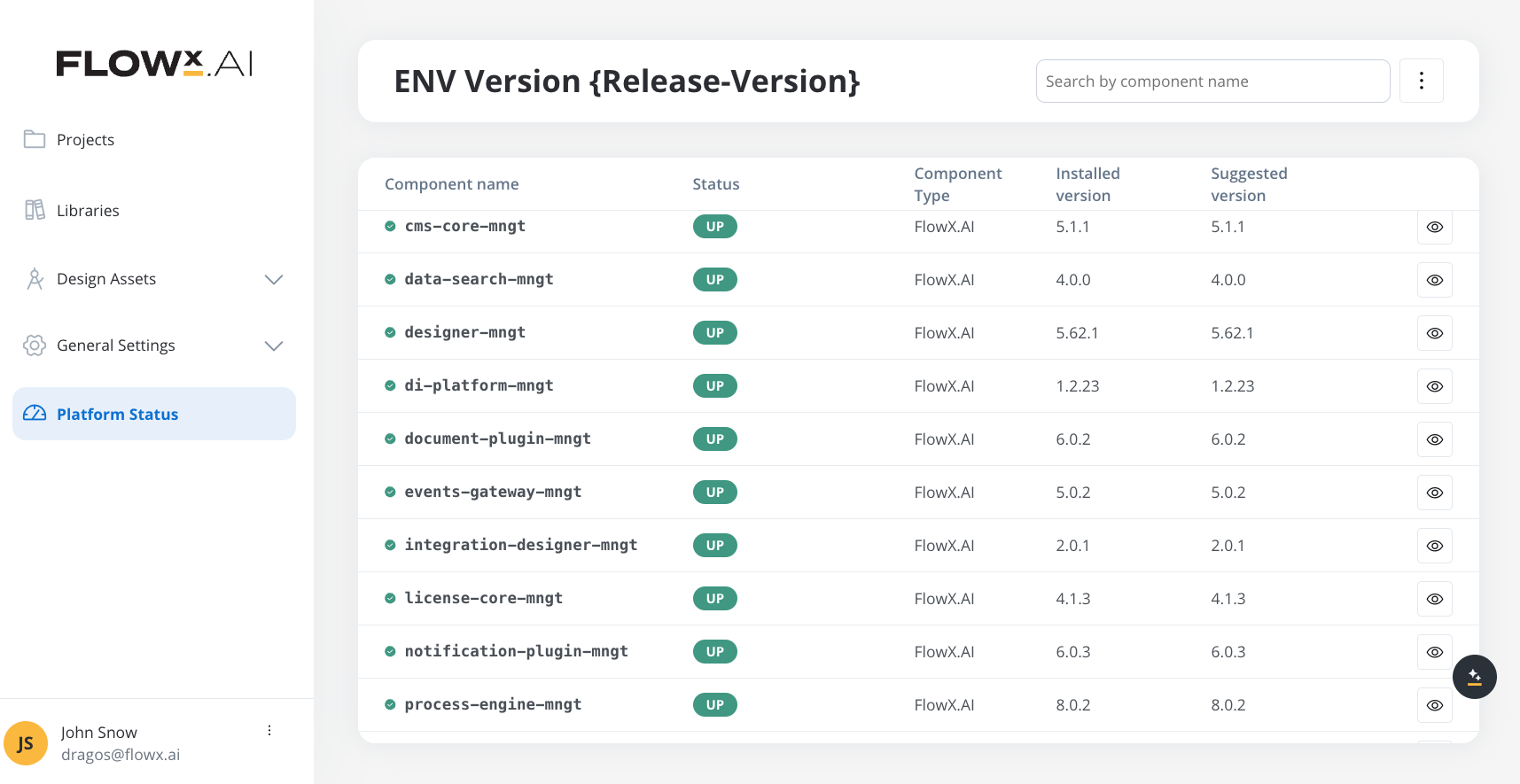
Component versions
Embedded components
- SpiceDB
- DGraph
Renderers
Plugins
AI Platform
Third-party supported component versions
New in v5.5.0
Key features and updates
Chat Component Enhancements
New subcomponents (reasoning, error, suggestions), display modes, and mobile support
UI Flows Improvements
Process renderer component, start workflow action, and on load events
Microsoft Outlook Integration
Native MS Graph data source for reading and sending Outlook emails
Send Notification Action
Send emails and reply to received emails directly from processes via SMTP
Knowledge Base v2
Updated Knowledge Base with audit, resource management, and improved UI
User Management Updates
Password policy, DISABLED status, resend invitations, workspace environment types
Upgrading from v5.4.0
Breaking changes
Authentication mechanism change
The default value ofSECURITY_TYPE has changed from oauth2 to jwt-public-key across 14 of 19 platform services. This reflects a shift from opaque-token introspection to JWT-based authentication as the default security mechanism.
Removed environment variables:
The following environment variables have been removed and are no longer supported:
Changed default values:
A new
security.oauth2.sa-realm property has been introduced to separate the service account realm from the main authentication realm. This property is used by the token URI for inter-service communication across 11 services.1
Update SECURITY_TYPE if explicitly set
If you explicitly set
SECURITY_TYPE=oauth2 in your deployment configuration, update it to jwt-public-key or remove it to use the new default.2
Remove deprecated opaque-token variables
Remove all
SPRING_SECURITY_OAUTH2_RESOURCE_SERVER_OPAQUE_TOKEN_* variables from your Helm values, environment configs, or deployment manifests.3
Update service account client IDs
Service account client IDs now follow the
flowx-{service-name}-sa pattern (e.g., flowx-admin-sa, flowx-process-engine-sa). Update your Keycloak service account configurations accordingly.4
Configure the service account realm
Add the
security.oauth2.sa-realm property to your configuration if your service account realm differs from the default.5
Remove legacy OAuth2 client variables
Remove
SECURITY_OAUTH2_REALM, SECURITY_OAUTH2_CLIENT_CLIENT_ID, SECURITY_OAUTH2_CLIENT_CLIENT_SECRET, and SECURITY_OAUTH2_SERVICE_ACCOUNT_ADMIN_* variables from your configuration.Key changes
- Authentication: Default
SECURITY_TYPEchanged fromoauth2tojwt-public-key(breaking change — see above) - Organization Manager: New microservice for organization and tenant management
- Chat Component: Enhanced with new subcomponents (reasoning, error, suggestions), display modes, and mobile support
- UI Flows: New process renderer component, start workflow action, and on load UI event
- Microsoft Outlook: New MS Graph data source for Outlook email integration
- Send Notification: New action type for sending/replying to emails via SMTP
- Knowledge Base v2: Updated UI, audit trail, and resource management
- Container Apps: Enhanced authentication flow and landing page
- File Upload: Improved progress indicators, drag and drop, and large file support
- File Encrypt/Decrypt: New document plugin actions for file encryption and decryption
- User Management: Password policy updates, DISABLED status, resend invitations, workspace environment type
- Process Variables Compare: Monaco diff editor for comparing variable values
- New Kafka topics: Multiple new topics added across document-plugin, integration-designer, admin, application-manager, email-gateway, authorization-system, and notification-plugin
New microservice: Organization Manager
Available starting with FlowX.AI 5.5.0The Organization Manager is a new microservice responsible for organization and tenant management, including user registration, organization lifecycle, and platform component health monitoring.
Organization Manager Setup
Complete setup and configuration guide for the Organization Manager microservice
New Kafka topics
FlowX.AI 5.5.0 introduces new Kafka topics across multiple services.Document-plugin Kafka topics
New topics for file encryption, decryption, bulk document persistence, and UI Flow session document persistence operations. Input topics (document-plugin consumes from these topics):
Output topics (document-plugin publishes to these topics):
Integration-designer Kafka topics
New topics for integration-designer in 5.5.0. Integration-designer now participates in the application sync mechanism for system and workflow resources.The
sync.out.v1 and correction-after-app-operation.response.v1 topics already exist since 5.1.x (used by admin). In 5.5.0, integration-designer becomes an additional producer on these shared response topics.
Existing topics (new producer in 5.5.0):
Admin Kafka topics
New topics for UI flow synchronization and correction operations in 5.5.0.The
sync.process.in.v1, sync.business-rule.in.v1, sync.reusable-template.in.v1, sync.out.v1, and correction-after-app-operation topics for process, business-rule, and reusable-template already exist since 5.1.x. Only the UI flow topics below are new in 5.5.0.Application-manager Kafka topics
New outbound topics for resource synchronization and correction of system, workflow, and UI flow resources in 5.5.0.Application-manager already produces sync and correction topics for process, business-rule, and reusable-template since 5.1.x. The topics below extend the same mechanism to system, workflow, and UI flow resources.
Email-gateway Kafka topics
Authorization-system Kafka topics
Notification-plugin Kafka topics
These topics are automatically created if your Kafka cluster has auto-topic creation enabled. For production environments, it is recommended to create them manually with appropriate partition counts and replication factors.
New environment variables
Platform-wide variables
The following new environment variables are available across multiple services:Document-plugin variables
This setting affects all file uploads handled by the document-plugin. Configure alongside the existing Spring multipart settings (
SPRING_SERVLET_MULTIPART_MAXFILESIZE, SPRING_SERVLET_MULTIPART_MAXREQUESTSIZE) for consistent upload limits. See Documents Plugin Setup.Authorization-system variables
Authorization System Setup
See the full redirect URI configuration details
Email-gateway variables
For complete email-gateway configuration including database, Redis, and Kafka settings, see the Email Gateway Setup guide.
Compatibility
- Authentication: Default
SECURITY_TYPEchanged tojwt-public-key— deployments using opaque-token introspection require migration (see breaking changes) - Renderer Updates: Web and mobile SDKs include new Chat component features and UI Flows enhancements
- Database: No schema changes required for this upgrade
- Mobile Support: Chat component now available on iOS and Android renderers
- New Service: Organization Manager requires PostgreSQL, Redis, Kafka, and Keycloak infrastructure
Support
For technical support, deployment assistance, or feature questions, please contact your FlowX.AI support representative.
Support channels
- Technical issues: Contact your FlowX.AI support representative
- Feature questions: Reach out through your designated support channel
- Documentation: Report documentation issues or suggestions