

Localization approach
Task Management localization operates through FlowX Substitution Tags:FlowX Substitution Tags (51 Keys) - manual configuration
Custom Task Management UI elements that must be configured manually in CMS for each language:- Table column names (title, stage, assignee, status, priority)
- Task actions (assign, unassign, hold, execute)
- Bulk operations (assign all to me, unassign all, hold all)
- History events and status values
- Comments and user selection dialogs
If you need to configure FlowX substitution tags default text values (51 keys) in CMS, you can do so by navigating to CMS → Substitution Tags and adding the default text values for the substitution tags.
FlowX substitution tags
FlowX substitution tags control custom Task Management interface elements outside the data table. These 51 tags must be configured manually in CMS for each language.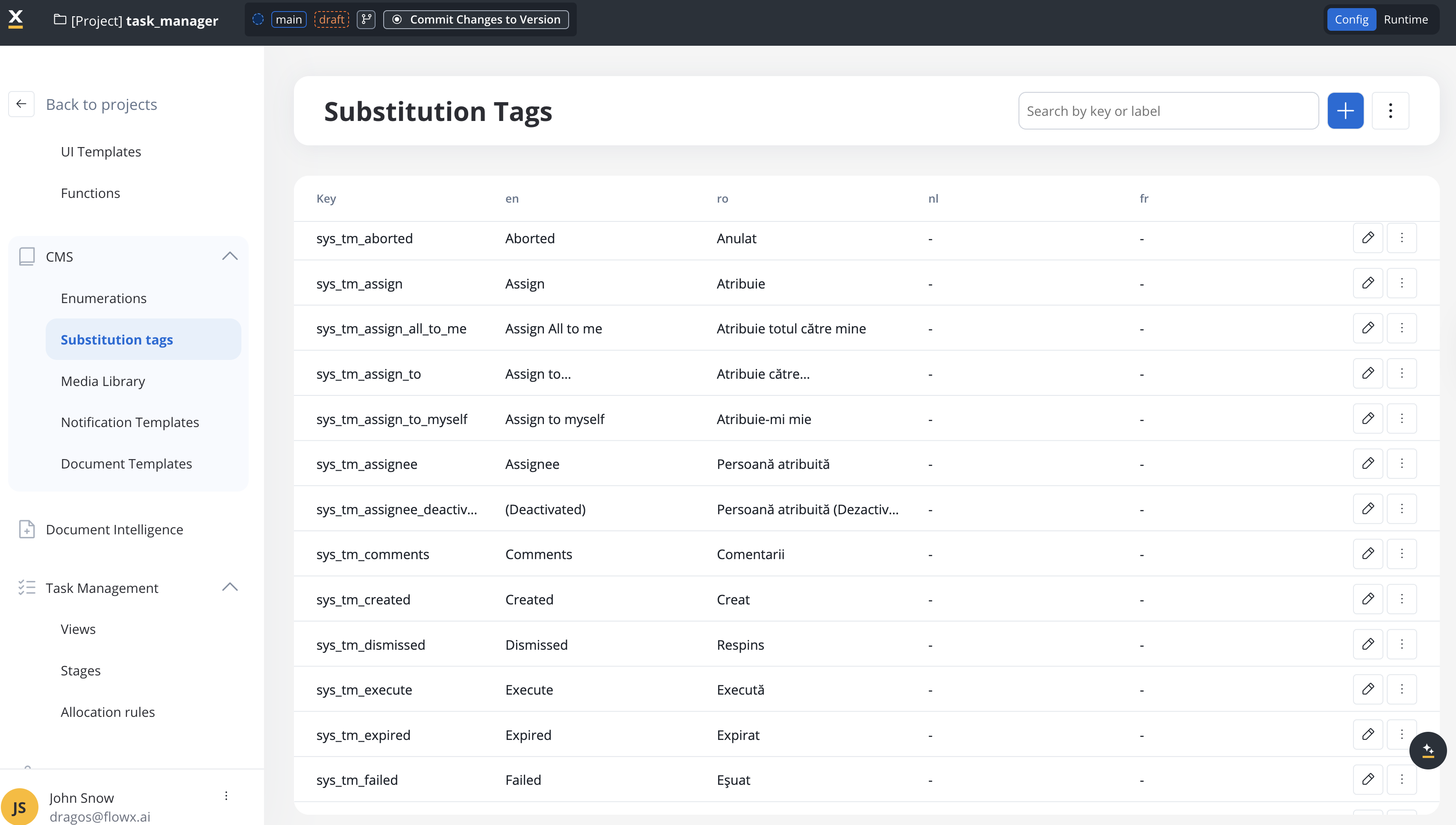
Complete tag reference
- Search & columns
- Process states
- Actions
- Task details
- User selection & UI
Search & Navigation
sys_tm_search- “Search”
sys_tm_title- “Title”sys_tm_stage- “Stage”sys_tm_assignee- “Assignee”sys_tm_status- “Status”sys_tm_priority- “Priority”sys_tm_last_updated- “Last updated”
Implementation guide
To localize Task Management, configure the 51 FlowX substitution tags in CMS for each language you want to support.1
Add FlowX substitution tags to CMS
For each supported language:
- Navigate to CMS → Substitution Tags
- Add values for all 51
sys_tm_*tags for the target language - These control custom Task Management UI elements:
- Task actions (assign, hold, unassign)
- Bulk operations (assign all to me, unassign all, hold all, unhold all)
- History events (task created, user created this task, started process instance with id, started process instance on build, task ownership changed to, task moved to, task status changed to, task assigned to, task owner removed)
- Comments section (comments, write a comment…)
- User selection dialogs (select person, search users, search term validation)
- UI states (loading, nothing found)
- Data display (in, yes, no)
2
Configure custom column names (Optional)
If you need columns beyond the default ones:
- Define custom parameters in Process Settings → Task Management
- Use substitution tags for column display names
- These tags will also need CMS translations for each language
- When you configure the column display name, use the substitution tag for the column name( it is called using ”@@” prefix)
3
Test localization
Verify that Task Management is properly localized:
- Task action buttons (assign, unassign, hold, execute)
- Bulk operation buttons (assign all to me, unassign all, hold all)
- Task history timeline and status values
- Comments section and user assignment dialogs
Localization best practices
1. Maintain consistency
Ensure translation consistency across:- CMS substitution tags
- Custom column display names
2. Handle dynamic content
For history events and comments that include dynamic values (user names, dates, IDs), use the variable placeholders:Localization by component
Task list view
Task details panel
Bulk operations
Search and sort on translated labels
SaaS · 5.13Available on SaaS with FlowX.AI 5.13. This feature is live on managed (SaaS) deployments now. Self-hosted deployments will receive it with the next LTS release family.
- Status: matched and sorted on the translated
sys_tm_*status labels. With the Romanian example below, searchingFinalizatfinds finished tasks. - Enumeration columns: matched and sorted on the enumeration labels for the viewer’s language.
- Text columns that hold a substitution tag: a value stored as a substitution tag is matched and sorted on the tag’s translated text. Ordinary text values match as before.
- Search box: partial, case-insensitive match against the label. A value displayed as a label is found through its label, not through the stored code.
- Text filters: filters applied in the task list match the labels the same way. Filters saved in a view’s Dataset Config keep comparing the stored values, so existing views return the same tasks. Filters on enumeration and status columns, which you pick from a list, work as before.
- Sorting: tasks are ordered by the displayed label, ignoring letter case. Tasks with no value in the sorted column are listed last, in both ascending and descending order.
If the task list has no language set, or its labels can’t be read, search and sort use the stored values, as in earlier versions. An enumeration value or status that has no label in the viewer’s language is matched on its stored value. A text value stored as a substitution tag that has no translation is displayed empty, is not found by search or text filters, and is sorted with the empty values.
Troubleshooting
Custom elements not translating
Custom elements not translating
Problem: Task actions, history, or comments display in English.Solutions:
- Verify all 51
sys_tm_*tags are configured in CMS - Check that translations exist for the current user’s language
- Ensure CMS language codes match your application’s language selection
- Verify substitution tag syntax is correct (no typos)
Mixed language display
Mixed language display
Problem: Some elements in one language, others in another.Solutions:
- This indicates incomplete CMS configuration - likely missing FlowX substitution tags
- Verify all 51
sys_tm_*tags are translated in CMS for the target language - Use browser dev tools to identify which specific elements are untranslated
Custom column names not translating
Custom column names not translating
Problem: Custom columns display original names instead of translations.Solutions:
- Ensure custom column display names use substitution tags
- Verify those substitution tags are configured in CMS for all languages
- Check that column configuration points to correct substitution tag keys
Example: complete Romanian localization
Here’s an example of configuring Task Management for Romanian language:1
Add Romanian CMS translations
In CMS, add translations for all 51 tags:
2
Verify complete localization
Test all areas to confirm:
- ✅ Task actions show Romanian labels (from CMS)
- ✅ History events display in Romanian (from CMS)
- ✅ Comments section uses Romanian labels (from CMS)
Additional resources
Task Management Overview
Learn about Task Management features and configuration
CMS Substitution Tags
Configure substitution tags in Content Management System