

After upgrading to a new platform version, always ensure that your installed component versions match the versions specified in the release notes. To verify this, navigate to FlowX.AI Designer > Platform Status.
Upgrading from 5.1.x LTS? This page describes the steady-state 5.9.0 deployment. For the architecture delta, deprecation list, and upgrade steps, see Migrating from 5.1 LTS.
Deployment packaging. 5.9.x is the last LTS release distributed as a multi-chart deployment, where each FlowX service is installed from its own Helm chart.
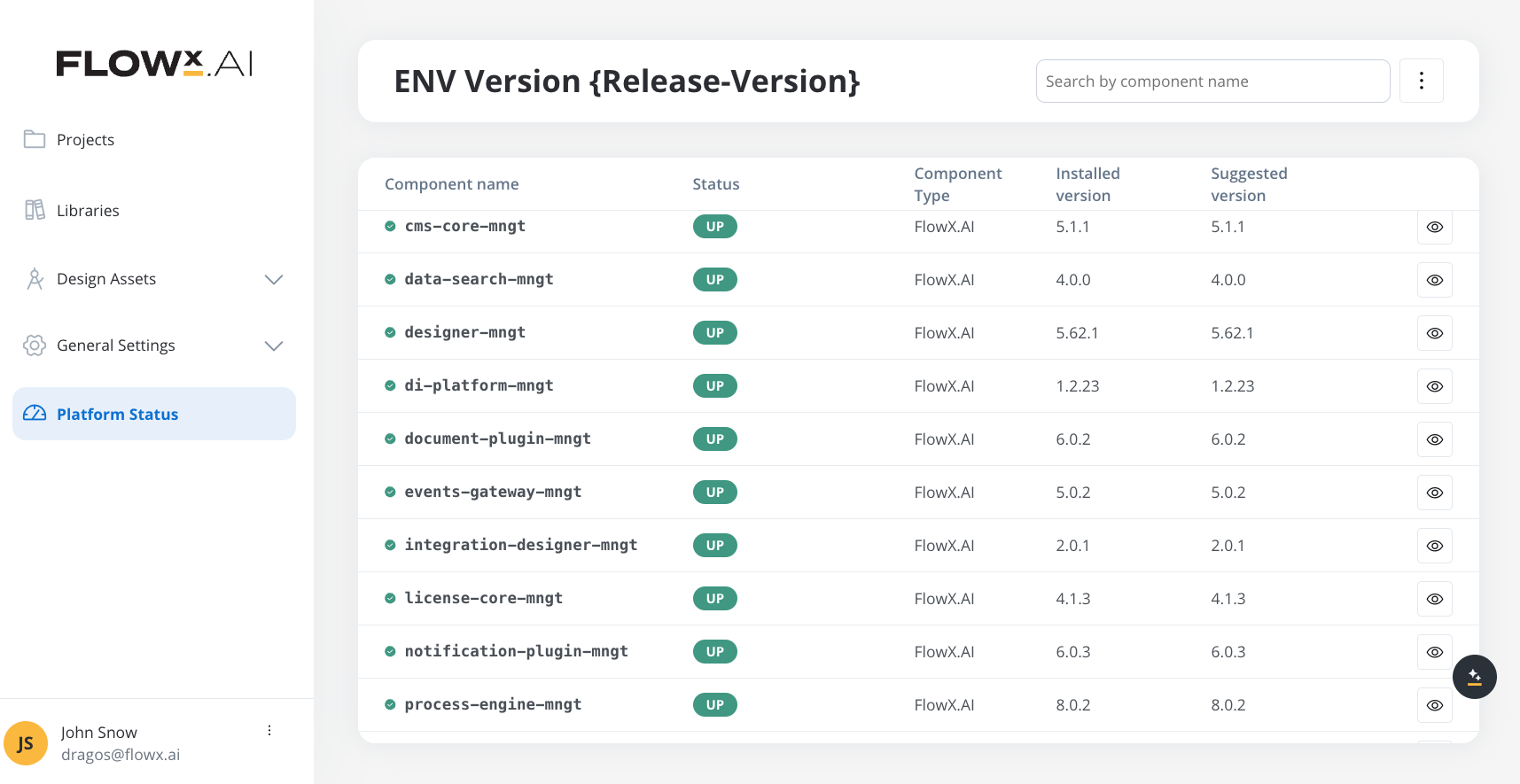
Component versions
The following tables list component versions per FlowX.AI release. Verify your installed versions against the 5.9.0 column in FlowX.AI Designer → Platform Status.Embedded components
- SpiceDB
- Qdrant (vector database) — bundled in the AI Platform Helm chart; its version is managed by the chart and not pinned here. See the Qdrant setup guide for deployment and configuration.
Renderers
The react-saas container app tracks the designer version.
Plugins
AI components
FlowX.AI groups AI services into four tiers by deployment role. AI Base components are the foundation; AI Runtime and AI Dev Time components both require Base to be installed first; AI Extensions are optional add-ons layered on top.AI Base components
Foundation services. Install these before any Runtime or Dev Time component.AI Runtime components
Requires AI Base. Services that execute AI workloads at runtime.AI Dev Time components
Requires AI Base. Services used at design time inside the Designer.AI Extensions
Optional add-ons layered on the AI Platform.Third-party supported component versions
Within each version line listed below, versions that have reached upstream end of life are not supported, even though their major/minor is listed.
(*) Required only if using indexing via Kafka. Multiple sink connector implementations also work, as long as they are compatible with both the deployed Kafka and Elasticsearch version.
The table lists version lines, not individual versions. A version is supported for as long as its vendor still supports it, so check the version you plan to deploy against that vendor’s lifecycle page before committing to it. When a version reaches upstream end of life it is no longer supported; upgrade that component to keep your deployment on a supported configuration. Versions can also be added during the family’s lifetime as FlowX validates them.
Kafka topics
Document-plugin archive and extract listeners
5.9.0 exposes four Kafka topics for the document-plugin archive and extract operations. Both follow the encrypt/decrypt trigger and reply pattern: document-plugin consumes thetrigger.*.file topic and process-engine consumes the matching engine.receive.*.file.results reply.
The four topic names are exposed as env vars on the document-plugin side (
KAFKA_TOPIC_FILE_ARCHIVE_IN, KAFKA_TOPIC_FILE_ARCHIVE_OUT, KAFKA_TOPIC_FILE_EXTRACT_IN, KAFKA_TOPIC_FILE_EXTRACT_OUT). See Documents plugin setup → File archive / File extract. Two new thread-pool entries are added: KAFKA_CONSUMER_THREADPOOLS_THREADPOOLGENERIC_THREADCOUNTPERCONTAINER_FILEARCHIVEIN and ..._FILEEXTRACTIN, both defaulting to 5.
Document-plugin encrypt and decrypt listeners
The encrypt and decrypt operations follow the same trigger-and-reply pattern: process-engine produces thetrigger.*.file topic and document-plugin replies on the matching engine.receive.*.file.results topic.
The topic names are exposed as env vars on the document-plugin side:
KAFKA_TOPIC_FILE_ENCRYPT_IN, KAFKA_TOPIC_FILE_ENCRYPT_OUT, KAFKA_TOPIC_FILE_DECRYPT_IN, KAFKA_TOPIC_FILE_DECRYPT_OUT.
Document-plugin session-upload listeners
Multi-file upload for UI flows routes uploaded files to the document-plugin for persistence. process-engine produces the trigger topic and document-plugin consumes it —session for a single upload session and session.bulk for batched multi-file uploads.
The topic names are exposed on process-engine as
KAFKA_TOPIC_SESSION_UPLOAD_OUT and KAFKA_TOPIC_SESSION_UPLOAD_BULK_OUT, and on document-plugin as KAFKA_TOPIC_DOCUMENT_PERSIST_SESSION_IN and KAFKA_TOPIC_DOCUMENT_PERSIST_SESSION_BULK_IN.
AI Platform job topics
integration-designer dispatches asynchronous jobs to the standalone AI services over Kafka, using a request/response pair per service. Provision these topics when you deploy the corresponding AI service (see AI components above).
On
integration-designer the topic names are set via KAFKA_TOPIC_AI_<SERVICE>_JOB_REQUEST_OUT and ..._RESPONSE_IN (for example KAFKA_TOPIC_AI_EVALSJUDGE_JOB_REQUEST_OUT). Each service also has a dead-letter topic — ai.flowx.ai-platform.<service>.job.dlq.v1, set via KAFKA_TOPIC_AI_<SERVICE>_JOB_DLQ_IN — that integration-designer consumes for failed jobs.
UI Flow runtime triggers
process-engine consumes two trigger topics that back the UI Flow runtime cache and expiration features.update invalidates a cached UI Flow when its definition changes; expire removes expired UI Flow runtime data.
On process-engine these are set via
KAFKA_TOPIC_UIFLOW_UPDATE_IN and KAFKA_TOPIC_UIFLOW_EXPIRE_IN; the producers expose KAFKA_TOPIC_UIFLOW_UPDATE_OUT. The expire trigger uses the platform scheduler: when a UI Flow session is created, process-engine registers a delayed message with scheduler-core, which publishes it back to this topic at the expiry time. It is consumed by a dedicated consumer group (KAFKA_CONSUMER_GROUPID_PROCESS_UIFLOWEXPIRE, default ui-flow-expire).
File and webhook process triggers
Two trigger topics let the file-gateway and webhook-gateway start or resume processes in process-engine. The start-for-event topic starts a process when a watched file arrives (file-gateway) or an incoming webhook fires (webhook-gateway); the message event topic resumes a running process that is waiting on an intermediate message catch event.
On the producers, the start-for-event topic is set via
KAFKA_TOPIC_TRIGGER_STARTFOREVENT_PROCESS_OUT (file-gateway) and KAFKA_TOPIC_PROCESS_START_OUT (webhook-gateway); process-engine consumes it via KAFKA_TOPIC_PROCESS_STARTFOREVENT_IN. The message event topic uses KAFKA_TOPIC_PROCESS_EVENT_MESSAGE on both webhook-gateway and process-engine. Like every service, file-gateway and webhook-gateway also publish to the shared audit topic ai.flowx.core.trigger.save.audit.v1 via KAFKA_TOPIC_AUDIT_OUT (consumed by audit-core).
Environment variables
Data-sync: Keycloak admin credentials
The data-sync job provisions FlowX-managed end-user groups and runtime roles in Keycloak on first run, using the Keycloak admin API. Configure the following on the data-sync job:
For full data-sync configuration, see Data-sync job setup.
Anonymous service account: shared client secret
5.9.x introduces a single shared service-account client,flowx-anonymous-sa, used by FlowX backend services for inter-service calls on anonymous (unauthenticated) runtime flows. One client secret is reused across all consumers — it must be provided in two places.
On authorization-system — passed to Liquibase so the client is provisioned with the correct secret when FlowX manages Keycloak:
On every consuming service — the Spring Security OAuth2 client registration for the
anonymousidentity alias resolves the same secret at runtime:
For the Keycloak-side context (
flowx-anonymous-sa client, SA_FLOWX_ANONYMOUS realm role, manual-configuration recipe for deployments without Keycloak admin access), see Manual Keycloak configuration.
Knowledgebase-rag: Qdrant search tuning
Two env vars control the fanout of dense and sparse Qdrant queries inside theknowledgebase-rag service. Defaults are tunable per environment.
Raise both when recall is insufficient on very large or long-tailed Knowledge Bases. Lower them when Qdrant pods report memory pressure or filter-heavy queries time out.
CORS handling: APPLICATION_CORS_ALLOWORIGIN
CORS is enforced at the application layer. Each backend service exposed via admin or public URLs reads its allowed-origin list from a single environment variable. Allowed methods, allowed headers, exposed headers, and credential handling are baked into each service’s application.yaml with safe defaults. The 5.9.x default allow-headers set is Accept, Content-Type, Authorization, Fx-Workspace-Id, Fx-Client-Host, Referer, User-Agent, Flowx-Platform, X-Fx-Anonymous-Session-Id, Fx-BuildId, Fx-AppId, and X-Fx-Anonymous-Session-Id is exposed to the browser for anonymous runtime sessions. Only APPLICATION_CORS_ALLOWORIGIN is deployment-specific.
For migration guidance and the full list of removed NGINX CORS annotations, see Ingress routing and CORS.
Process-engine and integration-designer: native script engine
The default script engine for JavaScript and Python execution is a native subprocess pool. Scripts run in isolated Node.js and Python worker processes.
To use GraalVM instead of the native engine, set
APPLICATION_SCRIPTENGINE_PROVIDER=graalvm on both services.